
1. Introduzione
This manual provides comprehensive instructions for the installation, operation, and maintenance of your LongPlus Smart 4K 8CH Home Security Camera System. This system is designed to provide robust surveillance with advanced features such as 4K UHD resolution, intelligent AI detection, and flexible storage options, ensuring comprehensive protection for your property.
Please read this manual thoroughly before operating the system and retain it for future reference.
2. Contenuto della confezione
Verify that all items listed below are included in your package. If any items are missing or damaged, please contact LongPlus customer support.
- 1 x 8CH NVR with 48/1.875V Adaptor
- 4 x 4K PoE Bullet Cameras
- Mouse 1 x USB
- 1 cavo Cat1 da 5 m
- 1 cavo HDMI da 1 m
- 4 cavi Cat18 da 5 m
- 2 x Extra Connectors
- 4 confezioni di viti e altri accessori
- 1 x Guida rapida

Image: The LongPlus 4K 8CH NVR system, including the main NVR unit, four white PoE bullet cameras, and a 2TB hard drive. This image illustrates the primary components of the security system.
3. Impostazione
3.1 Installazione fisica
Before mounting, test all cameras and connections to ensure proper functionality.
- Posizionamento NVR: Posizionare l'NVR in un luogo sicuro, asciutto e ben ventilato, lontano dalla luce solare diretta e da fonti di calore. Assicurarsi che sia facilmente accessibile per i collegamenti.
- Posizionamento della fotocamera:
- Choose strategic locations that provide optimal coverage of desired areas (e.g., entry points, driveways, yards).
- Consider the camera's 132° wide-angle view per una copertura completa.
- Ensure the cameras are within the 100ft night vision range for effective low-light monitoring.
- The cameras are designed for outdoor use with a durable metal body, capable of withstanding extreme weather conditions (-22°F to 140°F).
- cablaggio:
- Connect each PoE camera to the NVR's PoE ports using the provided Cat5 cables. The system supports cable runs up to 660ft.
- Connect the NVR to a monitor using the HDMI or VGA cable.
- Collegare il mouse USB alla porta USB dell'NVR per la navigazione.
- Connect the NVR to your router's LAN port using the 1M Cat5 cable for network access.

Image: A detailed diagram illustrating the connection setup for the LongPlus 8-channel PoE Home Security Camera System. It shows PoE cameras connecting to the NVR, the NVR connecting to a router for internet access, and connections to a monitor, mouse, and power. Remote access via PC and mobile devices is also depicted.

Immagine: un primo piano view of the rear panel of the LongPlus NVR, highlighting its various ports including HDMI, VGA, USB, and Ethernet ports for camera and network connections.

Image: A visual comparison showing the LongPlus camera's 132-degree wide viewing angle providing broader coverage compared to a typical 121-degree view from other cameras.
3.2 Accensione iniziale e configurazione
- Connect the NVR power adapter to a power outlet. The system will power on automatically.
- Follow the on-screen prompts on the connected monitor to complete the initial setup wizard, including setting up a password and network settings.
- The NVR comes with a 2TB HDD pre-installed. Ensure it is properly connected inside the NVR for local storage.
4. Funzionamento
4.1 Remote Access and App Installation
To access your security system remotely, download the Longvision APP on your smartphone or tablet (iOS/Android) or use the client software for Mac/Windows.
- Cercare "Longvision" in the Apple App Store or Google Play Store.
- Install the app and follow the in-app instructions to add your NVR system.
- The system supports up to 32 users for shared access.

Image: Screenshots of the Longvision mobile application, demonstrating its live view, smart motion alert notifications, and video playback features. The app is compatible with Mac, Windows, Apple iOS, and Google Android operating systems.
4.2 Modalità di registrazione e archiviazione
The NVR supports various recording modes and flexible storage options.
- Registrazione continua 24 ore su 24, 7 giorni su 7: The system records continuously to the pre-installed 2TB HDD. The storage is expandable up to 10TB.
- Registrazione attivata dal movimento: Records only when motion is detected, saving storage space. This is the default mode.
- Registrazione programmata: Imposta orari specifici per la registrazione.
- Compressione H.265+: Utilizes advanced H.265+ video compression technology, which saves over 75% of storage space compared to H.264, allowing for longer recording times.
- Archiviazione cloud: Bank-level encrypted cloud storage is available as an optional service for off-site backup.
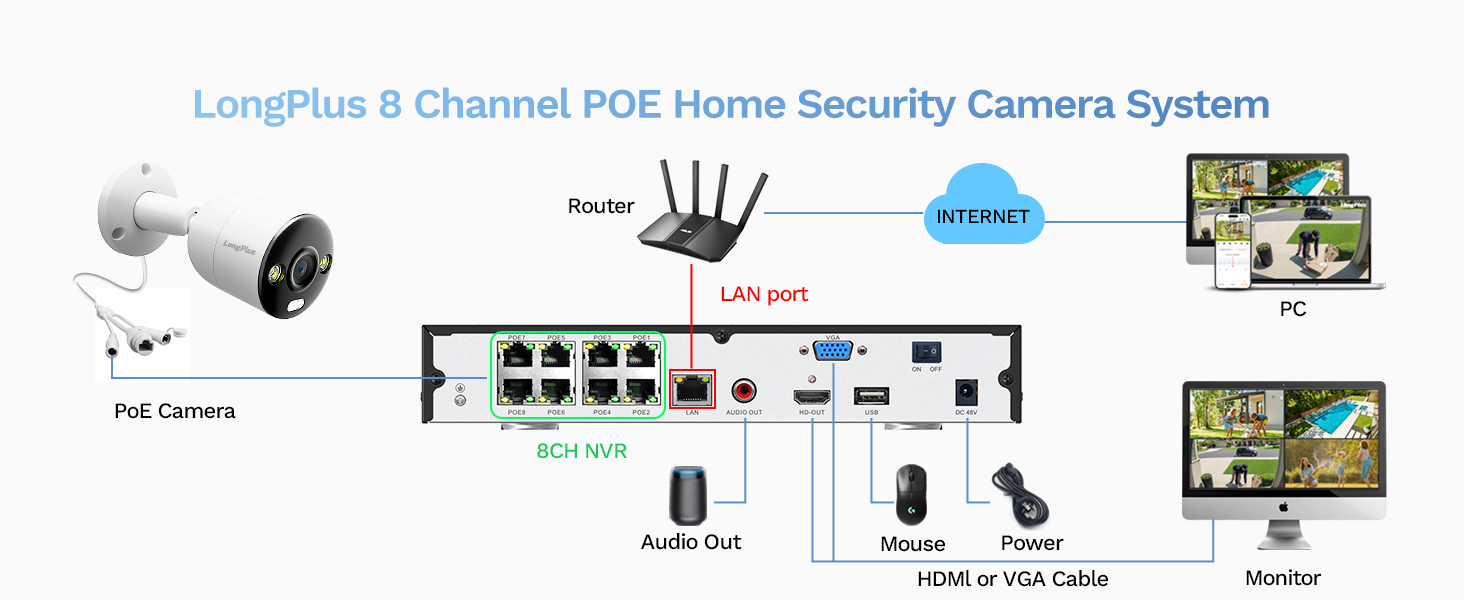
Image: A visual comparison demonstrating the efficiency of H.265+ compression over H.264, highlighting how H.265+ saves over 75% of storage space, enabling longer recording durations.
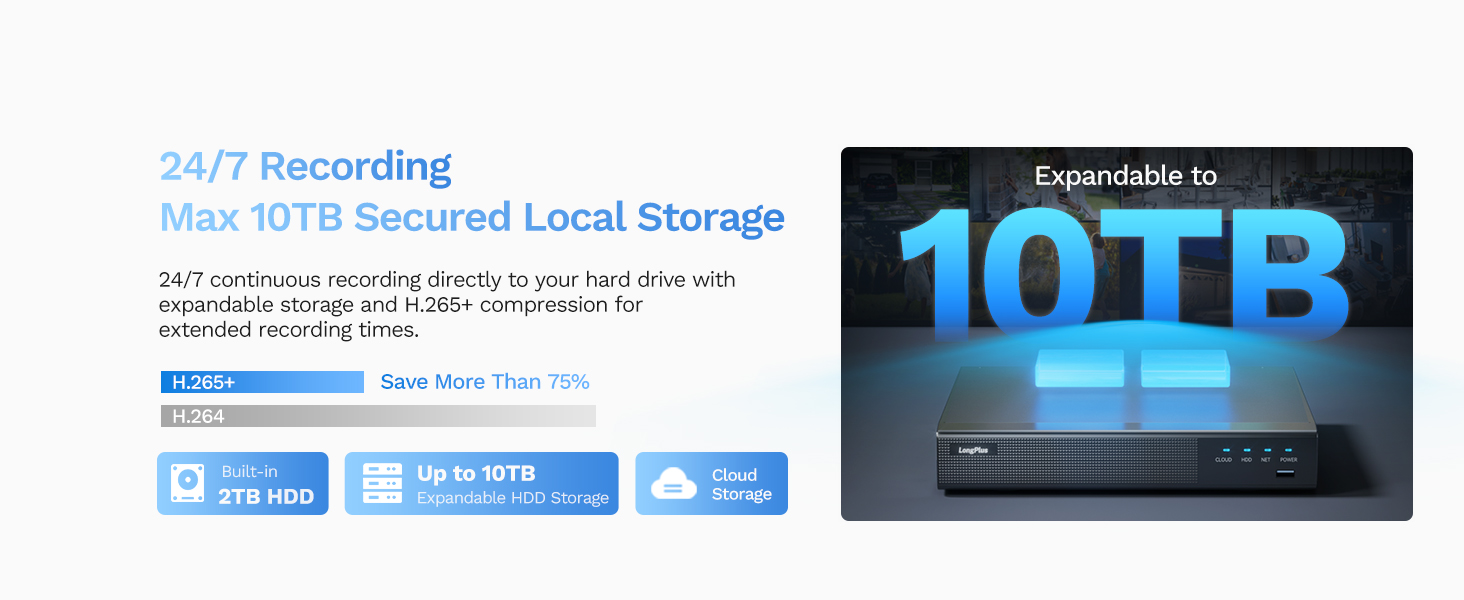
Image: An illustration of the LongPlus NVR's 24/7 recording capability and its support for expandable local storage up to 10TB, with a built-in 2TB HDD.
4.3 Modalità di visione notturna
The LongPlus system offers three distinct night vision modes to suit various lighting conditions:
- IR Night Vision (Infrared Mode): Fornisce cibo bianco e nero chiarotage in complete darkness up to 100ft.
- Color Night Vision (Full Color Mode): Delivers vibrant, full-color footage even in low-light conditions, allowing for better identification of details.
- Smart Night Vision (AI Mode): Automatically switches to color night vision and activates the built-in spotlights when motion is detected, providing clear, illuminated footage.

Image: A visual comparison demonstrating the three night vision modes: Full Color Mode, Infrared Mode, and Smart Night Vision (AI Mode), showing how each mode renders the scene differently in low light.
4.4 AI Motion Detection and Activity Zones
The system features advanced AI object detection for precise alerts.
- Rilevamento degli oggetti: Accurately detects humans, vehicles, and pets, reducing false alarms.
- Avvisi in tempo reale: Receive instant push notifications, emails, or siren alerts when motion is detected.
- Zone di attività: Definire aree specifiche all'interno del campo di ripresa della telecamera view where motion detection should be active. This helps to ignore irrelevant motion (e.g., public roads).
- Maschera privacy: Configure privacy masks to block out specific areas from being recorded or viewed, ensuring privacy.

Image: An illustration of the smart AI detection capabilities, showing the system identifying a person and a vehicle, and the corresponding alert options: push notification, email, and siren.

Image: A visual representation of how to set up motion detection zones and privacy masks within the camera's view, allowing users to customize surveillance areas and protect privacy.
4.5 Two-way Audio and Strobe Light Alarm
Enhance your security with interactive features:
- Audio a due vie: Communicate directly with visitors or deter intruders using the built-in microphone and speaker on the cameras.
- Strobe Light Alarm: When a humanoid, vehicle, or pet motion is detected, the camera can automatically trigger a red and blue strobe light to warn off intruders.
- Allarme sirena: An audible siren can be activated manually or automatically upon detection to further deter unwanted presence.

Image: An illustration depicting the two-way audio feature, where a person can speak through the camera, and the camera's red and blue strobe light alarm activating upon detection of an intruder.
5. Manutenzione
- Pulizia regolare: Pulire periodicamente le lenti della fotocamera con un panno morbido eamp panno per garantire una qualità dell'immagine nitida.
- Aggiornamenti del firmware: The NVR firmware automatically updates when connected to the internet. Ensure your system is connected to receive the latest features and security enhancements.
- Controllo dello stato dell'HDD: Regularly check the health of your HDD through the NVR's system settings to prevent data loss.
- Ispezione dei cavi: Inspect all cables for wear and tear, especially outdoor cables, to ensure reliable connection and power.
6. Risoluzione Dei Problemi
| Problema | Possibile causa | Soluzione |
|---|---|---|
| Nessuna immagine sul monitor/TV | Loose HDMI/VGA cable, NVR not powered on, incorrect input source on monitor. | Check all cable connections. Ensure NVR is powered. Select correct input source on monitor (HDMI/VGA). |
| Nessuna immagine della telecamera | Loose PoE cable, camera not powered, faulty camera/cable. | Check PoE cable connections to NVR and camera. Ensure NVR PoE ports are active. Try a different port or cable. |
| Nessun accesso remoto tramite app | NVR not connected to internet, incorrect network settings, app not configured correctly. | Ensure NVR is connected to router and has internet access. Verify network settings on NVR. Re-add device in Longvision app. |
| Avvisi di movimento non ricevuti | Motion detection not enabled, activity zones not set correctly, notification settings off in app. | Enable motion detection in NVR settings. Adjust activity zones. Check app notification settings. |
| Scarsa qualità della visione notturna | Dirty lens, IR/Starlight mode not optimal, external light interference. | Clean camera lens. Try different night vision modes (IR, Color, Smart). Reduce external light sources that might cause glare. |
7. Specifiche
| Caratteristica | Dettaglio |
|---|---|
| Marca | Lungo Plus |
| Numero di modello | LP8ME84B1 |
| Tecnologia di connettività | Cablato (PoE) |
| Risoluzione di acquisizione video | 4K (8MP) |
| Numero di canali | 8 |
| Capacità di archiviazione della memoria | 10 TB (2TB HDD included) |
| Dimensioni articolo (L x P x A) | 11.76 x 11.41 x 7.67 pollici |
| Compatibilità del sistema operativo | Android, Mac OS, Windows, iOS |
| Usi consigliati | Interno, Esterno |
| Gamma di visione notturna | 100 piedi |
| Frequenza dei fotogrammi | 30 fotogrammi al secondo |
| Modalità di registrazione | Motion-triggered (default), Scheduled, 24/7 |
| Porte USB totali | 2 |
| Interfaccia Hardware | Ethernet, HDMI, USB, VGA |
| Viewangolo di ing | 132 gradi |
| Caratteristiche speciali | High Efficiency Video Coding (H.265+), Red & Blue Flashing Lights, Easy to Install, Waterproof, Vehicle Detection, Adjustable, Motion Sensor, Siren Alarm, Flexible Storage (Local/Cloud), Smart Playback, Person/Vehicle/Animal Detection, Two-way Audio |
8. Garanzia e supporto
LongPlus provides a Garanzia di 2 anno for this product, ensuring peace of mind regarding manufacturing defects and performance issues.
Inoltre, supporto tecnico a vita is available for all LongPlus customers. If you encounter any issues or have questions regarding your security system, please do not hesitate to contact our professional technical team. We aim to respond to all queries within 24 hours.
For support, please refer to the contact information provided in your Quick Start Guide or visit the official LongPlus websito.