
Introduzione
This manual provides detailed instructions for the installation, operation, and maintenance of your DELLA 6000 BTU Window Air Conditioner. Please read this manual thoroughly before using the appliance and retain it for future reference.
Informazioni sulla sicurezza
Quando si utilizzano apparecchi elettrici, seguire sempre le precauzioni di sicurezza di base per ridurre il rischio di incendi, scosse elettriche e lesioni alle persone.
- Assicurarsi che l'unità sia adeguatamente messa a terra.
- Non utilizzare l'unità con un cavo o una spina danneggiati.
- Non inserire dita o oggetti estranei nell'ingresso/uscita dell'aria.
- Scollegare l'unità prima di pulirla o di effettuare qualsiasi intervento di manutenzione.
- Tenere i materiali infiammabili lontani dall'unità.
Prodotto finitoview
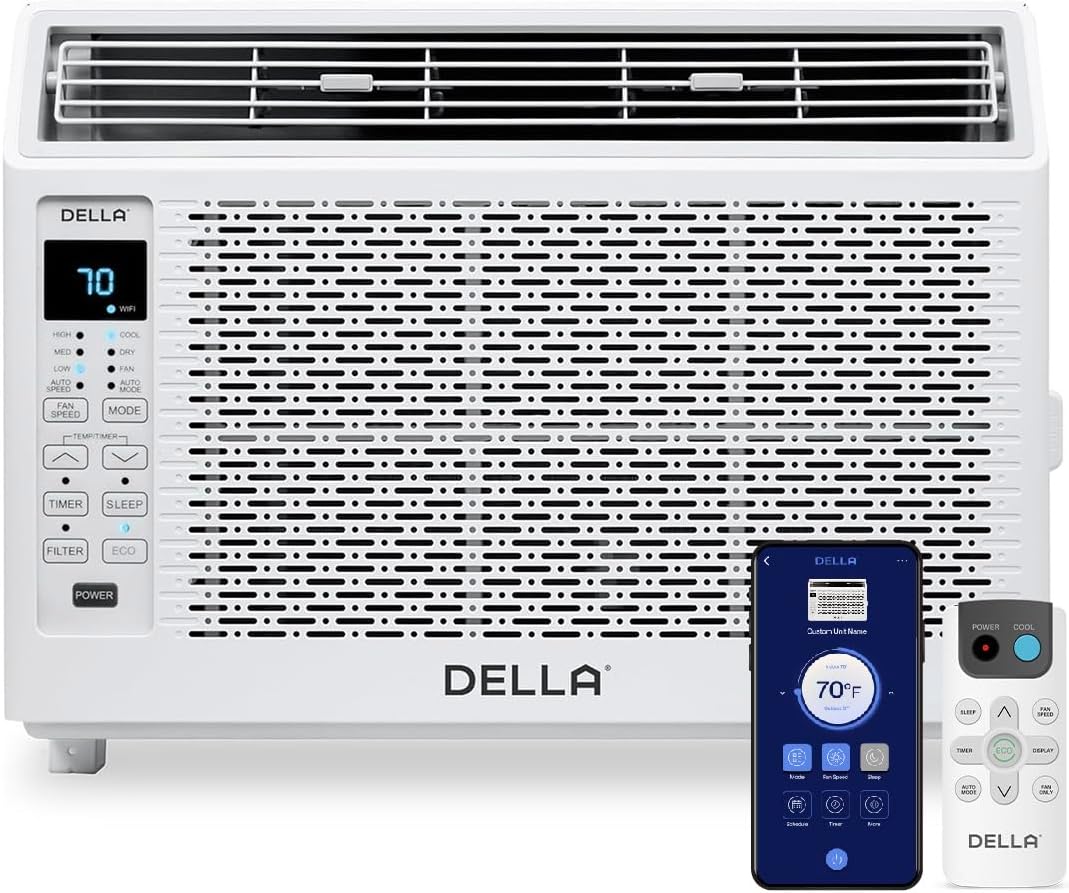
Figure 1: DELLA 6000 BTU Window Air Conditioner Unit, Remote Control, and Smartphone App Interface.
Pannello di controllo
The unit features an intuitive control panel with various buttons and indicator lights for easy operation.
- Pulsante di accensione: Accende o spegne l'unità.
- Pulsante Modalità: Cycles through Cool, Dry (Dehumidifier), Fan, Auto Mode, and ECO Mode.
- Pulsante velocità ventola: Adjusts fan speed (High, Med, Low, Auto Speed).
- Temp/Timer Buttons: Adjusts temperature settings or sets timer.
- Pulsante di sospensione: Attiva la modalità di sospensione per un funzionamento silenzioso e a basso consumo energetico durante la notte.
- Pulsante Filtro: Indica quando è necessario pulire il filtro.
- Indicatore Wi-Fi: Mostra lo stato della connettività Wi-Fi.
Telecomando

Figure 2: Remote Control for the DELLA Air Conditioner.
The remote control allows for convenient operation of all unit functions from a distance. Ensure batteries are correctly installed.
Installazione
The DELLA 6000 BTU Window Air Conditioner features a T-design for simplified installation.
Fasi di installazione

Figure 3: T-design installation allows for flexible window opening.

Figure 4: Simplified 3-step installation process.
- Step 1: Secure into window frame. Place the unit into the window opening, ensuring it is securely seated.
- Step 2: Mount with four screws. Fasten the unit to the window frame using the provided screws for stability.
- Step 3: Extend side panels into wall. Extend the accordion side panels to fill the gap between the unit and the window frame, providing insulation and reducing air leaks.
Componenti del kit di installazione

Figure 5: Included installation kit components.
The installation kit includes filler panels, insulation strips, lock frame & sash lock, screws, window sash seal, and a top mounting rail to ensure a secure and efficient installation.
Dimensioni del prodotto

Figure 6: Unit dimensions and recommended window opening.
The unit dimensions are approximately 15.94"D x 16.02"W x 12.05"H. It is designed for window widths between 23"-34" and requires at least 14.5" vertical clearance.
Istruzioni per l'uso
Modalità e velocità della ventola

Figure 7: Available operating modes and fan speeds.
The unit offers 5 operating modes (Cool, Auto, Dehumidify, Fan Only, ECO Mode) and 4 fan speeds (Auto, Low, Mid, High) to suit various comfort needs. Use the 'Mode' and 'Fan Speed' buttons on the control panel or remote to select your desired settings.
Controllo della temperatura
Use the up and down arrow buttons on the control panel or remote to set your desired temperature. The digital display will show the current setting.
Smart Features (Wi-Fi Control)

Figure 8: Control your unit wirelessly with the Della+ APP.

Figure 9: Della+ app supports Google Assistant and Alexa for voice control.
Download the free Della+ app to control your unit from anywhere. The app allows for remote control, scheduling, and integration with smart home systems like Google Assistant and Alexa.
Funzione di geolocalizzazione

Figure 10: Smart Geo Location feature for automatic operation.
The Geo Location feature allows the unit to automatically turn on or off based on your proximity to your home. This feature can be configured via the Della+ app.
Video 1: Demonstration of the Geo Location Function setup and customization within the Della+ app.
Modalità di sospensione

Figure 11: Intelligent sleep mode adjusts temperature for optimal comfort.
Intelligent sleep mode automatically adjusts the temperature overnight to maintain comfort and save energy. Activate it using the 'Sleep' button.
Funzione timer
The 24-hour auto on/off timer allows you to program the unit to turn on or off at specific times, enhancing convenience and energy efficiency.
Manutenzione
Pulizia del filtro riutilizzabile

Figure 12: The unit features a washable and reusable filter.
The unit is equipped with a washable and reusable filter. A clean filter helps maintain optimal cooling performance and air quality. When the 'Filter' indicator light illuminates, it's time to clean the filter.
- Spegnere e scollegare il condizionatore d'aria.
- Remove the front panel and slide out the air filter.
- Lavare il filtro con acqua calda e sapone. Risciacquare abbondantemente.
- Lasciare asciugare completamente il filtro prima di reinserirlo.
- Riposizionare il pannello frontale.
Assistenza generale
- Pulire l'esterno dell'unità con un panno morbido, damp stoffa.
- Non utilizzare prodotti chimici aggressivi o detergenti abrasivi.
- Ensure the drainage area is clear of obstructions.
Risoluzione dei problemi
Se riscontri problemi con il tuo condizionatore d'aria, fai riferimento ai seguenti problemi comuni e alle relative soluzioni:
| Problema | Possibile causa | Soluzione |
|---|---|---|
| L'unità non si accende | No power; circuit breaker tripped; unit unplugged. | Check power supply; reset circuit breaker; ensure plug is fully inserted. |
| L'unità non raffredda efficacemente | Filtro dell'aria sporco; presa/uscita dell'aria bloccata; stanza troppo grande; finestre/porte aperte. | Clean air filter; clear obstructions; ensure unit is sized correctly for room; close windows/doors. |
| Funzionamento rumoroso | Loose parts; unit not level; fan obstruction. | Check for loose components; ensure unit is level; remove any fan obstructions. |
| Fuori gocciola acqua | Funzionamento normale (condensa). | This is normal during cooling. Ensure proper drainage. |
Specifiche
| Caratteristica | Dettaglio |
|---|---|
| Nome del marchio | Della |
| Informazioni sul modello | Codice articolo: 048-TL-W6KWD |
| Dimensioni del prodotto | 15.94 x 16.02 x 12.05 pollici |
| Numero modello articolo | Codice articolo: 048-TL-W6KWD |
| Efficienza | Efficienza energetica |
| Capacità | 0.5 tonnellate |
| Rumore | 51 dB |
| Tipo di installazione | Finestra |
| Numero di parte | 048-TL-W6KW_2 |
| Fattore di forma | Condizionatore d'aria da finestra |
| Caratteristiche speciali | Telecomando |
| Voltage | 115 Volt (CA) |
| Cosatage | 517.5 watt |
| Batterie incluse? | NO |
| Superficie del pavimento | 250 piedi quadrati |
| Potenza di raffreddamento | 6000 unità termiche britanniche |
| Valutazione a stelle BEE | SÌ |
| Rapporto di efficienza energetica stagionale (SEER) | 11 |
| Fonte di alimentazione | Elettrico con cavo |
Garanzia e supporto
Your DELLA 6000 BTU Window Air Conditioner comes with a Garanzia di 1 anni. For any inquiries or technical assistance, Della provides Assistenza clienti 24 ore su 7, XNUMX giorni su XNUMX.
Si prega di visitare il Della Store su Amazon per maggiori informazioni o per contattare il supporto.