
1. Finitaview
The OBEST H360 Motorcycle Helmet Bluetooth Headset provides a true wireless audio solution for various helmet types, including motorcycle, cycling, ski, vintage, and off-road helmets. It features Bluetooth 5.3 technology for stable and fast connections, active noise cancellation for clear communication, and a long-lasting battery. The headset includes a wireless remote control for easy operation while riding.

Immagine: Oltreview of the OBEST H360 Wireless Bluetooth Headset components.
2. Cosa c'è nella scatola
Il pacchetto include i seguenti articoli:
- Custodia di ricarica wireless
- Headset (2 speakers)
- Controllo remoto senza fili
- Cavo di ricarica di tipo C.
- Velcro Pads (4 pieces)
- Manuale d'uso
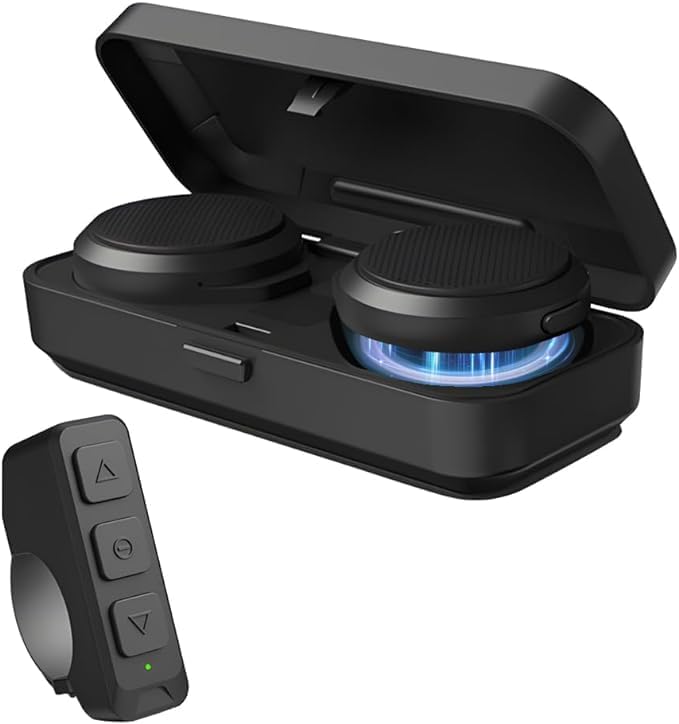
Image: All components included in the OBEST H360 package.
3. Configurazione e installazione
Follow these steps to install your OBEST H360 headset into your helmet:
- Preparare il casco: Ensure your helmet's ear pockets are clean and dry.
- Attach Velcro to Speakers: Peel the protective backing from the adhesive side of two Velcro pads. Attach one pad to the back of each headset speaker.
- Install Speakers in Helmet: Carefully position each speaker inside the helmet's ear pockets. Press firmly to secure the Velcro. Ensure the speakers are centered over your ears for optimal sound.
- Cavi del percorso: Tuck any excess speaker cables neatly under the helmet's lining to prevent tangling and ensure comfort.
- Attach Remote Control: The wireless remote control can be mounted on your handlebar or other convenient location using its integrated strap.

Image: Visual guide for headset installation in a helmet.
Video di installazione
Video: A short demonstration of the motorcycle helmet Bluetooth headset installation process.
4. Istruzioni per l'uso
4.1. Accensione/spegnimento
- Accensione: Open the charging case. The headsets will automatically power on.
- Spegni: Place the headsets back into the charging case and close the lid. They will automatically power off.
4.2. Accoppiamento Bluetooth
- Ensure the headsets are powered on and in pairing mode (indicated by flashing LED lights).
- Sul tuo cellulare, attiva il Bluetooth e cerca i dispositivi disponibili.
- Select "OBEST H360" from the list to connect. A voice prompt will confirm successful pairing.
- To pair the wireless remote control, ensure it is powered on and in pairing mode. Select it from your phone's Bluetooth list.
4.3. Call & Music Control (via Remote Control)
The wireless remote control allows for easy management of calls and music:
- Rispondi/Riaggancia alla chiamata: Premere il pulsante centrale.
- Riproduci/Pausa musica: Premere il pulsante centrale.
- Increase Volume/Previous Track: Premi il pulsante in alto.
- Decrease Volume/Next Track: Premi il pulsante in basso.

Image: Remote control functions for calls, music, and GPS.
5. Ricarica
The OBEST H360 headset comes with a portable charging case to keep your headsets powered on the go.
- Charging Headsets: Place the headsets into the charging case. The LED display on the case will show the charging status for each earphone (L/R) and the case's battery capacity.
- Custodia di ricarica: Connect the Type-C charging cable to the charging port on the case and to a suitable USB power source. The LED display will indicate the charging progress.

Image: Charging case with digital display for battery levels.
6. Manutenzione
- Mantenere l'auricolare e la custodia di ricarica puliti e asciutti.
- Evitare di esporre il dispositivo a temperature estreme o alla luce solare diretta.
- Non tentare di smontare o riparare da soli il dispositivo. Contatta l'assistenza clienti per assistenza.
7. Risoluzione Dei Problemi
- Nessun potere: Ensure the headsets and charging case are fully charged.
- Impossibile associare: Make sure Bluetooth is enabled on your device and the headset is in pairing mode. Try restarting both devices.
- Scarsa qualità del suono: Check the speaker placement in the helmet. Ensure there are no obstructions. Adjust volume levels on both the headset and your connected device.
- Il telecomando non risponde: Ensure the remote control is paired and its battery is charged.
8. Specifiche
| Caratteristica | Dettaglio |
|---|---|
| Nome del modello | Motorcycle Helmet Bluetooth Headset (H360) |
| Tecnologia di connettività | Senza fili (Bluetooth 5.3) |
| Controllo del rumore | Cancellazione attiva del rumore |
| Durata della batteria (auricolare) | 5.5 ore (tempo di conversazione) |
| Tempo di standby | Fino a 50 ore |
| Custodia di ricarica Batteria | 1900mAh |
| Interfaccia di ricarica | Tipo C |
| Distanza di trasmissione | Fino a 10 metri |
| Metodo di controllo | Remoto |
| Peso dell'articolo | 9.2 once |
| Materiale | Plastica o silicone |

Image: Dimensions of the headset components.
9. Garanzia e supporto
For warranty information or customer support, please refer to the contact details provided in your product packaging or visit the official OBEST websito.