
1. Introduzione
This manual provides essential information for the safe and efficient operation, maintenance, and troubleshooting of your RYOBI USB Lithium Desktop Vacuum, model FVH67K. Please read this manual thoroughly before using the product and retain it for future reference.
The RYOBI USB Lithium Desktop Vacuum is designed for light-duty cleaning tasks on flat surfaces such as desks, office spaces, and computer equipment. It is powered by a 2.0 AH USB Lithium-ION battery, offering cordless convenience.
2. Informazioni sulla sicurezza
AVVERTIMENTO: To reduce the risk of injury, always follow basic safety precautions when using this product.
- Leggere tutte le istruzioni prima dell'uso.
- Non raccogliere liquidi infiammabili o combustibili, come benzina, né utilizzarli in aree in cui potrebbero essere presenti.
- Non raccogliere nulla che stia bruciando o che stia producendo fumo, come sigarette, fiammiferi o cenere calda.
- Non utilizzare senza il contenitore della polvere e il filtro in posizione.
- Tenere capelli, abiti larghi, dita e tutte le parti del corpo lontani dalle aperture e dalle parti mobili.
- Utilizzare solo come descritto nel presente manuale. Utilizzare solo gli accessori consigliati dal produttore.
- Non maneggiare il caricabatterie o l'apparecchio con le mani bagnate.
- Non caricare la batteria all'aperto.
- Store the vacuum indoors.
3. Contenuto della confezione
Verifica che tutti gli articoli elencati di seguito siano inclusi nel pacco. Se alcuni articoli risultano mancanti o danneggiati, contatta il servizio clienti.
- RYOBI USB Lithium Desktop Vacuum (FVH67K)
- 2.0 AH USB Lithium-ION Battery
- Cavo di ricarica (USB)
- Strumento per fessure

Image 3.1: Package contents including the vacuum, 2.0 AH USB Lithium-ION battery, and charging cable.
4. Prodotto finitoview
Familiarize yourself with the components of your RYOBI USB Lithium Desktop Vacuum.
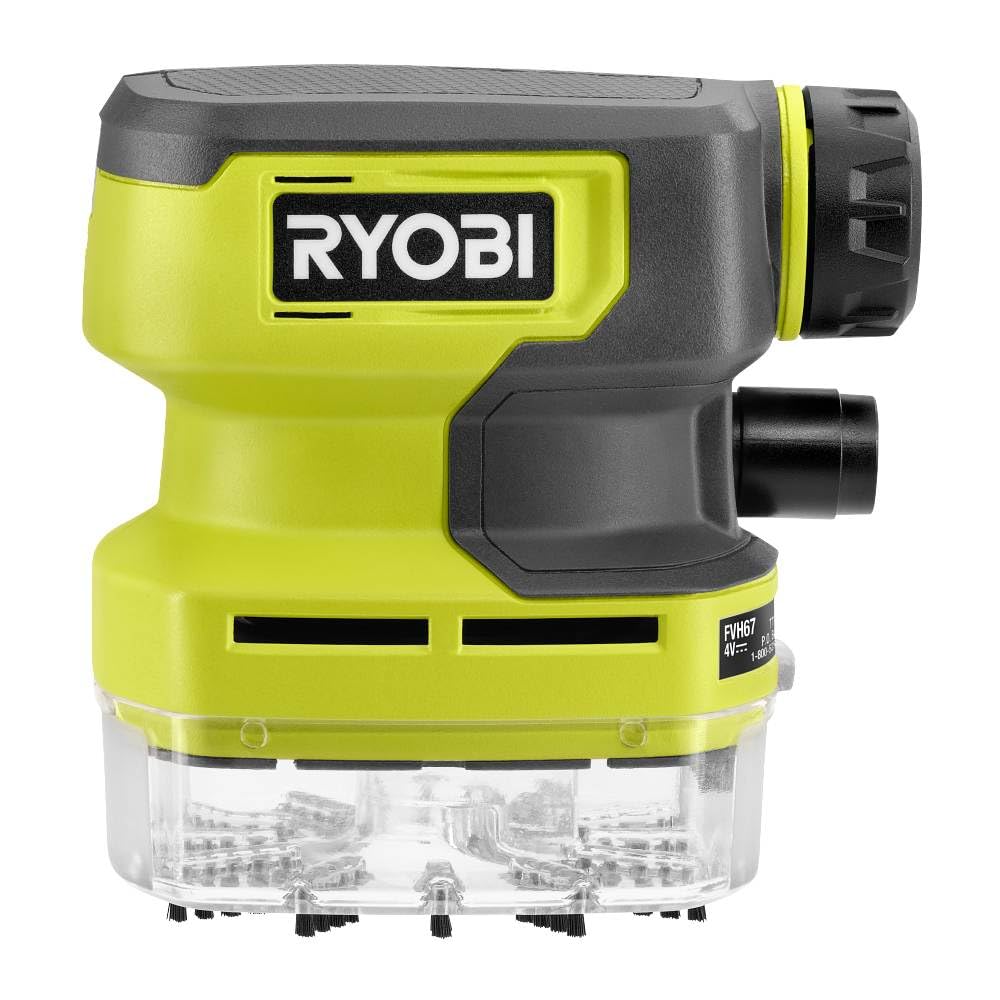
Image 4.1: Annotated diagram of the FVH67K Desktop Vacuum.
- Pulsante ON/OFF: Attiva e disattiva il vuoto.
- Indicatore LED: Signals low battery status.
- Filtro rimovibile: Captures dust and debris, designed for easy cleaning.
- Nylon Bristles: Located at the intake for effective debris collection.
- Ergonomic Overmold Grip: Offre una maneggevolezza confortevole.
- Spazio di archiviazione a bordo: Conveniently stores the included crevice tool.
- Easy to Empty Clear Dust Cup: Transparent design allows visibility of debris level and simplifies emptying.
5. Impostazione
5.1 Caricamento della batteria
- Connect the USB charging cable to the 2.0 AH USB Lithium-ION Battery.
- Plug the other end of the USB charging cable into a compatible USB power source (e.g., computer, wall adapter).
- Allow the battery to charge fully before first use. The LED indicator on the battery will show charging status.
5.2 Inserimento della batteria
- Assicurarsi che l'aspirapolvere sia spento.
- Align the charged 2.0 AH USB Lithium-ION Battery with the battery compartment on the vacuum.
- Far scorrere la batteria in posizione finché non scatta in modo sicuro.
5.3 Collegamento degli accessori
- The crevice tool can be attached to the vacuum's intake nozzle for reaching tight spaces.
- For storage, the crevice tool can be placed in the on-board storage slot.
6. Istruzioni per l'uso
6.1 Accensione/Spegnimento
- To turn on the vacuum, press the ON/OFF button.
- To turn off the vacuum, press the ON/OFF button again.
6.2 Utilizzo dell'aspirapolvere
- Hold the vacuum by the ergonomic overmold grip.
- Move the intake nozzle over the surface to be cleaned. The nylon bristles assist in sweeping debris into the vacuum.
- For narrow areas, attach the crevice tool.
- The vacuum is designed for dry pick-up only. Do not attempt to vacuum liquids.
6.3 Svuotamento del contenitore della polvere
- Assicurarsi che l'aspirapolvere sia spento.
- Detach the clear dust cup from the main body of the vacuum.
- Empty the contents of the dust cup into a waste receptacle.
- Reattach the dust cup securely to the vacuum.
7. Manutenzione
7.1 Pulizia del filtro
La pulizia regolare del filtro garantisce prestazioni di aspirazione ottimali.
- Spegnere l'aspirapolvere e rimuovere il contenitore per la polvere.
- Carefully remove the removable filter from the dust cup.
- Tap the filter gently over a waste bin to dislodge dust. For thorough cleaning, rinse the filter with water.
- Lasciare asciugare completamente il filtro all'aria prima di reinserirlo nel contenitore della polvere. Non utilizzare l'aspirapolvere con il filtro bagnato.
7.2 Pulizia generale
- Pulisci l'esterno dell'aspirapolvere con un panno morbido eamp stoffa. Non utilizzare prodotti chimici aggressivi o detergenti abrasivi.
- Ensure the charging port on the battery is free from dust and debris.
7.3 Cura della batteria
- Conservare la batteria in un luogo fresco e asciutto, lontano dalla luce solare diretta e da temperature estreme.
- Non esporre la batteria all'acqua o all'umidità.
- If the vacuum will not be used for an extended period, charge the battery periodically to maintain its health.
8. Risoluzione Dei Problemi
Se riscontri problemi con il tuo aspirapolvere, fai riferimento ai seguenti problemi comuni e alle relative soluzioni.
| Problema | Possibile causa | Soluzione |
|---|---|---|
| L'aspirapolvere non si accende. | La batteria non è carica o non è inserita correttamente. | Assicurarsi che la batteria sia completamente carica e inserita saldamente. |
| Bassa potenza di aspirazione. | Dust cup is full, filter is clogged, or nozzle is blocked. | Empty dust cup, clean filter, check for and remove any blockages in the nozzle. |
| Batteria non in carica. | Problema con il cavo di ricarica o con la fonte di alimentazione. | Verify the charging cable is properly connected and the USB power source is functional. Try a different cable or power source. |
| Rumore insolito durante il funzionamento. | Debris caught in the fan or motor area. | Turn off and disconnect the battery. Inspect the intake and fan area for obstructions and carefully remove them. |
9. Specifiche
Technical specifications for the RYOBI USB Lithium Desktop Vacuum FVH67K.
| Caratteristica | Specificazione |
|---|---|
| Nome del modello | FVH67K |
| Marca | RYOBI |
| Fonte di alimentazione | Battery Powered (USB Lithium) |
| Tipo di batteria | 2.0 AH Lithium-ION |
| Voltage | 4 volt |
| Durata | Circa 1 ora |
| Tipo di filtro | Stoffa |
| Capacità | 0.3 litri |
| Aspirazione massima | 0.1 metri (circa) |
| Uso consigliato | Desk, Office, Computer (flat surfaces) |
| Fattore di forma | Portatile |
| Tecnologia di connettività | USB |
| Dimensioni articolo (L x P x A) | 2.5" x 7" x 7.5" |
| Peso dell'articolo | 1.12 once |
| Componenti inclusi | USB Lithium 2Ah Battery, Cable, Crevice Tool |
10. Garanzia e supporto
For warranty information and customer support, please refer to the documentation provided with your purchase or visit the official RYOBI websito. Conservare la prova d'acquisto per eventuali reclami in garanzia.


