
Introduzione
This manual provides detailed instructions for the installation, operation, and maintenance of your DERAPID WiFi 6E AX5400 M.2/NGFF WiFi Card. Please read this manual thoroughly before installation to ensure proper setup and optimal performance.
Prodotto finitoview
The DERAPID WiFi 6E AX5400 M.2/NGFF WiFi Card is designed to provide ultra-fast wireless connectivity and Bluetooth capabilities for your desktop computer. Key features include:
- Ultra-Fast Tri-Band WiFi 6E AX5400: Powered by the Intel AX210 chipset, offering up to 5400Mbps total speed across 2.4GHz, 5GHz, and 6GHz bands.
- Bluetooth 5.3: Integrated Bluetooth for seamless connection with various peripherals.
- OFDMA e MU-MIMO: Technologies for efficient data transmission and stable performance with multiple connected devices.
- Antenne ad alto guadagno: Two omnidirectional antennas for enhanced signal strength and coverage.
- Ampia compatibilità: Supports Windows 10/11 64-bit systems and includes both standard and low-profile parentesi.

Image: Components of the DERAPID WiFi 6E AX5400 M.2/NGFF WiFi Card, including the M.2 card, antennas, and mounting bracket.
Configurazione e installazione
Follow these steps to install the WiFi card into your desktop computer. Ensure your computer is powered off and unplugged before beginning installation.
- Prepara il tuo computer: Turn off your desktop computer and unplug the power cable. Open the computer case to access the motherboard.
- Individuare lo slot M.2: Identify an available M.2/NGFF slot (Key E) on your motherboard. Refer to your motherboard's manual if you are unsure.
- Installa la scheda WiFi: Gently insert the WiFi card into the M.2 slot at an angle, then press it down and secure it with the provided screw.
- Collegare le antenne: Attach the antenna cables to the corresponding connectors on the WiFi card. Ensure a secure connection.
- Mount Antennas: Install the high-gain antennas to the provided bracket and secure the bracket to an available PCIe slot opening on your computer case. Connect the antenna cables from the card to the bracket.
- Chiudere la custodia e accendere: Close your computer case, plug in the power cable, and turn on your computer.
- Installa i driver: Once Windows starts, you will need to install the Intel AX210 drivers for both WiFi and Bluetooth. These can typically be downloaded from the Intel website or the DERAPID support page.

Image: Illustration of opening a desktop computer case to access internal components.

Image: Close-up of an M.2 slot on a motherboard, indicating where the WiFi card will be inserted.

Image: The WiFi card installed with antennas attached to the bracket, ready for mounting in a PC case.
Istruzioni per l'uso
After successful driver installation, your WiFi card will be ready for use.
Connessione wifi:
- Click on the WiFi icon in your system tray.
- Seleziona la rete WiFi desiderata dall'elenco.
- Se richiesto, immettere la password di rete e fare clic su "Connetti".
- Your computer should now be connected to the internet via WiFi 6E.
Connessione Bluetooth:
- Vai su Impostazioni di Windows > Dispositivi > Bluetooth e altri dispositivi.
- Assicurati che il Bluetooth sia attivato.
- Fare clic su "Aggiungi dispositivo Bluetooth o altro" e selezionare "Bluetooth".
- Metti il tuo dispositivo Bluetooth in modalità di associazione.
- Select your device from the list and follow on-screen prompts to complete pairing.
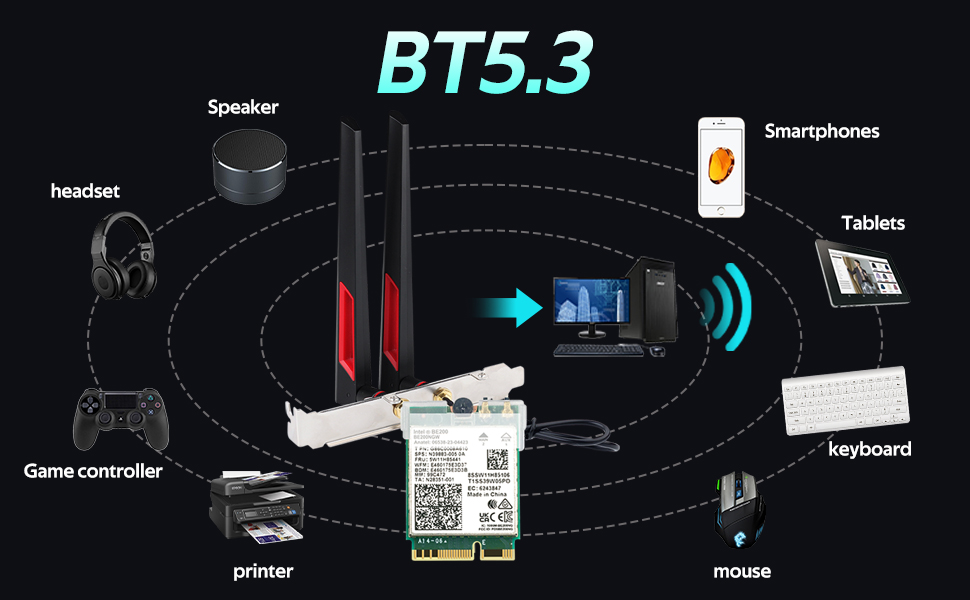
Image: Diagram illustrating Bluetooth 5.3 connectivity with various devices like headsets, speakers, and input devices.
Compatibilità
This DERAPID WiFi 6E AX5400 M.2/NGFF WiFi Card is compatible with:
- Operating Systems: Windows 10 64-bit, Windows 11 64-bit.
- Motherboard Slot: M.2 Key E slot.
- Form Factors: Compatible with full-size, small, HTPC, and mini PC cases using the included standard and low-profile parentesi.
Note: This card does not support AMD motherboards.

Image: Visual guide showing compatibility with Windows 10/11 64-bit and M.2 Key E slots, explicitly stating no support for AMD motherboards.
Risoluzione dei problemi
In caso di problemi, fare riferimento alle seguenti soluzioni comuni:
- No WiFi/Bluetooth after installation:
- Ensure the card is properly seated in the M.2 Key E slot.
- Verify that all antenna cables are securely connected.
- Install the latest drivers for the Intel AX210 chipset from the official Intel websito.
- Check Device Manager to see if the device is recognized and if there are any error codes.
- Slow WiFi speeds:
- Ensure your router supports WiFi 6E and is configured for optimal performance.
- Verificare la presenza di interferenze da parte di altri dispositivi o reti.
- Aggiorna il firmware del router.
- Ensure antennas are positioned correctly for best signal reception.
- Bluetooth devices not pairing:
- Assicurati che il Bluetooth sia abilitato nelle impostazioni di Windows.
- Assicurati che il tuo dispositivo Bluetooth sia in modalità di accoppiamento.
- Rimuovere e aggiungere nuovamente il dispositivo Bluetooth nelle impostazioni di Windows.
- Aggiorna i driver Bluetooth.

Image: Visual representation of common network problems like slow internet, buffering, and lag, which this card aims to resolve.
Specifiche
| Caratteristica | Specificazione |
|---|---|
| Marca | DERAPID |
| Numero di modello | AX210kit |
| Chipset | IntelAX210 |
| standard wireless | Wi-Fi 6E (802.11ax) |
| Velocità di trasferimento dati | Fino a 5400 Mbps (2.4 GHz: 574 Mbps, 5 GHz: 2400 Mbps, 6 GHz: 2400 Mbps) |
| Versione Bluetooth | Bluetooth 5.3 |
| Interfaccia | M.2/NGFF (Key E) |
| Antenne | 10dBi High-Gain Omnidirectional Antennas |
| Sistema operativo compatibile | Windows 10 a 64 bit, Windows 11 a 64 bit |
| Peso dell'articolo | 160 grammi |
Garanzia e supporto
This DERAPID WiFi 6E AX5400 M.2/NGFF WiFi Card comes with a Garanzia di 1 anno dalla data di acquisto.
For technical support, driver downloads, or warranty claims, please visit the official DERAPID websito o contattare il servizio clienti tramite la piattaforma di acquisto.
