
1. Introduzione
Thank you for choosing the Vortex Powerhub30 Black 30000 mAh External Battery. This device is designed to provide reliable portable power for your electronic devices. Please read this manual carefully before use to ensure proper operation and to maximize the lifespan of your power bank.
2. Informazioni sulla sicurezza
- Non esporre il power bank a temperature estreme (superiori a 60°C / 140°F o inferiori a 0°C / 32°F), alla luce solare diretta o al fuoco.
- Avoid dropping, disassembling, or attempting to repair the device yourself. This may cause damage and void the warranty.
- Tenere il power bank lontano da acqua, umidità e materiali corrosivi.
- Non utilizzare il power bank se è visibilmente danneggiato, gonfio o presenta perdite.
- Tenere fuori dalla portata dei bambini.
- Utilizzare solo cavi di ricarica e adattatori certificati.
- Smaltire il power bank in modo responsabile, nel rispetto delle normative locali.
3. Contenuto della confezione
- Vortex Powerhub30 Black 30000 mAh External Battery
- USB Charging Cable (Micro-USB/Type-C compatible)
- Manuale d'uso
4. Prodotto finitoview
The Vortex Powerhub30 is equipped with multiple ports and an LED display for convenient charging and monitoring.

Immagine 1: anteriore view of the Vortex Powerhub30 Black external battery, showing its compact design and the Vortex logo. The image also highlights its 30000 mAh capacity and illustrates its use with various devices like smartphones, tablets, and headphones.
Componenti:
- Porte di uscita USB-A (x2): Per caricare dispositivi esterni.
- Porta USB di tipo C: Bidirectional, used for both charging the power bank and charging external devices.
- Porta di ingresso Micro-USB: Per caricare il power bank.
- Display a LED: Mostra la percentuale residua della batteriatage.
- Pulsante di accensione: Attiva il display LED e avvia la ricarica.
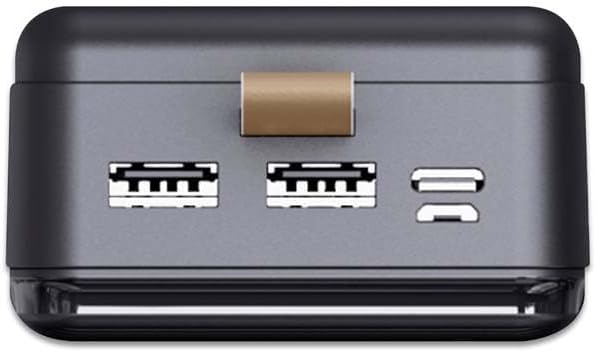
Immagine 2: In alto view of the Vortex Powerhub30, clearly displaying the two USB-A output ports and the single bidirectional USB Type-C port. This view illustrates the multiple connectivity options available.

Image 3: Close-up top view of the Vortex Powerhub30, highlighting the integrated LED indicator which displays the current battery charge level. The power button is also visible next to the indicator.
5. Impostazione
Ricarica iniziale del Power Bank:
- Before first use, fully charge your Powerhub30.
- Connect the provided USB charging cable to either the Micro-USB input port or the USB Type-C port on the power bank.
- Collegare l'altra estremità del cavo a un caricabatterie da muro USB (non incluso) o alla porta USB di un computer.
- The LED display will show the charging progress. Once 100% is displayed, the power bank is fully charged.
6. Istruzioni per l'uso
Ricarica dispositivi esterni:
- Connect your device's charging cable to one of the USB-A output ports or the USB Type-C port on the Powerhub30.
- Collega l'altra estremità del cavo allo smartphone, al tablet o ad un altro dispositivo compatibile.
- Press the power button on the Powerhub30 to initiate charging. The LED display will show the power bank's remaining charge.
- The Powerhub30 can charge up to three devices simultaneously.
- Una volta che il dispositivo è completamente carico, scollegalo dal power bank. Il power bank si spegnerà automaticamente dopo un periodo di inattività.
7. Manutenzione
- Pulisci il power bank con un panno morbido e asciutto. Non utilizzare prodotti chimici aggressivi o detergenti abrasivi.
- Conservare il power bank in un luogo fresco e asciutto quando non viene utilizzato.
- Per preservare la salute della batteria, caricare completamente il power bank almeno una volta ogni tre mesi, anche se non lo si utilizza regolarmente.
- Evitare di sovraccaricare o scaricare completamente la batteria frequentemente.
8. Risoluzione Dei Problemi
Il power bank non si carica:
- Assicurarsi che il cavo di ricarica sia collegato saldamente sia al power bank sia alla fonte di alimentazione.
- Prova un cavo di ricarica o un adattatore da parete diverso.
- Verificare che la fonte di alimentazione sia attiva.
Dispositivo non in carica tramite power bank:
- Assicurarsi che il power bank abbia una carica sufficiente (controllare il display LED).
- Premere il pulsante di accensione sul power bank per attivare l'uscita.
- Prova un cavo di ricarica diverso per il tuo dispositivo.
- Assicurati che il tuo dispositivo sia compatibile con le specifiche di uscita del power bank.
Ricarica lenta:
- Assicurati di utilizzare un cavo di ricarica di alta qualità.
- Some devices may charge slower if multiple devices are connected simultaneously.
- Check if your device supports fast charging and if the cable/port used supports it.
9. Specifiche
| Modello | Powerhub30 |
| Capacità della batteria | 30000 mAh |
| Porte di ingresso | Micro USB, USB di tipo C |
| Porte di uscita | 2x USB-A, 1x USB Type-C (bidirectional) |
| Caratteristica speciale | Compact design, LED battery display |
| Uso consigliato | Smartphones, Tablets, other USB-powered devices |
| Dimensioni | 14.8 × 7 × 2.8 cm (approx.) |
| Materiale | ABS Casing |
10. Garanzia e supporto
Per informazioni sulla garanzia e sull'assistenza clienti, fare riferimento al sito ufficiale Vortex websito o contattare il rivenditore. È inoltre possibile visitare il sito Negozio del marchio Vortex per maggiori dettagli.