
Eonon M3BKX7
Eonon M3BKX7 Android 14 Car Stereo User Manual
Per Mazda 3 (2004-2009)
1. Introduzione
This manual provides detailed instructions for the installation, operation, and maintenance of your Eonon M3BKX7 Android 14 Car Stereo. This unit is designed for specific Mazda 3 models manufactured between 2004 and 2009, offering an enhanced in-car entertainment and navigation experience.

Image: Eonon M3BKX7 Android 14 Car Stereo unit with external microphone and backup camera accessories.
1.1 Compatibilità
The Eonon M3BKX7 is compatible with Mazda 3 vehicles from model years 2004 to 2009. It integrates with existing vehicle systems, including steering wheel controls and reverse signals, via the included CANBUS module. Please note that the unit does not work with the factory car LCD screen of 2004-2005 Mazda 3 models. If your car dash matches the image for 2010-2013 Mazda 3, please refer to the Eonon 2010-2013 Mazda 3 car stereo manual.

Image: Visual guide for Mazda 3 dashboard compatibility, indicating which models are supported.
2. Contenuto della confezione
Verify that all items listed below are present in your package before beginning installation:
- Eonon M3BKX7 Head Unit
- Backup Camera (A0125) *1
- Cavo di alimentazione *1
- Antenna GPS *1
- Cavo adattatore USB *2
- Audio Video Adapter Cable *2
- Cavo di ingresso video della telecamera di backup *1
- Fusibile da 15 A *1
- Microfono esterno *1
- CAN Bus *1
- Manuale d'uso *1
- Cuscinetto adesivo *1
- Cavo adattatore antenna radio *1
- Altoparlante *1

Image: Diagram illustrating all components included in the Eonon M3BKX7 package.
3. Configurazione e installazione
The Eonon M3BKX7 is designed for plug-and-play installation in compatible Mazda 3 vehicles (2004-2009). No additional kits or cable modifications are typically required. Professional installation is recommended if you are unfamiliar with car audio system wiring.
3.1 Lista di controllo pre-installazione
- Assicurarsi che l'accensione del veicolo sia spenta e che la batteria sia scollegata.
- Verificare che tutto il contenuto della confezione sia presente.
- Review the wiring diagram thoroughly.
3.2 Fasi di installazione (generali)
- Rimuovere con cautela l'autoradio di fabbrica e i pannelli di rivestimento.
- Connect the provided power cable, CAN Bus, and other necessary adapters to the vehicle's wiring harness.
- Connect the GPS antenna and external microphone, routing cables appropriately.
- If installing the backup camera, route its video input cable to the head unit and connect the camera to the vehicle's reverse light power source.
- Mount the Eonon M3BKX7 head unit into the dashboard opening.
- Reconnect the vehicle battery and test the unit's functionality before reassembling the trim panels.
3.3 Schema elettrico
Refer to the detailed wiring diagram for specific connections. The CAN Bus supports most original vehicle functions, including steering wheel controls and reverse signals (voice buttons are not supported).

Image: Comprehensive wiring diagram for the Eonon M3BKX7 car stereo, detailing all input and output connections.

Image: Illustration of plug-and-play features, highlighting compatibility with steering wheel controls, Bose audio system, and LCD screen (where applicable).
4. Istruzioni per l'uso
4.1 Accensione/spegnimento
The unit powers on automatically with the vehicle's ignition. To manually power off or restart, press and hold the power button on the unit's front panel.
4.2 CarPlay wireless / Android Auto
Connect your smartphone wirelessly for access to navigation, music, calls, and messages through the car stereo interface.
4.2.1 Connessione wireless Apple CarPlay
- Aprire l'applicazione 'Zlink5' sull'autoradio.
- On your iPhone, enable Wi-Fi and Bluetooth.
- In your iPhone's Bluetooth device list, locate and select 'EONON'. Enter the PIN '0000' to pair.
- Once connected, tap 'Use CarPlay' on your iPhone. The connection should complete within a few seconds.
4.2.2 Connessione wireless Android Auto
- Aprire l'applicazione 'Zlink5' sull'autoradio.
- On your Android phone, enable Wi-Fi and Bluetooth.
- In your Android phone's Bluetooth device list, locate and select 'EONON'. Enter the PIN '0000' and confirm.
- The connection should complete within a few seconds.

Image: Step-by-step guide for connecting an iPhone to Wireless Apple CarPlay.

Image: Step-by-step guide for connecting an Android phone to Wireless Android Auto.
4.3Bluetooth 5.4
The unit features Bluetooth 5.4 for quick and stable connections, noise reduction, clear call quality, and high-quality music streaming. Pair your phone via the Bluetooth settings on the head unit to enable hands-free calling and audio playback.

Image: Diagram highlighting the independent Bluetooth module and external antenna for enhanced connectivity.
Processore audio DSP 4.4
Utilize the built-in 32-bit DSP audio processor with FFT acceleration and a 48-band equalizer to customize your audio experience. Select from preset EQ modes (Custom, Standard, Popular, Rock, Classical, Jazz) or create your own sound profile. The ST TDA7388 amplifier provides 4x45W surround sound output.

Image: Details on the DSP audio processor, including 32-bit DSP, 48-band EQ, and optimization for car acoustics.
4.5 Mirroring dello schermo
Mirror your smartphone screen (iOS or Android) onto the car stereo display.
4.5.1 iOS Screen Mirroring
- Open the 'Zlink5' app on the car stereo and set it to iPhone wireless screen mirroring mode.
- Turn on your iPhone's personal hotspot and connect the car stereo to it.
- On your iPhone, enable the screen mirroring function and select 'zj-airplay'.
4.5.2 Mirroring dello schermo Android
- Open the 'Zlink5' app on the car stereo and set it to Android wireless screen mirroring mode.
- Turn on your Android phone's personal hotspot and connect the car stereo to it.
- Install the Zplus app on your phone. Open it and select 'wireless connection'.
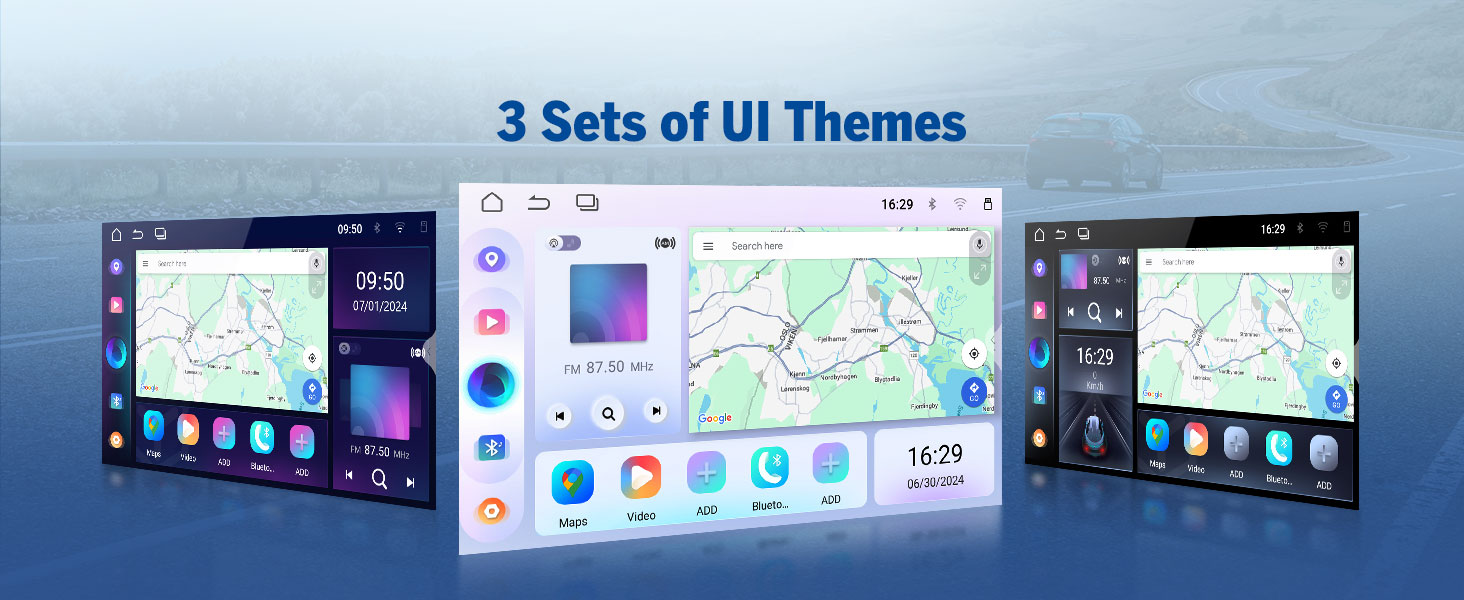
Image: Step-by-step instructions for setting up screen mirroring from an iOS device.

Image: Step-by-step instructions for setting up screen mirroring from an Android device.
4.6 Radio (AM/FM/RDS)
Access AM/FM radio stations. The unit supports RDS (Radio Data System) for displaying station information where available.
4.7 Riproduzione USB
Connect USB storage devices (up to 512GB) to play audio and video files. The unit features multiple USB ports for convenience.
4.8 Navigazione GPS
Utilize online or offline navigation applications. The included GPS antenna ensures accurate positioning.
4.9 ingressi telecamera
The unit supports both rear and front camera inputs. The included A0125 backup camera provides 1080P AHD resolution with a 140° rear viewing angle and reversing guidelines. An optional A100 dash cam (not included) can be connected for front recording.

Image: Features of the included A0125 backup camera, including reversing guidelines, 720P AHD, 140° viewangolo di visione e grado di impermeabilità IP68.
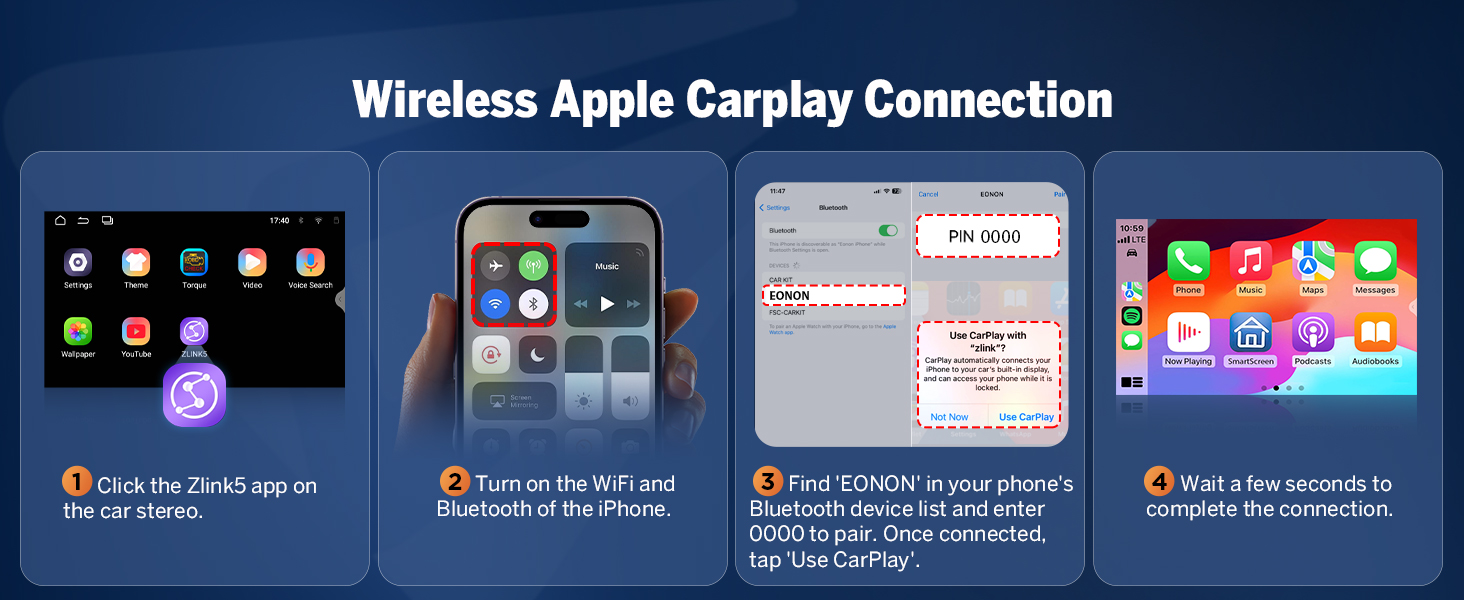
Image: Features of a compatible dash cam (A100, not included), showing 120° viewing angle and video playback capabilities.
4.10 OBD2 Functionality
The unit supports an optional V0056 OBD2 adapter (not included) for vehicle fault diagnosis and real-time status monitoring.
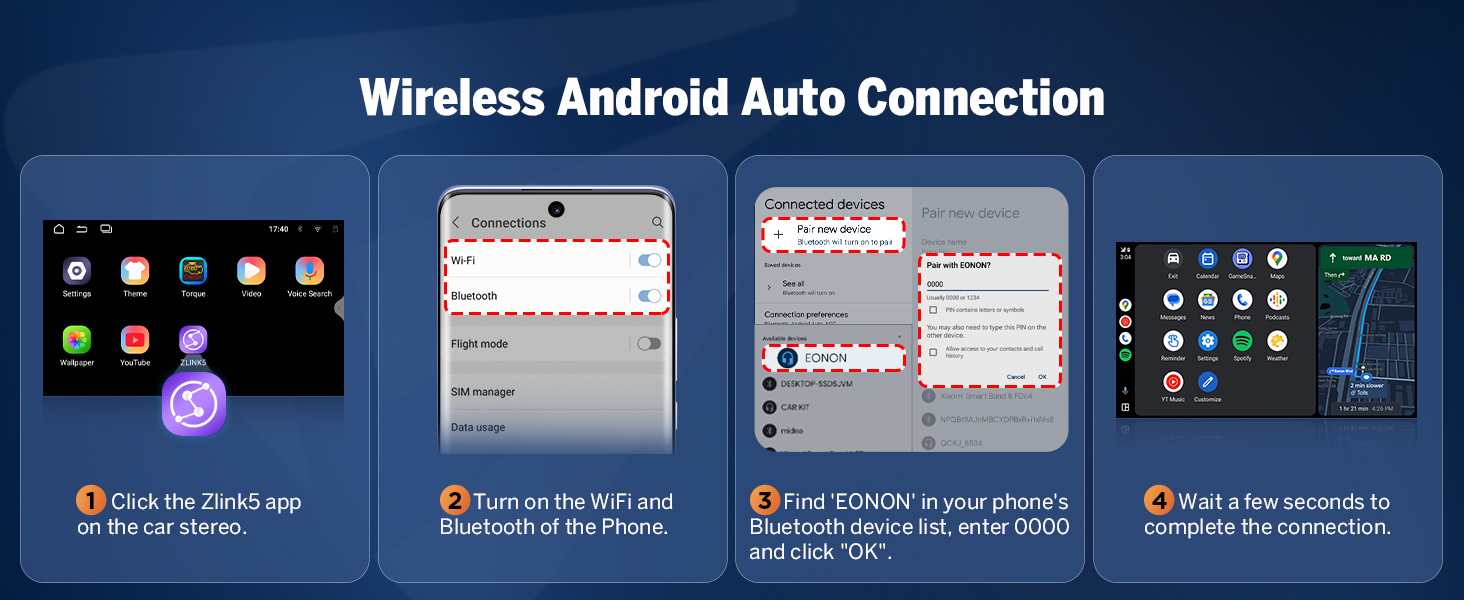
Image: Display showing vehicle fault diagnosis and real-time status via an optional OBD2 adapter.
4.11 Personalizzazione dell'interfaccia utente
Personalize your car stereo's appearance with customizable boot logos, button colors, and wallpapers. The unit also offers three distinct UI themes.

Immagine: Examples of user interface customization, including boot logo, button color selection, and wallpaper options.
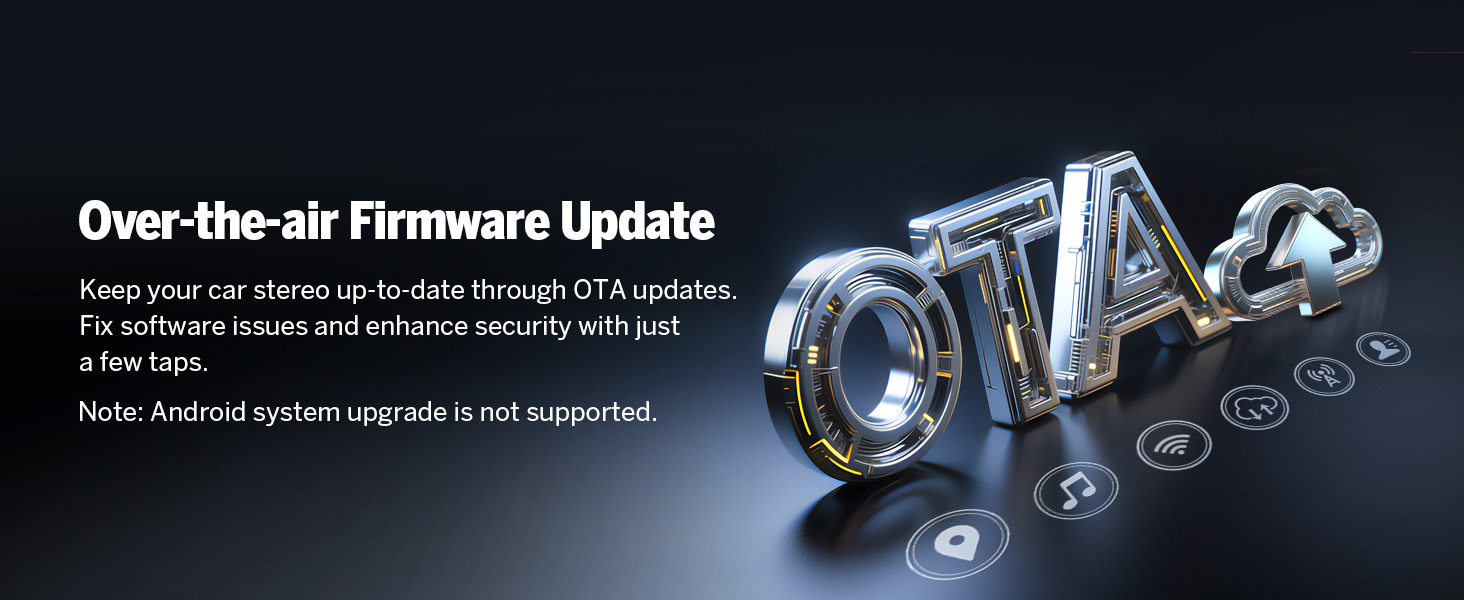
Image: Display of three different user interface themes available on the Eonon M3BKX7.
5. Manutenzione
5.1 Over-the-Air (OTA) Firmware Updates
The Eonon M3BKX7 supports OTA firmware updates. These updates address software issues and enhance security. To update, navigate to the system settings and check for available updates. Note that these are firmware updates and do not upgrade the Android operating system version.

Image: Graphic illustrating the Over-the-Air (OTA) firmware update process.
5.2 Cura generale
- Pulisci lo schermo con un panno morbido e privo di lanugine. Evita detergenti abrasivi.
- Tenere l'unità lontana da polvere e umidità eccessive.
- Garantire un'adeguata ventilazione intorno all'unità per evitare il surriscaldamento.
6. Risoluzione Dei Problemi
If you encounter issues with your Eonon M3BKX7, refer to the following common solutions:
- Nessun potere: Check all power connections and the 15A fuse. Ensure the vehicle battery is properly connected.
- Nessun suono: Verificare i collegamenti degli altoparlanti e le impostazioni dell'uscita audio. Controllare il livello del volume e assicurarsi che la funzione mute non sia attiva.
- Problemi di connettività CarPlay/Android Auto: Ensure Wi-Fi and Bluetooth are enabled on both the head unit and your smartphone. Re-pair the devices if necessary. Check for any software updates for the Zlink5 app or your phone's operating system.
- Comandi al volante non funzionanti: Confirm the CAN Bus module is correctly installed and connected. Some voice button functions may not be supported.
- Scarsa qualità del microfono: Ensure the external microphone is properly connected and positioned. Check microphone settings within the unit's menu.
- Perdita del segnale GPS: Assicurarsi che l'antenna GPS sia collegata saldamente e abbia una visuale libera view del cielo.
- Schermo non reattivo: Perform a soft reset by pressing the reset button (if available) or disconnecting and reconnecting the vehicle battery.
For persistent issues, contact Eonon customer support.
7. Specifiche
| Caratteristica | Dettaglio |
|---|---|
| Sistema operativo | Real Android 14 |
| processore | RK3562 Quad-core ARM Cortex-A53 @ 2.0GHz |
| Memoria RAM | 3 GB |
| ROM | 32 GB |
| Dimensioni dello schermo | 9 pollici |
| Risoluzione | 1280 * 720 IPS |
| Schermo tattile | Capacitivo 2.5D |
| Bluetooth | Bluetooth 5.4 |
| Wifi | Wi-Fi 6 (5Ghz support) |
| Amppiù vivace | ST TDA7388 (4x45W) |
| Controllo di Produzione | 32-bit DSP, 48-band Equalizer |
| Porte USB | 3 |
| Max USB Storage | 512 GB |
| Connettività | Bluetooth, USB, Wi-Fi |
| Caratteristiche speciali | Android Auto, Apple CarPlay, GPS Navigation, Hands-Free Calling, Digital Display Screen |
| Numero modello articolo | M3BKX7 |
| Dimensioni del pacco | Dimensioni: 38.2 x 19.9 x 18.4 cm |
| Peso dell'articolo | 1.91 kg |

Image: Diagram illustrating the internal components of the Eonon X7 Series, including the 4-layer automotive PCB, ST amplifier, Wi-Fi 6 & Bluetooth 5.4 module, Silicon Labs tuner, and memory.

Image: Close-up of the 9-inch IPS display, highlighting its 1280x720 resolution, 2.5D capacitive touchscreen, and 178° viewangolo di ing.

Image: Information on the Android 14 operating system and RK3562 processor, including AnTuTu running scores for performance comparison.
8. Garanzia e supporto
8.1 Informazioni sulla garanzia
The Eonon M3BKX7 comes with a Garanzia di 2 anno dalla data di acquisto. La presente garanzia copre difetti di fabbricazione e malfunzionamenti in condizioni di normale utilizzo. Si prega di conservare la prova d'acquisto per eventuali reclami in garanzia.
8.2 Politica di reso e sostituzione
- Resi gratuiti entro 30 giorni: Products can be returned for a full refund within 30 days of purchase.
- Sostituzione entro 90 giorni: A replacement unit will be provided within 90 days of purchase for qualifying issues.
8.3 Assistenza clienti
Eonon is committed to providing lifelong after-sales service. For technical assistance, troubleshooting, or warranty inquiries, please contact our customer support team. We aim to provide a quick reply within 24 hours (excluding weekends).
Ask a question about this manual
Ask about setup, troubleshooting, compatibility, parts, safety, or missing instructions. Manuals+ will review the question and use this page’s manual context to help answer it.