
Introduzione
This manual provides detailed instructions for the setup, operation, and maintenance of your MageGee V560 Wireless Gaming Keyboard and Mouse Combo. Please read this manual thoroughly before use to ensure optimal performance and longevity of your device.

Image: The MageGee V560 Wireless Gaming Keyboard and Mouse Combo, featuring a blue, white, and purple color scheme, with the USB receiver visible.
Contenuto della confezione
Si prega di verificare che tutti gli articoli siano presenti nel pacco:
- MageGee V560 Wireless Keyboard
- MageGee Wireless Mouse
- 2.4GHz USB Receiver (stored in mouse battery compartment)
- Cavo di ricarica USB-C
- Manuale d'uso

Image: Contents of the MageGee V560 package, including the keyboard, mouse, USB receiver, charging cable, and user manual.
Istruzioni di installazione
- Individuare il ricevitore USB: Open the battery cover of the wireless mouse. The 2.4GHz USB receiver is stored inside the compartment next to the mouse battery slot.
- Connetti il ricevitore: Collega il ricevitore USB a una porta USB disponibile sul tuo computer.
- Accendi i dispositivi: Ensure both the keyboard and mouse are powered on. The devices are plug-and-play and should connect automatically.
- Carica iniziale: For optimal performance, it is recommended to fully charge both the keyboard and mouse before first use. Use the provided USB-C charging cable.

Image: Illustration showing the 2-in-1 USB receiver connecting the keyboard and mouse wirelessly to a laptop.
Istruzioni per l'uso
Funzioni della tastiera
- Controllo della retroilluminazione RGB:
- Premere FN+INS per attivare o disattivare la retroilluminazione.
- Premere FN + PagSu or FN + PgGiù to adjust the 3-level backlight brightness.
- Premere FN + 1 / 2 / 3 / 4 / 5 to switch between different backlight modes. Note: Backlight settings are not saved after power off.
- Collegamenti multimediali: Utilizzare il FN chiave in combinazione con F1-F12 keys for quick access to multimedia functions such as volume control, media playback, and more.
- Design ergonomico: The keyboard features a stepped layout and foldable brackets at the bottom, allowing you to adjust the typing angle for comfort during extended use.
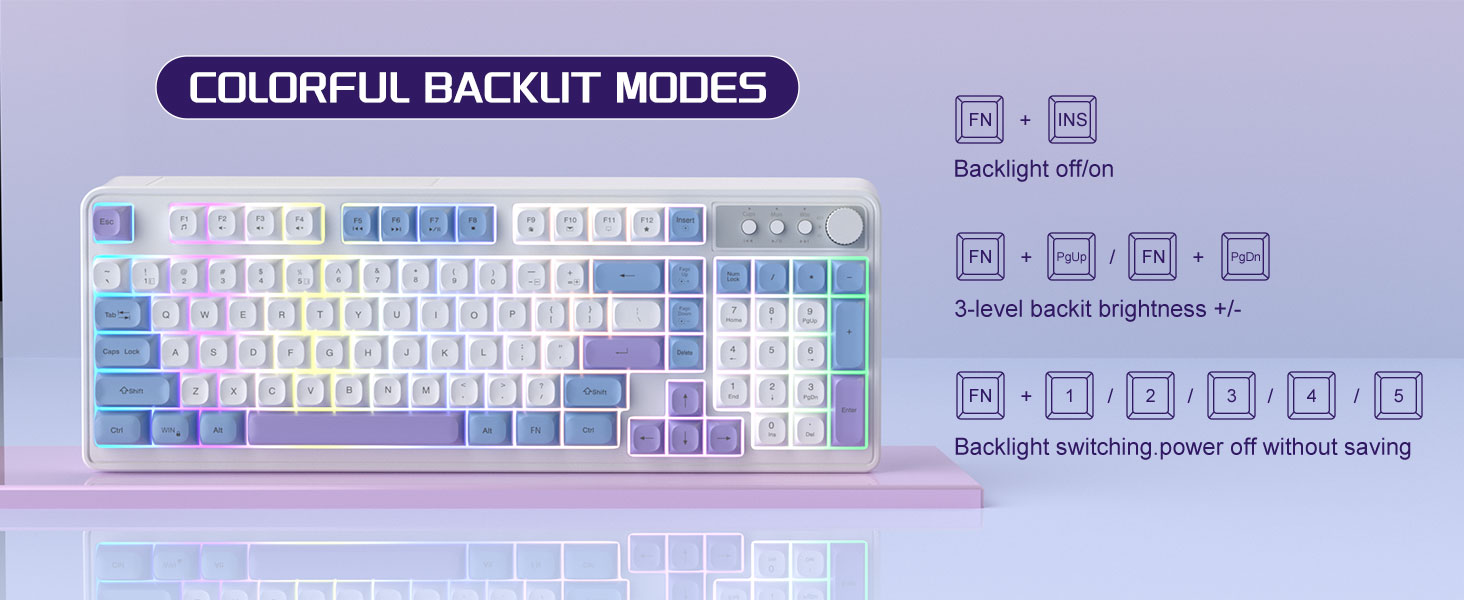
Image: The MageGee V560 keyboard displaying various colorful backlit modes, with instructions for controlling them.

Image: A visual representation of the 16 multimedia shortcuts available on the MageGee V560 keyboard, activated via the FN key.
Funzioni del mouse
- Regolazione DPI: The mouse supports 6 levels of DPI adjustment (600-3200 DPI). Press the DPI button (usually located below the scroll wheel) to cycle through the sensitivity settings. Internal indicator lights will show the current DPI level.
- Retroilluminazione respiratoria: The mouse features 7 dazzling color breathing backlights. This lighting is automatic and indicates mouse activity.

Image: The MageGee V560 mouse highlighting its DPI settings (1000, 1200, 1600 DPI) and showing the USB-C charging port.
Ricarica e durata della batteria
- Both the keyboard and mouse are rechargeable. Use the provided USB-C charging cable to charge them.
- Keyboard Standby Time: Fino a 365 giorni.
- Mouse Standby Time: Fino a 270 giorni.
- Funzione di sospensione automatica: The devices automatically enter sleep mode after a period of inactivity to conserve battery power and extend battery life.

Image: An illustration demonstrating the intelligent auto-sleep feature of the MageGee V560 combo, which conserves battery life.
Compatibilità
The MageGee V560 Wireless Gaming Keyboard and Mouse Combo is compatible with the following operating systems:
- Vincita2000
- Vinci XP
- Vinci
- Vista
- Vincita7
- Vincita8
- Vincita10
- Android
- Linux
- Sistema operativo Mac
Risoluzione dei problemi
If you encounter issues with your MageGee V560 combo, please refer to the following common solutions:
- Dispositivo non connesso:
- Assicurarsi che il ricevitore USB sia collegato saldamente a una porta USB funzionante.
- Verificare che sia la tastiera che il mouse siano accesi.
- Check the battery levels of both devices and charge if necessary.
- Prova a collegare il ricevitore USB a un'altra porta USB.
- Ritardo o disconnessione:
- Ensure the devices are within the 33 ft (10 meter) operating range of the USB receiver.
- Ridurre al minimo le interferenze provenienti da altri dispositivi wireless a 2.4 GHz (ad esempio, router Wi-Fi, telefoni cordless).
- Charge the devices to ensure sufficient power.
- Keys Not Registering / Mouse Not Responding:
- Recharge the keyboard and mouse.
- Ensure the USB receiver is properly connected.
- Riavvia il computer.
- Problemi di retroilluminazione:
- Assicurarsi che la tastiera sia carica.
- Utilizzo FN+INS per attivare/disattivare la retroilluminazione.
- Regola la luminosità con FN + PagSu/PagGiù.
Specifiche
| Marca | MageGee |
| Modello | V560 |
| Tecnologia di connettività | 2.4GHz wireless |
| Caratteristiche speciali | RGB lighting, rechargeable keyboard and mouse, ergonomic design |
| Dispositivi compatibili | Personal Computer (Win2000, Win XP, Win ME, Vista, Win7, Win8, Win10, Android, Linux, Mac OS) |
| Peso dell'articolo | 1.87 libbre |
| Dimensioni del pacco | 16.61 x 9.21 x 1.73 pollici |
| Produttore | MAGGEE |
Manutenzione
- Pulizia: Utilizzare un panno morbido e asciutto per pulire la tastiera e il mouse. Per lo sporco ostinato, un panno leggermenteamp è possibile utilizzare un panno, assicurandosi che nessun liquido entri nel dispositivo.
- Magazzinaggio: Conservare i dispositivi in un luogo fresco e asciutto, lontano dalla luce solare diretta e da temperature estreme.
- Cura della batteria: Evitare di scaricare completamente le batterie frequentemente. Caricarle regolarmente per mantenerle in buone condizioni.
Garanzia e supporto
Questo prodotto viene fornito con un Garanzia di 1 anno dalla data di acquisto.
For any questions or support needs, please contact MageGee customer service via Amazon email. We aim to respond within 12 hours and provide a satisfactory solution.