
Introduzione
The Yesido YAU41 is a versatile 2-in-1 Bluetooth 5.0 audio adapter designed to function as both a transmitter (TX) and a receiver (RX). It enables wireless audio streaming for a wide range of devices, converting traditional audio systems into Bluetooth-enabled ones. Additionally, it features a built-in TF card reader for direct music playback. This manual provides essential information for proper setup, operation, and maintenance of your YAU41 device.
Prodotto finitoview
Caratteristiche principali:
- Bluetooth 5.0 per una connessione wireless stabile ed efficiente.
- Funzionalità 2 in 1: modalità trasmettitore (TX) e ricevitore (RX).
- Integrated TF card reader for direct audio playback.
- 3.5mm AUX audio input/output.
- Rechargeable battery with approximately 10 hours of music playback.
- Design compatto e portatile.
- Intuitive TX/RX mode switch button.
Componenti del dispositivo:
Familiarize yourself with the various parts of your YAU41 audio adapter:
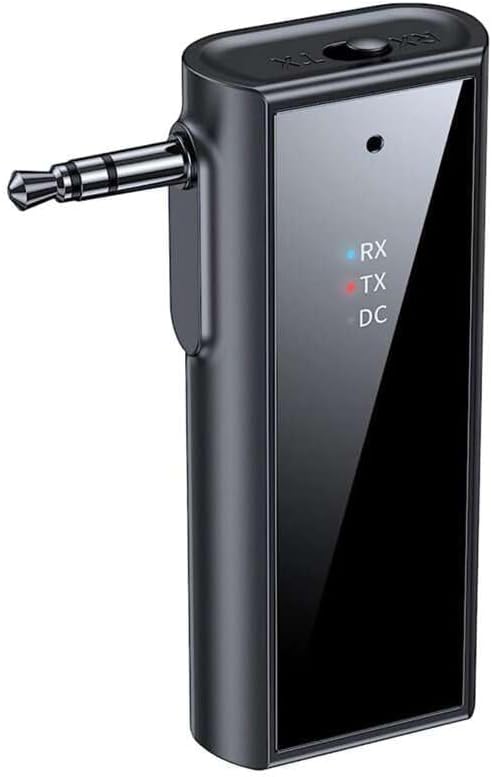
Immagine: Frontale view of the Yesido YAU41 Audio Adapter, highlighting the 3.5mm audio jack, mode indicator lights (RX, TX, DC), and the Yesido logo.
- Jack audio da 3.5 mm: For connecting to audio sources (TX mode) or speakers (RX mode).
- Pulsante di commutazione TX/RX: Alterna tra le modalità Trasmettitore e Ricevitore.
- Pulsante di accensione/pulsante multifunzione: Powers the device on/off, plays/pauses music, answers/ends calls.
- Pulsante Volume su/Traccia successiva: Aumenta il volume o passa alla traccia successiva.
- Pulsante Volume giù/Traccia precedente: Diminuisce il volume o passa alla traccia precedente.
- Slot per schede TF: For inserting a TF (MicroSD) card for direct music playback.
- Porta di ricarica USB-C: Per caricare il dispositivo.
- Indicator Lights (RX, TX, DC):
- RX (Blue): Indicates Receiver mode is active.
- TX (Red): Indicates Transmitter mode is active.
- DC (Green): Indica lo stato di carica.
Impostare
1. Ricarica iniziale:
Before first use, fully charge the YAU41 adapter. Connect the provided USB-C charging cable to the device's USB-C port and the other end to a standard USB power adapter (not included) or a computer USB port. The DC indicator light will illuminate during charging and turn off when fully charged.
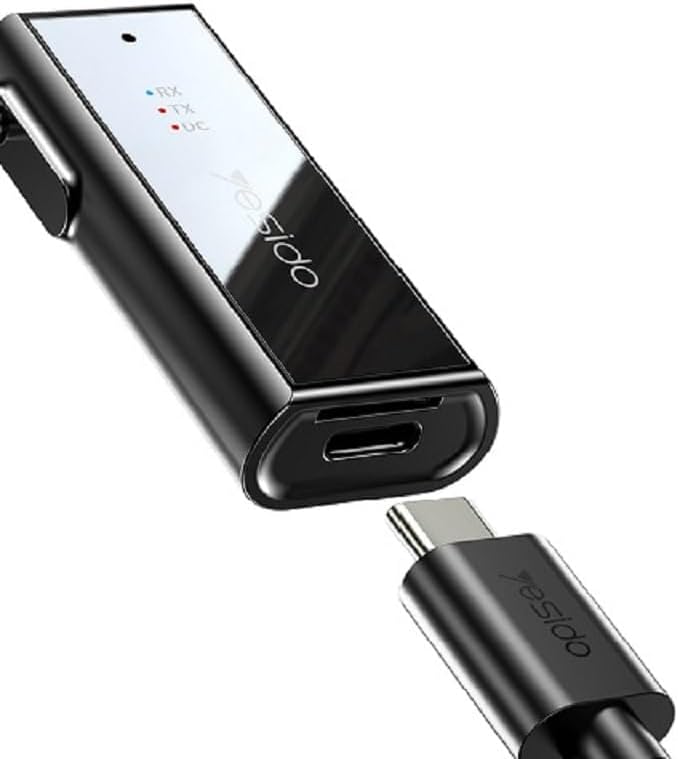
Image: The Yesido YAU41 Audio Adapter being charged via its USB-C port.
2. Accensione/spegnimento:
- Per accendere: Press and hold the Power button for approximately 3 seconds until the indicator lights flash.
- Per spegnere: Tenere premuto il pulsante di accensione per circa 3 secondi finché le spie luminose non si spengono.
Modalità operative
Modalità trasmettitore (TX):
In TX mode, the YAU41 transmits audio from a non-Bluetooth device (e.g., TV, computer, MP3 player) to a Bluetooth-enabled receiving device (e.g., Bluetooth headphones, Bluetooth speaker).
- Ensure the YAU41 is powered on.
- Far scorrere l'interruttore TX/RX su TX position. The red TX indicator light will illuminate.
- Connect the YAU41's 3.5mm audio jack to the audio output port of your non-Bluetooth device using the provided 3.5mm audio cable.
- Place your Bluetooth receiving device (headphones/speaker) into pairing mode.
- The YAU41 will automatically search for and connect to nearby Bluetooth receiving devices. Once connected, the TX indicator light may change its blinking pattern or remain solid.
- Play audio on your non-Bluetooth device. The sound should now be transmitted to your Bluetooth headphones/speaker.
Modalità ricevitore (RX):
In RX mode, the YAU41 receives audio from a Bluetooth-enabled device (e.g., smartphone, tablet) and outputs it to a non-Bluetooth audio system (e.g., car stereo, home stereo, wired headphones).
- Ensure the YAU41 is powered on.
- Far scorrere l'interruttore TX/RX su RX position. The blue RX indicator light will illuminate and flash, indicating it's in pairing mode.
- Connect the YAU41's 3.5mm audio jack to the audio input port (e.g., AUX-in) of your non-Bluetooth audio system using the provided 3.5mm audio cable.
- On your Bluetooth-enabled device (e.g., smartphone), enable Bluetooth and search for available devices. Select "YAU41" from the list to pair.
- Once successfully paired, the blue RX indicator light will remain solid.
- Play audio on your Bluetooth-enabled device. The sound will now be output through your connected audio system.

Image: The Yesido YAU41 Audio Adapter in a car, demonstrating its use with a TF card for direct music playback.
Riproduzione della scheda TF:
The YAU41 supports direct audio playback from a TF (MicroSD) card.
- Inserisci una scheda TF con audio files (e.g., MP3) into the TF card slot on the YAU41.
- The device will automatically switch to TF card playback mode.
- Use the Volume Up/Next Track and Volume Down/Previous Track buttons to control playback.
- The Power/Multi-function button can be used to play/pause.
- Ensure the YAU41 is connected to an audio output device (e.g., speaker in RX mode) to hear the audio.
Ricarica
When the battery is low, the indicator light may flash or a voice prompt may be heard. To charge the device:
- Connect the YAU41 to a USB power source using the provided USB-C cable.
- The DC indicator light will turn on during charging.
- Once fully charged, the DC indicator light will turn off.
- A full charge typically takes approximately 1-2 hours and provides up to 10 hours of music playback.
Manutenzione
- Mantenere il dispositivo asciutto. Non esporlo a umidità o liquidi.
- Pulisci il dispositivo con un panno morbido e asciutto. Evita l'uso di prodotti chimici aggressivi o detergenti abrasivi.
- Conservare il dispositivo in un luogo fresco e asciutto, lontano dalla luce solare diretta e da temperature estreme.
- Evitare di far cadere o sottoporre il dispositivo a forti impatti.
- Non tentare di smontare o modificare il dispositivo, poiché ciò invaliderebbe la garanzia e potrebbe causare danni.
Risoluzione dei problemi
| Problema | Possibile soluzione |
|---|---|
| Il dispositivo non si accende. | Ensure the device is fully charged. Press and hold the Power button for 3-5 seconds. |
| Cannot pair in TX/RX mode. |
|
| Nessuna uscita/ingresso audio. |
|
| Ritardo/ritardo audio. | Bluetooth audio transmission can sometimes introduce minor latency. This device uses Bluetooth 5.0, which minimizes this, but some applications (e.g., live music performance) may still experience noticeable delay. Ensure no obstacles are between devices. |
Specifiche
| Caratteristica | Dettaglio |
|---|---|
| Modello | YAU41 |
| Versione Bluetooth | 5.0 |
| Modalità operative | Trasmettitore (TX), Ricevitore (RX) |
| Connettività | Bluetooth, 3.5 mm AUX |
| Supporto per schede TF | Sì (MicroSD) |
| Distanza di trasmissione | Fino a 10 metri (33 piedi) |
| Tipo di batteria | Rechargeable Lithium Ion/Polymer |
| Tempo di riproduzione della musica | Circa 10 ore |
| Porta di ricarica | USB-C |
| Metodo di controllo | Pulsanti |
| Materiale | PC (policarbonato) |
| Peso | 300 grammi |
| Colore | Nero |
| Dispositivi compatibili | TV, Radio, Speaker, Smartphone, Car Audio Systems |
Informazioni sulla sicurezza
- Non esporre il dispositivo a temperature estreme, alla luce solare diretta o a fiamme libere.
- Avoid using the device in dusty or dirty environments.
- Tenere il dispositivo lontano da forti campi magnetici.
- Do not use unauthorized chargers or cables, as this may damage the device or pose a safety risk.
- Smaltire il dispositivo e la batteria in modo responsabile, nel rispetto delle normative locali.
Garanzia e supporto
Per informazioni sulla garanzia e assistenza tecnica, consultare la documentazione fornita con l'acquisto o contattare direttamente il produttore. Conservare la prova d'acquisto per eventuali reclami in garanzia.