
1. Introduzione
This manual provides essential information for the safe and efficient installation, operation, and maintenance of the Eastron SDM630 Modbus V2 MID Single/Three-Phase Energy Meter. The SDM630 series is a 100A multifunction three-phase electricity meter designed for direct connection and DIN rail mounting. It is capable of measuring and displaying characteristics of 1-phase 2-wire (1p2w), 3-phase 3-wire (3p3w), and 3-phase 4-wire (3p4w) power supplies. It features an intuitive navigation menu and a high-visibility LCD display. The meter is self-powered, eliminating the need for an external auxiliary power supply.
2. Informazioni sulla sicurezza
AVVERTIMENTO: Installation and servicing must be performed by qualified personnel only. Failure to follow these instructions may result in electric shock, fire, or serious injury.
- Scollegare sempre l'alimentazione prima di installare o effettuare la manutenzione del contatore.
- Assicurarsi che tutti i collegamenti elettrici siano sicuri e conformi alle normative elettriche locali.
- Non utilizzare il misuratore se appare danneggiato.
- Il misuratore è progettato per l'uso in ambienti interni asciutti.
3. Prodotto finitoview
The Eastron SDM630 Modbus V2 is a robust and accurate energy meter, MID certified to EN50470-1 & EN50470-3 standards. It is designed for easy integration into electrical systems with its DIN rail mounting capability.
3.1 Caratteristiche principali
- MID Certified: EN50470-1 & EN50470-3
- DIN Module Mounting
- Measures 1p2w, 3p3w, and 3p4w systems
- Direct connection up to 100A
- Funzionamento autoalimentato
- High-visibility LCD display with intuitive navigation
3.2 Componenti del misuratore
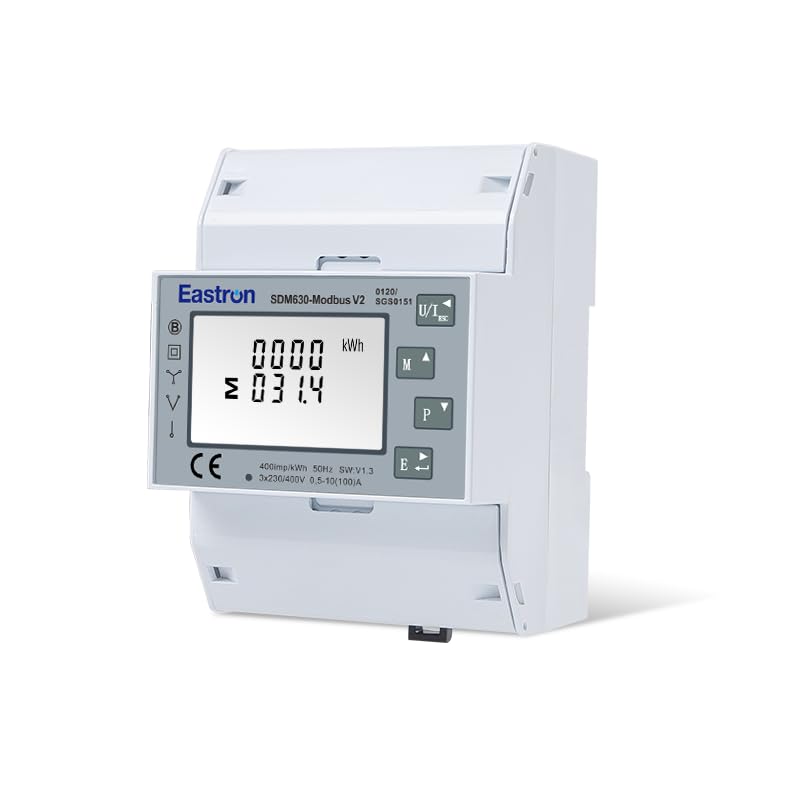
Figura 1: Davanti view of the Eastron SDM630 Modbus V2 energy meter, showing the LCD display, navigation buttons (M, P, E), and the 'COMMUNICATION SHIELD MUST BE FITTED' label above the terminals.
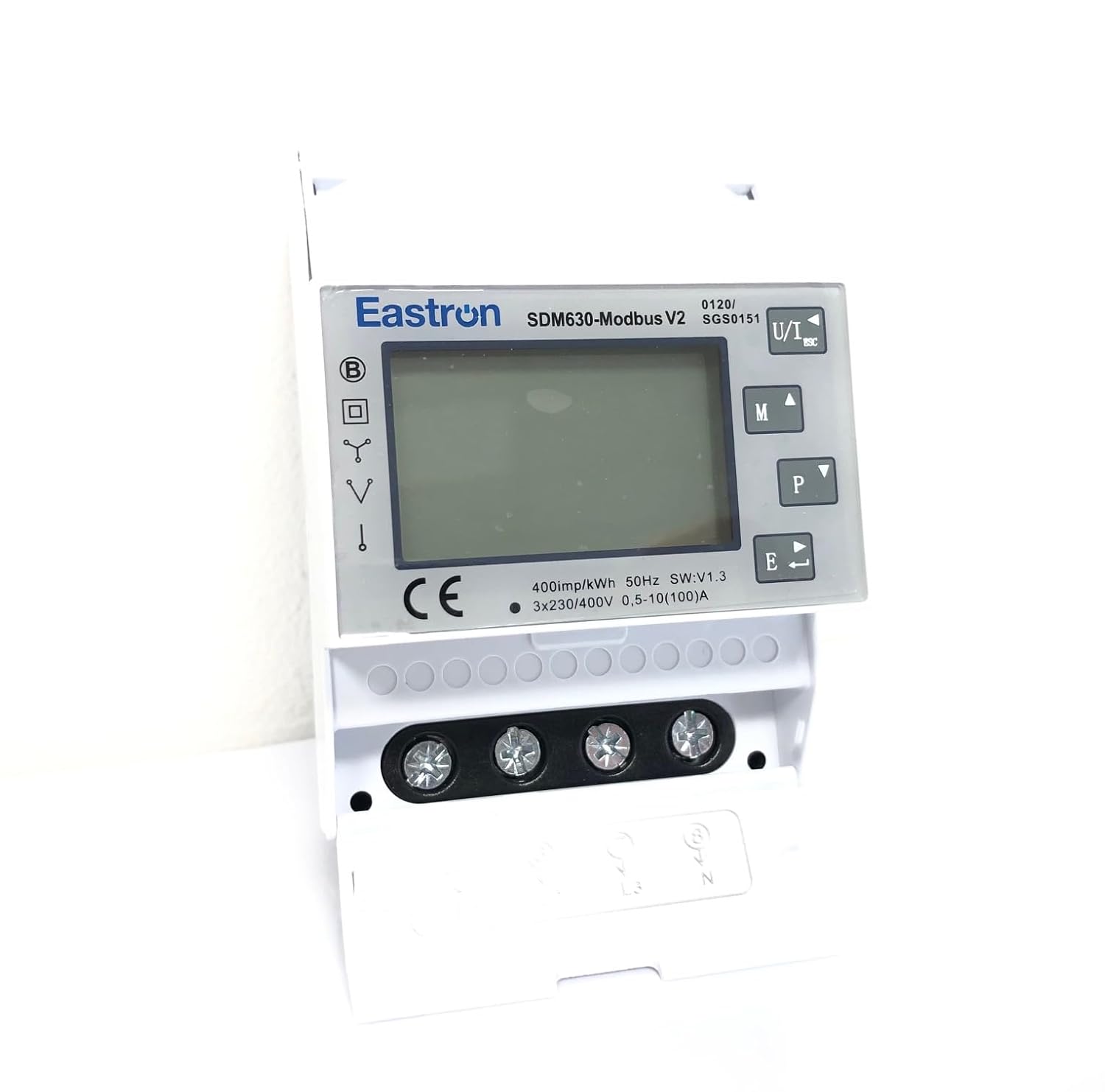
Figura 2: Davanti view of the meter with the terminal cover open, providing access to the main power and communication wiring terminals.

Figura 3: Superiore view of the meter, displaying the model name, voltage/current ratings, frequency, and various certifications including UKCA and CE marks.
4. Impostazione
4.1 Montaggio
The SDM630 Modbus V2 is designed for DIN rail mounting. Ensure the DIN rail is securely fastened within an appropriate enclosure. The meter occupies 4 DIN modules.
4.2 Cablaggio
The meter requires direct mains voltage inputs for operation. Connect the live in, live out, neutral in, and neutral out wires to the designated terminals. Refer to the wiring diagram provided on the meter's casing or in the full technical datasheet for correct phase and neutral connections for 1p2w, 3p3w, or 3p4w systems. Ensure all connections are tight and properly insulated.

Figura 4: Lato view of the meter, highlighting the Modbus communication ports (numbered 5, 6, 7, 8) and a 'QC PASS' sticker.
5. Istruzioni per l'uso
The SDM630 features an intuitive navigation menu accessible via the front panel buttons.
- Pulsante 'M': Typically used to enter the menu or cycle through main display screens.
- Pulsante 'P': Used to scroll through parameters within a menu or display screen.
- 'E' Button: Used to confirm selections or exit a menu.
Upon power-up, the meter will display default parameters such as total energy (kWh). Use the navigation buttons to view various electrical parameters including voltage, current, active power, reactive power, apparent power, power factor, and frequency for each phase and total.
6. Manutenzione
The Eastron SDM630 Modbus V2 is designed for minimal maintenance. Follow these guidelines to ensure optimal performance:
- Keep the meter clean and free from dust. Use a soft, dry cloth for cleaning. Do not use liquid cleaners.
- Controllare periodicamente i collegamenti elettrici per verificarne la tenuta e l'eventuale presenza di segni di usura o corrosione.
- Assicurarsi che l'ambiente operativo rimanga entro gli intervalli di temperatura e umidità specificati.
7. Risoluzione Dei Problemi
If you encounter issues with your SDM630 meter, consider the following common troubleshooting steps:
- Nessuna visualizzazione: Check the main power supply to the meter. Ensure all voltage inputs (Live In/Out, Neutral In/Out) are correctly connected and energized.
- Letture errate: Verify that the wiring connections match the system type (1p2w, 3p3w, or 3p4w) and that phase sequence is correct for three-phase systems. Ensure the meter's internal settings (if configurable) match the installation.
- Modbus Communication Failure: Check Modbus wiring (RS485 A/B lines), termination resistors, and ensure the Modbus address and baud rate settings on the meter match the master device.
- Il contatore non risponde: Try cycling the power to the meter. If the issue persists, contact technical support.
8. Specifiche
| Produttore | Estron |
| Modello | SDM630 Modbus V2 |
| Certificazione MID | EN50470-1 & EN50470-3 |
| Tipo di misurazione | Single-phase (1p2w), Three-phase (3p3w, 3p4w) |
| Voltage Ingresso | 230 V/400 V CA |
| Ingresso corrente | 100A (Direct Connection) |
| Montaggio | Guida DIN (4 moduli) |
| Alimentazione elettrica | Autoalimentato |
| Peso dell'articolo | 380 grammi |
| Batterie richieste | NO |
9. Garanzia e supporto
For warranty information and technical support, please refer to the documentation provided with your purchase or contact your supplier. Keep your purchase receipt as proof of purchase.