
Introduzione
The BolyGuard SG520-DB Trail Camera is a high-performance device designed for outdoor wildlife monitoring, property surveillance, and security applications. It captures high-resolution 4K videos and 37MP photos, featuring dual flash technology (Black IR & White LED) for clear color images both day and night. With a super-fast trigger speed of less than 0.7 seconds and IP67 waterproofing, this camera is built to perform reliably in various weather conditions and capture every important moment.
Cosa c'è nella scatola
Upon unboxing your BolyGuard SG520-DB Trail Camera, please ensure all the following items are present:
- 1 x BolyGuard SG520-DB Trail Camera
- 1 x Cinghia di montaggio
- 1 x Manuale utente
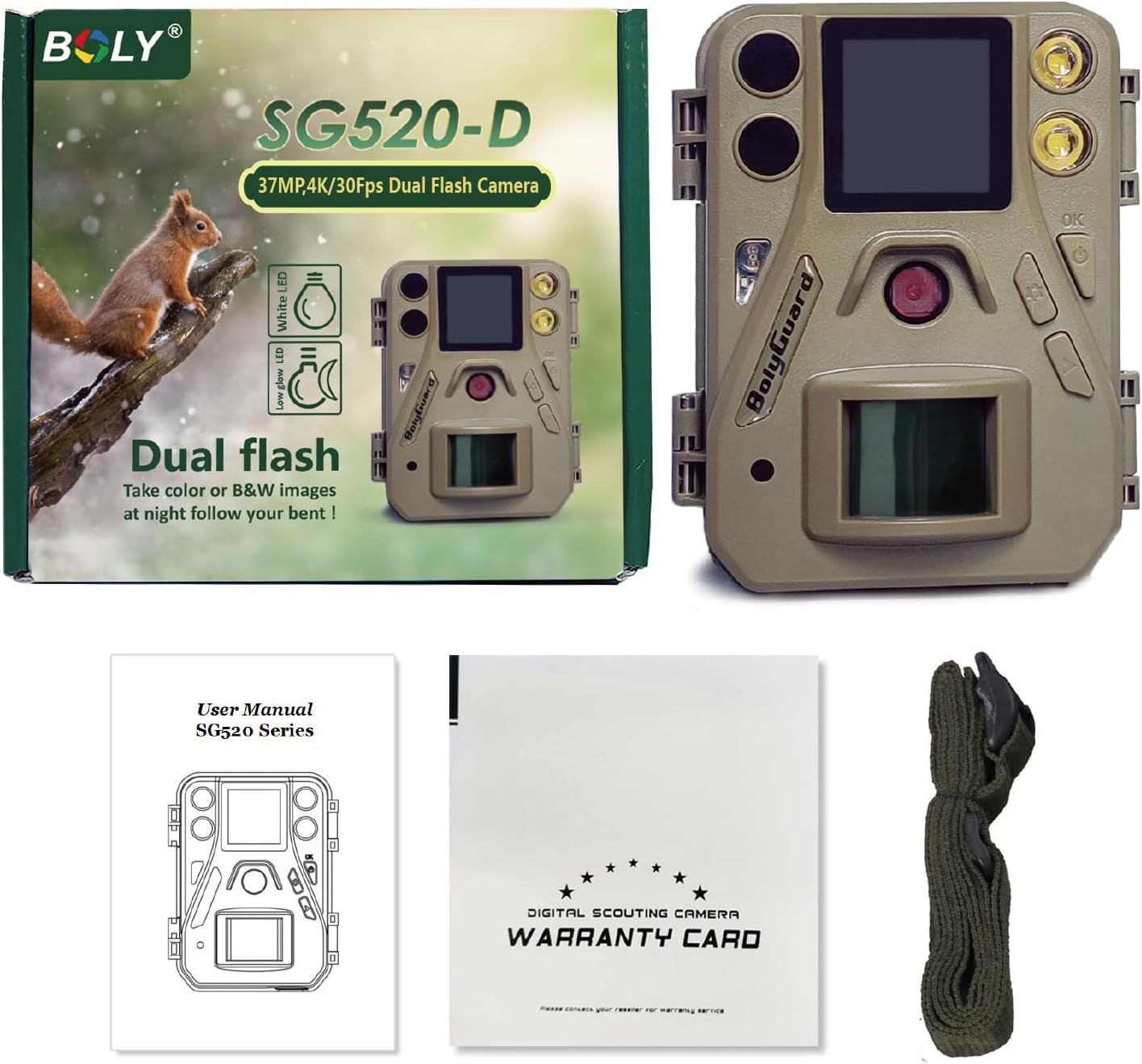
Image: Contents of the BolyGuard SG520-DB Trail Camera package.
Prodotto finitoview
Familiarize yourself with the key components of your SG520-DB Trail Camera:
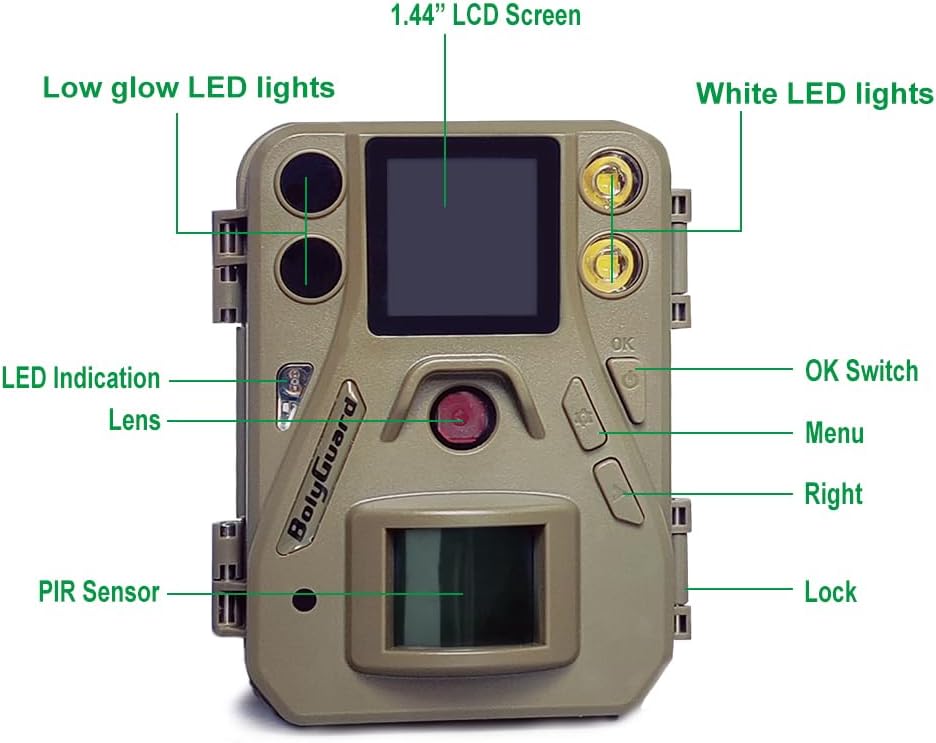
Image: Labeled diagram of the BolyGuard SG520-DB Trail Camera.
- Low Glow LED Lights: For discreet night vision.
- Schermo LCD da 1.44": Per la navigazione del menu e viewing.
- White LED Lights: Per la visione notturna a colori.
- Lente: Obiettivo della fotocamera principale.
- Sensore PIR: Sensore a infrarossi passivi per il rilevamento del movimento.
- OK Switch: Power on/confirm selections.
- Pulsante Menu: Enter/exit settings.
- Pulsante destro: Navigate options.
- Serratura: Protegge l'alloggiamento della telecamera.
- MICROFONO: Microfono per la registrazione audio.
Impostare
1. Installazione della batteria e della scheda SD
The camera operates on 4 AA batteries and supports an SD card up to 256GB. Ensure batteries are inserted with correct polarity and the SD card is properly seated before closing the camera housing.
Video: SG520-DB Unboxing & Setup Guide. This video demonstrates how to install batteries and the SD card, and navigate the basic settings of the camera.
2. Impostazioni di base
After installing batteries and the SD card, power on the camera using the OK button. Use the Menu and Right buttons to navigate through the settings. Key settings include:
- Lingua: Seleziona la lingua preferita.
- Modalità fotocamera: Scegli tra Foto, Video o Foto+Video.
- Dimensioni foto: Set the resolution for still images (e.g., 37MP).
- Dimensioni video: Set the resolution for videos (e.g., 4K).
- Foto a raffica: Configure the number of photos taken per trigger.
- Imposta l'orologio: Adjust the date and time for accurate timestamps sulle tue registrazioni.
Modalità operative
The SG520-DB Trail Camera offers versatile operating modes to suit different monitoring needs:
- Modalità foto: Cattura immagini fisse quando viene rilevato un movimento.
- Modalità video: Registra clip video quando viene rilevato un movimento.
- Modalità foto+video: Cattura un'immagine fissa seguita da un videoclip quando viene rilevato un movimento.
The camera features a fast trigger speed of less than 0.7 seconds, ensuring that movements are captured promptly. The trigger distance extends up to 30 meters (100 feet).
Qualità dell'immagine e del video
Experience superior clarity with the SG520-DB's advanced imaging capabilities:
- Alta risoluzione: Captures stunning 37MP photos and 4K videos at 30fps, encoded in H.265 format for efficient storage.
- Dual Flash Night Vision: Equipped with both White LED and 940nm no-glow IR LED lights. The White LED allows for color pictures and videos at night, while the IR LEDs provide discreet black and white night vision.

Image: Comparison of 37MP vs. 24MP image clarity.

Image: Demonstration of dual night vision modes (Black IR and White LED).
Video: Night footage from the SG520-DB, demonstrating color image selection in a garden setting.
Video: Night footage mostraasing the camera's color night vision capabilities.
Montaggio
The SG520-DB Trail Camera is designed for easy installation. Use the included mounting strap to secure the camera to a tree or post. Ensure the camera is positioned to capture the desired area without obstruction.

Image: BolyGuard SG520-DB Trail Camera mounted on a tree.
Specifiche
| Caratteristica | Specificazione |
|---|---|
| Numero di modello | Modello SG520-DB |
| Risoluzione fissa efficace | 37 MP |
| Risoluzione di acquisizione video | 4K |
| Frequenza dei fotogrammi | 30 fotogrammi al secondo |
| Codifica video | H.265 |
| Visione notturna | Dual Flash (Black IR & White LED) |
| Gamma di visione notturna | 90 piedi |
| Trigger Speed | < 0.7 secondi |
| Distanza di attivazione | Fino a 30 m (100 piedi) |
| Livello di resistenza all'acqua | IP67 impermeabile |
| Fonte di alimentazione | 4 AA Batteries or Solar Power Bank |
| Scheda SD supportata | Fino a 256 GB |
| Temperatura di esercizio | da -20℃ a +70℃ (da -4°F a 158°F) |
| Dimensioni del prodotto | 2 x 2 x 2 pollici |
| Peso dell'articolo | 1 libbra |
Manutenzione
To ensure the longevity and optimal performance of your BolyGuard SG520-DB Trail Camera, follow these maintenance guidelines:
- Pulizia: Regularly wipe the camera lens and PIR sensor with a soft, dry cloth to remove dirt, dust, or moisture. Avoid abrasive cleaners.
- Cura della batteria: Replace all batteries simultaneously with new, high-quality alkaline or rechargeable AA batteries. Remove batteries if the camera will not be used for an extended period to prevent leakage.
- Scheda SD: Format the SD card periodically using the camera's menu to ensure optimal performance and prevent data corruption. Use a reliable, high-speed SD card.
- Magazzinaggio: Quando non la si utilizza, conservare la fotocamera in un luogo fresco e asciutto, lontano dalla luce solare diretta e da temperature estreme.
Risoluzione dei problemi
Se riscontri problemi con la tua fotocamera, fai riferimento ai seguenti problemi comuni e alle relative soluzioni:
- La fotocamera non si accende: Controllare l'installazione delle batterie e assicurarsi che siano cariche. Verificare che l'interruttore di alimentazione sia in posizione ON.
- Nessuna immagine/video catturato: Ensure the SD card is inserted correctly and has sufficient free space. Check the camera mode settings (Photo, Video, Photo+Video). Verify the PIR sensor is not obstructed.
- Scarsa qualità dell'immagine/video: Pulisci l'obiettivo della fotocamera. Assicurati che la fotocamera sia montata saldamente per evitare movimenti. Controlla le impostazioni di risoluzione.
- Durata breve della batteria: Use high-quality batteries. Reduce the frequency of captures or video length in settings. Consider using an external solar power bank for extended use.
- Problemi di visione notturna: Ensure the night vision mode is enabled in settings. Check for obstructions in front of the IR/White LEDs.
Garanzia e supporto
The BolyGuard SG520-DB Trail Camera comes with a 2-Year Hassle-Free Guarantee, exceeding the standard 1-year market warranty. This includes 24/7 support and free replacements for eligible issues.
For further assistance, technical support, or warranty claims, please refer to the contact information provided in your warranty card or visit the official BolyGuard websito.
Additional Product Videos
Video: SG520 Product OverviewQuesto video fornisce una panoramica generaleview of the SG520-DB Trail Camera's features and design.
Video: 520 4K Series Day Footage. This video showcases the camera's performance during daylight hours.
Video: BolyGuard Trail Camera Footage. This video provides additional examples di footage catturato dalla fotocamera.