
FREEWOLF M96
FREEWOLF M96 Wireless Gaming Keyboard User Manual
Modello: M96
Introduzione
The FREEWOLF M96 Wireless Gaming Keyboard is designed for versatile use, offering both Bluetooth and 2.4G wireless connectivity. It features a mechanical feel, RGB LED backlighting, a digital display screen, and durable PBT keycaps. This manual provides detailed instructions to help you set up, operate, and maintain your keyboard for optimal performance.
Prodotto finitoview
The FREEWOLF M96 keyboard combines advanced features with a user-friendly design. Key components include:
- Doppia connettività: Supports Bluetooth (BT1, BT2) and 2.4G wireless modes for seamless switching between multiple devices.
- Schermo di visualizzazione digitale: Provides real-time information on battery capacity, connection mode, and charging status.
- Manopola di controllo multimediale: Allows for easy adjustment of volume and backlight settings.
- Tasti PBT: Durable, spherical keycaps designed for comfortable typing and longevity.
- Retroilluminazione LED RGB: Customizable lighting effects to enhance your gaming or typing experience.
- Batteria a lunga durata: Equipped with a 3000 mAh battery for extended use.
- Design ergonomico: Features adjustable feet for optimal typing comfort.

Immagine: Oltreview of the FREEWOLF M96 Wireless Keyboard, highlighting its 90% US layout, PBT keycaps, Bluetooth/2.4G connectivity, LED backlight, 3000 mAh battery, multimedia knob, LED screen, and compatibility with Win/Mac/Linux/iOS/Android systems.

Immagine: Primo piano view of the PBT color blocking keycaps, emphasizing their durability and longer lifespan.
Impostare
1. Ricarica della tastiera
Before first use, it is recommended to fully charge the keyboard. Connect the provided USB-C cable to the charging port on the keyboard and the other end to a USB power source (e.g., computer USB port, wall adapter).
- The digital display screen will indicate the charging status.
- Una carica completa richiede in genere diverse ore.

Immagine: Lato view of the keyboard illustrating the power switch, Type-C charging port, and the 2.4G/BT1/BT2 mode switch. The Type-C port is for charging only and cannot be used for wired connection.
2. Connessione tramite wireless 2.4G
- Locate the 2.4G wireless receiver (USB dongle), usually stored in a compartment on the keyboard's underside.
- Collega il ricevitore 2.4G a una porta USB disponibile sul tuo computer.
- Slide the mode switch on the keyboard to the "2.4G" position.
- The keyboard should automatically connect to your device. The display screen will show the 2.4G connection status.
3. Connessione tramite Bluetooth
The keyboard supports two Bluetooth channels (BT1 and BT2) for connecting to multiple devices.
- Slide the mode switch on the keyboard to either "BT1" or "BT2" position.
- Sul tuo dispositivo (computer, tablet, smartphone), attiva il Bluetooth e cerca nuovi dispositivi.
- Select "FREEWOLF M96" (or similar name) from the list of available devices.
- If prompted, enter the pairing code displayed on your device.
- Once connected, the digital display screen will show the active Bluetooth channel (BT1 or BT2).
To switch between connected Bluetooth devices, simply slide the mode switch to the desired BT1 or BT2 channel.
Video: Demonstrates the dual-mode connectivity of the FREEWOLF M96 Wireless Gaming Keyboard, showing how to switch between 2.4G wireless and Bluetooth connections (BT1, BT2) for seamless multi-device operation.
Istruzioni per l'uso
1. Schermo di visualizzazione digitale
The integrated electronic display provides essential information at a glance:
- Capacità della batteria: Mostra la percentuale attuale della batteriatage.
- Modalità di connessione: Indica se la tastiera è in modalità 2.4G, BT1 o BT2.
- Stato di carica: Displays an icon when the keyboard is charging.
- Indicatore di batteria scarica: Ti avvisa quando la batteria è scarica.

Immagine: dettagliata view of the digital display screen on the FREEWOLF M96 keyboard, showing indicators for power display, connection status (2.4G, BT1, BT2), charging, and low battery.
2. Manopola di controllo multimediale
The knob located on the top right of the keyboard offers dual functionality:
- Default Function (Volume Control):
- Ruotare in senso orario per aumentare il volume.
- Ruotare in senso antiorario per diminuire il volume.
- Premere la manopola per disattivare/riattivare l'audio.
- Controllo della retroilluminazione:
- Press and hold the knob for five seconds to switch to backlight control mode.
- In backlight control mode:
- Rotate clockwise to increase backlight brightness.
- Rotate counter-clockwise to decrease backlight brightness.
- Press the knob to switch between different backlight effects/modes.

Image: Illustration of the advanced dial control, detailing its default functions for volume (volume up, volume down, mute) and its backlight control functions (backlight brightness up, backlight brightness down, light effect switching) when pressed and held for 5 seconds.
3. Backlight Control (Function Keys)
In addition to the knob, you can control the backlight using function key combinations:
- FN+N: Cambia la modalità di retroilluminazione
- FN + Up Arrow / Down Arrow: Regola la luminosità della retroilluminazione
- FN + Left Arrow / Right Arrow: Regola la velocità della retroilluminazione
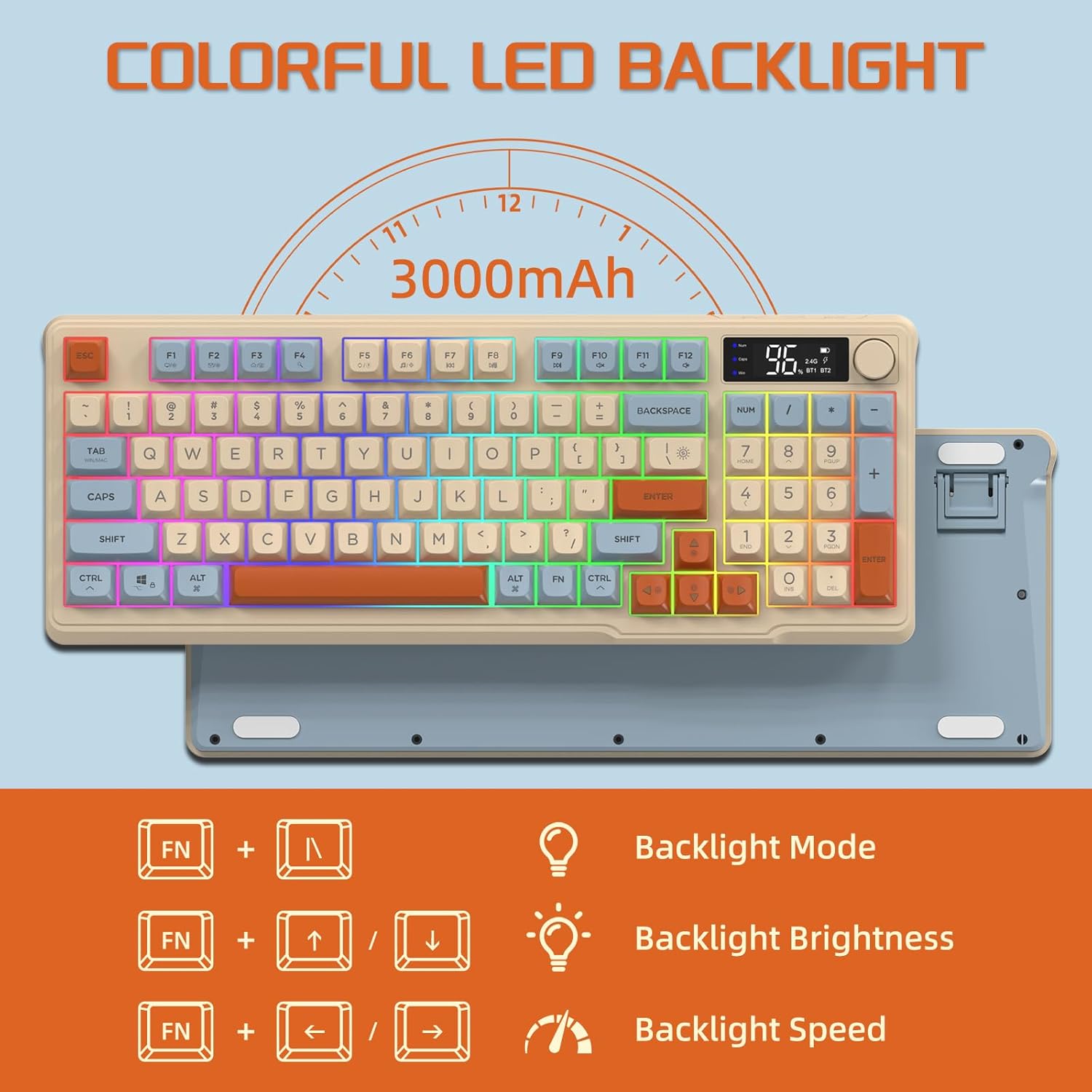
Image: The keyboard displaying the key combinations for controlling the colorful LED backlight, including changing backlight mode, brightness, and speed using the FN key with N, arrow keys.
4. Modalità di risparmio energetico
The keyboard is designed with power-saving features to extend battery life:
- Sleep Mode (3 minutes inactivity): After 3 minutes of inactivity, the keyboard enters sleep mode, and the backlight turns off.
- Deep Sleep Mode (10 minutes inactivity): After 10 minutes in sleep mode, the keyboard enters deep sleep. The first key press will be ignored to wake the keyboard, and the second key press will activate it.
5. Compatibilità
The FREEWOLF M96 keyboard is compatible with a wide range of operating systems, including Windows, Mac, and Linux, ensuring broad usability.
Manutenzione
1. Pulizia
- Spegnere la tastiera prima di pulirla.
- Utilizzare un panno morbido e privo di lanugine leggermente dampcon acqua o una soluzione detergente delicata per pulire la superficie.
- Per pulire tra i tasti, utilizzare aria compressa o una piccola spazzola.
- Evitare l'uso di prodotti chimici aggressivi o materiali abrasivi.
2. Cura della batteria
- Evitare di scaricare completamente la batteria frequentemente.
- Quando non si utilizza la tastiera per lunghi periodi, conservarla in un luogo fresco e asciutto.
- Utilizzare solo il cavo di ricarica fornito o un cavo USB-C compatibile.
Risoluzione dei problemi
| Problema | Possibile causa | Soluzione |
|---|---|---|
| La tastiera non risponde. | Low battery; incorrect connection mode; receiver not plugged in (2.4G); Bluetooth not paired. | Charge the keyboard; switch to correct mode (2.4G/BT1/BT2); ensure 2.4G receiver is connected; re-pair Bluetooth. |
| La retroilluminazione non funziona. | Backlight turned off; low battery; brightness set to minimum. | Check backlight settings using the knob or FN key combinations; charge the keyboard. |
| I tasti non vengono registrati o risultano fantasma. | Software conflict; low battery; interference. | Restart your device; charge the keyboard; move closer to the receiver/device; check for driver updates. |
| Connessione Bluetooth instabile. | Interferenza; distanza dal dispositivo; batteria scarica. | Reduce interference (other wireless devices); move keyboard closer to device; charge keyboard. |
Specifiche
| Caratteristica | Dettaglio |
|---|---|
| Marca | FREEWOLF |
| Numero di modello | Numero di modello: M96 |
| Tecnologia di connettività | Bluetooth, wireless 2.4G |
| Descrizione della tastiera | Mechanical feel with PBT keycaps |
| Numero di chiavi | 94 keys (US Layout) |
| Retroilluminazione | Retroilluminazione a LED RGB |
| Capacità della batteria | 3000 mAh |
| Caratteristiche speciali | Electronic display, multimedia control knob, power saving modes |
| Dispositivi compatibili | PC (Windows, Mac, Linux), iOS, Android |
| Colore | Blueberry (Myrtille) |
| Dimensioni del prodotto | 385 mm (15.16 pollici) x 145 mm (5.71 pollici) x 40 mm (1.57 pollici) |

Image: Diagram illustrating the product dimensions of the FREEWOLF M96 keyboard: 385mm (15.16 inches) length, 145mm (5.71 inches) width, and 40mm (1.57 inches) height.
Garanzia e supporto
This FREEWOLF M96 Wireless Gaming Keyboard comes with a standard manufacturer's warranty. Please refer to the product packaging or the seller's information for specific warranty terms and conditions. For technical support or further assistance, please contact the retailer or manufacturer directly.
For the latest information and support, visit the official FREEWOLF websito o contattare il loro servizio clienti.
Documenti correlati - Numero di modello: M96
 |
FREEWOLF M96 Dual Mode Keyboard User Manual User manual and quick start guide for the FREEWOLF M96 dual-mode keyboard, featuring Bluetooth and 2.4G wireless connectivity instructions, function key mapping, and charging details. |
 |
FREEWOLF M96 Dual Mode Keyboard User Manual Comprehensive user manual for the FREEWOLF M96 Dual Mode Keyboard, covering setup, connection modes (2.4G/Bluetooth), function keys, and troubleshooting. |
 |
Freewolf M96 Dual Mode Keyboard User Manual User manual and operating instructions for the Freewolf M96 dual-mode wireless keyboard, covering connection methods, charging, function keys, and troubleshooting. |
 |
FREEWOLF M96 Wireless Keyboard User Manual Comprehensive user manual for the FREEWOLF M96 wireless keyboard, covering setup, Bluetooth and 2.4G connection, function key shortcuts, and troubleshooting. |
 |
FREEWOLF M96 Dual Mode Keyboard User Manual User manual for the FREEWOLF M96 dual-mode keyboard, featuring instructions for Bluetooth and 2.4G wireless connection, function key shortcuts, charging, and system compatibility. |
 |
FREEWOLF M104 Tri-Mode Keyboard User Manual Comprehensive user manual for the FREEWOLF M104 Tri-Mode Keyboard, covering 2.4G, Bluetooth, and wired connectivity, function key operations, backlight settings, and troubleshooting. |
Ask a question about this manual
Ask about setup, troubleshooting, compatibility, parts, safety, or missing instructions. Manuals+ will review the question and use this page’s manual context to help answer it.