
1. Introduzione
The Fuers WLAN Water Leak Detector (Model WFSJ01) is designed to provide real-time monitoring for water leaks and drips in your home or office. This device connects to your 2.4 GHz Wi-Fi network and sends instant notifications to your smartphone via the Tuya app, allowing for prompt action to prevent potential water damage. Its robust design and dual detection capabilities make it an essential tool for safeguarding your property.
2. Informazioni sulla sicurezza
- Non esporre il dispositivo a temperature estreme o alla luce solare diretta.
- Tenere il dispositivo lontano dalla portata dei bambini e degli animali domestici.
- Use only the specified battery type (2 x AAA batteries).
- Assicurarsi della corretta polarità della batteria durante l'installazione.
- Smaltire le batterie usate secondo le normative locali.
- Non tentare di smontare o riparare il dispositivo da soli. Contattare l'assistenza se necessario.
3. Contenuto della confezione
- 1 x Fuers WLAN Water Leak Detector (Model WFSJ01)
- 2 batterie AAA
- 1 x Manuale utente
4. Prodotto finitoview
The Fuers WLAN Water Leak Detector features a compact design with advanced sensors for reliable water detection. It operates wirelessly and integrates with the Tuya Smart Life app for remote monitoring and alerts.
Caratteristiche principali:
- Smart Monitoring & Remote Notifications: Connects via 2.4 GHz Wi-Fi to send real-time alerts to your smartphone.
- Dual Detection Modes: Equipped with rear sensors for leak detection and a front probe for small drip detection.
- 100dB Local Alarm: Emits a loud audible alarm upon water detection.
- Grado di impermeabilità IP67: Designed for long-term use in humid environments.
- Materiale ABS durevole: High-quality construction ensures longevity and resistance to breakage.
- Alimentato a batteria: Operates on 2 AAA batteries (included) for flexible placement and continuous protection during power outages.
- Avviso di batteria scarica: Sends app notifications when batteries need replacement.
Componenti:
The device consists of a main body housing the electronics, battery compartment, and an audible alarm. It features two types of sensitive probes:
- Sensori posteriori: For detecting widespread water leaks.
- Front Probe: Specifically designed for detecting small drips.

Image: The Fuers Water Leak Detector with its battery compartment open, revealing two AAA batteries and illustrating the front and rear sensitive probes.
5. Impostazione
5.1 Installazione della batteria
- Gently twist the cover of the device counter-clockwise to open it.
- Confirm the positive (+) and negative (-) poles inside the battery compartment.
- Inserire le due batterie AAA, assicurandosi della corretta polarità.
- Align the cover and twist clockwise to tighten and secure it.

Image: A four-step visual guide demonstrating how to open the device cover, confirm battery polarity, insert AAA batteries, and securely close the cover.
5.2 Associazione app (Tuya Smart Life)
- Scarica l'app "Tuya Smart" o "Smart Life" dall'app store del tuo smartphone (iOS o Android).
- Registrati o accedi al tuo account.
- Assicurati che lo smartphone sia connesso a una rete Wi-Fi a 2.4 GHz. Il dispositivo non supporta la rete Wi-Fi a 5 GHz.
- Apri l'app e tocca l'icona "+" per aggiungere un nuovo dispositivo.
- Select "Security & Video Surveillance" > "Water Leak Sensor (Wi-Fi)" or search for "Water Leak Sensor".
- Follow the on-screen instructions to put the device into pairing mode (usually involves pressing and holding a button on the device until an indicator light flashes).
- Inserisci la password della tua rete Wi-Fi nell'app.
- Wait for the device to connect. Once connected, you can rename the device and assign it to a specific room.
6. Istruzioni per l'uso
Once set up, the Fuers WLAN Water Leak Detector continuously monitors for water presence. It features two primary detection methods:
- Rilevamento perdite: The rear sensors detect larger water leaks, triggering a 100dB alarm and sending an immediate app notification.
- Drip Detection: The front probe is designed to detect small drips, ideal for placement under faucets or pipes. This also triggers the alarm and app notification.
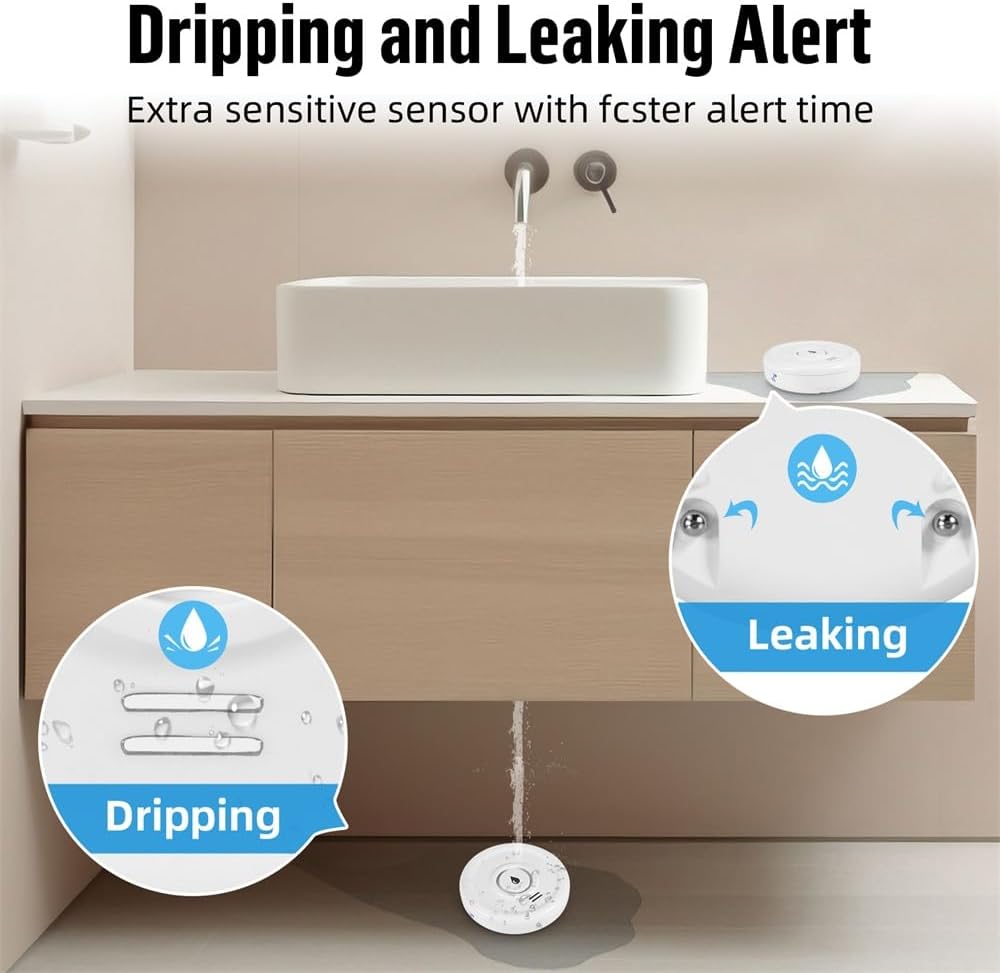
Image: A visual representation of the device's ability to detect both small drips and larger leaks, highlighting its versatile sensing capabilities.
Receiving Alerts:
When water is detected, the device will:
- Emit a loud 100dB audible alarm.
- Send a real-time push notification to your smartphone via the Tuya Smart Life app.

Image: The water leak detector placed on a wet surface, indicating a leak, while a smartphone displays a 'Water Leakage Alarm' notification from the app.
You can customize notification settings within the Tuya Smart Life app. The app also allows you to view the device's status and battery level.
7. Manutenzione
7.1 Sostituzione della batteria
The device operates on 2 AAA batteries with a standby time of up to two years. The app will send a low battery warning notification to your smartphone when the batteries need replacement. To replace batteries, follow the steps in Section 5.1.

Image: The Fuers Water Leak Detector with its battery compartment open, showing two AAA batteries and a graphical representation of battery life, indicating up to 2 years of standby time.
7.2 Pulizia
Wipe the device with a soft, dry cloth. Do not use abrasive cleaners or immerse the device in water (beyond its intended IP67 rating for detection) as this may damage internal components.
8. Risoluzione Dei Problemi
| Problema | Possibile causa | Soluzione |
|---|---|---|
| Dispositivo non connesso al Wi-Fi | Incorrect Wi-Fi password; Not a 2.4 GHz network; Device too far from router; Pairing mode not activated. | Verify Wi-Fi password. Ensure router is 2.4 GHz. Move device closer to router. Re-enter pairing mode as per app instructions. |
| Nessuna notifica dell'app | App notifications disabled; Device offline; Low battery. | Check app notification settings. Verify device is online in the app. Replace batteries if low battery warning is present. |
| L'allarme non suona | Batteria scarica; malfunzionamento del dispositivo. | Sostituisci le batterie. Se il problema persiste, contatta l'assistenza clienti. |
| Falsi allarmi | Condensation or high humidity; Device placed on a damp superficie. | Ensure placement is on a dry surface. Avoid areas with excessive condensation. |
9. Specifiche
- Numero modello: WFSJ01
- Dimensioni: 20 mm (Lunghezza) x 50 mm (Larghezza) x 65 mm (Altezza)
- Fonte di energia: 2 batterie AAA (incluse)
- Connettività wireless: Wi-Fi 2.4 GHz (IEEE 802.11b/g/n)
- Applicazione compatibile: Tuya Smart / Vita intelligente
- Volume allarme: 100 dB
- Grado di impermeabilità: Grado di protezione IP67
- Materiale: Plastica ABS di alta qualità
- Max Range (Wireless): 20 metri (senza ostacoli)
- Tecnologia dei sensori: Sensore di contatto
- Tipo di installazione: Floor/Surface Mount

Image: The Fuers Water Leak Detector partially submerged in water, demonstrating its IP67 waterproof and durable construction.
10. Garanzia e supporto
This product comes with a standard manufacturer's warranty. For detailed warranty information, please refer to the documentation included with your purchase or contact the retailer. For technical support, troubleshooting assistance, or any inquiries regarding your Fuers WLAN Water Leak Detector, please visit the official Fuers websito o contattare il loro servizio clienti.
Risorse online:
- App Tuya Smart: www.tuya.com/app
- Applicazione Vita intelligente: www.smartlife.com/app