
Introduzione
This manual provides instructions for the setup, operation, and maintenance of your Lepro B1 AI Smart Light Bulbs. These bulbs offer RGBWW color changing capabilities, Wi-Fi and Bluetooth connectivity, and integration with smart home assistants like Alexa and Google Assistant.

Image: Lepro B1 AI Smart Light Bulbs. These bulbs feature AI-powered lighting design and smart home integration.
Istruzioni di installazione
- Installare le lampadine: Screw the Lepro B1 smart light bulbs into standard E26 light sockets. Ensure the power is off before installation.
- Download the Lepro App: Cercare "Lepro" in your device's app store (App Store for iOS or Google Play for Android) and download the official Lepro app. Nota: Do not use "Lepro LampUX" or "Smart Life" apps for these bulbs.
- Registrati/Accedi: Open the Lepro app and follow the on-screen instructions to create an account or log in if you already have one.
- Connessione Wi-Fi a 2.4 GHz:
- The Lepro B1 bulbs require a 2.4GHz Wi-Fi network for initial setup and full functionality.
- If your router supports both 2.4GHz and 5GHz, ensure your phone is connected to the 2.4GHz network during the setup process. You may need to access your router's settings to separate or identify the 2.4GHz SSID.
- Aggiungi dispositivo:
- In the Lepro app, tap the "+" icon or "Add Device" to begin pairing.
- Follow the in-app instructions to put the bulb into pairing mode (usually by cycling the power switch ON/OFF several times until the bulb flashes).
- Confirm your 2.4GHz Wi-Fi network and enter the password when prompted.
- Connessione Bluetooth (opzionale): The bulbs can also be controlled via Bluetooth if a Wi-Fi connection is not available or preferred for local control. After initial pairing, you can skip Wi-Fi connection steps in the app if you only intend to use Bluetooth. Note that some AI functions may require an internet connection.
- Integrazione con gli assistenti vocali:
- To use with Amazon Alexa or Google Assistant, enable the "Lepro" skill/service in your Alexa or Google Home app.
- Link your Lepro account when prompted.
- Scopri i dispositivi nell'app Alexa/Google Home.
Image: The official Lepro App interface, essential for setting up and controlling your smart bulbs.
Istruzioni per l'uso
AI Lighting Designer (LightGPM 4)
The Lepro B1 bulbs feature LightGPM 4, an AI-powered lighting designer. This system learns your preferences over time to create personalized lighting effects.
- Istruzioni vocali: Use the Lepro app's voice control feature to describe desired moods, emotions, or commands (e.g., "ignite holiday vibes," "set a party scene"). The AI will generate appropriate lighting.
- Photo-to-Vibe: Upload a photo (e.g., of your room, a movie poster, or a game character) to the app. LightGPM will analyze the image and create a lighting design that matches its aesthetic.
- Personalizzazione: Adjust the brightness, speed, and color of AI-generated lighting effects within the app to fine-tune them to your liking.
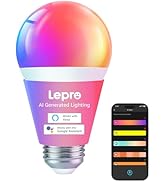
Image: The LightGPM 4 interface, demonstrating AI-generated lighting designs based on user input.
Controllo vocale
Control your bulbs using voice commands through the Lepro app, Amazon Alexa, or Google Assistant.
- Lepro App Voice Control: Speak commands directly into the Lepro app for instant lighting changes.
- Alexa/Assistente Google: Once integrated, use commands like "Alexa, set the light to 50% brightness" or "Hey Google, turn on the living room lights."
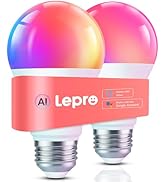
Image: A user interacting with a smart light bulb via voice command, demonstrating hands-free control.
Regolazione del colore e della luminosità
- 16 milioni di colori: Select from a wide spectrum of colors to create various ambiances for different occasions.
- Bianco regolabile: Adjust white light temperature from 2700K (warm white) to 6500K (cool white).
- Dimmerabile: Adjust brightness from 1% to 100% via the app or voice commands.
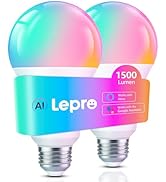
Image: Visual representation of the 16 million vivid colors available for selection.
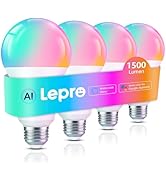
Image: A slider illustrating the tunable white light range from warm (2700K) to cool (6500K).
Image: A slider demonstrating the dimmable brightness range from 1% to 100%.
Music Sync (LightBeats)
The LightBeats feature synchronizes your bulb's lighting effects with music rhythms, creating a dynamic audio-visual experience.
Image: A person enjoying music with smart lights dynamically changing colors in sync with the audio.
Pianificazione e automazione
Set timers and routines to automate your lighting, including wake-up and sleep modes.
- Timer: Schedule specific ON/OFF times for your bulbs.
- Modalità di riattivazione: Simulate sunrise by gradually brightening the lights over a set period.
- Modalità risparmio: Simulate sunset by gradually dimming the lights over a set period.
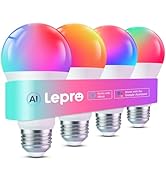
Image: The Lepro app displaying scheduling features for automated light control.
Group Control and Remote Access
- Controllo di gruppo: Manage multiple bulbs simultaneously by grouping them in the Lepro app.
- Telecomando: Control your lights from anywhere as long as your bulbs are connected to Wi-Fi and your phone has internet access.
- Controllo delle azioni: Share device control permissions with other family members through the "Me" page in the Lepro app under the "Share" option.
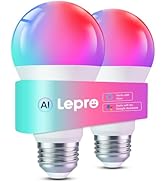
Image: An illustration of group control, where multiple smart bulbs are managed together from a single interface.
Image: Remote control functionality, showing a user managing lights from a distance.
Manutenzione
- Pulizia: Ensure the bulb is cool and power is off before cleaning. Wipe with a soft, dry cloth. Do not use liquid or abrasive cleaners.
- Aggiornamenti software: Regularly check the Lepro app for firmware updates to ensure optimal performance and access to new features.
- Condizioni ambientali: Use the bulbs in dry, indoor environments within their specified operating temperature range.
Risoluzione dei problemi
Arresti dell'app
If the Lepro app crashes:
- Check for the latest version of the Lepro app in your device's app store. Updates often resolve compatibility issues.
- Restart your phone/tablet and your Wi-Fi router to improve connectivity.
Bulb Not Found on App
If the device cannot be found during connection:
- Try resetting the bulb by switching it ON/OFF 4 times.
- Delete and re-add the bulb through the "Add Device" option in the app.
- Durante il processo di associazione, assicurati che il telefono sia connesso a una rete Wi-Fi da 2.4 GHz.
Compatibility with Dimmer Switches
Lepro AI smart bulbs are not designed to work with traditional dimmer switches and may flicker or malfunction if used with them. Control dimming exclusively through the Lepro app or voice assistants.
App Permissions (Camera, Microphone, GPS)
The Lepro app may request permissions for camera, microphone, and GPS. These permissions are only used for specific functions:
- Telecamera: For features like "Take a Photo, Get the Vibe" to analyze images for lighting effects.
- Microfono: For AI voice input and expression recognition, such as when using voice commands for lighting.
- Posizione GPS: For location-based automations or to help identify local Wi-Fi networks during setup.
Any information collected is used solely to generate matching lighting effects and is not stored or used for other purposes.
Specifiche
| Caratteristica | Dettaglio |
|---|---|
| Marca | Lebbroso |
| Nome del modello | B1 |
| Tipo di luce | GUIDATO |
| Caratteristiche speciali | Color Changing, Dimmable, Energy Efficient, Timer, Tunable |
| Cosatage | 8.5 watt |
| Forma della lampadina Dimensioni | A19 |
| Base della lampadina | E26 |
| Incandescente Equivalente Wattage | 60 Watt |
| Usi specifici | Appliance, Bedroom, Decoration, Gaming, Party |
| Colore chiaro | Multicolore (RGBWW) |
| Voltage | 120 Volt (CA) |
| Conteggio unità | 2.0 Count (as per product variant) |
| Temperatura del colore | 2700K-6500K |
| Luminosità | 800 lumen |
| Forma | Arbitrario (A) |
| Materiale | Plastica |
| Uso interno/esterno | Al chiuso |
| Fonte di alimentazione | Elettrico con cavo |
| Indice di resa cromatica (CRI) | 90 |
| Vol. Accettatotage Frequenza | Da 100 a 120 Volt e 60 Hertz |
| Metodo di controllo | App, telecomando, voce |
| Vita media | 15000 ore |
| Peso dell'articolo | 3.17 once (0.09 chilogrammi) |
| Certificazioni | ETL, FCC |
Informazioni sulla garanzia
For detailed warranty information regarding your Lepro B1 AI Smart Light Bulbs, please refer to the warranty card included in your product packaging or visit the official Lepro website. Typically, Lepro products come with a limited warranty covering manufacturing defects from the date of purchase.
Assistenza clienti
If you encounter any issues or have questions not covered in this manual, please contact Lepro customer support:
- Supporto online: Visit the official Lepro websito per FAQ, articoli di supporto e moduli di contatto.
- Supporto in-app: The Lepro app may offer a support section or direct contact options.
- Fornire informazioni: When contacting support, be prepared to provide your device ID, operating system version, and any error messages or screenshots.