
1. Introduzione
Thank you for choosing the FLYBIRD 4D Vibration Plate. This manual provides essential information for the safe and effective operation, maintenance, and troubleshooting of your new fitness equipment. Please read this manual thoroughly before initial use and retain it for future reference.
2. Istruzioni di sicurezza
Per garantire un funzionamento sicuro ed evitare lesioni, attenersi alle seguenti linee guida di sicurezza:
- Consultare un medico prima di iniziare un nuovo programma di esercizi, soprattutto se si hanno patologie preesistenti.
- Do not use the device if you are pregnant, have a pacemaker, or suffer from acute thrombosis, severe diabetes, epilepsy, or recent surgery.
- Assicurarsi che la piastra vibrante sia posizionata su una superficie stabile e piana.
- Maintain a clear area around the device during operation.
- The maximum user weight capacity for this device is 500 pounds (226 kg). Do not exceed this limit.
- Tenere bambini e animali domestici lontani dal dispositivo durante il funzionamento.
- Se durante l'uso ci si sente instabili, tenersi sempre a un supporto stabile.
- Stop using the device immediately if you experience pain, dizziness, or discomfort.
- Scollegare il dispositivo dalla presa di corrente quando non è in uso o prima di pulirlo.
3. Contenuto della confezione
Verificare che tutti i componenti siano presenti nella confezione:
- Pedana vibrante FLYBIRD 4D
- Telecomando (richiede 1 batteria al litio metallico, inclusa)
- 4 bande di resistenza
- 2 Loop Bands
- Tappetino per esercizi
- Manuale d'uso

Figura 3.1: The FLYBIRD 4D Vibration Plate shown with its complete set of accessories, including resistance bands, loop bands, an exercise mat, and the remote control.
4. Impostazione
Seguire questi passaggi per la configurazione iniziale:
- Disimballare: Rimuovere con attenzione tutti i componenti dalla confezione.
- Posizionamento: Place the vibration plate on a firm, level, and non-slip surface. Ensure there is adequate space around the device for safe movement.
- Collegamento elettrico: Connect the power cord to the vibration plate and then to a grounded electrical outlet.
- Telecomando: Insert the included Lithium Metal battery into the remote control.
- Exercise Mat: Place the exercise mat under the vibration plate for added stability and floor protection.
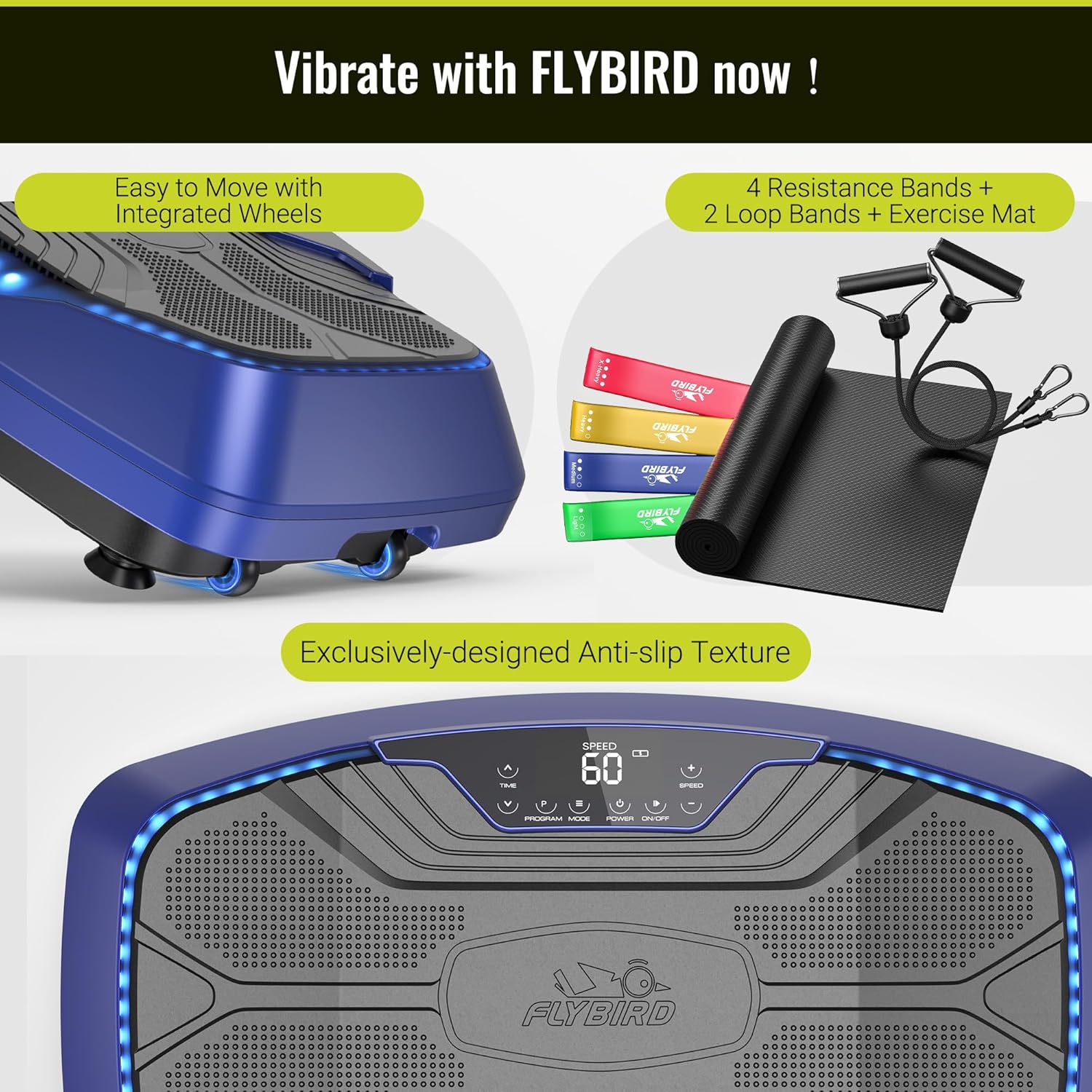
Figura 4.1: The vibration plate features integrated wheels for easy relocation and an exclusively designed anti-slip texture on the platform for user safety during exercise.
5. Istruzioni per l'uso
The FLYBIRD 4D Vibration Plate offers multiple modes and settings for a versatile workout experience.
5.1 Accensione/spegnimento
- Premere il tasto ENERGIA button on the LED touch screen or the remote control to turn the device on or off.
5.2 4D Vibration Modes
The device features triple high-performance motors, providing 7-in-1 4D vibration modes. These modes can be operated individually or in combination:
- Oscillazione: Up-down motion.
- Lineare: Movimento laterale.
- Pulsazione: Wave-like motion.
- Combinations of Oscillation + Linear, Oscillation + Pulsation, Linear + Pulsation, and Oscillation + Linear + Pulsation.
Utilizzare il MODALITÀ button on the control panel or remote to cycle through the available vibration modes.
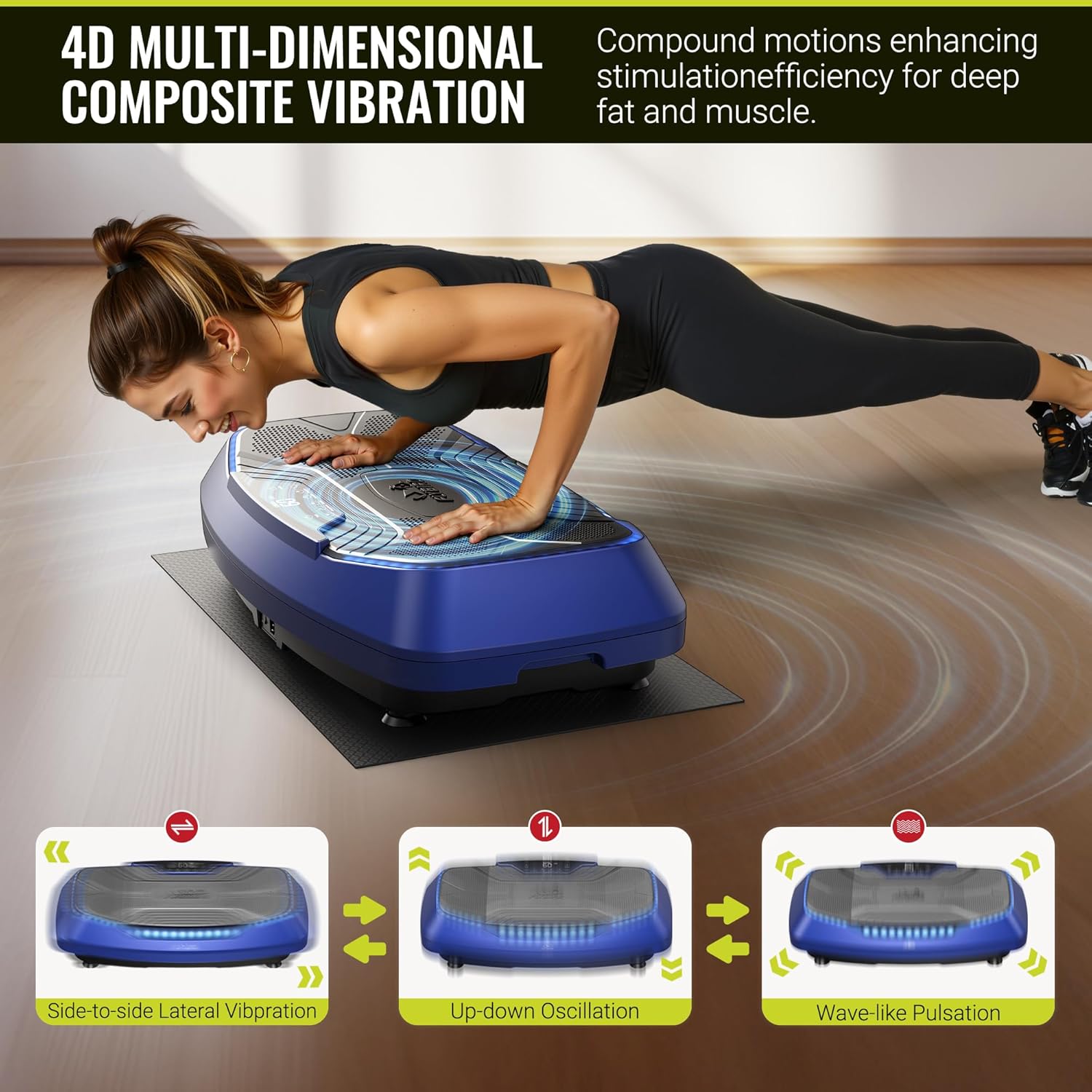
Figura 5.1: Visual representation of the three primary vibration types: side-to-side lateral vibration, up-down oscillation, and wave-like pulsation, which can be combined for 4D effects.
5.3 Speed Levels and Preset Programs
The vibration plate offers 99 speed levels and 9 preset programs for diverse training:
- Regolazione della velocità: Utilizzare il VELOCITÀ +/- buttons on the control panel or remote to increase or decrease the vibration intensity.
- Programmi preimpostati: Premere il tasto PROGRAMMA button to select from the 9 pre-programmed workout routines.
- Indicatori LED: Three LED light colors indicate the current speed level:
- Green: Speed 1-30
- Blue: Speed 31-60
- Red: Speed 61-99
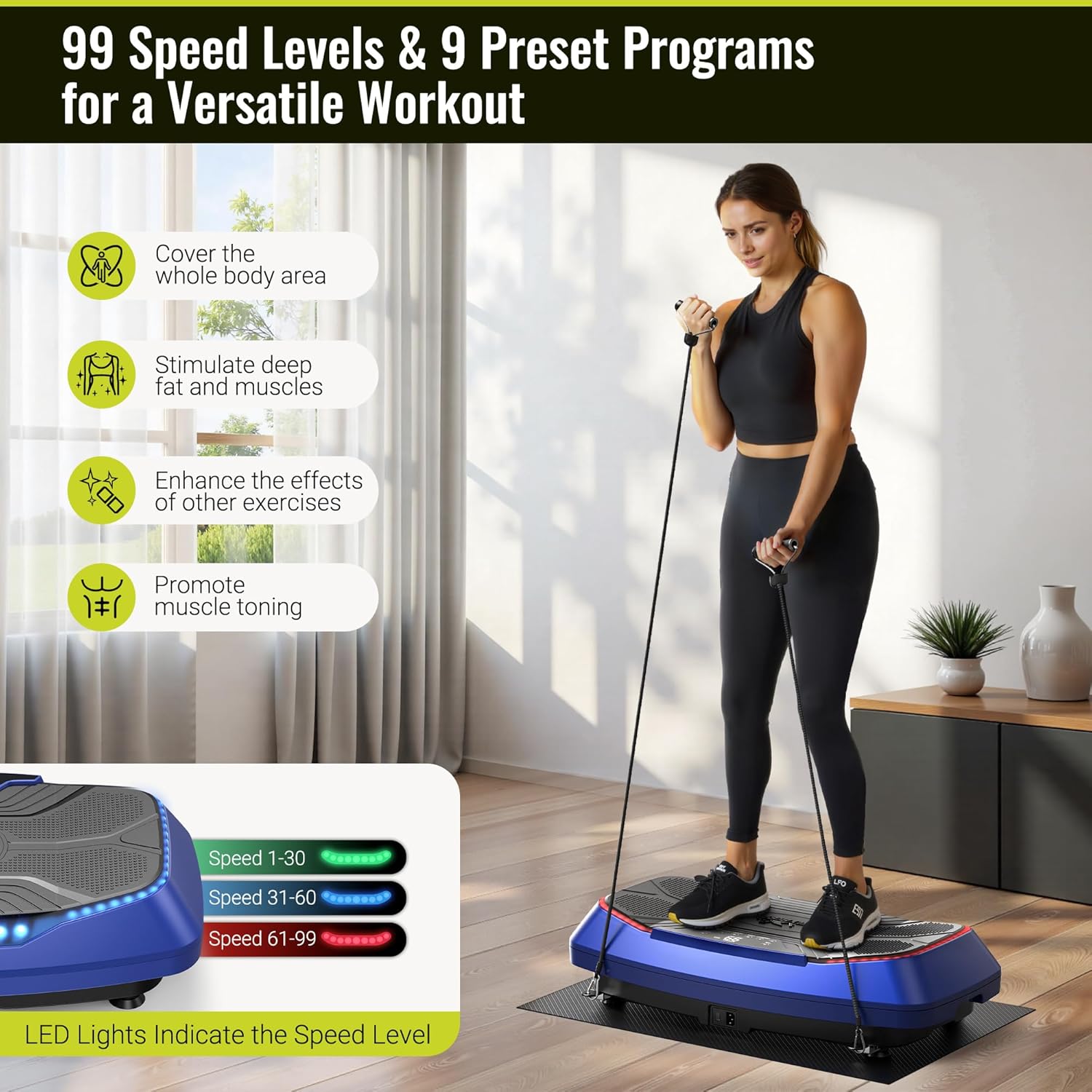
Figura 5.2: A user demonstrates an exercise on the vibration plate, highlighting the LED lights that change color to indicate the current speed level, ranging from 1 to 99.
5.4 Remote Control and Bluetooth Speaker
- Telecomando: The included remote allows for convenient adjustment of power, mode, speed, and program settings without interrupting your workout.
- Altoparlante Bluetooth: The built-in Bluetooth speaker allows you to connect your smartphone or other Bluetooth-enabled devices to play music during your exercise session. Refer to your device's Bluetooth pairing instructions to connect.

Figura 5.3: A user operates the vibration plate via the intuitive LED touch screen and remote control. The image also illustrates the built-in Bluetooth speaker functionality, allowing for music playback from a connected smartphone.
6. Guida agli esercizi
The FLYBIRD 4D Vibration Plate can be used for various exercises to stimulate muscles and improve circulation. The large pedal area (31.5" x 17.7") accommodates different stances and movements.
6.1 Basic Stances
- In piedi: Stand with feet shoulder-width apart, knees slightly bent. Adjust foot placement to vary intensity. Wider stance increases vibration intensity.
- Squat: Perform squats on the plate to engage leg and glute muscles.
- Sollevamento polpacci: Stand on your toes to target calf muscles.

Figura 6.1: A man demonstrates a squat exercise on the vibration plate, highlighting the spacious 31.5" x 17.7" pedal area that allows for flexible foot positioning and various movements.
6.2 Utilizzo delle fasce di resistenza
Attach the included resistance bands to the designated anchor points on the plate for upper body and full-body exercises. The loop bands can be used for lower body resistance.
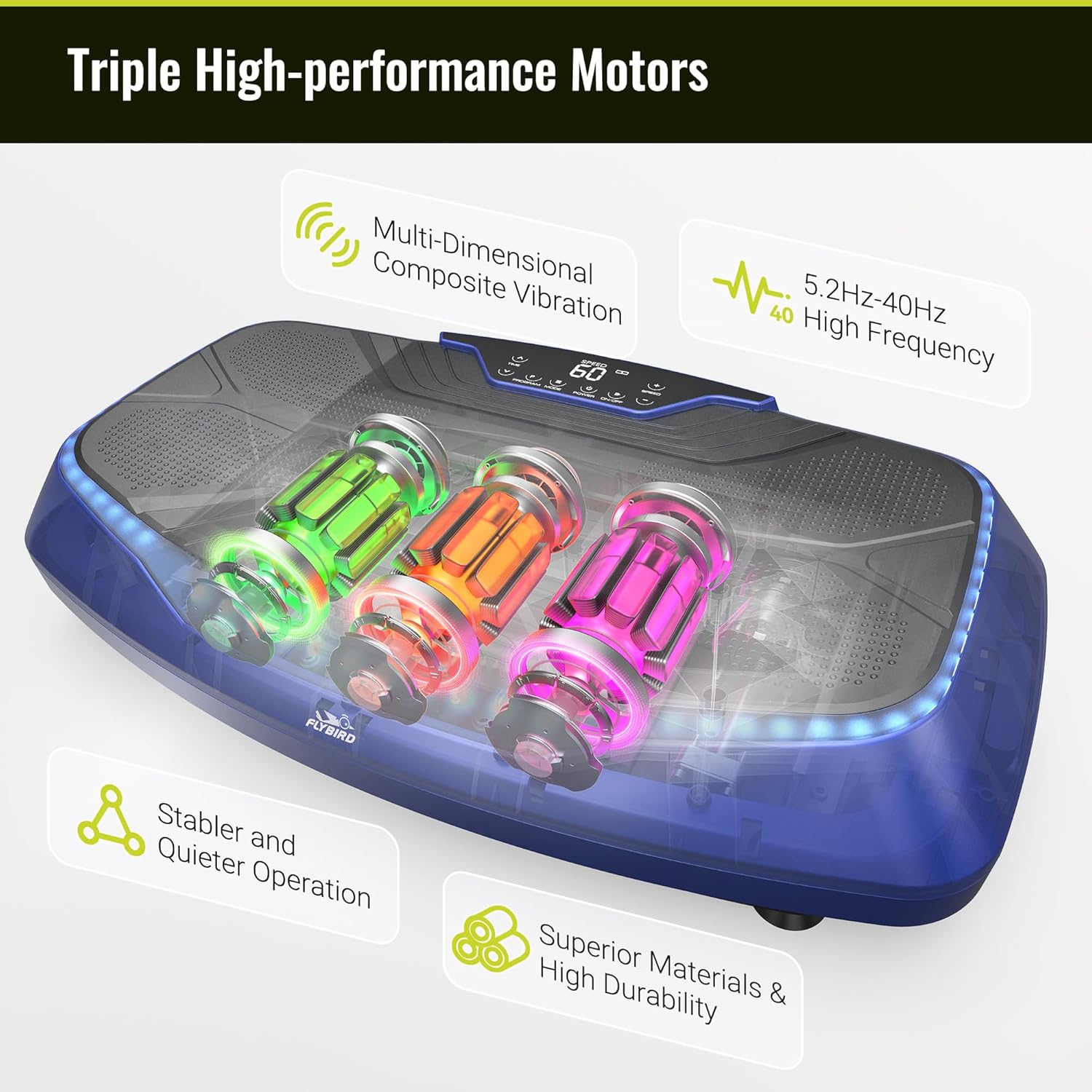
Figura 6.2: A man uses the vibration plate while incorporating resistance bands for a comprehensive full-body workout.
6.3 Vantaggi d'uso
Regular use of the vibration plate may contribute to:
- Relief of back and leg pain.
- Accelerated recovery.
- Improved stability and flexibility.
- Increased blood and lymphatic circulation.
- Muscle toning and enhanced exercise effects.

Figura 6.3: An elderly man uses the vibration plate while seated, demonstrating its potential for gentle stimulation to aid in relaxation, recovery, and improved circulation.
7. Manutenzione
Una corretta manutenzione garantisce la longevità e le prestazioni ottimali della tua pedana vibrante.
7.1 Pulizia
- Pulire la superficie della piastra vibrante con un panno morbido eamp panno dopo ogni utilizzo.
- Non utilizzare detergenti abrasivi o solventi, poiché potrebbero danneggiare la finitura.
- Assicurarsi che il dispositivo sia scollegato prima della pulizia.
7.2 Conservazione
- Conservare la piastra vibrante in un luogo fresco e asciutto, lontano dalla luce solare diretta e dall'umidità.
- Evitare di posizionare oggetti pesanti sul dispositivo.
- The integrated wheels allow for easy movement and storage.
8. Risoluzione Dei Problemi
If you encounter any issues with your FLYBIRD 4D Vibration Plate, refer to the following table:
| Problema | Possibile causa | Soluzione |
|---|---|---|
| Il dispositivo non si accende. | Cavo di alimentazione non collegato correttamente. Nessuna corrente dalla presa. | Controllare il collegamento del cavo di alimentazione. Testare la presa con un altro dispositivo. |
| Telecomando non funzionante. | Battery depleted or incorrectly inserted. Obstruction between remote and device. | Replace remote battery. Ensure clear line of sight to the device's receiver. |
| Vibration feels weak or inconsistent. | Incorrect mode or speed setting. Device overloaded. | Adjust speed and mode settings. Ensure user weight is within limits. |
| Le luci LED non funzionano. | Problema elettrico interno. | Contattare l'assistenza clienti per ricevere assistenza. |
| L'altoparlante Bluetooth non si connette. | Bluetooth not enabled on external device. Device too far from plate. | Ensure Bluetooth is active on your device. Keep devices within range. |
If the problem persists after attempting these solutions, please contact FLYBIRD customer support.
9. Specifiche
Key technical details of the FLYBIRD 4D Vibration Plate:
| Caratteristica | Dettaglio |
|---|---|
| Nome del modello | FBVP-4D-BLX |
| Tipo di controlli | Telecomando, schermo touch LED |
| Tipo di visualizzazione | GUIDATO |
| Numero di livelli di resistenza | 99 |
| Modalità di funzionamento | Automatico |
| Fonte di alimentazione | Elettrico con cavo |
| Dimensioni della confezione dell'articolo | 32 x 19 x 10 pollici |
| Peso dell'articolo | 43.4 libbre (19.68 kg) |
| Materiale | Plastica |
| Peso massimo raccomandato | 500 libbre (226 kg) |
| Vibration Frequency Range | Frequenza |
10. Garanzia e supporto
FLYBIRD offers a lifetime warranty for this product, ensuring long-term reliability and customer satisfaction.
For technical support, warranty claims, or any questions regarding your FLYBIRD 4D Vibration Plate, please contact FLYBIRD customer service through the official brand website or your retailer's support channels. When contacting support, please have your model name (FBVP-4D-BLX) and purchase information readily available.