
Protectli V1210-2
Protectli Vault V1210-2 Port Micro Appliance/Mini PC User Manual
Model: V1210-2 | Brand: Protectli
1. Introduzione
This manual provides essential information for the proper installation, operation, and maintenance of your Protectli Vault V1210-2 Port Micro Appliance/Mini PC. Please read this manual thoroughly before using the device to ensure optimal performance and safety. The Protectli Vault V1210-2 is a compact, fanless mini PC designed for network security applications such as firewalls, routers, and other open-source software solutions.
2. Informazioni sulla sicurezza
- Assicurarsi che il dispositivo sia posizionato su una superficie stabile e piana, con un'adeguata ventilazione.
- Non esporre il dispositivo ad acqua, umidità o temperature estreme.
- Utilizzare solo l'alimentatore fornito con il dispositivo.
- Non tentare di aprire o riparare il dispositivo da soli. Per qualsiasi intervento di assistenza, rivolgersi a personale qualificato.
- Scollegare l'alimentazione prima di pulire o spostare il dispositivo.
3. Contenuto della confezione
Verifica che tutti gli articoli siano presenti nel tuo pacco:
- Protectli Vault V1210-2 Micro Appliance
- Power Adapter with regional plugs
- USB Type-C Console Cable

Image: Contents of the Protectli Vault V1210-2 package, including the device, power adapter with various regional plugs, and a USB Type-C console cable.
4. Hardware finitoview
4.1 Pannello frontale
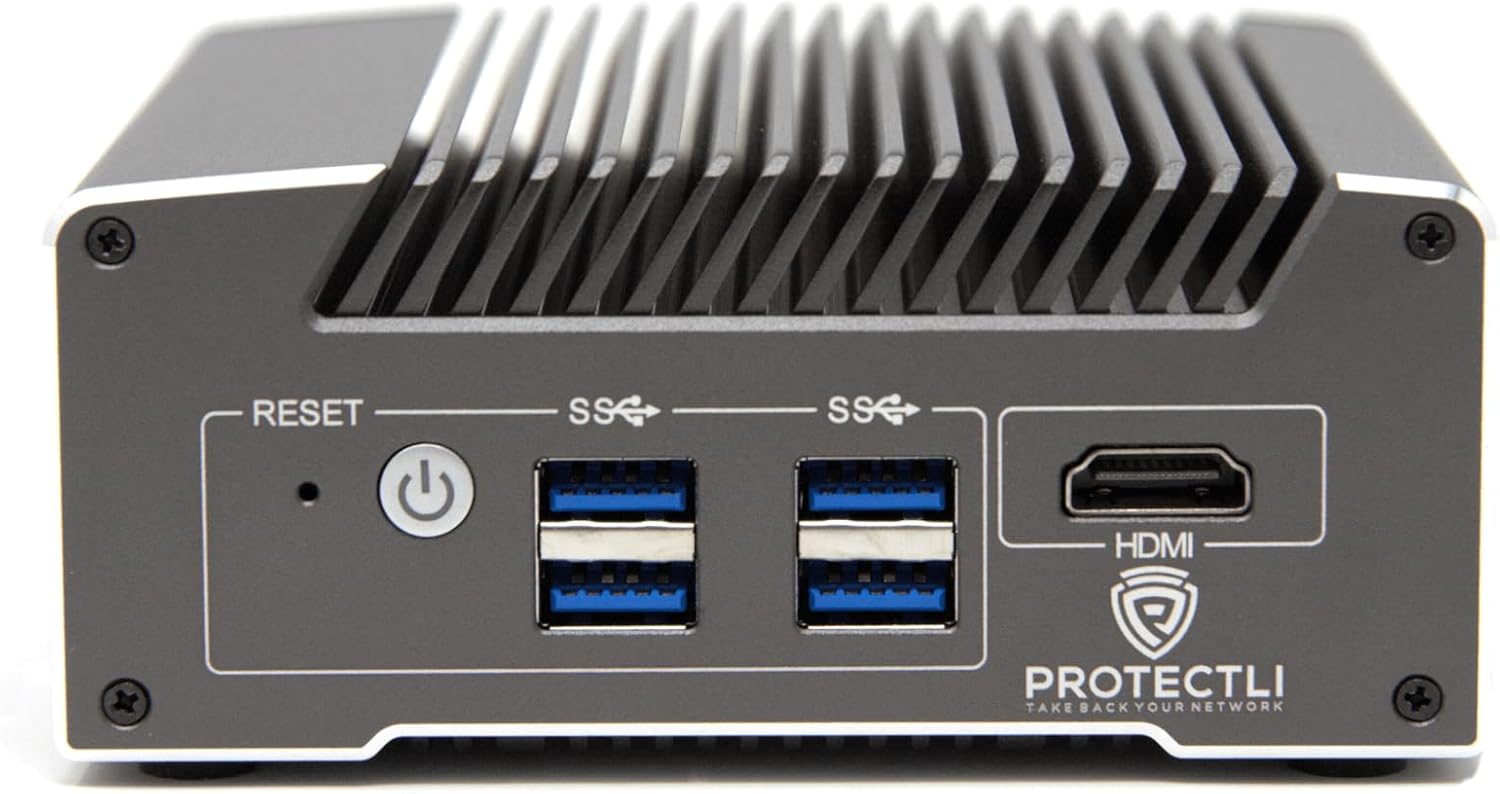
Immagine: Frontale view of the Protectli Vault V1210-2, showing the Reset button, Power button, two USB 3.0 ports, and an HDMI port.
- Pulsante di reset: Utilizzato per riavviare il dispositivo.
- Pulsante di accensione: Premere per accendere/spegnere il dispositivo.
- Porte USB 3.0 (x2): Per collegare dispositivi USB come tastiere, mouse o dispositivi di archiviazione esterni.
- Porta HDMI: For connecting a display monitor.
4.2 Pannello posteriore

Immagine: Posteriore view of the Protectli Vault V1210-2, showing the 12V DC power input, two 2.5G Ethernet ports, a USB Type-C console port, and LED indicators.
- Ingresso alimentazione CC 12 V: Collegare qui l'adattatore di alimentazione fornito.
- 2.5G Ethernet Ports (x2): For network connections. These are Intel I226-V NICs.
- USB Type-C Console Port: For serial console access, typically used for initial setup or debugging.
- Indicatori LED:
- Power LED (Green): Indicates power status.
- Storage Activity LED (Red): Indicates eMMC or NVMe storage activity.
4.3 Componenti interni
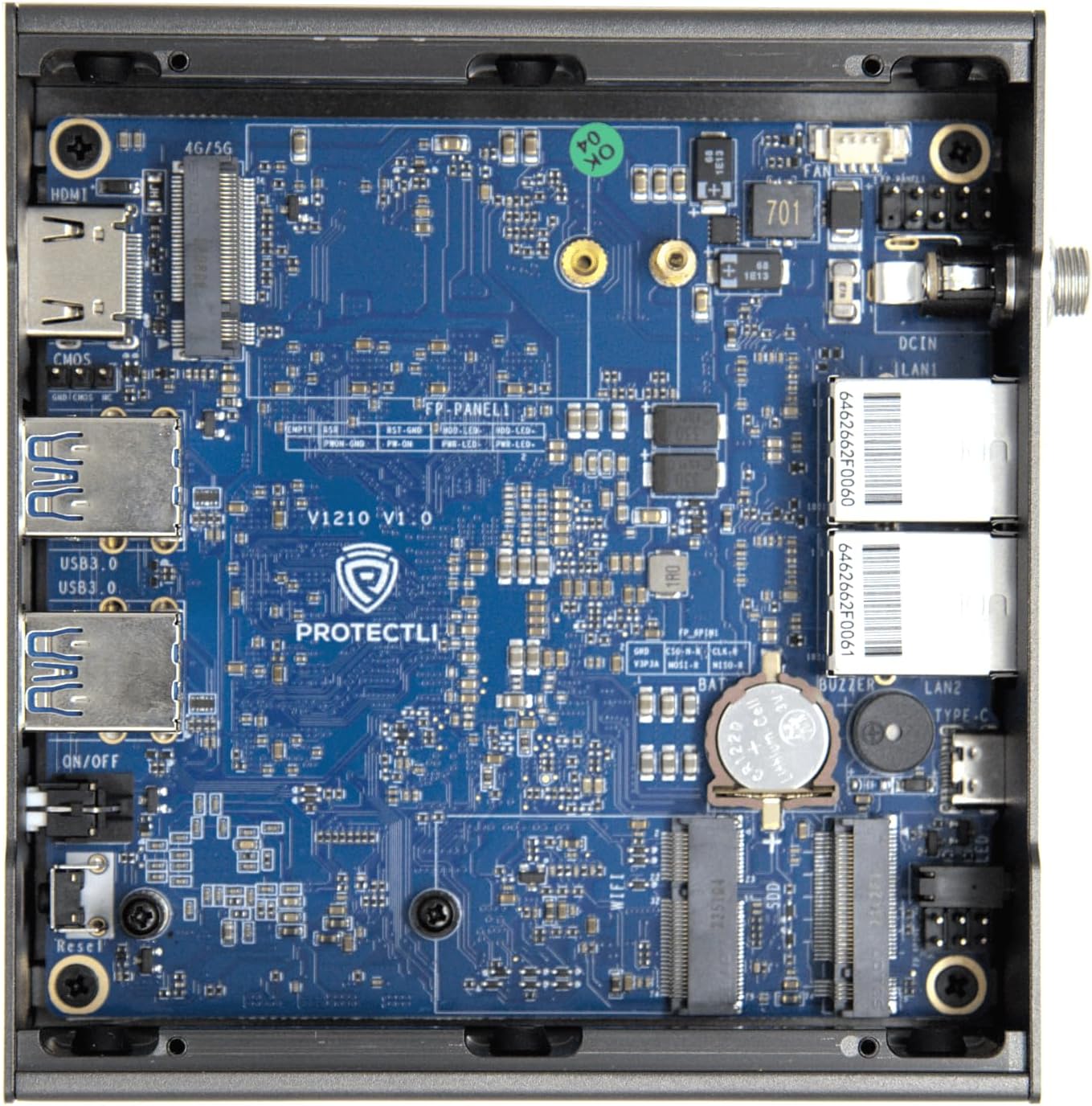
Immagine: Interna view of the Protectli Vault V1210-2, showing the motherboard with integrated RAM, eMMC storage, and M.2 slot for optional NVMe SSD.
- Intel N5105 Quad Core CPU: Processor for the device.
- 4 GB di RAM LPDDR4: On-board system memory.
- 32GB eMMC Storage: On-board flash storage for the operating system.
- Slot M.2: For optional NVMe SSD expansion (not included in this configuration).
5. Istruzioni per l'installazione
Follow these steps for initial setup of your Protectli Vault V1210-2:
- Connetti le periferiche: Connect a monitor to the HDMI port, a keyboard and mouse to the USB 3.0 ports.
- Connessione di rete: Connect your internet source (e.g., modem) to one of the 2.5G Ethernet ports. Connect your local network (e.g., switch or computer) to the other 2.5G Ethernet port.
- Collegamento elettrico: Connect the provided 12V DC power adapter to the power input port on the rear panel, then plug the adapter into a power outlet.
- Accensione: Press the power button on the front panel. The device will power on, and the power LED will illuminate.
- Installazione del sistema operativo: The Protectli Vault V1210-2 does not come with a pre-installed operating system. You will need to install your preferred open-source firewall or routing software (e.g., OPNsense, pfSense, VyOS) via a USB installation medium. Refer to the specific software's installation guide for detailed steps.
- Configurazione iniziale: After OS installation, follow the software's instructions for initial network configuration. You may need to use the USB Type-C console port for advanced setup or debugging if direct display output is not sufficient.
6. Istruzioni per l'uso
Once your operating system is installed and configured, the Protectli Vault V1210-2 operates as a dedicated network appliance. Its fanless design ensures silent operation, making it suitable for various environments.
- Funzionamento normale: The device is designed for continuous operation. Ensure it has adequate airflow around its heatsink chassis.
- Ciclismo di potenza: To safely power off the device, use the shutdown procedure within your installed operating system. If the system is unresponsive, press and hold the power button for 5-10 seconds to force a shutdown.
- Accesso al BIOS: To access the AMI BIOS settings, press the DEL ripetutamente il tasto durante l'avvio.

Image: Diagram illustrating various applications for the Protectli Vault, including VPN Router, Firewall, Hypervisor, Backup WAN, Industrial IoT, Home Automation, Remote Office, and Managed IT Providers.
7. Manutenzione
- Pulizia: Use a soft, dry cloth to clean the exterior of the device. Do not use liquid cleaners or aerosols. Ensure the heatsink fins are free from dust buildup to maintain optimal cooling.
- Aggiornamenti software: Regularly update your installed operating system and software to ensure security and performance. Refer to your software's documentation for update procedures.
- Aggiornamenti del firmware: Controllare periodicamente il Protectli website for BIOS/firmware updates for your V1210-2 model. Follow the provided instructions carefully when performing firmware updates.
8. Risoluzione Dei Problemi
Problemi comuni e soluzioni:
- Il dispositivo non si accende:
- Assicurarsi che l'adattatore di alimentazione sia collegato saldamente sia al dispositivo sia a una presa di corrente funzionante.
- Verificare che la presa di corrente funzioni.
- Prova un adattatore di alimentazione diverso, se disponibile (assicurati che corrisponda al volumetage e amperage specifications).
- Nessuna uscita di visualizzazione:
- Check the HDMI cable connection to both the device and the monitor.
- Assicurarsi che il monitor sia acceso e impostato sulla sorgente di input corretta.
- Try connecting to the device via the USB Type-C console port for serial console access to diagnose display issues.
- Problemi di connettività di rete:
- Verify Ethernet cables are securely connected to the 2.5G NIC ports.
- Controllare i LED di collegamento/attività sulle porte Ethernet.
- Ensure your operating system's network configuration is correct.
- Restart your modem/router and the Protectli Vault.
- Il sistema operativo non si avvia:
- Ensure the boot order in the BIOS is correctly configured for your installed OS or installation medium.
- If installing from USB, ensure the USB drive is bootable and properly formatted.
- Re-attempt OS installation if necessary.
Per ulteriore assistenza, fare riferimento a Protectli Store oppure contatta l'assistenza clienti.
9. Specifiche
| Caratteristica | Specificazione |
|---|---|
| Modello | Protectli Vault V1210-2 |
| Processore | Intel N5105 Quad Core CPU (2.0 GHz, Turbo 2.9 GHz) |
| Memoria RAM | 4GB LPDDR4 (on-board) |
| Magazzinaggio | 32GB eMMC (on-board) |
| Interfacce di rete | 2x Intel I226-V 2.5G NICs |
| Porte USB | 4x USB 3.0 Tipo A |
| Porta della console | 1x USB Type-C Console |
| Uscita video | 1x HDMI (Max Resolution: 3840 x 2160) |
| BIOGRAFIA | BIOS AMI |
| Dimensioni (LxWxH) | 4.5 x 4.5 x 2 pollici (115 x 115 x 50 mm) |
| Peso | 1.81 libbre (0.82 kg) |
| Sistema operativo | No OS pre-installed (Compatible with Linux-based firewall/router OS) |
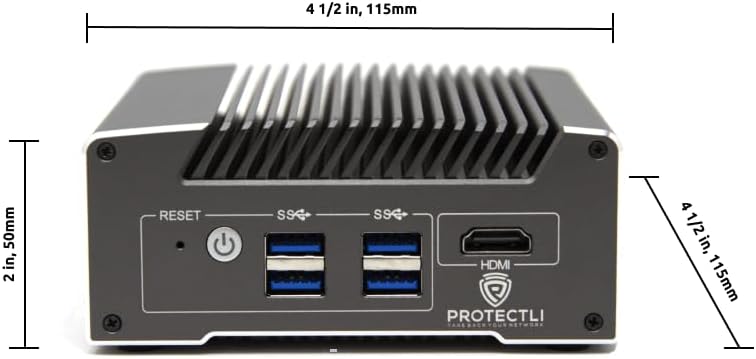
Immagine: Frontale view of the Protectli Vault V1210-2 with dimensions indicated: 4 1/2 inches (115mm) width and 2 inches (50mm) height.
10. Informazioni sulla garanzia
Protectli offers a 30-day money-back guarantee for the Vault V1210-2. For detailed warranty terms and conditions, please refer to the official Protectli websito o contattare il servizio clienti.
I piani di protezione estesa possono essere acquistati separatamente:
- Piano di protezione biennale
- Piano di protezione biennale
11. Supporto
For technical assistance, troubleshooting, or general inquiries, please contact Protectli's US-based support team. They are available to help resolve any issues you may encounter.
- Visita il sito ufficiale Negozio Protectli su Amazon per informazioni e risorse sui prodotti.
- Explore the Protectli Knowledge Base for extensive documentation and articles.

Image: Features of Protectli products, highlighting open-source readiness, coreboot support, 4G LTE failover, and US-based support.
Ask a question about this manual
Ask about setup, troubleshooting, compatibility, parts, safety, or missing instructions. Manuals+ will review the question and use this page’s manual context to help answer it.