
LEKATO RM
LEKATO 61-Key Digital Piano RM User Manual
Model: RM | Brand: LEKATO
Introduzione
Thank you for choosing the LEKATO 61-Key Digital Piano. This electronic keyboard is designed for both beginners and experienced musicians, featuring lighted keys, various learning modes, and versatile connectivity. This manual provides detailed instructions for setup, operation, and maintenance to ensure optimal performance and enjoyment of your instrument.
Cosa c'è nella scatola
Disimballare con cura tutti i componenti e assicurarsi che siano inclusi i seguenti articoli:
- LEKATO 61-Key Digital Piano
- X-Stand
- Adattatore di alimentazione
- Leggio
- Manuale dell'utente (questo documento)
- Screwdriver (for stand assembly)

Image: Contents of the LEKATO 61-Key Digital Piano package, showing the keyboard, X-stand, power adapter, music stand, user manual, and a screwdriver.
Istruzioni di installazione
1. Assembling the X-Stand
The included X-stand provides stable support for your digital piano. Follow the instructions provided with the stand for proper assembly. Ensure all screws are tightened securely using the provided screwdriver.
2. Attaching the Music Stand
Insert the music stand into the designated slots on the top panel of the keyboard. Ensure it is firmly seated to hold your sheet music or tablet securely.
3. Collegamento elettrico
Your LEKATO digital piano can be powered by either the AC adapter or 6 AA batteries (not included).
- Adattatore per corrente alternata: Connect the provided AC adapter to the DC 9V port on the rear of the keyboard and then plug it into a standard wall outlet.
- Batterie: Open the battery compartment on the underside of the keyboard and insert 6 AA batteries, ensuring correct polarity.
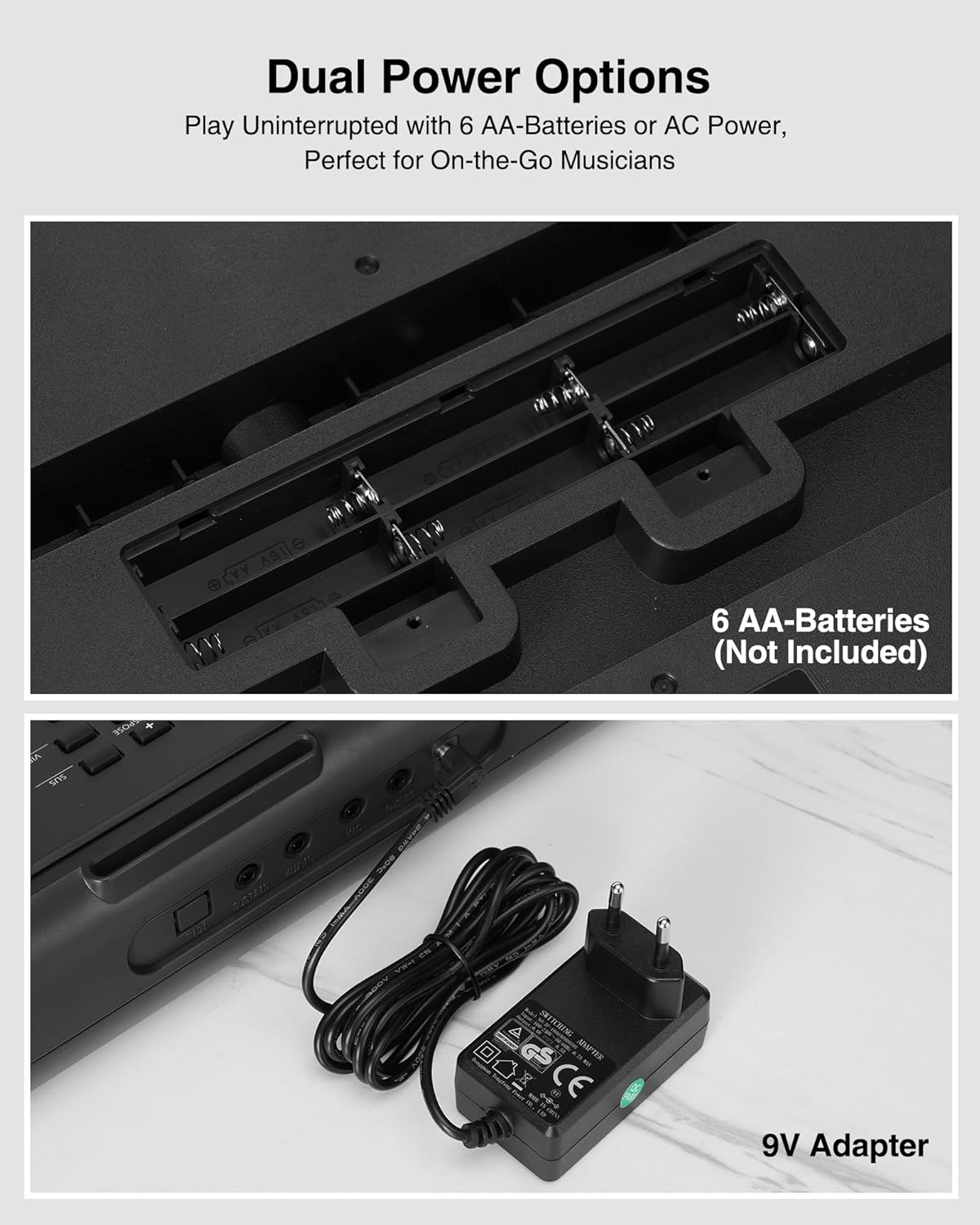
Image: The keyboard's dual power options, showing the battery compartment for 6 AA batteries and the connection for the 9V AC adapter.
Istruzioni per l'uso
1. Accensione/spegnimento
Premere il tasto ENERGIA button located on the left side of the control panel to turn the keyboard on or off. The LED display will illuminate upon power-on.
2. Controllo del volume
Utilizzare il VOLUME+ E VOLUME - pulsanti per regolare il livello sonoro complessivo.
3. Tones and Rhythms
The keyboard features 300 timbres (tones) and 300 rhythms. Use the TIMBRO E RITMO buttons, along with the numeric keypad, to select your desired sound or rhythm. The LED display will show the current selection.
4. Canzoni dimostrative
The keyboard includes 50 demonstration songs. Press the DIMOSTRAZIONE button and use the numeric keypad to select and play a demo song.
5. Learning Modes (Lighted Keys)
The LEKATO digital piano offers two teaching modes to assist beginners, utilizing the lighted keys feature:
- Teaching Mode 1: Single Keyboard - This mode guides you by lighting up the correct keys for a selected song.
- Teaching Mode 2: Follow - In this mode, the keyboard waits for you to play the correct lighted key before proceeding to the next note.
Premere il tasto INSEGNARE button to cycle through these modes. The LIGHTED KEYS button can toggle the key lights on or off.

Image: Two individuals playing the LEKATO keyboard, demonstrating its ease of use for beginners with lighted keys and teaching modes.
6. Funzione di divisione
IL DIVISO function divides the keyboard into two parts, allowing two different instrument sounds to be played simultaneously or for two players to use the keyboard at once. This is ideal for piano duets or teaching scenarios.
7. Altre funzioni
- Registrazione/Riproduzione: Utilizzare il REC/PROG E GIOCARE buttons to record and playback your performances.
- Tempo: Regola la velocità dei ritmi e delle canzoni demo utilizzando TEMPO+ E TEMPO - pulsanti.
- Trasporre: Change the pitch of the keyboard using the TRASPOSIZIONE + E TRANSPOSE - pulsanti.
- Sostenere: Premere il tasto SÌ pulsante per aggiungere un effetto sustain alle note.
- Vibrato: Premere il tasto VIB pulsante per aggiungere un effetto vibrato.
- Metronomo: Activate the metronome by pressing the METRO button to help with timing.
- Percussione: Access 61 drum sounds using the PERCUSSIONE pulsante.
- Modalità degli accordi: Features include single-finger chords, multi-finger chords, and bass chords.
Connettività
The LEKATO digital piano offers various ports for enhanced musical experiences:
- Italiano: Connect to external MIDI devices for advanced music production or learning software.
- SOSTENERE: Connect an external sustain pedal (not included) for more expressive playing.
- INGRESSO AUX: Collega una sorgente audio esterna (ad esempio uno smartphone, un lettore MP3) per riprodurre i tuoi brani preferiti.
- MICROFONO: Connect a microphone (not included) for singing along while playing.
- TELEFONI: Plug in headphones (not included) for silent practice without disturbing others.
- CC 9V: Ingresso di alimentazione per l'adattatore CA.

Immagine: Un dettaglio view of the keyboard's rear panel, illustrating the various input and output ports for versatile connectivity.
Opzioni di alimentazione
The keyboard supports two power methods:
- Alimentazione CA: Use the provided 9V AC adapter for continuous power.
- Potenza della batteria: For portable use, insert 6 AA batteries (not included) into the battery compartment. This allows for playing on the go.
Manutenzione
- Pulizia: Pulire la superficie della tastiera con un panno morbido e asciutto. Non utilizzare detergenti abrasivi o solventi.
- Magazzinaggio: Conservare la tastiera in un luogo fresco e asciutto, lontano dalla luce solare diretta e da temperature estreme.
- Cura della batteria: Se si utilizzano le batterie, rimuoverle se non si utilizza la tastiera per un periodo prolungato per evitare perdite.
- Gestione: Handle the keyboard with care to avoid dropping or impacting it, which could damage internal components.
Risoluzione dei problemi
- Nessun potere:
- Ensure the AC adapter is securely connected to both the keyboard and a working power outlet. If using batteries, check that they are inserted correctly and are not depleted.
- Nessun suono:
- Check the volume level. Ensure headphones are not plugged in if you intend to use the built-in speakers. Verify that the correct tone is selected.
- I tasti non si illuminano:
- Ensure the 'Lighted Keys' function is enabled and that a teaching mode or demo song is selected that utilizes this feature.
- Suono distorto:
- Reduce the volume. Check for any loose connections if external speakers are used. Ensure the power supply is stable.
If you encounter issues not covered here, please refer to the support section or contact LEKATO customer service.
Specifiche
| Caratteristica | Dettaglio |
|---|---|
| Marca | LECATO |
| Nome del modello | RM |
| Numero di chiavi | 61 |
| Livello di abilità | Intermediate (suitable for beginners) |
| Caratteristiche speciali | Lighted Keys, Learning Modes, LED Screen, Music Stand |
| Tecnologia di connettività | Auxiliary (Jack 3.5 mm) |
| Fonte di alimentazione | Battery Powered or Corded Electric (6 AA batteries or 9V AC adapter) |
| Presa per cuffie | Martinetto 3.5 mm |
| Componenti inclusi | X-Stand |
| Dimensioni (circa) | 92 cm (L) x 25 cm (L) x 7 cm (A) |
| Peso (circa) | 3KG |

Image: Diagram illustrating the approximate dimensions (length, width, height) and weight of the LEKATO 61-Key Digital Piano.
Informazioni sulla garanzia
This product comes with a 1-year warranty from the date of purchase. Please retain your proof of purchase for warranty claims. The warranty covers manufacturing defects but does not cover damage caused by misuse, accidents, or unauthorized modifications.
Supporto
For further assistance, technical support, or warranty inquiries, please contact LEKATO customer service through the retailer where you purchased the product or visit the official LEKATO websito per le informazioni di contatto.
Prodotto finitoview Video
Video: Un breve riassuntoview of the LEKATO 61-Key Digital Piano, showcasing its features such as lighted keys, teaching modes, split function, connectivity ports, and dual power options. This video provides a visual guide to the product's main functionalities.
Ask a question about this manual
Ask about setup, troubleshooting, compatibility, parts, safety, or missing instructions. Manuals+ will review the question and use this page’s manual context to help answer it.