
Introduzione
This manual provides comprehensive instructions for the ProtoArc EK01 Plus Ergonomic Wireless Backlit Keyboard. Please read this guide carefully to ensure proper setup, operation, and maintenance of your device. Keep this manual for future reference.
Contenuto della confezione
Verificare che tutti gli articoli siano presenti nel pacco:
- ProtoArc EK01 Plus Ergonomic Wireless Backlit Keyboard
- Poggiapolsi
- Cavo di ricarica USB-C
- Ricevitore USB 2.4G
- Manuale d'uso
Prodotto finitoview
The ProtoArc EK01 Plus is a full-size ergonomic keyboard designed to enhance typing comfort and reduce muscle strain. Its split and curved keyframe design promotes a natural hand and wrist posture.
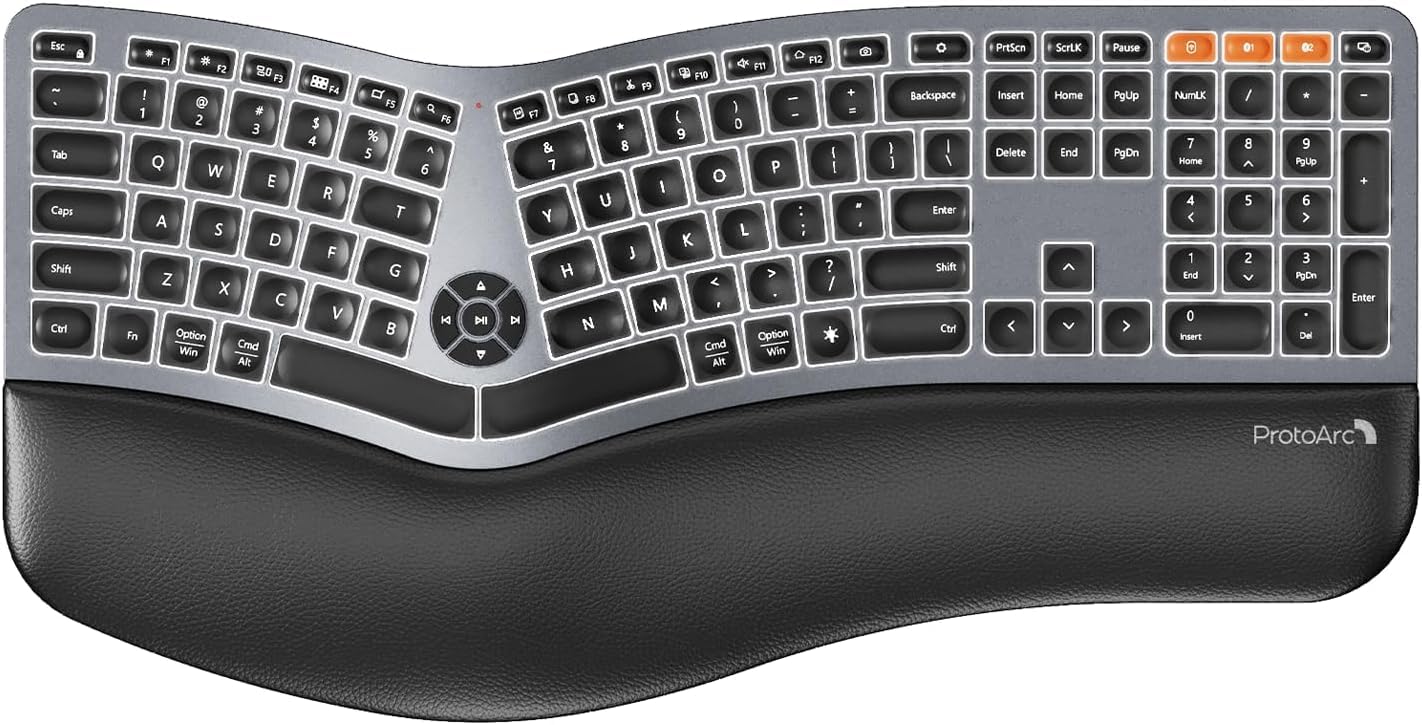
Image 1: ProtoArc EK01 Plus Ergonomic Wireless Backlit Keyboard. This image displays the full keyboard with its split design, integrated wrist rest, and key layout.
Caratteristiche principali:
- Ergonomic Full-Size Design: Features a split, curved keyframe and integrated wrist rest to minimize muscle fatigue and promote proper posture.
- Piedini regolabili inclinabili: Four adjustable tilt feet allow customization of the keyboard angle for optimal comfort.
- Adjustable Backlighting: Soft white LED backlighting with three adjustable brightness levels (low-medium-high) for comfortable typing in various lighting conditions.
- Connettività multi-dispositivo: Connects to up to three devices simultaneously via Bluetooth and 2.4G USB. Easily switch between devices with a dedicated key.
- USB-C ricaricabile: Equipped with a 2000 mAh rechargeable lithium battery for extended use.
- Modalità di sospensione automatica: Enters sleep mode after 60 minutes of inactivity to conserve power, waking up within 3 seconds upon key press.
- Compatibilità: Widely compatible with Windows 7/8/10, Mac OS X 10.12 or higher, and Android 4.3 or higher.
Impostare
1. Ricarica della tastiera
- Individuare la porta di ricarica USB-C sulla tastiera.
- Connect the provided USB-C cable to the keyboard and the other end to a USB power source (e.g., computer USB port, wall adapter).
- La spia di carica si illuminerà. Una volta completata la carica, la spia potrebbe cambiare colore o spegnersi.
2. Connessione ai dispositivi
The keyboard supports both 2.4G USB and Bluetooth connectivity.
2.1. Connessione USB 2.4G
- Locate the 2.4G USB receiver (dongle). It is usually stored in a compartment on the keyboard or in the packaging.
- Collega il ricevitore USB a una porta USB disponibile sul tuo computer.
- Accendi la tastiera utilizzando l'interruttore di alimentazione.
- La tastiera dovrebbe connettersi automaticamente al tuo dispositivo.
2.2. Connessione Bluetooth (fino a 3 dispositivi)
- Accendi la tastiera.
- Premere e tenere premuto uno dei tasti del canale Bluetooth (ad esempio, Modello BT1, Modello BT2, O Modello BT3) for 3-5 seconds until the indicator light flashes, indicating pairing mode.
- Sul tuo dispositivo (computer, tablet, smartphone), attiva il Bluetooth e cerca nuovi dispositivi.
- Select "ProtoArc EK01 Plus" (or similar name) from the list of available devices.
- Seguire le istruzioni sullo schermo per completare il processo di associazione. La spia luminosa smetterà di lampeggiare una volta effettuata la connessione.
- Repeat these steps for up to two additional Bluetooth devices using the other Bluetooth channel keys.
Operazione
1. Passaggio da un dispositivo all'altro
Per passare da un dispositivo connesso all'altro, è sufficiente premere il tasto di connessione corrispondente:
- Premere 2.4G per passare al dispositivo collegato tramite il ricevitore USB.
- Premere Modello BT1 to switch to the first Bluetooth device.
- Premere Modello BT2 to switch to the second Bluetooth device.
- Premere Modello BT3 to switch to the third Bluetooth device.
2. Regolazione della retroilluminazione
The keyboard features a soft white LED backlight with three brightness levels.
- To cycle through brightness levels (low, medium, high, off), press the dedicated backlight key (refer to keyboard layout for specific key).
3. Sleep Mode and Power Saving
To conserve battery life, the keyboard will automatically enter sleep mode after 60 minutes of inactivity. To wake the keyboard, press any key. The keyboard will be ready for use within 3 seconds.
4. Adjustable Tilt
The keyboard includes four adjustable tilt feet. Extend or retract these feet to customize the typing angle to your preference, ensuring comfortable wrist positioning whether sitting or standing.
Manutenzione
1. Pulizia della tastiera
- Prima di pulirla, scollegare la tastiera da tutti i dispositivi e dalle fonti di alimentazione.
- Utilizzare un panno morbido e privo di lanugine leggermente dampPulire la superficie della tastiera con acqua o una soluzione detergente delicata.
- Evitare l'uso di prodotti chimici aggressivi, detergenti abrasivi o solventi, poiché potrebbero danneggiare la finitura della tastiera.
- Per la pulizia tra i tasti, utilizzare aria compressa per rimuovere polvere e detriti.
2. Cura della batteria
- Caricare regolarmente la tastiera per preservare la salute della batteria.
- Evitare di scaricare completamente la batteria frequentemente.
- Se si conserva la tastiera per un periodo prolungato, caricarla a circa il 50% prima di riporla.
Risoluzione dei problemi
| Problema | Possibile causa | Soluzione |
|---|---|---|
| La tastiera non risponde | Low battery; Keyboard off; Incorrect connection mode; USB receiver not plugged in (2.4G); Bluetooth not paired. | Charge the keyboard; Turn on the keyboard; Switch to the correct connection mode (2.4G, BT1/2/3); Ensure USB receiver is securely plugged in; Re-pair Bluetooth. |
| Input ritardato o in ritardo | Interferenza; Distanza dal ricevitore/dispositivo; Batteria scarica. | Move closer to the receiver/device; Ensure no strong interference sources nearby; Charge the keyboard. |
| Retroilluminazione non funzionante | Retroilluminazione disattivata; batteria scarica. | Press the backlight key to adjust brightness; Charge the keyboard. |
| Impossibile connettersi tramite Bluetooth | Keyboard not in pairing mode; Device Bluetooth off; Already connected to 3 devices. | Ensure keyboard is in pairing mode (flashing indicator); Enable Bluetooth on your device; Disconnect from an existing Bluetooth device if maximum reached. |
Specifiche
| Marca | ProtoArco |
| Numero di modello | EK01 Plus |
| Tecnologia di connettività | Bluetooth, USB 2.4G |
| Descrizione della tastiera | Ergonomic, Full Size, Split Design |
| Caratteristiche speciali | Ergonomic, Full Size, Wrist Rest, Backlit, Rechargeable |
| Colore | Grigio siderale |
| Backlight Color Support | Monochromatic (White LED) |
| Materiale | Plastica |
| Fonte di alimentazione | Alimentato a batteria (batteria al litio da 2000 mAh) |
| Tipo di interruttore | Membrana |
| Disposizione della tastiera | QWERTY (UK layout for this variant) |
| Numero di chiavi | 117 |
| Dispositivi compatibili | Laptop, PC, Tablet, Windows/Mac/Android |
| Peso dell'articolo | 1.6 chilogrammi |
| Dimensioni (circa) | 48 cm (lunghezza) x 25 cm (larghezza) |
Garanzia e supporto
For warranty information and technical support, please refer to the ProtoArc official website or contact their customer service. Details are typically provided on the product packaging or the official brand store.
ProtoArc Official Store: Visit ProtoArc Store on Amazon