
1. Introduzione
The Irfora Tuya WiFi 7in1 Water Quality Tester is a multi-functional device designed for real-time monitoring of various water parameters. This analyzer provides accurate readings for PH, ORP, EC, PPM, CF, humidity, and temperature, making it suitable for a wide range of applications including aquariums, hydroponics, aquaculture, swimming pools, and drinking water analysis.
This manual provides detailed instructions on how to set up, operate, and maintain your water quality tester to ensure optimal performance and longevity.
2. Caratteristiche del prodotto
- Monitoraggio 7 in 1: Simultaneously measures PH, ORP, EC, PPM, CF, humidity, and temperature.
- High-Accuracy Electrode: Features a detachable, corrosion-resistant electrode for quick and precise measurements.
- Controllo tramite APP Tuya: Connects via WiFi for stable data transmission, allowing real-time and historical data viewsul tuo dispositivo mobile.
- Registrazione dei dati: Records historical data for long-term analysis and comparison.
- Funzione di allarme: Provides abnormal high and low data alarms through the Tuya APP.
- Ampie applicazioni: Ideal for aquariums, hydroponics, aquaculture, swimming pools, drinking water, and laboratory use.
3. Guida all'installazione
3.1 Disimballaggio e controllo dei componenti
Carefully unpack all components from the packaging. Ensure you have the main water quality tester unit, the detachable electrode probe, and the power adapter.

Figure 3.1: Main unit, probe, and power adapter.
3.2 Collegamento della sonda
Connect the electrode probe to the main unit by screwing it into the designated port. Ensure a secure connection to prevent water ingress and ensure accurate readings.
3.3 Collegamento di alimentazione
Plug the power adapter into the main unit and then into a standard US electrical outlet. The device display should illuminate.

Figure 3.2: Device dimensions for placement consideration.
3.4 Connessione all'APP Tuya
- Download the Tuya Smart APP from your mobile device's app store (iOS or Android).
- Registrati o accedi al tuo account Tuya.
- Add a new device by following the in-app instructions. Ensure your device is in pairing mode (refer to the device's display or manual for specific pairing instructions, usually involving holding a button).
- Connect the device to your WiFi network.
- Una volta connesso, puoi view real-time data and access settings via the APP.
4. Istruzioni per l'uso
4.1 Esecuzione delle misurazioni
Submerge the electrode probe into the water sample you wish to test. Ensure the probe is fully immersed and free from air bubbles. The device will display real-time readings for PH, ORP, EC, PPM, CF, humidity, and temperature on its digital screen.

Figure 4.1: Water quality tester in operation, displaying readings and connected to the Tuya APP.
4.2 Comprensione del display
The device features three main display sections:
- Left Display: Shows EC/PPM/CF readings. Use the 'MODE' button below to cycle through these parameters.
- Middle Display: Shows pH/ORP readings. Use the 'MODE' button below to cycle through these parameters.
- Right Display: Shows Temperature and Humidity readings. Use the '°C/°F' button to switch temperature units.
The 'CAL' button is used for calibration (refer to section 5.2 for calibration details).
4.3 Using the Tuya APP
The Tuya APP provides enhanced functionality:
- Dati in tempo reale: View all 7 parameters simultaneously on your smartphone.
- Dati storici: Access recorded data over time to track trends and analyze water quality changes.
- Impostazioni di allarme: Set custom high and low thresholds for each parameter. The APP will send notifications if readings fall outside these ranges.
- Cambio unità: Change temperature units (°C/°F) directly from the app.
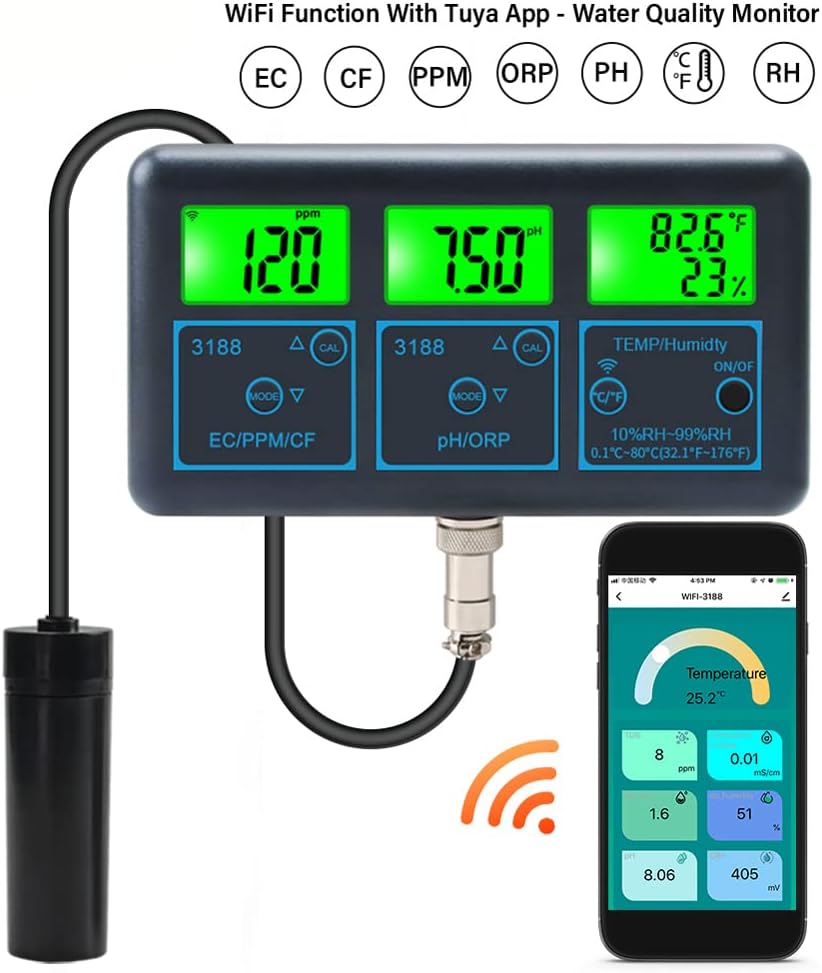
Figure 4.2: Tuya APP interface for real-time data viewing e analisi.
5. Manutenzione
5.1 Electrode Cleaning and Storage
Regularly clean the electrode probe to ensure accurate readings. Rinse the probe with distilled water after each use. For long-term storage, ensure the probe is clean and stored in a protective solution (if applicable, consult specific electrode instructions) or kept moist to prevent drying out.
5.2 Calibrazione
Periodic calibration is essential for maintaining accuracy, especially for pH and ORP measurements. Use standard calibration solutions (e.g., pH 4.00, pH 6.86, pH 9.18 for pH) and follow the device's calibration procedure, typically initiated by pressing the 'CAL' button and immersing the probe in the respective solution.
5.3 Important Waterproof Notice
This tester is NOT waterproof. Do not immerse the main unit in water or allow it to get wet during use. Exposure to water can cause damage and lead to improper functioning of the device.

Figure 5.1: Important notice: The main unit is not waterproof.
6. Risoluzione Dei Problemi
- Nessun potere: Ensure the power adapter is securely connected to both the device and a working electrical outlet. Check the power source.
- Letture imprecise: Clean the electrode probe thoroughly. Perform a calibration using fresh, accurate calibration solutions. Ensure the probe is fully immersed in the samplui.
- Problemi di connettività dell'APP: Verify your WiFi network is active and the device is within range. Restart the device and your mobile phone. Re-attempt the pairing process if necessary.
- Display non funzionante: Controllare il collegamento elettrico. Se il problema persiste, contattare l'assistenza clienti.
7. Specifiche
| Parametro | Campo di misura |
|---|---|
| PH | 0.00-14.00pH |
| ORP | Da -1200 mV a 1200 mV |
| EC | 0.00-19.00mS/cm, 20.1-200.0mS/cm |
| CF | 0.1-199.9CF |
| Umidità | 1-99% UR |
| Temperatura | 0.1°C-80°C (32.1°F-176°F) |
- Dimensioni del prodotto: 9.84 x 7.09 x 2.76 pollici
- Peso dell'articolo: 1.42 libbre
- Produttore: Ifora
- ASIN: B0D3LGLPB9
8. Garanzia e supporto
Warranty information for the Irfora Tuya WiFi 7in1 Water Quality Tester is typically provided by the manufacturer or seller at the time of purchase. Please refer to your purchase documentation or contact the seller directly for details regarding warranty coverage and customer support.
For technical assistance or inquiries not covered in this manual, please reach out to the Irfora customer support team through the contact information provided with your product or on the official Irfora websito.
9. Ampia gamma di applicazioni
This multi-parameter water quality detector is highly practical for various environments:
- Acquari
- Idroponica
- Acquacoltura
- Piscine
- Drinking Water Testing
- Uso in laboratorio

Figura 9.1: Esamples of suitable applications for the water quality tester.