
ELISWEEN WP006
ELISWEEN Wireless Presenter WP006 User Manual
Modello: WP006
Introduzione
This manual provides detailed instructions for the ELISWEEN Wireless Presenter Model WP006. It covers setup, operation, maintenance, and troubleshooting to ensure optimal performance and longevity of your device. Please read this manual thoroughly before using the product.
Contenuto della confezione
Verifica che tutti gli articoli siano presenti nel tuo pacco:
- ELISWEEN Wireless Presenter (Model WP006)
- USB/Type-C Dual-Head Receiver
- Custodia protettiva
- Manuale dell'utente (questo documento)
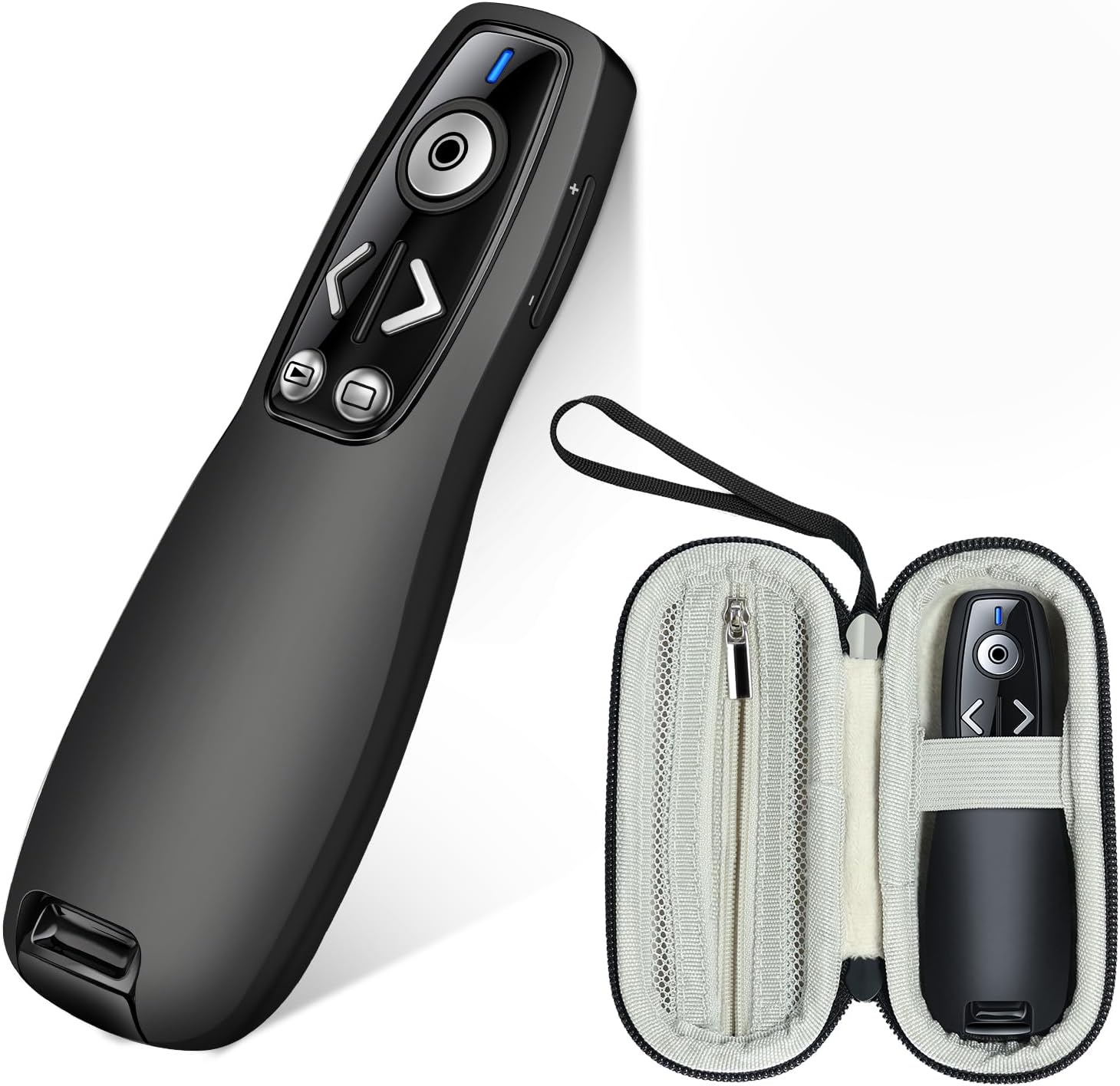
Image: The ELISWEEN Wireless Presenter and its included protective carry case.
Prodotto finitoview
The ELISWEEN Wireless Presenter WP006 is designed for seamless presentations. It features intuitive controls and a dual-head USB/Type-C receiver for broad compatibility.

Immagine: un primo piano view of the ELISWEEN Wireless Presenter, highlighting its control buttons including Page Up/Down, Slide Show/Black Screen, Laser Pointer, and the wireless receiver storage.
Caratteristiche principali:
- Pagina su/giù: Navigate through slides.
- Slide Show & Black Screen: Start/end presentations and black out the screen.
- Puntatore laser: Highlight specific content on the screen.
- Controllo del volume: Regola l'uscita audio.
- Cambia finestra: Toggle between open applications.
- Ricevitore a doppia testa: USB-A and USB-C compatibility.
- Integrated Receiver Storage: Securely store the receiver within the presenter.
Impostare
1. Installazione della batteria
The ELISWEEN Wireless Presenter requires 2 AAA batteries (not included).
- Locate the battery compartment on the back of the presenter.
- Aprire il coperchio della batteria.
- Inserire due batterie AAA, assicurandosi della corretta polarità (+/-).
- Chiudere bene il coperchio della batteria.
2. Collegamento del ricevitore
The presenter uses a dual-head USB/Type-C receiver for versatile connectivity.
- Remove the USB/Type-C receiver from its storage slot at the bottom of the presenter.
- Identify the appropriate port on your computer (USB-A or USB-C).
- Plug the receiver into the chosen USB port. The system will automatically detect and install the necessary drivers. No additional software installation is required.

Image: The wireless presenter with its USB receiver inserted into a laptop's USB port, illustrating the plug-and-play functionality.

Image: Two laptops demonstrating the dual compatibility of the receiver, showing both USB-A and USB-C connections.
3. Accensione/Spegnimento
Locate the power switch on the side of the presenter. Slide it to the "ON" position to activate the device. Slide it to "OFF" when not in use to conserve battery life.
Istruzioni per l'uso
Once the receiver is connected and the presenter is powered on, you can begin your presentation.
- Pagina su/giù: Premere il tasto < (Page Up) or > (Page Down) buttons to navigate through your presentation slides.
- Slide Show & Black Screen: Premere il pulsante con il icona di riproduzione/pausa to start or end a slide show. Press the button with the black screen icon to black out the screen during a presentation and press again to resume.
- Puntatore laser: Premere e tenere premuto il tasto circular button in the center to activate the red laser pointer. Release to turn it off.
- Controllo del volume: Utilizzare il + E - buttons on the side of the presenter to adjust the system volume.
- Cambia finestra: Premere il tasto dedicato window icon button to switch between open applications on your computer.

Image: A presenter using the ELISWEEN Wireless Presenter to highlight content on a screen with its red laser pointer, demonstrating its long-range control.
Compatibilità:
The ELISWEEN Wireless Presenter is compatible with a wide range of operating systems and presentation software:
- Sistemi operativi: Windows, Mac OS, Linux, Android
- Software: PowerPoint, Excel, Word, Prezi, PDF, Keynote
Manutenzione
Presenter Care:
- Clean the presenter with a soft, dry cloth. Avoid using harsh chemicals or abrasive materials.
- Do not expose the presenter to extreme temperatures, humidity, or direct sunlight.
- Remove batteries if the presenter will not be used for an extended period to prevent leakage.
Carry Case Care:
The included protective carry case is made from durable EVA material to shield your presenter from drops, scratches, bumps, and dust.
- Keep the case clean by wiping it with a damp stoffa.
- Utilize the internal mesh pocket for storing spare batteries or other small accessories.
- Always store the presenter in its case when transporting to ensure maximum protection.

Immagine: Varie views of the protective carry case, showcasing its zippered mesh pocket for accessories, comfortable hand strap, and the presenter securely stored inside.
Risoluzione dei problemi
| Problema | Possibile causa | Soluzione |
|---|---|---|
| Il presentatore non risponde. |
|
|
| Il puntatore laser non funziona. |
|
|
| Portata limitata o connessione intermittente. |
|
|
Specifiche
| Numero di modello | WP006 |
| Connettività | 2.4GHz Wireless (USB-A & USB-C dual-head receiver) |
| Campo di funzionamento | Fino a 100 piedi (30 metri) |
| Tipo di laser | Red Laser (Class 2) |
| Fonte di alimentazione | 2 x batterie AAA (non incluse) |
| Sistema operativo compatibile | Windows, Mac OS, Linux, Android |
| Dimensions (Presenter) | Circa 5.63 x 2.6 x 2.56 pollici (dimensioni della confezione) |
| Peso (presentatore) | Circa 1.94 once |
| Caratteristiche speciali | Ergonomic design, Integrated receiver storage, Volume control, Window switch, Full/Black screen function |
Garanzia e supporto
For warranty information or technical support, please refer to the contact details provided with your purchase or visit the official ELISWEEN websito. Conservare la ricevuta d'acquisto come prova d'acquisto per eventuali reclami in garanzia.
Ask a question about this manual
Ask about setup, troubleshooting, compatibility, parts, safety, or missing instructions. Manuals+ will review the question and use this page’s manual context to help answer it.