
1. Introduzione
This manual provides detailed instructions for the proper use and maintenance of your BOBLOV KJ25 Body Camera. Please read this manual thoroughly before operating the device to ensure optimal performance and longevity.
Package Contents: What's in the Box
- 1 x telecamera corporea BOBLOV KJ25
- 1 x clip posteriore corta a 360°
- 1 x clip lunga per spalla a 180°
- 1 x Charging Plug
- 1 cavo USB
- 1 x Manuale utente (questo documento)
- 1 scheda Micro SD da 128 GB (preinstallata o inclusa separatamente)

Image: The BOBLOV KJ25 Body Camera and its included accessories.
2. Prodotto finitoview
The BOBLOV KJ25 is a compact and versatile body camera designed for various recording needs. It features a durable casing, a clear display, and intuitive controls.
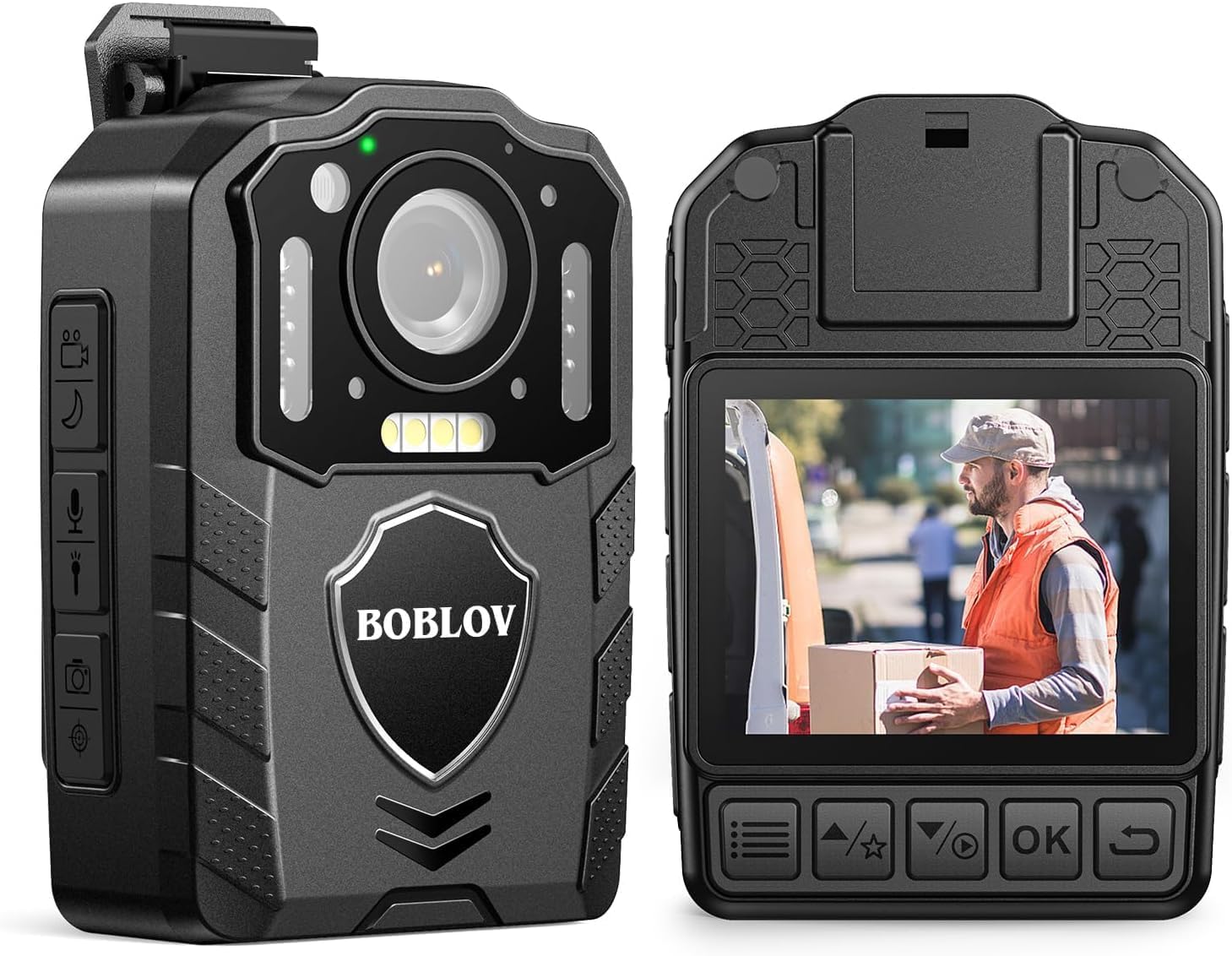
Immagine: anteriore e posteriore views of the BOBLOV KJ25 Body Camera, highlighting its design and interface.
Caratteristiche principali:
- Risoluzione video: 1080P at 30fps for clear footage.
- Risoluzione foto: Fino a 48 Megapixel.
- Durata della batteria: Built-in 3000mAh battery provides up to 13 hours of continuous recording.
- Visione notturna: Equipped with 10 IR lights for clear recording in low-light conditions.
- Memoria esterna: Supports Micro SD cards from 64GB to 512GB (128GB card included).
- Registrazione in loop: Sovrascrive automaticamente i più vecchi filequando lo spazio di archiviazione è pieno.
- Pre/Post-recording: Captures events before and after the main recording trigger.
- Laser rosso: For quick aiming and location identification.
- Luci di riempimento bianche: Fornisce ulteriore illuminazione quando necessario.
- Design indossabile: Easily attaches to clothing using included clips.
3. Impostazione
3.1 Caricamento della batteria
Before first use, fully charge the camera's internal 3000mAh battery. Connect the camera to the charging plug using the provided USB cable. The charging indicator light will show the charging status. A full charge typically takes approximately 5 hours.

Image: The BOBLOV KJ25 Body Camera being charged, illustrating its size and battery specifications.
3.2 Inserimento della scheda Micro SD
The BOBLOV KJ25 supports Micro SD cards from 64GB to 512GB. A 128GB card is included. Locate the Micro SD card slot on the side of the camera. Gently insert the card with the gold contacts facing down until it clicks into place. To remove, push the card in slightly until it springs out.

Image: Inserting a Micro SD card into the camera's dedicated slot.
3.3 Fissaggio delle clip
The camera comes with a short 360° back clip and a long 180° shoulder clip. Choose the appropriate clip for your intended use. Attach the clip to the camera's mounting point and secure it. The clips allow for hands-free operation by attaching the camera to your uniform, belt, or backpack strap.

Image: The BOBLOV KJ25 Body Camera worn on a uniform, illustrating its hands-free application.
4. Istruzioni per l'uso
4.1 Accensione/spegnimento
- Per accendere: Tenere premuto il pulsante di accensione finché lo schermo non si illumina.
- Per spegnere: Tenere premuto il pulsante di accensione finché il dispositivo non si spegne.
4.2 Registrazione video
The camera records video in 1080P resolution at 30 frames per second, ensuring clear and detailed footage.
- Avvia la registrazione: In standby mode, press the Video Record button once to begin recording.
- Interrompi registrazione: Press the Video Record button again to stop and save the current video file.

Image: Visual comparison highlighting the clear 1080P video quality of the camera.
Video: An official product video demonstrating the BOBLOV KJ25 Body Camera's 1080P video recording capabilities and features.
4.3 Scattare foto
Capture high-resolution still images up to 48MP.
- Scatta una foto: In standby mode, press the Photo button once to capture an image.

Image: The camera's 48MP photo and 1080P video resolution in a practical setting.
4.4 Visione notturna
The KJ25 features automatic and manual night vision capabilities, utilizing 10 IR lights to ensure clear recordings in dark environments.
- Attiva la visione notturna: Refer to the camera's on-screen menu or dedicated button for night vision activation. It can be set to automatic or manual mode.

Image: Demonstration of the camera's auto/manual night vision feature in a dark setting.
4.5 Registrazione in loop
Se abilitata, la registrazione in loop consente alla telecamera di registrare in modo continuo sovrascrivendo la registrazione più vecchia files quando la scheda di memoria è piena. Questo assicura che tu abbia sempre la versione più recentetage.
- Setting Loop Recording: Access the camera's settings menu to adjust loop recording duration (e.g., 3, 5, 10, 15, 20, 30 minutes) or to enable/disable the feature. The default setting is typically 10 minutes.

Image: Explanation of loop recording functionality and customizable video segment lengths.
4.6 Red Laser Quick Locate
The integrated red laser assists in quickly identifying the camera's aiming point, useful for precise recording.
- Attiva Laser: Refer to the camera's controls for the dedicated laser activation button.

Image: The red laser quick locate feature in use by an officer.
4.7 White Filling Lights
For additional illumination in dark areas, the camera includes white filling lights.
- Activate White Lights: Refer to the camera's controls for the dedicated white light activation button.

Image: The white filling lights feature providing illumination for a delivery person.
4.8 Riproduzione
Review recorded videos and photos directly on the camera's screen or by connecting it to a computer.
- Riproduzione in camera: Use the navigation buttons to access the playback menu and select files.
- Riproduzione da computer: Connect the camera to a computer using the USB cable. The camera will appear as a removable disk, allowing you to access and transfer files.
5. Manutenzione
5.1 Pulizia
- Per pulire il corpo della fotocamera, utilizzare un panno morbido e asciutto.
- Per la lente, utilizzare un panno e una soluzione specifici per la pulizia delle lenti, per evitare graffi.
- Non utilizzare prodotti chimici aggressivi o detergenti abrasivi.
5.2 Conservazione
- Conservare la fotocamera in un luogo fresco e asciutto, lontano dalla luce solare diretta e da temperature estreme.
- Ensure the battery is partially charged (around 50%) before long-term storage to preserve battery health.
6. Risoluzione Dei Problemi
Problemi comuni e soluzioni:
- La fotocamera non si accende: Assicurarsi che la batteria sia carica. Collegare a una fonte di alimentazione e riprovare.
- Recording issues (e.g., freezing, errors): Check if the Micro SD card is properly inserted and has sufficient free space. Format the SD card if issues persist (this will erase all data).
- Scarsa qualità video/foto: Ensure the lens is clean and free from smudges. Check lighting conditions; use night vision or white lights if necessary.
- Il computer non riconosce la fotocamera: Prova una porta USB o un cavo diverso. Assicurati che la fotocamera sia accesa quando è collegata.
7. Specifiche
| Caratteristica | Dettaglio |
|---|---|
| Marca | capitoli |
| Numero di modello | Numero di parte: KJ25 |
| Risoluzione di acquisizione video | Formato: 1080p |
| Risoluzione fissa efficace | 48 MP |
| Tecnologia del sensore fotografico | CMOS |
| Tipo di memoria flash | Micro SD (supporta da 64 GB a 512 GB) |
| Dimensioni della memoria flash installata | 128 GB (incluso) |
| Formato di acquisizione video | Movimento |
| Formato audio supportato | MP3 |
| Dimensioni dello schermo | 2 pollici |
| Tecnologia di connettività | USB |
| Colore | Nero |
| Caratteristiche | Night Vision, Red Laser, White Filling Lights, Loop Recording |
| Livello di resistenza all'acqua | Non resistente all'acqua |
| Stabilizzazione dell'immagine | NO |
| Fattore di forma | Compatto |
| Compatibilità del sistema operativo | Finestre |
| Dimensioni dell'articolo (P x L x A) | 2.1"P x 1.1"L x 2.9"A |
| Numero di batterie | 1 polimero di litio (incluso) |
| Tipo di lente | Grandangolo |
| Tipo di messa a fuoco | Messa a fuoco manuale |
| Risoluzione massima dello schermo | 240×320 pixel |
| Modalità di scatto | Notte |
| Rapporto di aspetto dell'immagine | 16:9 |
| Formato immagine supportato | Formato JPG |
| Tipo di controllo dell'esposizione | Manuale |
| Dispositivi compatibili | Smartphone (for data transfer) |
8. Garanzia e supporto
8.1 Informazioni sulla garanzia
The BOBLOV KJ25 Body Camera comes with a Garanzia di 2 anno dalla data di acquisto. La presente garanzia copre i difetti di fabbricazione e garantisce un funzionamento affidabile in condizioni di utilizzo normali. Si prega di conservare la prova d'acquisto per eventuali reclami in garanzia.
8.2 Assistenza clienti
For further assistance, technical support, or warranty inquiries, please refer to the official BOBLOV websito o contattare direttamente il servizio clienti. Puoi trovare maggiori informazioni e risorse di supporto sul Negozio BOBLOV su Amazon.