1. Introduzione
Thank you for choosing the Takywep 12000 BTU Window Air Conditioner. This manual provides essential information for the safe and efficient operation, installation, and maintenance of your new air conditioning unit. Please read this manual thoroughly before installation and use, and retain it for future reference.
This unit is designed to provide cooling, dehumidification, and fan functions for rooms up to 550 square feet, featuring Wi-Fi connectivity and remote control for convenient operation.
2. Informazioni sulla sicurezza
Per evitare lesioni all'utente o ad altre persone e danni alle cose, è necessario seguire le seguenti istruzioni. Il funzionamento errato dovuto all'ignoranza delle istruzioni può causare danni o danni.
- Always connect to a grounded power outlet. Do not use extension cords or adapter plugs.
- Non utilizzare l'unità con le mani bagnate o quando si è immersi nell'acqua.
- Ensure the air conditioner is installed securely according to the installation instructions to prevent it from falling.
- Non inserire le dita o oggetti estranei nell'ingresso o nell'uscita dell'aria.
- Tenere i materiali infiammabili lontani dall'unità.
- Scollegare l'unità prima della pulizia o della manutenzione.
- Questo apparecchio non è destinato all'uso da parte di persone (bambini compresi) con ridotte capacità fisiche, sensoriali o mentali, o prive di esperienza e conoscenza, a meno che non siano supervisionate o abbiano ricevuto istruzioni riguardanti l'uso dell'apparecchio da una persona responsabile della loro sicurezza.

Immagine: Oltreview of the safety protection functions, including water-full safety alarm, anti-frozen protection, and compressor delay protection.
3. Prodotto finitoview
The Takywep 12000 BTU Window Air Conditioner is designed for efficient cooling and comfort. It integrates multiple functions and smart controls for ease of use.
Caratteristiche principali:
- Capacità di raffreddamento: 12000 BTU, adatto per aree fino a 550 piedi quadrati.
- Efficienza energetica: CEER 10.9 for reduced energy consumption.
- Modalità multiple: Cool, Dehumidifier, Fan.
- Controllo intelligente: Wi-Fi enabled for app control, includes a remote control.
- Funzionamento silenzioso: Noise levels as low as 56 dB.
- Modalità risparmio: Automatically adjusts temperature and fan speed for comfortable sleep.
- Filtro riutilizzabile: Facile da pulire e manutenere.
- Velocità della ventola regolabili: 3 fan speeds for customized airflow.
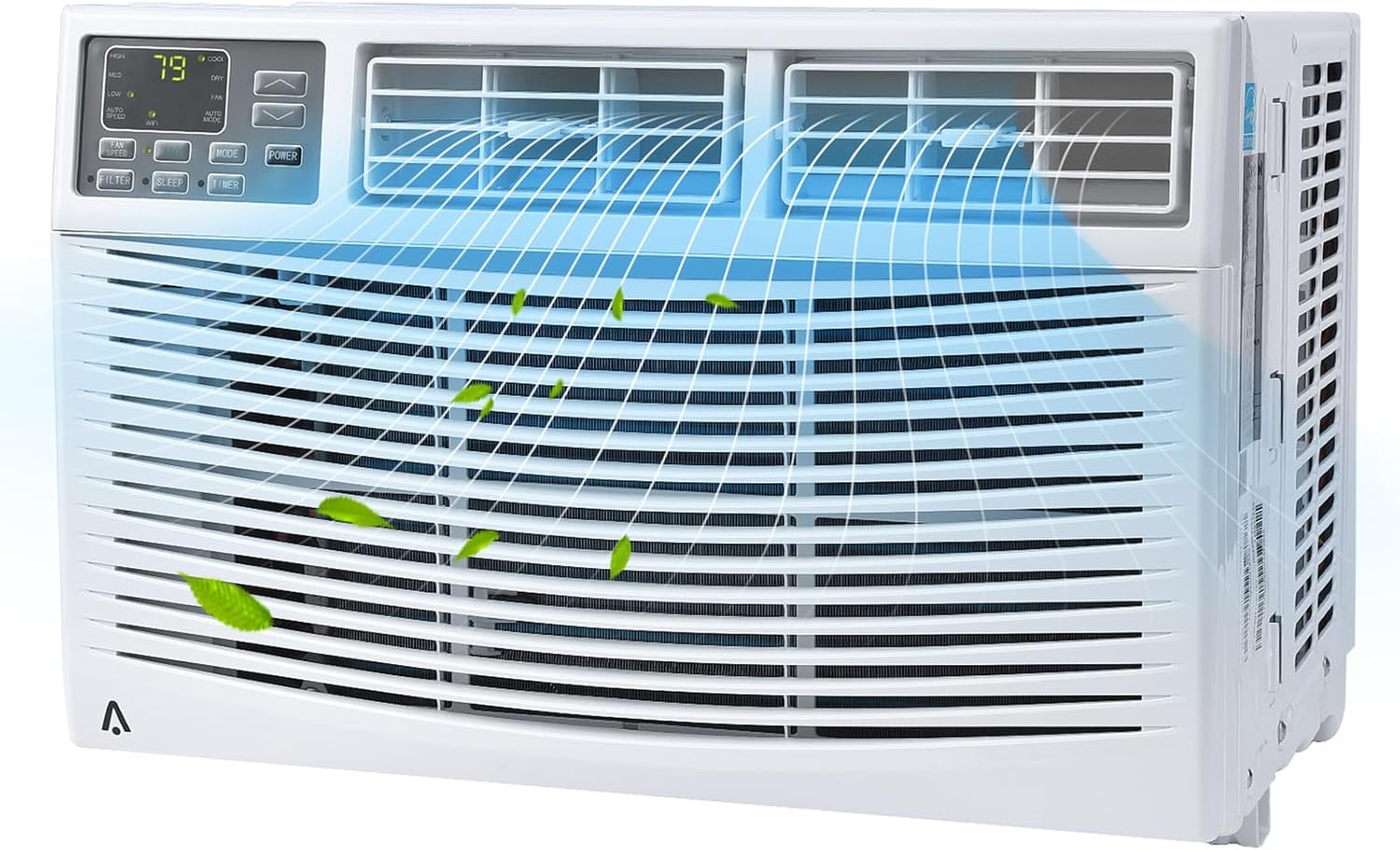
Immagine: Frontale view of the Takywep 12000 BTU Window Air Conditioner, showing the control panel and air vents.

Image: The air conditioner installed in a window, highlighting features such as 4 fan speeds, 0.5-24H timer, precise temperature control, ECO mode, and washable filter.
4. Installazione
This section provides general guidelines for installing your window air conditioner. For detailed, step-by-step instructions, please refer to the separate installation guide included with your product.
Requisiti della finestra:
- Suitable for windows 26-36 inches wide.
- Minimum window height of 16 inches.
Componenti inclusi per l'installazione:
- Window AC Unit (x1)
- Telecomando (x1)
- Telaio di bloccaggio (x2)
- Pannelli di riempimento (x2)
- Sash Lock (x1)
- Window Sash Seal (x1)
- Various Screws (3/8" x4, 1/2" x3, 3/4" x4)

Image: Diagram showing the dimensions of the air conditioner unit and the adjustable window panels, indicating suitability for window widths between 26 and 41 inches and a unit height of 15.16 inches.

Image: All components included in the installation kit, such as the AC unit, remote control, lock frames, filler panels, sash lock, window sash seal, and various screws.
5. Funzionamento
Your Takywep air conditioner offers various modes and settings for optimal comfort.
Pannello di controllo:
The control panel on the front of the unit allows direct access to all functions. It includes buttons for Power, Mode, Fan Speed, Temperature Up/Down, Timer, and Filter Reset.
Telecomando:
The included remote control provides convenient operation from a distance. Ensure batteries are correctly inserted.

Image: The air conditioner unit in a living room setting, with an illustration of the remote control and icons indicating features like dehumidifier function, cooling up to 550 sq. ft., and horizontal manual swing.
Modalità operative:
- Modalità fredda: Offre un raffreddamento potente. Imposta la temperatura desiderata tra 61 °C e 88 °C.
- Modalità ventola: Fa circolare l'aria senza raffreddare. Scegli tra 3 velocità della ventola (bassa, media, alta).
- Modalità deumidificatore: Riduce l'umidità nella stanza.
- Modalità ecologica: Optimizes energy usage by cycling the compressor on and off to maintain the set temperature.
- Modalità risparmio: Gradually increases the set temperature over several hours and reduces fan speed for quiet, comfortable sleep. Display lights can be shut off.

Image: A child sleeping peacefully with the air conditioner in the background, illustrating the benefits of the built-in Sleep Mode, including automatic temperature/fan speed adjustment, display lights shut off, noise level below 56dB, and energy saving.
6. Configurazione Wi-Fi
Your Takywep air conditioner is Wi-Fi enabled, allowing you to control it remotely via a smartphone application.
Steps for Wi-Fi Connectivity:
- Download the official Takywep smart home application from your device's app store.
- Crea un account o accedi se ne hai già uno.
- Ensure your air conditioner is powered on and within range of your Wi-Fi network.
- Follow the in-app instructions to add your new device. This typically involves putting the AC unit into pairing mode (refer to the unit's display or specific Wi-Fi button if available) and connecting it to your home Wi-Fi network.
- Once connected, you can control the unit's functions, set schedules, and monitor its status from your smartphone.
7. Manutenzione
Una manutenzione regolare garantisce prestazioni ottimali e longevità del tuo condizionatore.
Pulizia del filtro dell'aria:
Il filtro dell'aria deve essere pulito regolarmente, in genere ogni due settimane, o più spesso a seconda dell'utilizzo e della qualità dell'aria. Un filtro sporco può ridurre l'efficienza di raffreddamento e il flusso d'aria.
- Spegnere e scollegare il condizionatore d'aria.
- Aprire il pannello frontale e rimuovere con cautela il filtro dell'aria.
- Lavare il filtro con acqua calda e sapone. Risciacquare abbondantemente.
- Lasciare asciugare completamente il filtro all'aria prima di reinstallarlo. Non esporre alla luce solare diretta o a fonti di calore elevate.
- Reinserire il filtro asciutto e chiudere il pannello frontale.
Pulizia generale:
- Pulire l'esterno dell'unità con un panno morbido, damp stoffa. Non utilizzare prodotti chimici aggressivi o detergenti abrasivi.
- Ensure the drainage area is clear of obstructions.
8. Risoluzione Dei Problemi
Prima di contattare l'assistenza clienti, fai riferimento ai seguenti problemi comuni e alle relative soluzioni:
| Problema | Possibile causa | Soluzione |
|---|---|---|
| L'unità non si accende | Nessuna alimentazione; Cavo di alimentazione non completamente collegato; Fusibile bruciato/interruttore automatico scattato | Check power connection; Reset circuit breaker; Contact an electrician if issue persists |
| Raffreddamento insufficiente | Dirty air filter; Room too large; Doors/windows open; Temperature setting too high | Clean air filter; Ensure room size is within specifications; Close doors/windows; Lower temperature setting |
| L'unità è rumorosa | Loose installation; Obstruction in fan; Unit not level | Check installation for tightness; Remove any obstructions; Ensure unit is level |
| Perdita d'acqua | Unit not level; Drain plug blocked | Ensure unit is level; Clear any blockages from the drain plug |
| Problemi di connessione Wi-Fi | Password Wi-Fi errata; Router troppo lontano; App non aggiornata | Verify Wi-Fi password; Move unit closer to router or use Wi-Fi extender; Update app to latest version |
9. Specifiche
| Caratteristica | Specificazione |
|---|---|
| Marca | Takywep |
| Numero di modello | CW8AkocLtVK9ueubqbCA4gb3Y7o |
| Potenza di raffreddamento | 12000 unità termiche britanniche (BTU) |
| Area di copertura | Fino a 550 piedi quadrati |
| Voltage | 115V |
| Seasonal Energy Efficiency Ratio (CEER) | 10.9 |
| Peso dell'articolo | 72.8 libbre |
| Dimensioni del prodotto (P x L x A) | 19.76 x 21.5 x 15.16 pollici |
| Livello di rumore | 56 decibel |
| Refrigerante | La 410A |
| Tipo di installazione | Finestra |
| Caratteristiche speciali | Wi-Fi Enabled, Remote Control, Dehumidifier, Fan, Reusable Filter, Sleep Mode |
10. Garanzia e supporto
For warranty information and customer support, please refer to the warranty card included with your product or contact Takywep customer service directly. Details regarding product registration and service requests can typically be found on the manufacturer's official websito.
Data prima disponibilità: 9 maggio 2024