Introduzione
This manual provides instructions for the Allimity N2QAYB001101 replacement remote control. This remote is designed to function as a direct replacement for original Panasonic remote controls, compatible with various CD Stereo System models including SB-PMX70, SC-PMX82, SC-PMX80, SA-PMX82MEBK, and SC-PMX94EG-K. It offers full access to all original functions without requiring any programming.

Figure 1: Replacement Remote vs. Original Remote.
Impostare
Installazione della batteria
The Allimity N2QAYB001101 remote control requires two (2) 1.5V AAA alkaline batteries (not included). Follow these steps to install the batteries:
- Individuare il vano batterie sul retro del telecomando.
- Per aprire il coperchio del vano batteria, farlo scorrere verso il basso.
- Inserire due batterie AAA, assicurandosi che i terminali positivo (+) e negativo (-) siano allineati correttamente con le marcature all'interno del vano.
- Riposizionare il coperchio del vano batteria finché non scatta in posizione.

Figure 2: Battery Compartment. Ensure correct battery polarity during installation.
Utilizzo iniziale
No programming or setup is required for this remote control. Once batteries are installed, it is ready for immediate use with compatible Panasonic CD Stereo Systems.
Istruzioni per l'uso
This remote control provides full functionality for your compatible Panasonic CD Stereo System. The layout and function of the buttons are designed to mirror the original remote control.
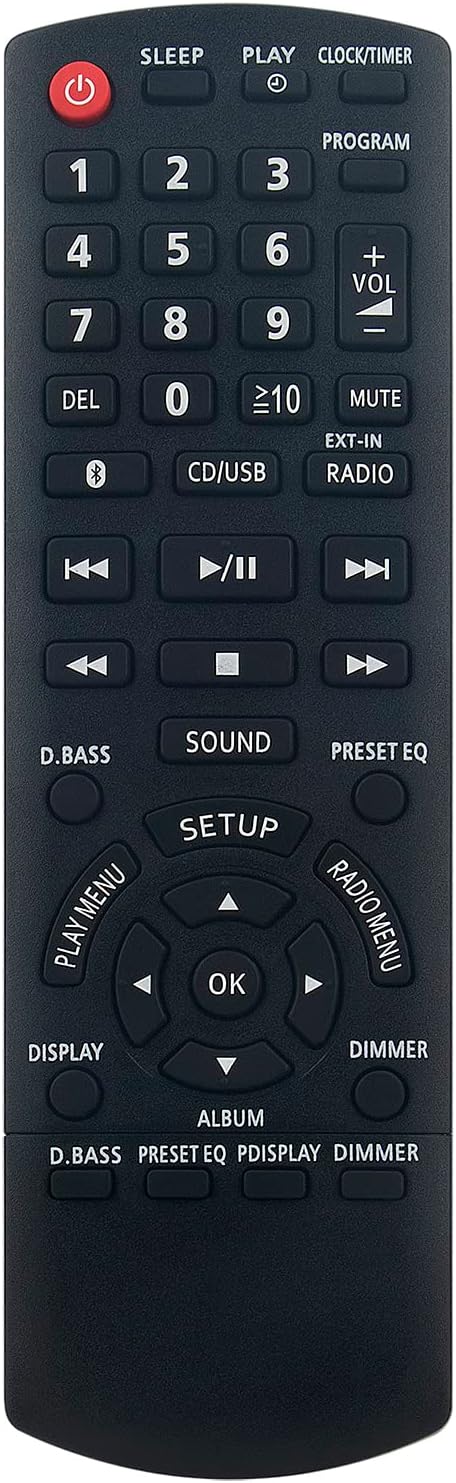
Figura 3: Fronte View del telecomando.
Funzioni chiave finiteview
- Pulsante di accensione (●): Accende o spegne l'impianto stereo.
- Tastierino numerico (0-9): Used for direct track selection or inputting numbers for programming.
- Controllo del volume (VOL +/-): Regola il livello di uscita audio.
- Disattiva audio: Disattiva l'uscita audio.
- CD/USB: Selects the CD or USB input source.
- EXT-IN: Selects the external input source.
- RADIO: Passa alla modalità radio.
- Playback Controls (Play/Pause, Stop, Skip Forward/Backward): Controlli standard per la riproduzione multimediale.
- D.BASS: Activates or deactivates dynamic bass boost.
- SUONO: Accede alle impostazioni audio.
- EQ PREIMPOSTATO: Scorre le modalità di equalizzazione preimpostate.
- IMPOSTARE: Accede al menu di configurazione del sistema.
- Pulsanti di navigazione (Su, Giù, Sinistra, Destra, OK): Utilizzato per la navigazione e la selezione del menu.
- DISPLAY: Modifica le informazioni visualizzate.
- DIMMERATORE: Regola la luminosità del display dell'impianto stereo.
- PLAY MENU: Accesses playback options.
- RADIO MENU: Accesses radio specific options.
Manutenzione
Pulizia del telecomando
Per preservare l'aspetto e la funzionalità del telecomando, pulirlo regolarmente:
- Pulisci la superficie con un panno morbido e asciutto.
- Per sporco ostinato, leggermente dampPulire il panno con acqua o con un detergente delicato e non abrasivo. Non spruzzare il detergente direttamente sul telecomando.
- Evitare l'uso di prodotti chimici aggressivi, solventi o spugne abrasive, poiché potrebbero danneggiare la finitura del telecomando o i componenti interni.
Sostituzione della batteria
Replace batteries when the remote control's response becomes sluggish or stops functioning. Always replace both batteries at the same time with new 1.5V AAA alkaline batteries. Do not mix old and new batteries or different types of batteries.
Magazzinaggio
Store the remote control in a cool, dry place away from direct sunlight and extreme temperatures when not in use for extended periods. Remove batteries if storing for more than a month to prevent leakage.
Risoluzione dei problemi
| Problema | Possibile causa | Soluzione |
|---|---|---|
| Il telecomando non risponde. | Batterie scariche o installate in modo errato. | Sostituire le batterie con nuove batterie alcaline AAA da 1.5 V, assicurandosi della corretta polarità. |
| La portata del telecomando è ridotta. | Weak batteries; Obstruction between remote and stereo system; Infrared sensor on stereo system is blocked. | Replace batteries. Ensure a clear line of sight between the remote and the stereo system. Clean any dust or debris from the stereo system's IR sensor. |
| Pulsanti specifici non funzionanti. | Sporco o detriti sotto il pulsante; malfunzionamento interno. | Clean the remote control. If the issue persists, the remote may be faulty and require replacement. |
Specifiche
- Modello: N2QAYB001101
- Marca: ALLIMITÀ
- Dispositivi compatibili: Panasonic SB-PMX70, SC-PMX82, SC-PMX80, SA-PMX82MEBK, SC-PMX94EG-K CD Stereo Systems, and other listed models.
- Tecnologia di connettività: Infrarossi
- Caratteristica speciale: Nessuna programmazione richiesta
- Portata massima: Circa 10 metri (33 piedi)
- Fonte di energia: 2 batterie alcaline AAA da 1.5 V (non incluse)
- Dimensioni del prodotto: 17 x 5 x 2.5 cm (6.7 x 2 x 1 pollici)
- Peso del prodotto: 80 grammi (2.8 once)
Garanzia e supporto
For warranty information and customer support, please refer to the seller's policy on the platform where the product was purchased. As a replacement remote, specific warranty terms may vary. For general inquiries or assistance, please contact the seller directly through the purchase platform.
This product is designed to be a direct replacement and should function immediately upon battery installation. If you encounter any issues not covered in the troubleshooting section, please reach out to the seller for further assistance.