
LIGE ST6 PRO-E
LIGE ST6 PRO-E Smart Watch User Manual
Model: ST6 PRO-E | Brand: LIGE
Introduzione
This manual provides detailed instructions for the LIGE ST6 PRO-E Smart Watch. It covers product features, setup procedures, operational guidelines, maintenance tips, and troubleshooting information to ensure optimal use of your device.
Cosa c'è nella scatola
- Orologio intelligente
- Cavo di ricarica
- Smartwatch Manuals
- Strumenti di impostazione dell'orologio
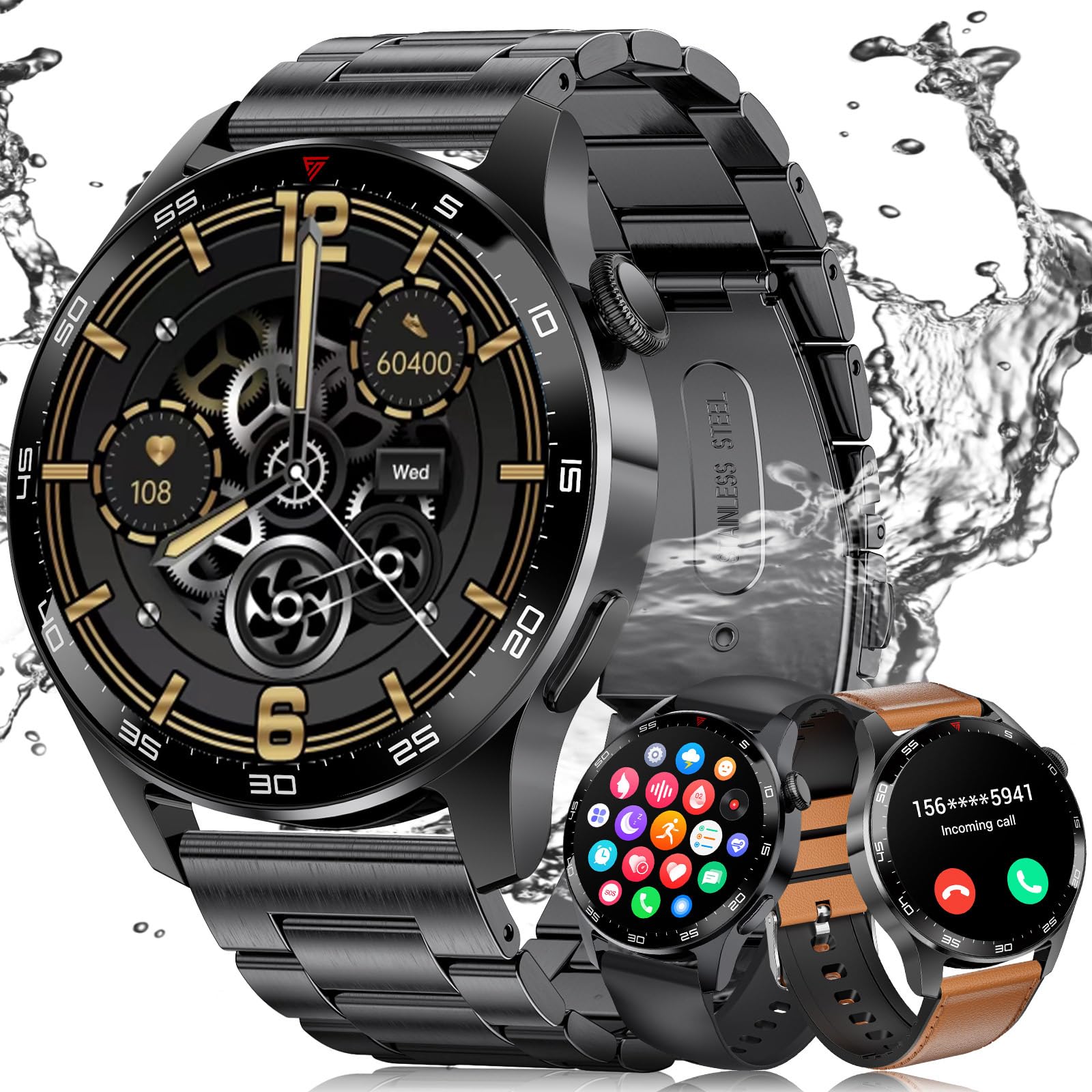
- Watch Straps (3 types: black stainless steel, black silicone, brown leather)
Impostare
1. Installazione dell'app e associazione del dispositivo
To use all features of your LIGE ST6 PRO-E Smart Watch, download and install the "GloryFit" app on your smartphone. The watch is compatible with Android 5.0+ and iOS 9.0+ devices.
- Assicurati che il Bluetooth del tuo smartphone sia abilitato.
- Open the "GloryFit" app and follow the on-screen instructions to add a new device.
- Select "ST6 PRO" from the list of available devices.
- Conferma la richiesta di associazione sia sul telefono che sullo smartwatch.
- Allow the "GloryFit" app to run in the background to maintain a stable connection.
2. Strap Adjustment and Replacement
Your smartwatch comes with three interchangeable straps: black stainless steel, black silicone, and brown leather. Use the provided watch setting tools to adjust or replace straps.
- To remove a strap: Locate the spring bar on the underside of the strap where it connects to the watch body. Use the tool to push the spring bar inward and gently pull the strap away.
- To attach a strap: Insert one end of the spring bar into the lug hole on the watch. Use the tool to push the other end of the spring bar inward, align it with the opposite lug hole, and release. Ensure the strap is securely fastened.
- For the stainless steel strap: Use the provided pin removal tool to adjust the length by pushing out pins from the links you wish to remove. Reinsert pins to secure the adjusted length.
Istruzioni per l'uso
1. Navigazione di base
- Scorri verso l'alto/il basso: Accedi alle impostazioni rapide o alle notifiche.
- Scorri verso sinistra/destra: Navigate through widgets like activity, heart rate, weather, music control.
- Premere il pulsante laterale: Torna alla schermata iniziale o accedi al menu dell'app.
- Ruota la corona: Scroll through menus and watch faces.

2. Chiamate e notifiche Bluetooth
Once paired with your phone, the smartwatch supports Bluetooth calls and smart notifications.
- Effettuare le chiamate: Access the "Call" function from the app menu, use the dial pad to enter a number, or select from contacts.
- Rispondere alle chiamate: Quando ricevi una chiamata, tocca l'icona verde sullo schermo dell'orologio per rispondere.
- Notifiche: Receive alerts for messages from social media apps (e.g., WeChat, Facebook, WhatsApp) directly on your watch.
- Non disturbare: Swipe down on the watch face and tap the crescent moon icon to activate "Do Not Disturb" mode.

3. Monitoraggio della salute
L'orologio offre funzionalità di monitoraggio continuo della salute.
- Monitoraggio della frequenza cardiaca: Tiene traccia della frequenza cardiaca durante il giorno.
- Monitoraggio dell'ossigeno nel sangue (SpO2): Misura i livelli di ossigeno nel sangue.
- Monitoraggio del sonno: Records sleep patterns, including deep sleep, light sleep, and REM.
- Consumo calorico: Tracks calories burned based on activity.

4. Monitoraggio fitness e modalità sport
The smartwatch supports over 100 sports modes and tracks daily activity.
- Monitoraggio delle attività: Monitors steps, distance, and active time.
- Modalità Sportive: Select from various modes like outdoor running, cycling, skipping, swimming, and more to track specific workout data.

5. Funzionalità aggiuntive
- Controllo della musica: Controlla la riproduzione musicale sul tuo telefono direttamente dall'orologio.
- Telecamera remota: Utilizza l'orologio come otturatore remoto per la fotocamera del tuo telefono.
- Previsioni del tempo: Ricevi aggiornamenti meteo in tempo reale.
- Sveglia: Imposta più sveglie.
- Assistente vocale: Interagisci con l'assistente vocale del tuo telefono.
- Trova telefono/orologio: Locate your phone using the watch, or vice-versa via the app.
- Quadranti personalizzati: Choose from various pre-installed watch faces or use your own photos.

Manutenzione
1. Durata della batteria
The LIGE ST6 PRO-E Smart Watch is equipped with a 400mAh battery. Average service life is up to 3 days, with standby time exceeding 7 days. Ensure the "GloryFit" app is allowed to run in the background to optimize battery performance and maintain connectivity.

2. Grado di impermeabilità
The smartwatch has an IP68 waterproof rating, making it resistant to dust and immersion in water up to 1.5 meters for 30 minutes. It is suitable for daily use and light water activities like swimming, but not for diving or high-pressure water activities.
Risoluzione dei problemi
- Problemi di connettività: Ensure Bluetooth is on, the watch is within 9-10 meters of your phone, and the "GloryFit" app is running in the background without being closed by your phone's system.
- Dati sanitari imprecisi: Ensure the watch is worn snugly on your wrist. Clean the sensor regularly.
- L'orologio non si accende: Carica l'orologio per almeno 30 minuti. Se ancora non si accende, contatta l'assistenza clienti.
- App non sincronizzata: Check your phone's internet connection and ensure the "GloryFit" app has all necessary permissions. Restart both the watch and the app.
Specifiche
| Caratteristica | Dettaglio |
|---|---|
| Numero di modello | ST6 PRO-E |
| Dimensioni dello schermo | 1.43 pollici HD AMOLED |
| Capacità della batteria | Polimeri di litio da 400 mAh |
| Connettività | Bluetooth 5.2 |
| Grado di impermeabilità | Grado di protezione IP68 |
| Compatibilità | Android 5.0+ / iOS 9.0+ |
| Archiviazione della memoria | 256 MB |
| Peso dell'articolo | 4.16 once |
| Caratteristiche speciali | Fitness Tracker, Always On Display, Phone Call, Sleep Monitor, 100+ Sports Modes, Blood Oxygen (SpO2) Monitor, Heart Rate Monitor, Calorie Tracker, Alarm Clock, Stopwatch, Timer, Pedometer, Camera Control, Music Playback/Control, Sedentary Reminder, Weather, Notifications. |
Garanzia e supporto
LIGE is committed to ensuring customer satisfaction. If you have any questions or require assistance with your LIGE ST6 PRO-E Smart Watch, please do not hesitate to contact our customer service. We are dedicated to providing reliable service and a positive experience.
Ask a question about this manual
Ask about setup, troubleshooting, compatibility, parts, safety, or missing instructions. Manuals+ will review the question and use this page’s manual context to help answer it.