1. Prodotto finitoview
This document provides instructions for the Generic Replacement Remote Control, designed to operate various Toshiba Air Conditioner models, including RC-WC-TA06NE, RAS-13N3KV-E, RAS-24BKVG-E, RAS-10N3KV2-A1, RAS-10N3AV2-A1, RAS-13N3KV2-A1, RAS-13N3AV2-A, and RAS-16N3KV2-A1. This is an infrared (IR) replacement remote control that requires no complex setup or programming.
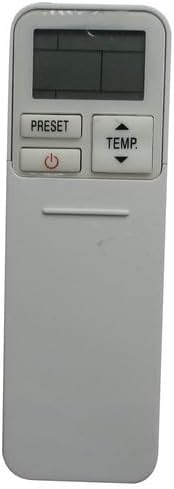
Immagine 1.1: Davanti view of the replacement remote control. It features a display screen at the top, with 'PRESET' and 'TEMP' buttons, and a power button below the display. The lower section is smooth, indicating a sliding cover for additional buttons.
2. Configurazione e installazione della batteria
The remote control requires two AAA batteries (not included). No additional setup or coding is required for operation; simply insert the batteries and the remote is ready for use.
2.1 Installazione della batteria
- Locate the battery compartment on the back of the remote control. This is typically covered by a sliding panel.
- Per aprire il coperchio del vano batteria, farlo scorrere verso il basso o verso l'esterno.
- Inserire due batterie AAA, assicurandosi che i terminali positivo (+) e negativo (-) siano allineati correttamente con le marcature all'interno del vano.
- Riposizionare il coperchio del vano batteria finché non scatta in posizione.

Immagine 2.1: Posteriore view of the remote control with the battery cover removed. This image clearly shows the empty battery compartment at the bottom and the array of functional buttons that are typically hidden under a sliding panel on the front.
3. Istruzioni per l'uso
To operate the air conditioner, point the remote control directly at the air conditioner's receiver. Ensure there are no obstructions between the remote and the unit.
3.1 Funzioni dei pulsanti

Immagine 3.1: Angolato view of the remote control with its sliding cover open, revealing the full set of control buttons. The top section includes the display, 'PRESET', 'TEMP', and power button. Below the sliding cover, buttons for 'MODE', 'SWING', 'FAN', 'QUIET', 'FIX', 'HI POWER', 'TIMER', 'ON', 'OFF', 'CLR', 'SET', 'CHECK', 'CLOCK', 'FILTER', and 'RESET' are visible.
| Pulsante | Funzione |
|---|---|
| Potenza (⏻) | Accende o spegne l'unità del condizionatore. |
| TEMP (▲/▼) | Regola l'impostazione della temperatura verso l'alto o verso il basso. |
| PRESET | Recalls a saved preferred operating setting. |
| MODALITÀ | Passa attraverso le modalità operative (ad esempio, Raffreddamento, Riscaldamento, Ventilatore, Deumidificazione, Auto). |
| SWING | Controlla la direzione verticale del flusso d'aria (oscillazione delle alette). |
| FAN | Regola la velocità della ventola (ad esempio, Bassa, Media, Alta, Auto). |
| TRANQUILLO | Attiva una modalità di funzionamento a basso rumore. |
| AGGIUSTARE | Sets the louver to a fixed position. |
| ALTA POTENZA | Attiva una funzione di raffreddamento o riscaldamento rapido. |
| TIMER ON / OFF | Sets the time for the unit to turn ON or OFF automatically. |
| CLR | Clears a setting or timer. |
| IMPOSTATO | Confirms a setting or timer. |
| CONTROLLO | Displays operational status or error codes. |
| OROLOGIO | Imposta l'ora corrente sul display del telecomando. |
| FILTRO | Indicates when the air filter needs cleaning or resetting the filter indicator. |
| RESET | Resets the remote control to factory default settings (often requires a pointed object). |
4. Manutenzione
4.1 Sostituzione della batteria
Replace batteries when the remote's display becomes dim or the remote no longer controls the air conditioner effectively. Always replace both batteries simultaneously with new AAA batteries.
4.2 Pulizia
Pulisci il telecomando con un panno morbido e asciutto. Non utilizzare detergenti liquidi, abrasivi o spray chimici, poiché potrebbero danneggiare la superficie o i componenti interni del telecomando.
4.3 Conservazione
Se il telecomando non verrà utilizzato per un periodo prolungato, rimuovere le batterie per evitare perdite e potenziali danni al telecomando.
5. Risoluzione Dei Problemi
- Il telecomando non risponde:
- Controllare che le batterie siano inserite correttamente, rispettando la polarità corretta.
- Sostituire le vecchie batterie con quelle nuove.
- Assicurarsi che non vi siano ostacoli tra il telecomando e il ricevitore del condizionatore.
- Confirm you are within the effective operating range of the air conditioner's IR receiver.
- Il display è scuro o vuoto:
- Sostituire le batterie.
- Remote functions are erratic:
- Try resetting the remote by removing the batteries for a few minutes, then reinserting them.
- Ensure no other infrared devices are interfering with the signal.
6. Specifiche
- Tipo di prodotto: Telecomando a infrarossi (IR) sostitutivo
- Dispositivi compatibili: Toshiba Air Conditioners (Specific models listed in Product Overview)
- Fonte di energia: 2 x batterie AAA (non incluse)
- Caratteristiche speciali: Ergonomic design, no setup or coding required
- Colore: Nero
7. Garanzia e supporto
As a generic replacement product, specific warranty terms and support channels may vary. Please refer to the purchase documentation or contact the seller directly for information regarding warranty coverage, returns, or technical assistance.
This remote control is designed to function as a direct replacement for the original unit. Compatibility is confirmed if your original remote matches the appearance of this replacement remote, as indicated in the product listing.


