
SingularXYZ SingularXYZ-E1 Lite-1+1
Manuale utente dell'apparecchiatura di rilevamento GNSS RTK SingularXYZ E1 Lite
Model: SingularXYZ-E1 Lite-1+1 | Brand: SingularXYZ
1. Introduzione
This user manual provides comprehensive instructions for the setup, operation, and maintenance of your SingularXYZ E1 Lite GNSS RTK Surveying Equipment. Designed for high-precision satellite positioning, this system offers centimeter-level accuracy for various surveying applications. Please read this manual thoroughly before using the equipment to ensure optimal performance and safety.
2. Cosa è incluso
Upon opening the transport case, verify that all components are present:
- E1 Lite GNSS Receiver (x2)
- Transport Case (x2)
- USB-Type C Cable (x2)
- Super Charger (x2)
- SingularPad Software (x1)
- SC200 Data Collector (x1)
- Cavo USB (x1)
- Super Charger (x1)
- Staffa (x1)
- Guida rapida (x1)
- Quick Start Card (x1)
- Whip Antenna (x2)
- Tape Measure (x1)
- 20 cm extension rod plugged on tribrach (x1)

Figure 2.1: E1 Lite GNSS RTK Surveying Equipment components.

Figura 2.2: Imballaggio e contenuto del prodotto.
Nota speciale: Poles, tripods, and tribrachs are not included with this product and must be acquired separately if needed for your surveying tasks.
3. Configurazione e connessione iniziale
3.1 Ricarica dei dispositivi
The E1 Lite RTK handheld GPS provides over 20 hours of continuous operation on a single charge. Use the provided Type-C chargers to fully charge both the E1 Lite GNSS Receivers and the SC200 Data Collector before initial use. Fast charging is supported.
3.2 Dispositivo suview e interfacce
Familiarize yourself with the device's front panel indicators and various connection interfaces:

Figure 3.1: Front Panel and Interfaces of the E1 Lite GNSS Receiver.
- Pannello frontale: Satellite Tracking Indicator, Static & Network Indicator, Power Indicator, Function Button.
- Interfacce: NFC (Touch connection), Bluetooth, USB Type-C (for charging and data download), WiFi, TNC Connector (for UHF Antenna), RS232 Serial Port.
3.3 Connecting Devices via SingularPad Software
The SingularPad software is essential for controlling and configuring your E1 Lite GNSS RTK equipment. Follow these steps to connect your devices:
Video 3.1: Singular Software Tutorial - Device Connection. This video demonstrates how to connect your GNSS device to the SingularPad software via Bluetooth, including steps for SingularXYZ RTK Receivers, other brand NMEA devices, and SingularXYZ GNSS Tablets.
Passaggi generali per la connessione:
- Accendi il tuo dispositivo GNSS.
- On the SC200 Data Collector, open the SingularPad software.
- Vai a Dispositivo >> Comunicazione per connettere il tuo dispositivo.
- Per i ricevitori RTK SingularXYZ (ad esempio, ricevitore GNSS Y1): selezionare SingolareXYZ >> RTK >> Bluetooth. Cercare your device's Serial Number (SN) and connect.
- Per dispositivi GNSS NMEA (altre marche): selezionare Altro >> RTK(NMEA0183) >> BluetoothCerca e connetti il dispositivo.
- Per i tablet GNSS SingularXYZ (ad esempio, tablet GNSS T8 Pro): seleziona Altro >> GPS interno >> GPS interno e collegare il dispositivo.
- After successful connection, you can go to Dispositivo >> Informazioni sul dispositivo A view informazioni sul dispositivo corrente.

Figure 3.2: Setting up Rover and Base units in SingularPad.
Setting up Rover and Base (for Base + Rover mode):
- Ensure you have two E1 Lite GNSS receivers. Designate one as the base and the other as the rover.
- Connect both to your PDA device via Bluetooth.
- Place both your E1 Lite base and rover in an open view del cielo.
- Connect the whip antenna to both E1 Lite base and rover.
- Impostazione della base: Connect E1 Lite base to your PDA, go to Device >> Base. Per Base Startup Mode, you can input known point coordinates or select Punto singolo mode for automatic setup. Set Collegamento dati as Internal Radio, and customize radio channels, frequency, and protocol. Save settings and Start Base.
- Setting up the Rover: Disconnect E1 Lite base and connect to the rover in the software. Go to Device >> Rover, impostato Collegamento dati as Internal Radio. Match and set the same protocol and frequency as the base setting. Click Collezione to save settings and click Fare domanda a.
4. Istruzioni per l'uso
4.1 modalità di lavoro
The E1 Lite GNSS RTK system supports two primary working modes:
- Base + Rover Mode: Provides millimeter-level positioning. Compatible with base stations of other brands. Not subject to network and regional restrictions.
- Rover + CORS Mode: Provides centimeter-level positioning. Requires a network signal. CORS account is not included and must be purchased from your local CORS provider.

Figure 4.1: E1 Lite Working Modes.
4.2 Working with CORS/RTK Correction Service
To utilize the CORS/RTK correction service, ensure you have purchased a CORS/RTK Correction Service account in your local area. Your PDA device (phone/tablet/data collector) must have network access and support Bluetooth connection. Place your E1 Lite GNSS receiver in an open view del cielo.
- Open SingularPad software.
- Clic "Communication" and connect to your E1 Lite receiver's SN via Bluetooth.
- Clic Ottenere to obtain Mount-Point list and select appropriate one. Click Inizio E Fare domanda a.
- Clic "Rover". Impostato Collegamento dati as Phone Internet. Then go to Modalità di connessione and fill in your CORS/RTK Correction Service account details.

Figure 4.2: Connecting to CORS/RTK Correction Service.
4.3 Viewing RTK Positioning Status
After completing your E1 Lite RTK setup, check the current RTK solution status in the upper left corner of the SingularPad software:
- FISSO: E1 Lite is receiving corrections stably and obtaining a Fixed RTK solution with centimeter-level accuracy. Typically, E1 Lite achieves a Fixed RTK solution in a few seconds under good environments.
- GALLEGGIANTE: E1 Lite receives corrections from the base/CORS, but due to obstructions or magnetic field interference, the signal reception is not very stable and the accuracy is sub-meter level. In tougher conditions, it may take a bit longer to achieve FIXED status.
- AUTONOMO: Single-point satellite positioning without receiving RTK correction data. The accuracy is around meter-level.

Figure 4.3: RTK Positioning Status Indicators.
Mancia: Before surveying, make sure E1 Lite has a clear sky, free from obstacles like buildings, trees, cars, and more.
4.4 Funzionalità avanzate
- 60° Tilt Surveying: The E1 Lite GNSS Surveying System with IMU initializes in 5 seconds and supports tilt measurements up to 60°, compatible with regular 5/8" thread poles. This allows for surveying in challenging locations without needing perfect vertical alignment.
- 5 Kilometers UHF Range: The radio range between the rover and the base can reach 5 kilometers (3.1 miles). The E1 Lite is compatible with base stations of other brands in both Radio and CORS mode and supports RTCM v3/CMR correction data transmission.
- Robust Signal Tracking: Supports Full-Constellation Tracking (GPS/GLONASS/Galileo/BDS/QZSS/IRNSS/SBAS etc.), allowing for fixed RTK solutions in seconds even in challenging environments like multipath, trees, and city canyons.
- Easy Data Download via Web Interfaccia utente: Access E1's WiFi to conduct static data download, firmware upgrade, and configuration via its web pagina.

Figure 4.4: Advanced IMU Tilt Measurement in action.

Figure 4.5: Superior Performance in Challenging Environments.

Figure 4.6: Easy Data Download via Web UI.
5. Manutenzione
The E1 Lite GNSS RTK equipment is designed for durability and reliability in harsh environments. It features an Grado di protezione IP68, making it waterproof, dustproof, and shock-resistant.
- Pulire regolarmente il dispositivo con un panno morbido, damp stoffa. Evitare detergenti abrasivi.
- Ensure all ports (Type-C, TNC) are free from debris and properly sealed when not in use.
- Store the equipment in its transport case when not in use to protect it from physical damage and environmental factors.
- Periodically check cables and connectors for wear and tear. Replace if damaged.

Figure 5.1: E1 Lite's Rugged Design and Battery Life.
6. Risoluzione Dei Problemi
If you encounter issues with your E1 Lite GNSS RTK Surveying Equipment, consider the following common points:
- Problemi di connessione: Ensure Bluetooth is enabled on both the data collector and the receiver. Verify that the correct device type and manufacturer are selected in the SingularPad software. Try restarting both devices.
- Poor Accuracy/No Fixed Solution:
- Assicurarsi che il ricevitore abbia una chiara view of the sky, free from obstructions like buildings, dense trees, or large metal objects.
- Check the status indicator on the device and in the SingularPad software (refer to Section 4.3).
- Verify that the base station (if in Base+Rover mode) or CORS service (if in Rover+CORS mode) is active and providing corrections.
- Confirm that the radio frequency and protocol settings match between the base and rover units.
- Durata della batteria: Ensure devices are fully charged before use. Check the battery indicator in the SingularPad software.
- Problemi software: Ensure your SingularPad software is up to date. Refer to the software's help section or online tutorials for specific software-related problems.
For persistent issues or problems not covered here, please contact SingularXYZ customer support for assistance. Refer to the "Support" section for contact details.
7. Specifiche
| Caratteristica | Specificazione |
|---|---|
| Peso dell'articolo | 1.91 libbre |
| Dimensioni del prodotto | 2.64 x 5.26 x 5.26 pollici |
| Numero modello articolo | SingularXYZ-E1 Lite-1+1 |
| Batterie | 3 batteria agli ioni di litio richiesta (inclusa) |
| Durata della batteria | 20 ore |
| Display Size (SC200 Data Collector) | 5.5 inches (SC200) / 1 inch (E1 Lite receiver display) |
| Tilt Survey Accuracy | ±2.5cm at 60° tilt |
| Canali | 1408 canali |
| UHF Radio Range | Up to 5 kilometers (3.1 miles) |
| Constellation Tracking | GPS/GLONASS/Galileo/BDS/QZSS/IRNSS/SBAS etc. |
| Connettività | NFC, Bluetooth, USB Type-C, WiFi, TNC Connector, RS232 Serial Port |
| Grado di protezione IP (ingresso) | IP68 (Waterproof, Dustproof, Shock-resistant) |
| Paese di origine | Cina |
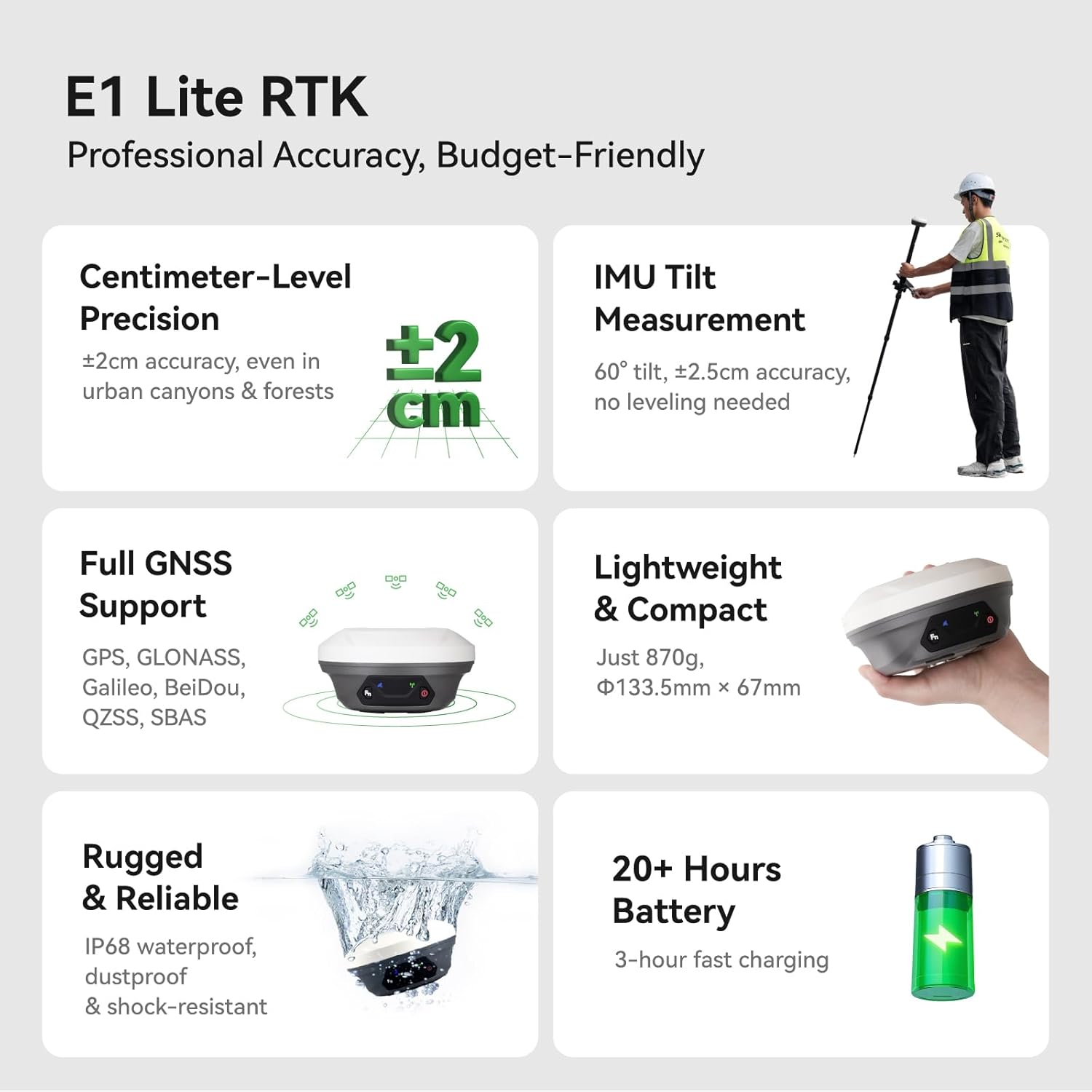
Figure 7.1: E1 Lite RTK Key Specifications.

Figure 7.2: Lightweight and Portable Design.
8. Garanzia
The SingularXYZ E1 Lite GNSS RTK Surveying Equipment comes with a garanzia di un anno dalla data di acquisto. Questa garanzia copre i difetti di fabbricazione e garantisce che il prodotto soddisfi gli standard prestazionali specificati. Si prega di conservare la prova d'acquisto per eventuali reclami in garanzia.
9. Supporto e risorse
SingularXYZ is committed to providing excellent customer support. For any inquiries, technical assistance, or service requests, please utilize the following resources:
- 1-On-1 Support Service: Direct technical support is available to assist you with any operational or technical challenges.
- Manuale utente (PDF): A comprehensive PDF version of the user manual is available for download. Scarica il manuale utente in formato PDF
- Video tutorial: Access a library of video tutorials to help you get started and master various functions of your equipment.
- Aggiornamenti software: Enjoy permanent free software upgrades and update services for the SingularPad and Post-processing Software.
- FCC Radio License Note: U.S. users must apply for an FCC radio license for commercial use (e.g., surveying, construction) with the UHF function (450–470 MHz). The device is FCC certified, and supporting information can be provided if needed.
For direct contact, please visit the official SingularXYZ websito o fare riferimento alle informazioni di contatto fornite con la documentazione del prodotto.
Ask a question about this manual
Ask about setup, troubleshooting, compatibility, parts, safety, or missing instructions. Manuals+ will review the question and use this page’s manual context to help answer it.