
1. Introduzione
This manual provides detailed instructions for the assembly, operation, and maintenance of your AODK Electric L Shaped Standing Desk. This desk is designed to offer a versatile and ergonomic workspace with adjustable height settings and integrated power solutions. Please read this manual thoroughly before assembly and use to ensure proper function and safety.
2. Informazioni sulla sicurezza
- Questo prodotto è progettato esclusivamente per uso interno.
- Non superare la portata massima della scrivania.
- Ensure that all screws and bolts are tightened properly during assembly and periodically checked for tightness.
- Do not use the desk if any parts are damaged or missing.
- Tenere la scrivania lontana da fonti d'acqua e liquidi.
- Unplug the desk when not in use.
- Always use the electric height adjustment feature responsibly and be aware of your surroundings while the desk is in motion.
- Children should not be allowed to play with the desk or its controls.
3. Contenuto della confezione
Verificare che tutti i componenti siano presenti prima di iniziare il montaggio. Se qualche componente risulta mancante o danneggiato, contattare l'assistenza clienti.
- Main Desktop Panels (L-shaped sections)
- Pannelli per supporto monitor
- Desk Legs and Feet
- Electric Lift System (Motor, Control Panel, Power Adapter)
- Built-in Power Strip (with AC outlets, USB, and Type-C ports)
- Ferramenta di montaggio (viti, bulloni, chiave a brugola)
- Manuale di istruzioni
4. Istruzioni di montaggio
Follow these steps carefully to assemble your AODK Electric L Shaped Standing Desk. It is recommended to have two people for certain steps, especially when handling large desktop panels.
4.1 Disimballaggio e identificazione delle parti
Carefully unpack all components and lay them out on a soft, clean surface to prevent scratches. Identify each part using the provided parts list in your physical manual.
4.2 Assemblaggio del telaio
Assemble the desk frame by attaching the legs to the crossbars. Ensure all connections are secure but do not fully tighten screws until the desktop is in place.
4.3 Desktop Attachment and Reversible Design
Place the desktop panels onto the assembled frame. The L-shape design is reversible, allowing you to install the sub-table panel on either the left or right side to suit your workspace configuration. Secure the desktop panels to the frame using the provided hardware. Once the desktop is in place, fully tighten all screws on the frame.

Image: Two assembly options for the L-shaped desk, demonstrating the reversible design.
4.4 Power Strip and Monitor Stand Installation
Install the built-in power strip into its designated slot on the desktop. Position the monitor stand panels on the desktop as desired. Connect the power adapter to the desk's control box and plug it into a wall outlet.

Image: Close-up of the built-in power strip with 3 AC outlets, 1 USB, and 1 Type-C port.

Immagine: View of the full-sized monitor stand providing elevated display space.
5. Istruzioni per l'uso
5.1 Regolazione elettrica dell'altezza
The desk features an electric lift system allowing height adjustment from 28.3 inches to 47.2 inches. Use the up and down arrow buttons on the control panel to manually adjust the desk height.

Image: Multi-function control panel with LED display and buttons.
5.2 Preimpostazioni di memoria
The control panel includes three memory preset buttons (1, 2, 3) to save your preferred sitting and standing heights. To set a memory position:
- Regolare la scrivania all'altezza desiderata utilizzando le frecce su/giù.
- Press the 'S' (Set) button.
- Immediately press one of the number buttons (1, 2, or 3) to save the current height to that preset.
Per richiamare un'altezza salvata, basta premere il pulsante numerico corrispondente (1, 2 o 3).

Image: Desk adjusting between minimum and maximum heights.
5.3 Using the Built-in Power Outlets
The integrated power strip provides convenient access to power for your devices. It includes 3 standard AC outlets, 1 USB-A port (5V/2A), and 1 USB-C port (5V/2A). Simply plug your devices into the appropriate ports.
6. Funzionalità finiteview
- Regolazione elettrica dell'altezza: Customize workspace height from 28.3" to 47.2" with 3 programmable preset buttons.
- Motore di potenza potenziato: Smooth and quiet operation (45-55 dB) with a service life of over 20,000 cycles.
- Large-sized Monitor Shelf: Ergonomic design to reduce neck and back strain, providing additional storage space.
- Reversible L-shape Design: Flexible configuration to fit various room layouts.
- Prese di corrente integrate: Equipped with 3 AC outlets, 1 USB-A port, and 1 Type-C port for convenient device charging.
- Costruzione robusta: Frame made of industrial-grade steel for durability and stability.
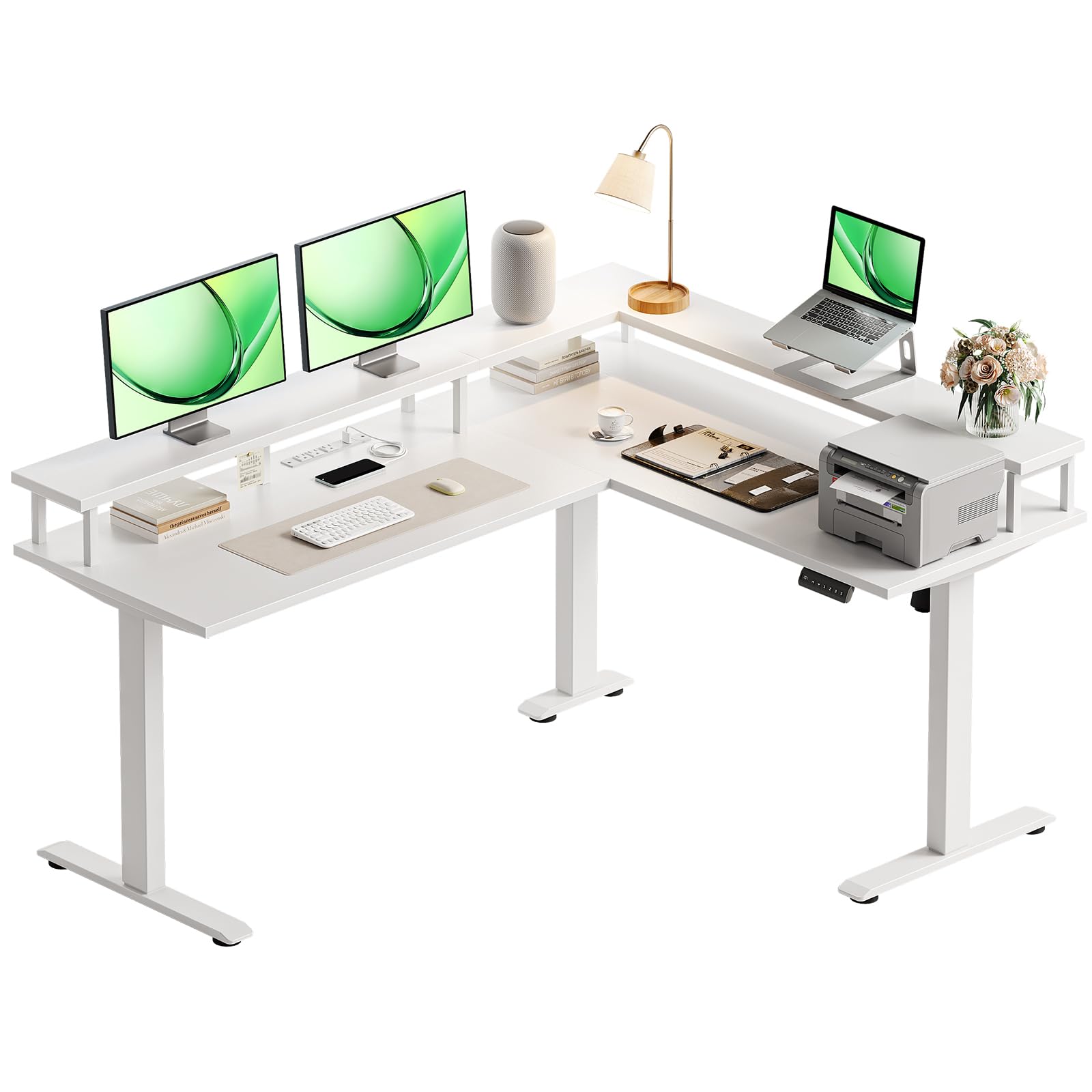
Image: AODK Electric L Shaped Standing Desk in a home office setting.
7. Manutenzione
To ensure the longevity and optimal performance of your AODK Electric L Shaped Standing Desk, follow these maintenance guidelines:
- Pulizia: Pulisci le superfici della scrivania con un panno morbido eamp panno. Evitare prodotti chimici aggressivi o detergenti abrasivi che potrebbero danneggiare la finitura.
- Controllo di tenuta: Controllare periodicamente tutte le viti e i bulloni per assicurarsi che siano ben serrati. Serrarli nuovamente se necessario per mantenere la stabilità.
- Gestione dei cavi: Keep power cords and other cables organized to prevent entanglement and damage, especially during height adjustments.
- Fuoriuscite di liquidi: In case of liquid spills, immediately wipe them dry to prevent damage to the desktop and electrical components.
8. Risoluzione Dei Problemi
Se riscontri problemi con la tua scrivania, consulta i seguenti suggerimenti comuni per la risoluzione dei problemi:
- La scrivania non si muove: Controllare tutti i collegamenti elettrici. Assicurarsi che l'adattatore di corrente sia collegato saldamente sia alla scrivania che a una presa a muro funzionante.
- Movimento irregolare: Ensure the desk is placed on a level surface. Check that all leg components are correctly assembled and tightened.
- Il pannello di controllo non risponde: Scollegare la scrivania dalla presa di corrente per 10-15 secondi, quindi ricollegarla per ripristinare il sistema.
- Rumori insoliti: While the motor is designed for quiet operation, minor sounds during adjustment are normal. If you hear loud or grinding noises, stop operation and check for any obstructions or loose parts.
Se i problemi persistono dopo aver provato questi passaggi, contattare l'assistenza clienti.
9. Specifiche
| Caratteristica | Specificazione |
|---|---|
| Marca | AODK |
| Numero di modello | Scrivania in piedi a forma di L |
| Forma | Forma a L. |
| Progettazione della scrivania | Scrivania in piedi |
| Dimensioni del prodotto (P x L x A) | 47"P x 59"L x 31"A |
| Colore | Bianco |
| Stile | Moderno |
| Materiale di base | Metallo |
| Tipo di materiale superiore | Legno ingegnerizzato |
| Caratteristica speciale | Prese di corrente |
| Componenti inclusi | Presa elettrica integrata, porta USB integrata |
| Altezza minima | 28.3 pollici |
| Altezza massima | 47.2 pollici |
| Peso dell'articolo | 78.04 libbre |
| Codice UPC | 850064516036 |
| Assemblaggio richiesto | SÌ |

Image: Detailed desk dimensions for planning your space.
10. Garanzia e supporto
The AODK Electric L Shaped Standing Desk comes with a limited warranty. For specific details regarding warranty coverage and duration, please refer to the warranty information included with your purchase or contact AODK customer support directly.
For technical assistance, missing parts, or any other inquiries, please reach out to AODK customer service through the contact information provided in your product packaging or on the official AODK websito.