1. Introduzione
Thank you for choosing the Dafit ZL02CPRO Smart Watch. This device is designed to enhance your daily life with advanced health monitoring, communication features, and smart assistant capabilities. Please read this manual carefully to ensure proper use and optimal performance of your new smart watch.
2. Cosa c'è nella scatola
Upon opening your Dafit ZL02CPRO Smart Watch package, you should find the following items:
- Orologio intelligente Dafit ZL02CPRO
- Wristbands (pre-attached or separate, depending on model)
- Cavo di ricarica
- Manuale dell'utente (questo documento)
3. Prodotto finitoview
The Dafit ZL02CPRO Smart Watch features a 1.28-inch round TFT screen and is available with either a metal or silicone strap. It includes a side button for navigation and interaction.

Image: Dafit ZL02CPRO Smart Watch with a black metal mesh band, displaying time, date, steps, and heart rate data.
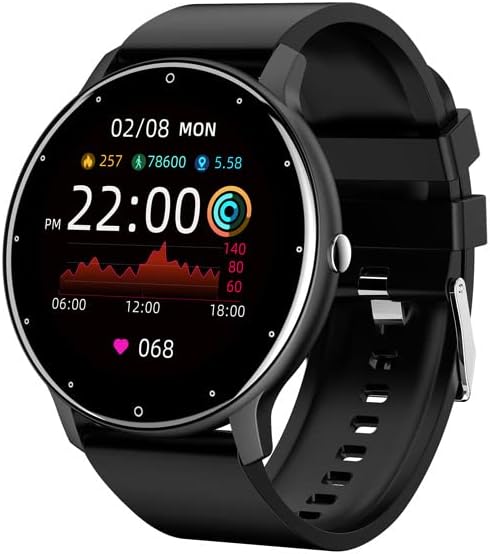
Image: Dafit ZL02CPRO Smart Watch with a black silicone band, showing a similar display with health metrics.

Image: A selection of over 100 stylish digital watch faces available for the Dafit ZL02CPRO Smart Watch, demonstrating customization options.
4. Guida all'installazione
4.1 Ricarica del dispositivo
Before first use, fully charge your smart watch. Connect the magnetic charging cable to the charging points on the back of the watch and plug the USB end into a standard USB power adapter (not included) or a computer USB port. A full charge typically takes about 2 hours.
4.2 Download dell'App
To unlock the full functionality of your smart watch, download the companion application. Cercare "Dafit" in your smartphone's app store (Google Play Store for Android or Apple App Store for iOS). The app supports Android 5.0 and above, and Apple iOS 9.0 or later.
4.3 Associazione con lo smartphone
- Assicurati che il tuo smartwatch sia carico e acceso.
- Abilita il Bluetooth sul tuo smartphone.
- Open the Dafit app on your smartphone.
- Follow the in-app instructions to search for and connect to your ZL02CPRO watch. The app will guide you through the pairing process.
- Once paired, you can synchronize data, customize settings, and receive notifications.
5. Istruzioni per l'uso
5.1 Navigazione di base
- Schermo tattile: Scorri verso sinistra/destra, su/giù per navigare tra i menu e le funzioni. Tocca per selezionare.
- Pulsante laterale: Premi per tornare alla schermata iniziale o riattivare il dispositivo. Premi a lungo per le opzioni di risparmio energetico.
5.2 Funzione di chiamata Bluetooth
After successful pairing, your watch can make and receive calls directly. Ensure the Bluetooth connection is stable and within 10 meters of your phone.
- Effettuare le chiamate: Accedi al tastierino numerico o all'elenco dei contatti sull'orologio per avviare una chiamata.
- Ricevere chiamate: When a call comes in, the watch will display the caller ID. Tap to answer or reject the call.
5.3 Notifiche
Receive notifications for calls, SMS messages, and various app alerts directly on your watch. Enable desired app notifications within the Dafit app settings on your smartphone.
5.4 Controllo della musica e della telecamera
- Controllo della musica: Controlla la riproduzione musicale sul tuo smartphone (riproduci, metti in pausa, salta i brani) direttamente dall'orologio.
- Telecamera remota: Utilizza il tuo orologio come otturatore remoto per la fotocamera del tuo smartphone.
6. Funzionalità di monitoraggio della salute
The Dafit ZL02CPRO Smart Watch provides comprehensive health and fitness tracking capabilities:
- Monitoraggio attività: Monitors step number, calories burned, and distance traveled.
- Monitoraggio della frequenza cardiaca: Tiene traccia in modo continuo della tua frequenza cardiaca durante tutto il giorno.
- Monitoraggio del sonno: Analizza i tuoi schemi di sonno, inclusi sonno profondo, sonno leggero e orari di veglia.
- Modalità multi-sport: Supports various sport modes to track specific exercise data, including GPS movement track (requires smartphone GPS).
7. Funzionalità dell'assistente intelligente
Beyond health tracking, your smart watch offers several convenient smart assistant functions:
- Previsioni meteo: Ricevi aggiornamenti meteo in tempo reale.
- Promemoria sedentario: Ti avvisa quando sei rimasto inattivo per troppo tempo.
- Sveglia: Imposta le sveglie direttamente dal tuo orologio.
- Cronometro: Un cronometro integrato per cronometrare le attività.
- Regolazione della luminosità: Regola la luminosità dello schermo per una resa ottimale viewing.
- Modalità di risparmio energetico: Prolunga la durata della batteria quando necessario.
8. Water Resistance and Battery Life
8.1 Resistenza all'acqua IP68
The Dafit ZL02CPRO Smart Watch is IP68 waterproof, meaning it is resistant to dust and can withstand immersion in water up to 1.5 meters for 30 minutes. It can be worn when washing hands or in the rain. Importante: Do not use the watch in showers, saunas, hot tubs, or during diving, as steam and hot water can damage the device.
8.2 Durata della batteria
With a full charge, the watch can be used for approximately 5-7 days, depending on usage patterns and features enabled. Charging time is approximately 2 hours.
9. Manutenzione
To ensure the longevity and proper functioning of your Dafit ZL02CPRO Smart Watch, follow these maintenance guidelines:
- Pulizia: Pulire regolarmente lo schermo e il corpo dell'orologio con un panno morbido e asciutto. Se necessario, utilizzare un panno leggermenteamp panno e poi asciugare accuratamente.
- Cura del cinturino: Clean silicone straps with mild soap and water. For metal straps, use a soft brush to remove debris. Ensure straps are dry before wearing.
- Evitare i prodotti chimici: Non utilizzare prodotti chimici aggressivi, solventi o detergenti aggressivi, poiché potrebbero danneggiare la finitura dell'orologio o i componenti interni.
- Magazzinaggio: Quando non si utilizza l'orologio per lunghi periodi, conservarlo in un luogo fresco e asciutto, lontano dalla luce solare diretta.
10. Risoluzione Dei Problemi
Se riscontri problemi con il tuo smartwatch Dafit ZL02CPRO, fai riferimento alle seguenti soluzioni comuni:
| Problema | Possibile soluzione |
|---|---|
| L'orologio non si accende | Ensure the watch is fully charged. Connect to the charging cable and wait a few minutes before attempting to power on again. |
| Impossibile associare allo smartphone | Check that Bluetooth is enabled on your phone. Ensure the watch is within Bluetooth range (10m). Restart both the watch and your phone. Try unpairing and re-pairing through the Dafit app. |
| Notifiche non ricevute | Verify that notifications are enabled in the Dafit app settings for specific applications. Ensure the watch is connected via Bluetooth. Check your phone's notification settings. |
| Dati sanitari imprecisi | Assicurati che l'orologio sia ben aderente al polso, circa un dito sopra l'osso del polso. Pulisci il sensore sul retro dell'orologio. |
| Durata breve della batteria | Reduce screen brightness, disable continuous heart rate monitoring if not needed, and use power-saving mode. Limit frequent screen wake-ups. |
Se il problema persiste, contattare l'assistenza clienti per ulteriore assistenza.
11. Specifiche
Below are the technical specifications for the Dafit ZL02CPRO Smart Watch:
| Caratteristica | Dettaglio |
|---|---|
| Modello | ZL02CPRO |
| Tipo di schermo | Schermo TFT |
| Dimensioni dello schermo | 1.28 Inches (Round Screen) |
| Tecnologia di connettività | Bluetooth |
| Standard di comunicazione wireless | Bluetooth |
| Sistema operativo | Wear OS (compatible with Android 5.0+ / iOS 9.0+) |
| Capacità della batteria | 230 milioneamp Ore |
| Durata della batteria | 5-7 giorni (utilizzo tipico) |
| Tempo di ricarica | Circa 2 ore |
| Resistenza all'acqua | Grado di protezione IP68 |
| Peso dell'articolo | 80 grammi (2.82 once) |
| GPS | GPS tramite smartphone |
| Lingue supportate | Chinese, English, German, Spanish, French, Russian, Arabic, Ukrainian, Italian, Portuguese |
12. Garanzia e supporto
For warranty information, please refer to the documentation included with your purchase or contact the retailer. If you have any questions or require technical support, please reach out to the manufacturer's customer service. Contact details are typically available on the product packaging or the official brand websito.