
Rabitpos U27-W
Rabitpos U27-W Wireless 1D 2D QR Barcode Scanner User Manual
Model: U27-W
1. Introduzione
Thank you for choosing the Rabitpos U27-W Wireless 1D 2D QR Barcode Scanner. This manual provides detailed instructions for setting up, operating, and maintaining your device. Please read this manual thoroughly before use to ensure optimal performance and longevity of your scanner.

Image 1.1: The Rabitpos U27-W Wireless Barcode Scanner, shown held comfortably in a user's hand, highlighting its ergonomic design.
2. Prodotto finitoview
Caratteristiche principali:
- Scansione versatile: Reads 1D, 2D, and QR barcodes from both paper and digital screens.
- Connettività wireless e cablata: Supports 2.4GHz wireless via USB dongle and wired USB connection.
- Batteria a lunga durata: Equipped with a 2000mAh rechargeable battery for extended operation.
- Modalità di scansione multiple: Features Key Trigger and Auto-induction scanning modes.
- Opzioni di caricamento dati: Supports Instant Upload and Storage modes for flexible data management.
- Ampia compatibilità: Funziona con i sistemi operativi Windows, Mac e Linux.
3. Istruzioni per l'installazione
3.1 Collegamento dello scanner
The Rabitpos U27-W scanner offers two connection methods: 2.4GHz wireless and wired USB. Both are plug-and-play, requiring no driver installation.
Connessione wireless (2.4 GHz):
- Insert the 2.4GHz USB receiver into an available USB port on your computer (PC, laptop, or POS system).
- Turn on the barcode scanner. It will automatically pair with the receiver. A successful connection is indicated by a specific beep sound or LED indicator (refer to LED indicator section for details).
Connessione cablata (cavo USB):
- Collegare un'estremità del cavo USB in dotazione alla porta USB dello scanner.
- Collegare l'altra estremità del cavo USB a una porta USB disponibile sul computer.
- Lo scanner verrà riconosciuto come un dispositivo tastiera HID standard.

Image 3.1: Illustration of the scanner's 2-in-1 connection capability, demonstrating both wired USB 2.0 and 2.4GHz wireless options with a laptop.
4. Istruzioni per l'uso
4.1 Modalità di scansione
Lo scanner supporta due modalità di scansione principali per soddisfare diverse esigenze operative:
- Modalità di attivazione chiave: Premere il pulsante di attivazione per attivare il raggio di scansione e leggere un codice a barre. Rilasciare il pulsante per interrompere la scansione.
- Modalità di autoinduzione: The scanner automatically detects a barcode within its scanning range and activates the beam to read it without requiring a trigger press. This mode is ideal for hands-free operation.
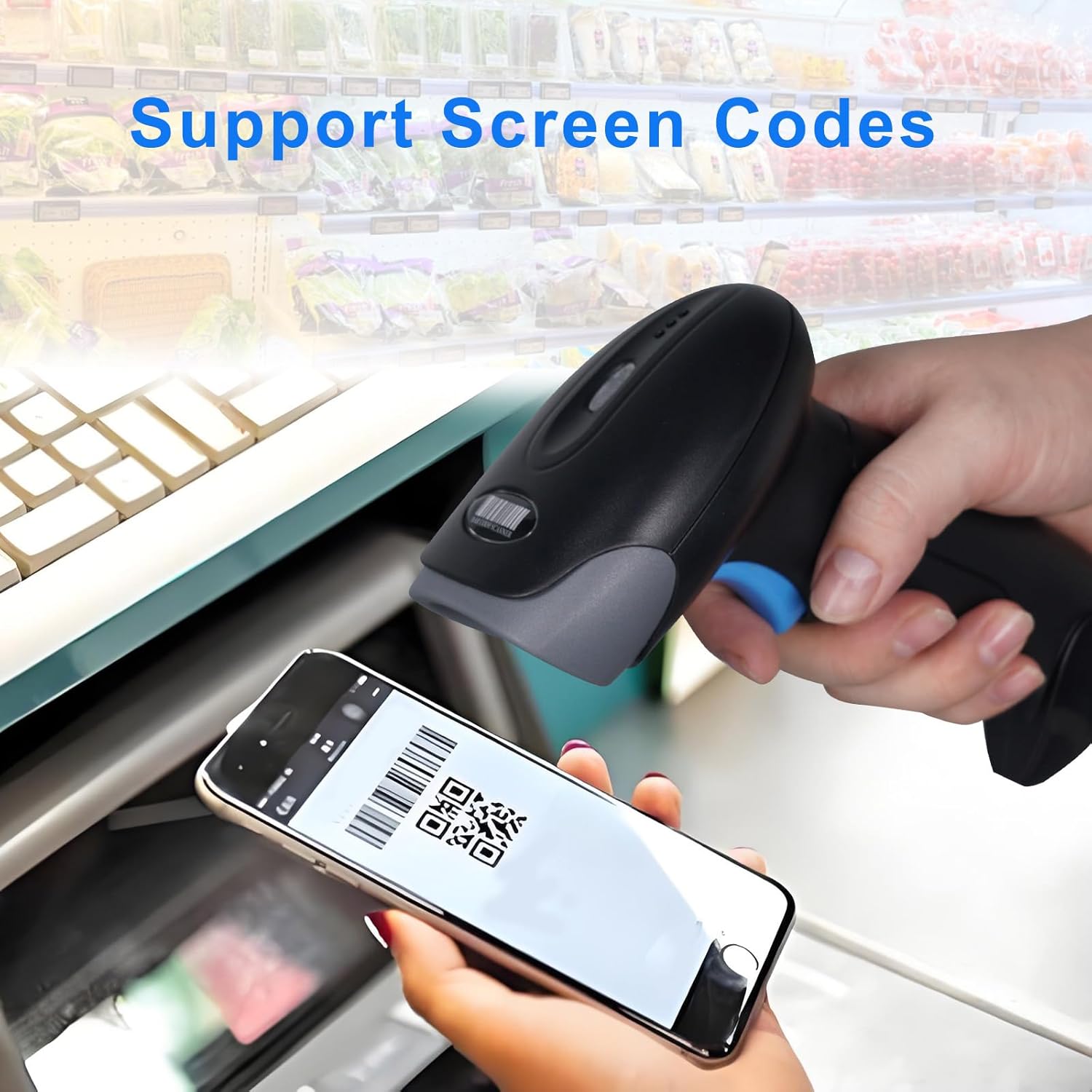
Image 4.1: Visual representation of the two scanning modes: Key Trigger Mode, where the user presses a button, and Auto-induction Mode, where scanning is automatic.
4.2 Modalità di caricamento dati
Choose between two data upload modes based on your workflow:
- Modalità di caricamento istantaneo: Scanned data is immediately transmitted to the connected device. This is the default mode and suitable for real-time inventory or POS operations.
- Modalità di archiviazione: Scanned data is stored internally in the scanner's memory. This mode is useful when working out of range of the receiver. Data can be uploaded later by scanning a specific command barcode (refer to the programming guide for details).

Image 4.2: Depiction of the two data upload modes: Instant Upload, where data is sent immediately, and Storage Mode, where data is saved for later batch upload.
4.3 Tipi di codici a barre supportati
The Rabitpos U27-W scanner is capable of decoding a wide range of 1D and 2D barcode symbologies:
- Codici a barre 1D: UPC-A, UPC-E, EAN-8, EAN-13, Code 128, Code 39, Code 93, Code 11, Interleaved 2 of 5, Matrix 2 of 5, Standard 2 of 5, Codabar, MSI Plessey, GS1, Databar (RSS), etc.
- Codici a barre 2D: PDF417, Data Matrix, QR Code, Aztec Code, Micro QR Code, MaxiCode, etc.
The scanner also supports reading barcodes directly from digital screens, such as mobile phones or tablets.

Image 4.3: The scanner demonstrating its ability to read QR codes and other barcodes directly from a mobile phone screen.

Image 4.4: The scanner's superior decoding ability is shown as it accurately reads a 1D barcode from a printed sheet.
4.4 Impostazioni del segnale acustico
The scanner provides audible feedback for successful scans and other operations. You can configure the beep sound settings:
- Turn On Sound: Enables audible beeps.
- Disattiva audio: Disables audible beeps for silent operation.
Refer to the scanner's programming guide (usually a separate sheet of barcodes) to change these settings by scanning the appropriate configuration barcodes.

Image 4.5: Visual guide for adjusting the scanner's beep settings, allowing users to enable or disable sound feedback.
5. Manutenzione
5.1 Pulizia dello scanner
Per mantenere prestazioni di scansione ottimali, mantenere pulita la finestra dello scanner. Utilizzare un panno morbido e privo di lanugine, leggermente dampened with water or a mild, non-abrasive cleaning solution. Avoid harsh chemicals or abrasive materials that could scratch the scanning window.
5.2 Cura della batteria
The scanner is equipped with a 2000mAh rechargeable battery, providing approximately 72 hours of continuous operation and up to 1 month of standby time on a full charge. To prolong battery life:
- Caricare completamente la batteria prima del primo utilizzo.
- Evitare di scaricare completamente la batteria regolarmente.
- Quando non si utilizza lo scanner per lunghi periodi, conservarlo in un luogo fresco e asciutto.
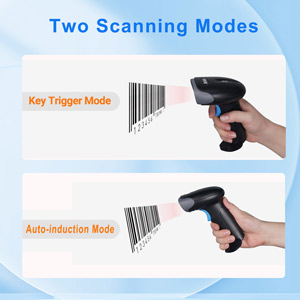
Image 5.1: An illustration emphasizing the scanner's built-in rechargeable battery and its long-lasting capacity.
6. Risoluzione Dei Problemi
If you encounter issues with your Rabitpos U27-W scanner, refer to the following common problems and solutions:
| Problema | Possibile causa | Soluzione |
|---|---|---|
| Lo scanner non si connette in modalità wireless. | USB receiver not properly inserted; scanner not powered on; out of range; pairing lost. | Ensure receiver is firmly plugged in. Turn scanner on. Move closer to receiver. Re-pair the scanner by scanning the pairing barcode (refer to programming guide). |
| Lo scanner non legge i codici a barre. | Barcode damaged or unclear; incorrect scanning mode; scanner window dirty; unsupported barcode type. | Ensure barcode is clear. Check scanning mode (Key Trigger/Auto-induction). Clean scanner window. Verify barcode type is supported. |
| Slow scanning response. | Low battery; interference; system lag. | Charge the scanner fully. Reduce wireless interference. Test on a different computer. |
| No scan indicator (light/beep). | Scanner not powered on; beep sound disabled. | Ensure scanner is powered on. Enable beep sound via programming barcode. |
| Data not uploading in Storage Mode. | Upload command barcode not scanned; memory full. | Scan the 'Upload Data' programming barcode. Clear memory if full (refer to programming guide). |
7. Specifiche
| Caratteristica | Dettaglio |
|---|---|
| Numero di modello | HBA-U27W |
| Connettività | Wireless a 2.4 GHz, cavo USB |
| Batteria | Ricaricabile da 2000 mAh (batteria da 1 A inclusa) |
| Tempo di lavoro continuo | Fino a 72 ore |
| Tempo di standby | Fino a 1 mese |
| Dispositivi compatibili | Sistemi desktop, laptop, POS |
| Sistemi operativi | Windows, Mac OS, Linux |
| Peso dell'articolo | 0.634 once |
| Dimensioni del pacco | 7.68 x 4.21 x 3.31 pollici |
8. Garanzia e supporto
Rabitpos products are designed for reliability and performance. For warranty information, technical support, or service inquiries, please refer to the contact information provided with your product packaging or visit the official Rabitpos website. Please have your model number (U27-W) and purchase details ready when contacting support.
Ask a question about this manual
Ask about setup, troubleshooting, compatibility, parts, safety, or missing instructions. Manuals+ will review the question and use this page’s manual context to help answer it.