
pxton 888S, 666S
pxton 888S and 666S Walkie Talkies User Manual
Models: 888S, 666S
1. Introduzione
Thank you for choosing pxton 888S and 666S walkie talkies. These two-way radios are designed for reliable and clear communication across various environments. This manual provides essential information for setting up, operating, and maintaining your devices to ensure optimal performance.
The pxton 888S and 666S models offer a robust set of features including 16 memory channels, 165 privacy codes, VOX sensitivity adjustment, Time-Out Timer (TOT), emergency alarm, noise reduction, automatic squelch, low battery alert, power-saving mode, scanning, monitoring, and an LED flashlight. They are equipped with a 1500mAh Li-ion battery for extended use.

Image 1.1: An 8-pack of pxton 888S and 666S walkie talkies, showing the devices, charging bases, and included headphones.
2. Contenuto della confezione
Dopo aver aperto la confezione, verifica che siano inclusi tutti i seguenti articoli:
- pxton 888S Walkie Talkies (quantity as per pack)
- pxton 666S Walkie Talkies (quantity as per pack)
- Batterie agli ioni di litio da 1500 mAh
- Charging Bases
- Adattatori di alimentazione
- Cuffie
- Clip da cintura
- Cordini
- Manuale dell'utente (questo documento)
3. Prodotto finitoview
Familiarize yourself with the main components and controls of your pxton walkie talkie:
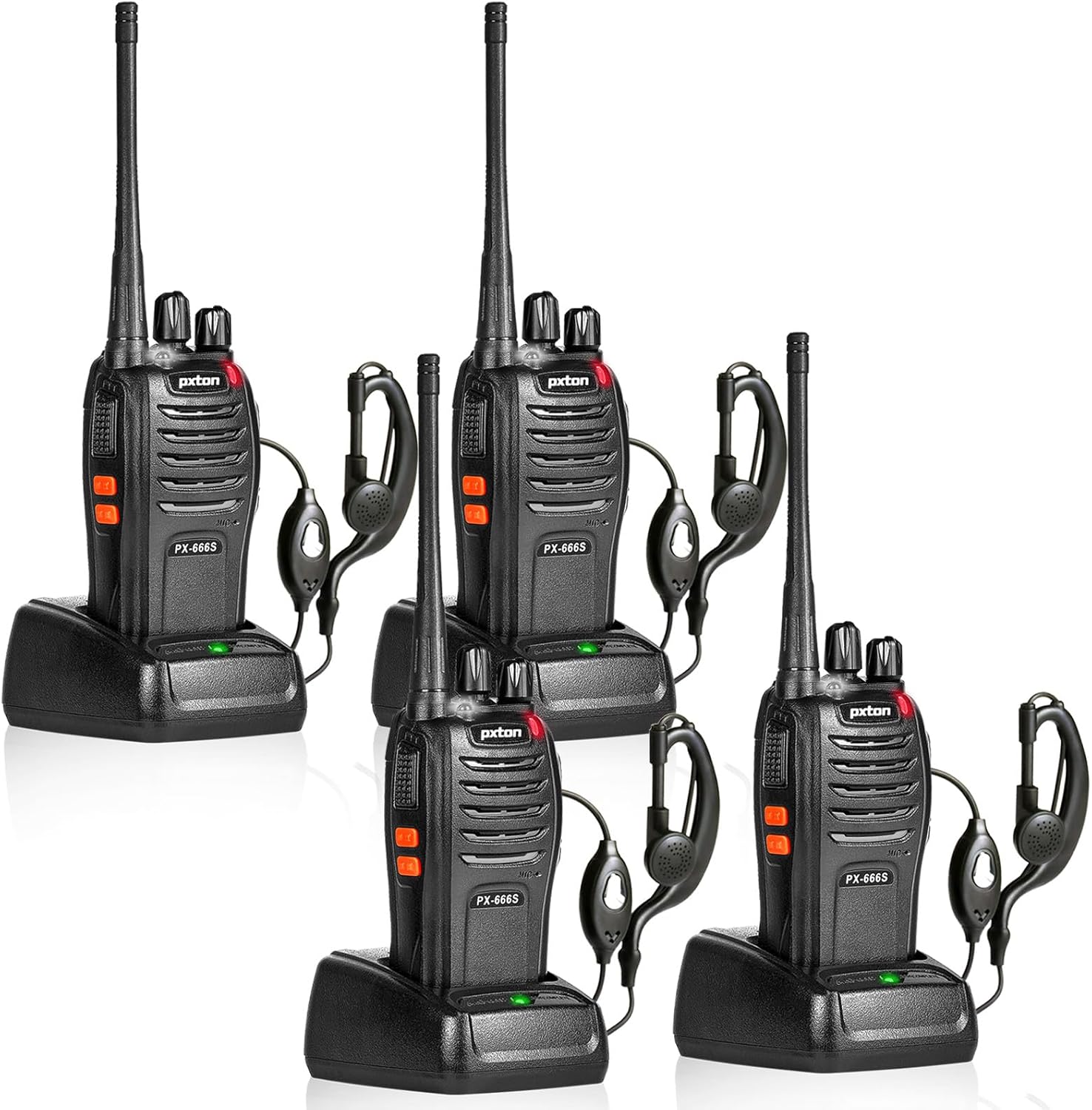
Image 3.1: Detailed diagram of the PX-666S walkie talkie, highlighting the Integrated Sensitive Antenna, Flashlight, LED Indicator, PTT Button, Clear Speaker, Built-in Microphone, Power Switch/Volume Control, Channel Switch, SP/MIC Jacks, MONI Button, and Flashlight Button.
- Integrated Sensitive Antenna: Per trasmettere e ricevere segnali.
- Torcia elettrica: Luce LED integrata per l'illuminazione.
- Indicatore LED: Mostra lo stato (ad esempio, trasmissione, ricezione, batteria scarica).
- Pulsante PTT (premi per parlare): Tenere premuto per trasmettere, rilasciare per ricevere.
- Clear Speaker: Per l'uscita audio.
- Microfono incorporato: Per input vocale.
- Interruttore di alimentazione/controllo del volume: Manopola rotante per accendere/spegnere la radio e regolare il volume.
- Cambio canale: Manopola rotante per selezionare i canali di comunicazione.
- Jack SP/MIC: Ports for connecting external headphones or microphones.
- MONI Button (Monitor): Premere per disattivare temporaneamente lo squelch e ascoltare i segnali deboli.
- Pulsante torcia: Attiva la torcia LED.
4. Impostazione
4.1 Installazione e ricarica della batteria
Your walkie talkie comes with a 1500mAh Li-ion battery. For optimal performance, fully charge the battery before first use.
- Installa la batteria: Align the battery with the grooves on the back of the walkie talkie and slide it into place until it clicks securely.
- Mettere in carica la batteria: Place the walkie talkie (with battery installed) into the charging base. Ensure the metal contacts on the radio align with those on the charger. The LED indicator on the charger will typically show red during charging and green when fully charged.
- Tempo di ricarica: Una ricarica completa richiede in genere 3-4 ore.

Image 4.1: The 1500mAh Li-ion battery for pxton walkie talkies, alongside visual indicators for standby time (5-7 days), typical use (1-2 days), continuous use (8-12 hours), and full charging time (3-4 hours).
4.2 Collegamento degli accessori
- Clip da cintura: Per un trasporto più agevole, agganciare la clip da cintura all'apposito slot sul retro della radio.
- Cuffie: Plug the headphone jack into the SP/MIC jacks on the side of the walkie talkie.
5. Istruzioni per l'uso
5.1 Accensione/spegnimento e regolazione del volume
Rotate the Power Switch/Volume Control knob clockwise to turn the radio on. Continue rotating to increase the volume. Rotate counter-clockwise to decrease volume and turn the radio off.
5.2 Selezione del canale
Rotate the Channel Switch knob to select one of the 16 available channels. Ensure all radios you wish to communicate with are set to the same channel and privacy code (if applicable).
5.3 Trasmissione e ricezione
- Per trasmettere: Press and hold the PTT (Push-to-Talk) button on the side of the radio. Speak clearly into the microphone, holding the radio approximately 2-5 cm from your mouth. The LED indicator will glow red.
- Per ricevere: Rilasciare il pulsante PTT. L'indicatore LED si illuminerà di verde quando viene ricevuto un segnale.
5.4 Funzione VOX (trasmissione a comando vocale)
The VOX function allows for hands-free operation. When activated, the radio will automatically transmit when it detects your voice. There are 5 levels of VOX sensitivity adjustment. Refer to advanced programming software (not included) for detailed VOX setup.
5.5 Funzionamento della torcia
Press the Flashlight Button to turn the built-in LED flashlight on or off.
5.6 Monitoring Function (MONI)
Press and hold the MONI button to temporarily disable the squelch function. This allows you to listen to very weak signals that might otherwise be blocked by the squelch, or to check if a channel is clear before transmitting.
5.7 Funzione di scansione
The scan function allows the radio to automatically scan through all programmed channels to find active conversations. When an active channel is found, the radio will stop on that channel until the conversation ends, then resume scanning. Refer to advanced programming software for scan list setup.
5.8 Riduzione del rumore
The walkie talkies feature built-in noise reduction technology to improve audio clarity in noisy environments.
5.9 Allarme di emergenza
The emergency alarm function can be activated to send out an alert signal. Refer to advanced programming software for specific activation methods.
5.10 TOT (Time-Out Timer)
The TOT function prevents any single user from occupying a channel for too long. If the PTT button is held down for a preset duration, the radio will automatically stop transmitting and emit a warning tone.
5.11 Low Battery Alert and Power-Saving Mode
When the battery level is low, the radio will emit an audible alert or the LED indicator will flash. The power-saving mode automatically reduces power consumption when no signal is being received or transmitted, extending battery life.
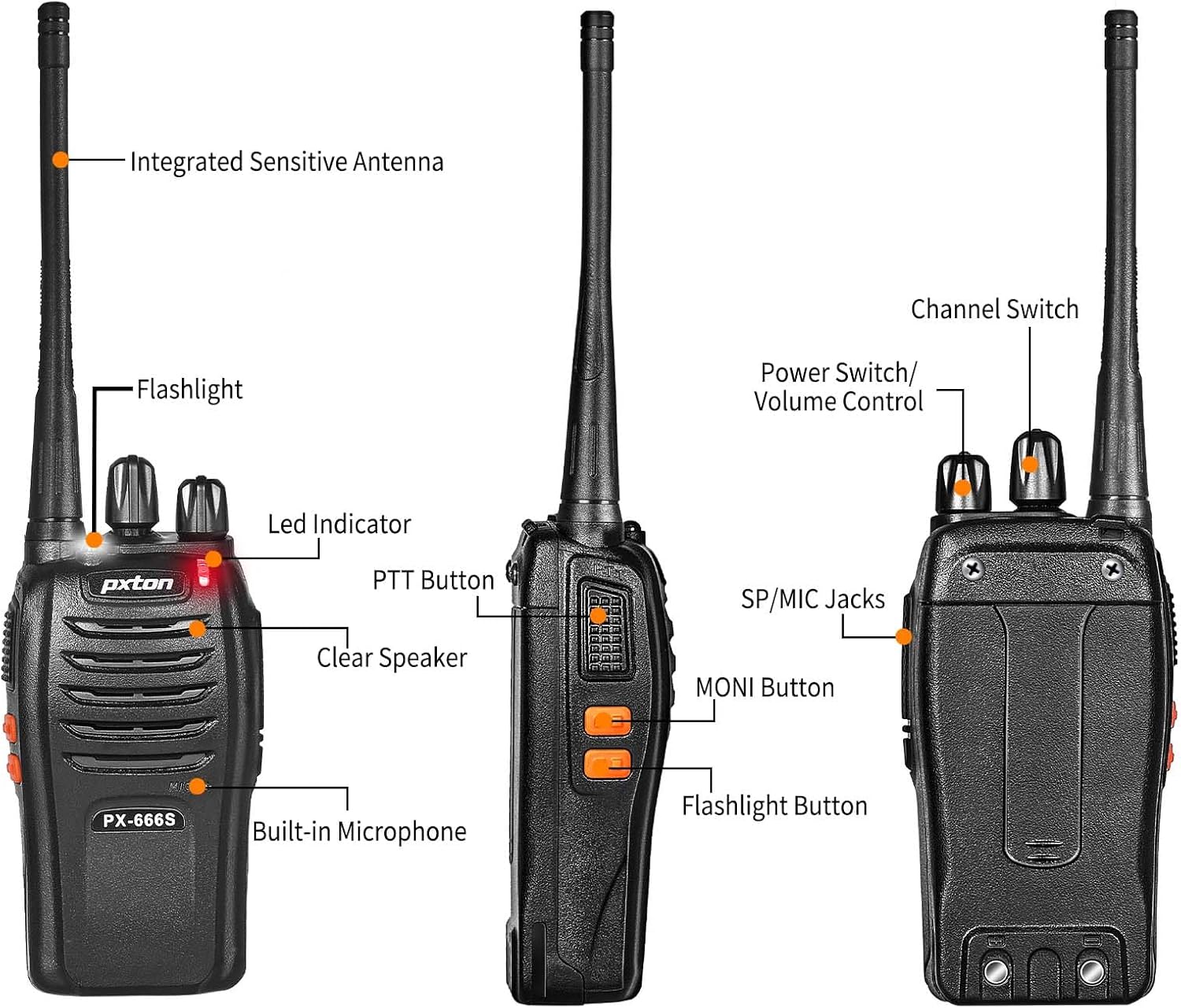
Image 5.1: Pxton 666S walkie talkies shown with icons representing key features: VOX/Hands-Free, Flashlight, 50 CTCSS/210 DCS (privacy codes), Squelch adjustment, SOS (Emergency Alarm), Noise reduction, Battery save, and Channel Scan.
6. Manutenzione
- Pulizia: Utilizzare un morbido, damp panno per pulire la superficie della radio. Non utilizzare prodotti chimici aggressivi o detergenti abrasivi.
- Cura della batteria: To prolong battery life, avoid overcharging or completely draining the battery. Store batteries in a cool, dry place when not in use.
- Magazzinaggio: Se si conserva la radio per un periodo prolungato, rimuovere la batteria.
- Resistenza all'acqua: The radios are water resistant, but not waterproof. Avoid submerging them in water.
7. Risoluzione Dei Problemi
| Problema | Possibile causa | Soluzione |
|---|---|---|
| Nessun potere | Battery not installed correctly; Battery drained; Power switch off. | Reinstall battery; Charge battery; Turn power switch on. |
| Impossibile trasmettere o ricevere | Wrong channel selected; Out of range; Battery low. | Ensure all radios are on the same channel; Move closer to other radios; Charge battery. |
| Scarsa qualità audio | Volume too low/high; Out of range; Interference. | Adjust volume; Move closer; Change channel or location. |
| La radio trasmette continuamente (VOX) | Sensibilità VOX troppo alta. | Adjust VOX sensitivity (requires programming software) or disable VOX. |
| La durata della batteria è breve | Batteria non completamente carica; Batteria vecchia; Trasmissione frequente. | Ensure full charge; Consider replacing old battery; Use power-saving mode. |
8. Specifiche
| Caratteristica | Specificazione |
|---|---|
| Numeri di modello | 888S, 666S |
| Marca | pxton |
| Numero di canali | 16 |
| Gamma di frequenza | Frequenza 462-467 MHz |
| Portata massima di conversazione | Fino a 3 miglia (aree aperte) |
| Tipo di batteria | Batteria agli ioni di litio da 1500 mAh |
| Durata della batteria (uso tipico) | Up to 120 hours standby, 12 hours continuous talk |
| Tempo di ricarica | Circa 3-4 ore |
| Caratteristiche speciali | VOX, Noise Reduction, TOT, Flashlight, Monitoring, Scan Function, Emergency Alarm, Low Battery Alert, Power-Saving Mode |
| Livello di resistenza all'acqua | Resistente all'acqua |
| Componenti inclusi | Headphones, Li-ion Battery |
| Identificazione FCC | 2AX68GTR8 |

Image 8.1: Size comparison of the PX-666S walkie talkie (4.5 inches tall, 2.3 inches wide, 1.14 inches deep, 8.3 inches with antenna) next to an iPhone 14 Pro (5.8 inches tall, 2.8 inches wide).
9. Garanzia e supporto
pxton offers a 30-day no-questions-asked replacement and refund policy for your peace of mind. Additionally, lifelong after-sales service is provided. If you encounter any issues or have questions regarding your pxton walkie talkies, please do not hesitate to reach out to pxton customer support for assistance. We are committed to helping you resolve any concerns.
Ask a question about this manual
Ask about setup, troubleshooting, compatibility, parts, safety, or missing instructions. Manuals+ will review the question and use this page’s manual context to help answer it.