
Introduzione
This manual provides essential information for the proper use and maintenance of your KRPTQJoo RM-RK50 replacement remote control. This remote is designed to be compatible with various JVC car stereo system models, including KD-G386, KD-G385, KW-XG706, KD-G369, KD-R751, KW-R950BT, KD-RD99BTS, KD-RD79BT, KD-R452, KD-R451, KD-R995BTS, KD-R990BTS, and KD-R895BTS. Please read this manual thoroughly before use.
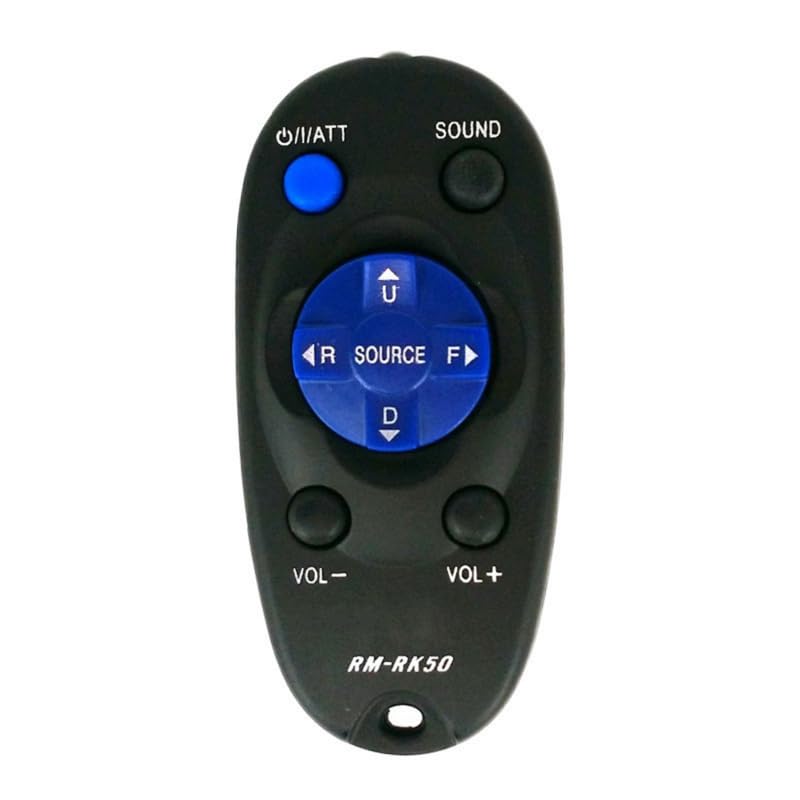
Immagine: Frontale view of the KRPTQJoo RM-RK50 remote control. It is black with blue circular buttons for navigation (Up, Down, Left, Right, Source) and a blue power button. Other buttons include Sound, Volume -, and Volume +.
Impostare
1. Installazione della batteria
The RM-RK50 remote control requires two AAA batteries (not included). Follow these steps to install them:
- Individuare il vano batterie sul retro del telecomando.
- Per aprire il coperchio del vano batteria, farlo scorrere verso il basso.
- Inserire due batterie AAA, assicurandosi che i terminali positivo (+) e negativo (-) siano allineati correttamente con le marcature all'interno del vano.
- Riposizionare il coperchio del vano batteria finché non scatta in posizione.

Image: Back of the remote control with the battery cover detached, revealing the battery compartment.
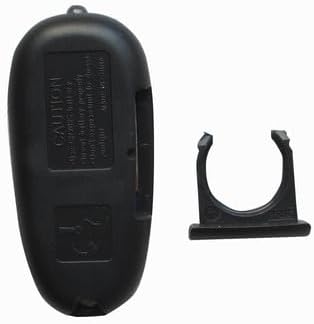
Image: Back of the remote control with the battery cover partially slid off, showing the mechanism for removal.
2. Controllo di compatibilità
This remote control is a replacement unit. It is designed to work with the JVC car stereo models listed in the introduction. No pairing or programming is required. However, some buttons may not function if your specific JVC model does not support those features. Refer to your JVC car stereo's original manual for detailed feature support.
Istruzioni per l'uso
Point the remote control directly at the infrared receiver on your JVC car stereo system. Ensure there are no obstructions between the remote and the stereo.
Funzioni dei pulsanti:
- Power (U/ATT): Turns the stereo system on or off, or activates the attenuator function.
- Suono: Accesses sound settings or audio modes.
- VOL - / VOL +: Regola il livello del volume verso l'alto o verso il basso.
- FONTE: Changes the audio source (e.g., Radio, CD, USB, Bluetooth).
- Navigation Buttons (U, D, R, F): Used for menu navigation, track skipping (Up/Down), or fast forward/rewind (Left/Right) depending on the active source and stereo model.

Immagine: dettagliata view of the remote control's buttons, showing the Power, Sound, Volume, Source, and navigation controls.
Manutenzione
- Pulizia: Pulire il telecomando con un panno morbido e asciutto. Non utilizzare detergenti liquidi o materiali abrasivi.
- Sostituzione della batteria: Sostituisci le batterie quando la portata del telecomando diminuisce o smette di rispondere. Sostituisci sempre entrambe le batterie contemporaneamente con batterie nuove dello stesso tipo (AAA).
- Magazzinaggio: Store the remote control in a cool, dry place away from direct sunlight and extreme temperatures. If not used for extended periods, remove the batteries to prevent leakage.
Risoluzione dei problemi
| Problema | Possibile causa | Soluzione |
|---|---|---|
| Il telecomando non funziona. |
|
|
| Alcuni pulsanti non funzionano. |
|
|
Specifiche
- Nome modello: Modello RM-RK50
- Marca: KRPTQJoo
- Colore: Nero
- Tecnologia di connettività: Infrarossi (IR)
- Portata massima: 8 metri
- Fonte di energia: 2 batterie AAA (non incluse)
- Dispositivi compatibili: JVC Car Stereo Systems (specific models listed in Introduction)
- Numero massimo di dispositivi supportati: 1
Informazioni sulla garanzia
This product is a replacement remote control. For specific warranty details, please refer to the seller's policy at the time of purchase. Typically, replacement parts may come with a limited warranty against manufacturing defects.
Supporto
If you encounter any issues not covered in this manual or require further assistance, please contact the seller directly through the platform where the purchase was made. Provide your order number and a detailed description of the problem for prompt support.
For information regarding your JVC car stereo system's features and functions, please consult the original JVC user manual.