
Jufodrca 4 Core 2G RAM 32G ROM
Jufodrca Car Radio Stereo User Manual
For Honda Accord 7th Generation (2003-2007)
Introduzione
This manual provides detailed instructions for the installation, operation, and maintenance of your Jufodrca 10-inch Car Radio Stereo. Designed specifically for the Honda Accord 7th Generation (2003-2007), this unit integrates advanced features such as Wireless CarPlay, Android Auto, Bluetooth 5.0, 5G WiFi, GPS Navigation, and Rear Camera support to enhance your driving experience.
Compatibilità del veicolo
This car radio stereo is compatible with Honda Accord 7th Generation models from 2003, 2004, 2005, 2006, and 2007. It is designed for vehicles with a 2+32G configuration and offers seamless integration of advanced features.

Figure 1: Before and After Installation in Honda Accord 7th Gen (2003-2007)

Figure 2: AC Connection Details for Single and Dual AC Systems
Nota: This unit is only suitable for manual AC. Ensure correct connection of the 2 connectors into the decoder port (A & B) for AC functionality. For dual AC, use original AC plugs to ports A & B; the green AC wire from the package is not needed.
Impostare
The Jufodrca car radio stereo comes with all necessary wiring for installation. Professional installation is recommended. Refer to the included wiring diagram for specific connections. Ensure the vehicle's power is disconnected before beginning installation.
Cosa c'è nella scatola
- Unità principale
- canbus
- Telecamera
- Cavo di alimentazione
- RCA
- Linea di retromarcia
- Radio Antenna
- 2*Cavo USB
- Piede di porco
- Antenna GPS
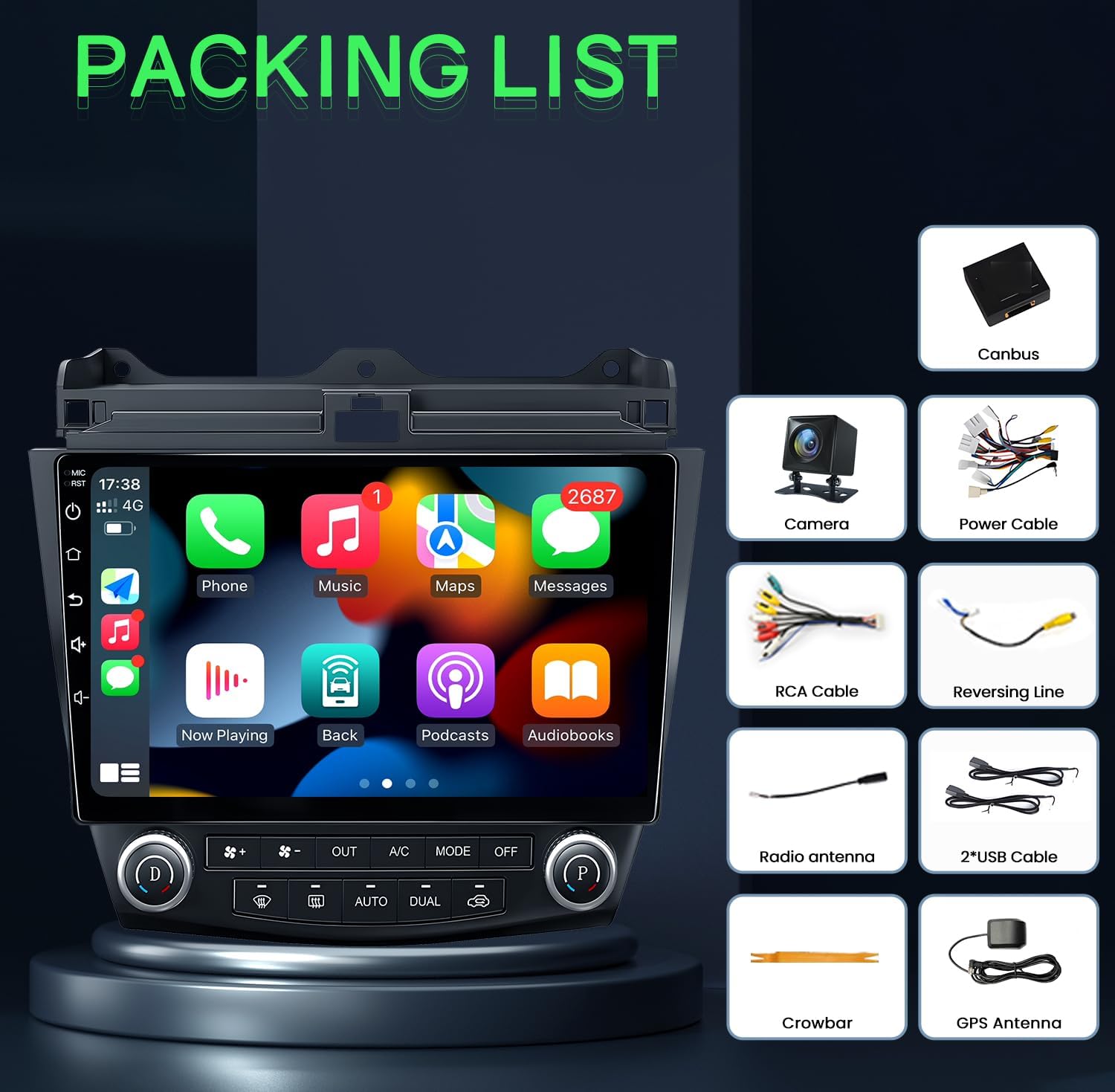
Figura 3: Componenti inclusi (elenco di imballaggio)
Istruzioni per l'uso
Wireless CarPlay e Android Auto
Connect your iOS or Android smartphone wirelessly to access navigation, music, messages, and voice control features directly on the car stereo display. This allows for hands-free operation and reduces distractions while driving.
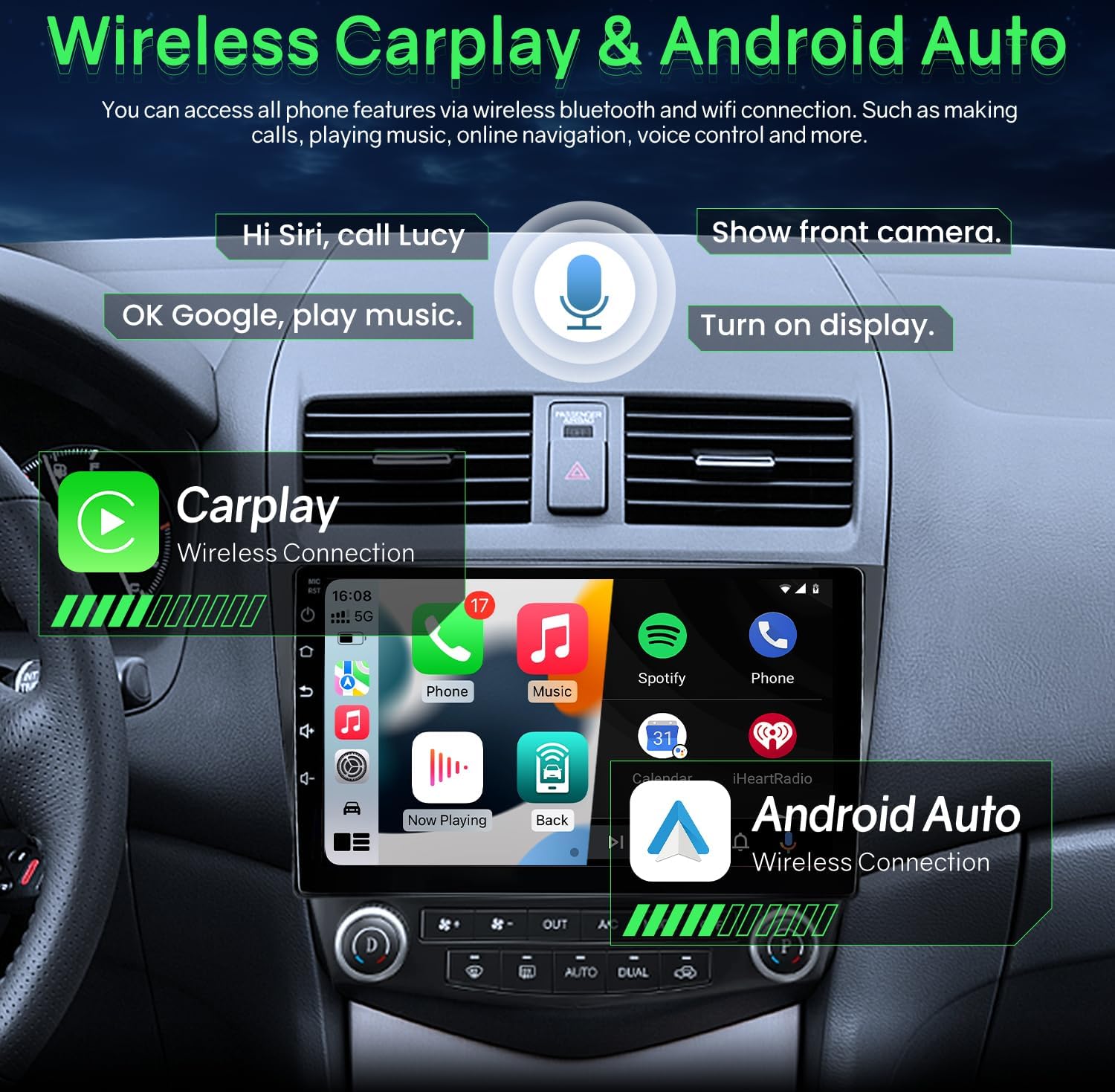
Figura 4: Interfaccia wireless CarPlay e Android Auto
Bluetooth 5.0 & FM/RDS Audio
The unit features Bluetooth 5.0 for stable and fast connections, enabling hands-free calls and audio streaming. The FM radio includes RDS (Radio Data System) and can store multiple stations. A 15-band EQ option allows for personalized audio tuning.

Figure 5: Bluetooth Music and FM Radio Interface
HD Display & 5G WiFi
Experience clear visuals on the 1280x800 resolution 2.5D tempered glass display. Integrated 5G WiFi supports quick downloads for offline maps and fast online access.

Figura 6: Connettività WiFi 5G

Figure 7: Full HD 1280x800 IPS Screen Quality

Figure 8: 5G WiFi vs 2.4G WiFi Performance
Navigazione GPS
The integrated GPS provides accurate directions and real-time traffic updates. It supports both online and offline navigation applications, ensuring efficient travel to your destination.
Controllo del volante (SWC)
Control essential stereo functions such as answering calls, adjusting volume, and changing music or videos directly from your steering wheel buttons. This feature promotes safer driving by keeping your hands on the wheel.
Telecamera posteriore
The system includes a 1080P rear view camera that automatically activates when the vehicle is in reverse gear. It provides a wider, clearer field of view with parking lines, assisting with safe maneuvering and reducing blind spots.

Figura 9: Posteriore View Display della fotocamera
Impostazioni DSP integrate
Customize your audio experience with the built-in Digital Sound Processor (DSP). Adjust equalizer settings, surround sound, and subwoofer levels to achieve optimal sound quality.
Modalità schermo diviso
Utilize the split screen function to run two applications simultaneously, such as GPS navigation and video playback, for enhanced multitasking.
Video ufficiali dei prodotti
Prodotto finitoview for Honda Accord 7th Gen
Video 1: Questo video fornisce una panoramica generaleview of the Jufodrca car radio stereo features and compatibility with the Honda Accord 7th Generation (2003-2007).
Operation for Honda Accord Radio
Video 2: This video demonstrates the operational aspects of the Honda Accord radio, including navigating the main interface, using various applications, and accessing settings.
Android System for Accord Radio
Video 3: This video showcases the Android operating system interface and features specific to the Accord radio, including app management and system settings.
Manutenzione
- Pulizia dello schermo: Utilizzare un panno morbido e privo di lanugine per pulire delicatamente lo schermo. Per macchie ostinate, leggermente dampPulisci il panno con acqua o un detergente per schermi. Evita prodotti chimici aggressivi.
- Aggiornamenti software: Periodically check for software updates to ensure optimal performance and access to new features. Refer to the device settings or manufacturer's websito per le istruzioni di aggiornamento.
- Connessioni via cavo: Ensure all cables are securely connected to prevent intermittent issues with power, audio, or data transfer.
- Condizioni ambientali: Avoid exposing the unit to extreme temperatures or direct sunlight for prolonged periods, as this can affect performance and longevity.
Risoluzione dei problemi
- Nessun potere:
- Controllare tutti i collegamenti elettrici e i fusibili.
- Assicurarsi che l'accensione del veicolo sia accesa.
- Nessun suono:
- Verificare che il volume non sia disattivato o troppo basso.
- Controllare i collegamenti dei cavi degli altoparlanti.
- Assicurarsi che sia selezionata la sorgente audio corretta.
- GPS non funzionante:
- Assicurarsi che l'antenna GPS sia installata correttamente e abbia una visuale libera view del cielo.
- Controllare le impostazioni GPS all'interno dell'unità.
- Verify map data is installed and up to date.
- Problemi di connettività Bluetooth:
- Assicurati che il Bluetooth sia abilitato sia sullo stereo che sul dispositivo.
- Eliminare gli abbinamenti precedenti e riassociare il dispositivo.
- Move the device closer to the stereo.
- CarPlay/Android Auto non si connette:
- Assicurati che il sistema operativo del tuo telefono sia aggiornato.
- Check the USB cable connection if using wired CarPlay/Android Auto.
- Per la connessione wireless, assicurati che Wi-Fi e Bluetooth siano abilitati sul telefono e sullo stereo.
Specifiche
| Caratteristica | Dettaglio |
|---|---|
| Peso dell'articolo | 4.4 libbre |
| Dimensioni del pacco | 12.32 x 11.97 x 5.51 pollici |
| Dimensioni dello schermo | 10 pollici |
| Risoluzione dello schermo | 1280x800 |
| Processore | 4 Nucleo |
| Memoria RAM | 2 GB |
| ROM | 32 GB |
| Tecnologia di connettività | Bluetooth 5.0, Wi-Fi 5G |
| Caratteristiche speciali | Wireless/wired CarPlay & Android Auto & Mirroring, Airplay, Secondary Video Window, 1080P Backup Camera, Support SWC (Steering wheel Control), APK install, FM/RDS Radio |
| Tipo di mappa | Nord America (supporta la navigazione online/offline) |
| Modalità di uscita audio | Stereo |
| Tipo di montaggio | Supporto per cruscotto |

Figure 10: Upgraded Smart Chip Details
Garanzia e supporto
The Jufodrca Car Radio Stereo comes with a Garanzia di 2 anno. For technical support, troubleshooting assistance, or warranty claims, please contact Jufodrca customer service through the retailer where the product was purchased. Keep your purchase receipt as proof of purchase for warranty validation.