
1. Prodotto finitoview
The Phezer P16-1 is a portable intelligent inkjet printer designed for various coding and marking applications. It features a 4.3-inch LCD capacitive touchscreen and operates independently without requiring external applications or computers.
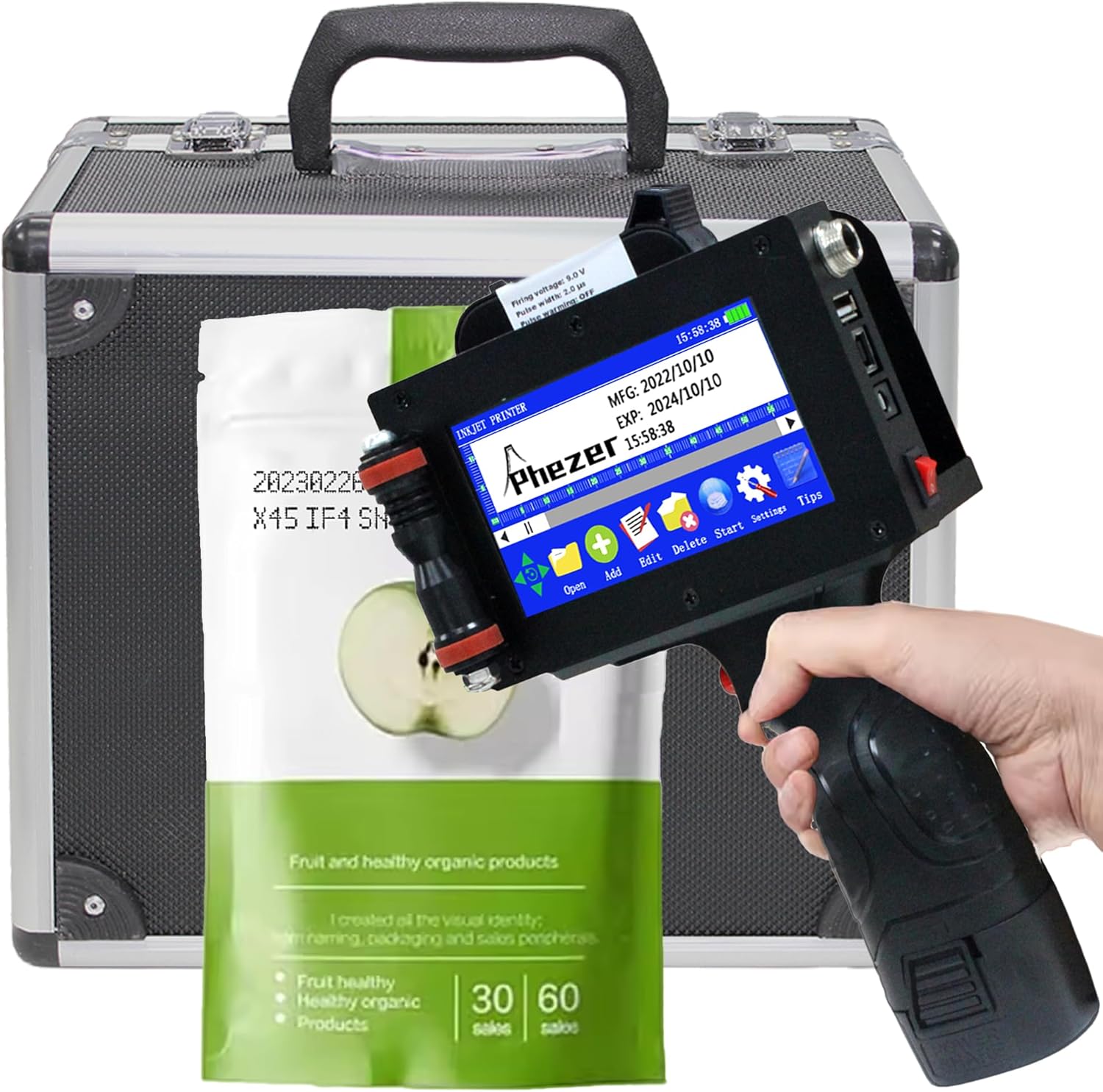
Image 1.1: Phezer P16-1 Handheld Inkjet Printer and accessories.
Caratteristiche principali:
- No External Connection Required: Operates with an upgraded Cortex-A9 quad-core CPU and independent system.
- Leggero e portatile: Weighs 1.54 lbs (0.7 kg) with a built-in 2600mAh rechargeable battery.
- Stampa versatile: Supports text, labels, digits, QR codes, barcodes, production dates, times, and logos.
- Ampia compatibilità superficiale: Prints on paper, boards, carton, stone, pipe, cable, metal, glass, plastic, and cloth.
- Adjustable Print Height: From 2mm to 25.4mm (1 inch), with unlimited length.
- Multi-directional Printing: Supports 360-degree all-round printing.
- Più lingue: 22 lingue disponibili.
- Quick-Drying Ink: Includes a 42ml black high-definition solvent ink cartridge. Other ink colors available include white, yellow, red, blue, green, invisible, and UV.
2. Istruzioni per l'installazione
2.1. Disimballaggio e ispezione iniziale
Carefully remove all components from the packaging. Verify that all items listed in the product manual are present and undamaged.
2.2. Installazione della cartuccia d'inchiostro
- Open the ink cartridge compartment on the printer.
- Remove the protective cap from the new ink cartridge.
- Insert the ink cartridge into the compartment, ensuring it is seated correctly.
- Chiudere bene lo scomparto.
Video 2.1: Demonstrates ink cartridge installation and initial cleaning for clear printing.
2.3. Accensione
Press and hold the power button until the screen illuminates and the system starts. The device is ready for operation once the main interface is displayed.
3. Istruzioni per l'uso
3.1. Navigazione dell'interfaccia
The printer features a 4.3-inch LCD capacitive touchscreen. Navigate through menus and options using the stylus or your finger.
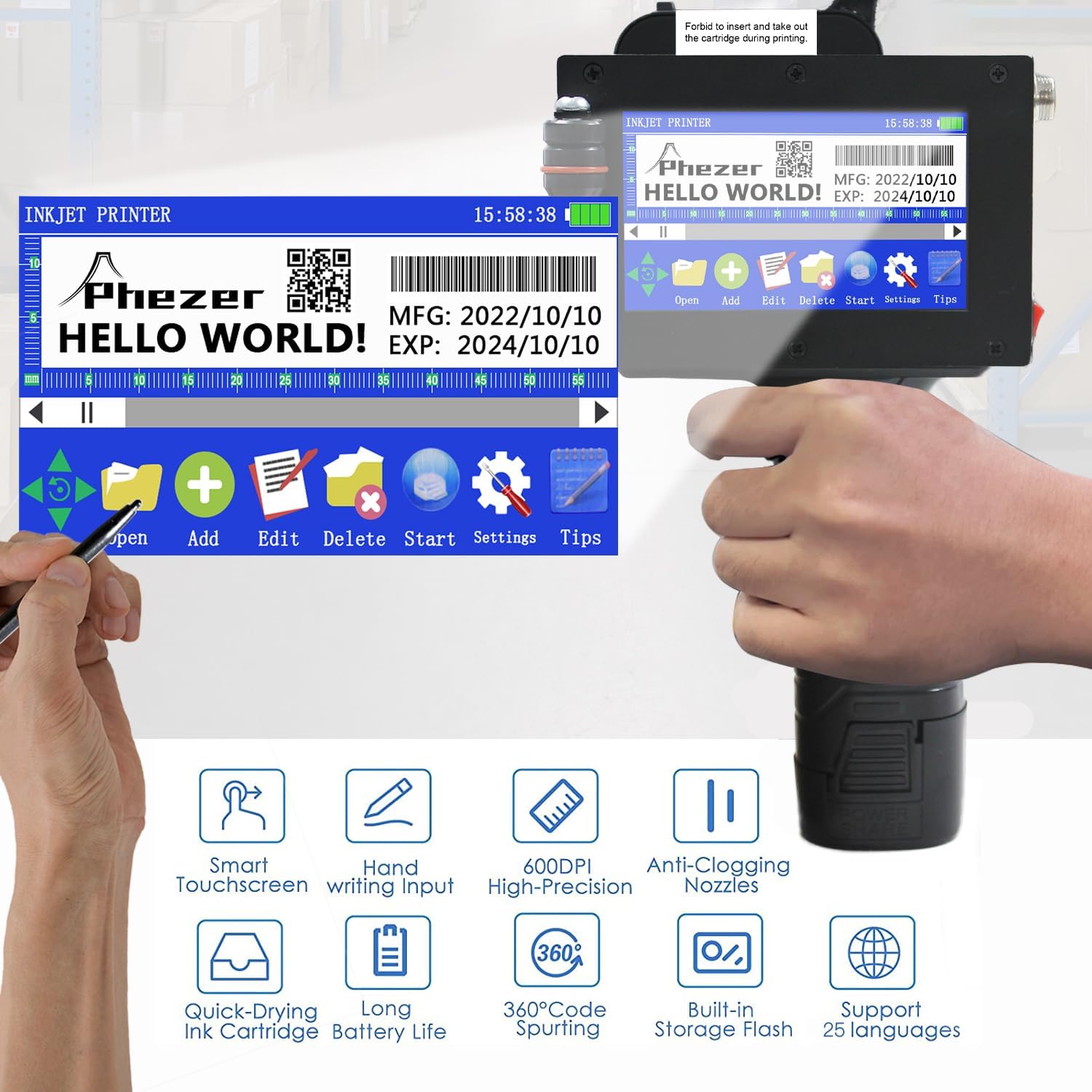
Image 3.1: Main screen interface with editing and settings options.
3.2. Creating and Editing Print Content
The printer supports various content types including text, date, time, QR codes, barcodes, and logos. You can directly edit font, size, and style on the touchscreen.

Immagine 3.2: Es.amples of supported print content types.
3.3. Variable Data Printing (Excel Files)
The printer can print variable data directly from Excel fileS. Segui questi passi:
- Crea un nuovo file sulla stampante.
- Select the 'Table' option to add a table.
- Insert a USB drive containing your Excel file (.xlsx format) into the printer's USB port.
- Exit and re-enter the 'Table' option to refresh the file lista.
- Select your desired Excel file dall'elenco.
- Save the changes using the 'OK' button.
- The printer is now ready to print the variable data from the Excel file.
Video 3.3: Guide on how to print Excel files with variable data.
3.4. Printing Procedure
To print, hold the printer firmly and press the print trigger. Gently slide the printer across the desired surface. The print height can be adjusted from 2mm to 25.4mm.

Immagine 3.4: Es.amples of multi-purpose usage on different materials.
3.5. 360-Degree Printing
The P16-1 supports 360-degree all-round printing, allowing you to print on curved or irregular surfaces.

Image 3.5: 360-degree coding on cylindrical objects.
3.6. Supported Surfaces
The printer is compatible with a wide range of materials, including paper, boards, carton, stone, pipe, cable, metal, glass, plastic, and cloth.
Video 3.6: Demonstrates printing on various surfaces like plastic and acrylic.
Video 3.7: Demonstrates printing on plastic bags and other flexible packaging.
4. Manutenzione
4.1. Pulizia degli ugelli
If printing appears unclear or incomplete, the ink cartridge nozzle may need cleaning. Use a cotton fabric sprayed with a moderate amount of alcohol to gently wipe the nozzle once. Then, attempt to print again.
Video 4.1: Instructions for cleaning the nozzle when printing is unclear.
4.2. Preventing Clogs and Leaks
The included 42ml quick-drying ink cartridge is designed to minimize ink-leaking and nozzle-blocking. Always ensure the cartridge is properly seated and the protective cap is replaced when not in use for extended periods.
5. Risoluzione Dei Problemi
5.1. Unclear or Incomplete Printing
If your prints are not clear or complete, refer to the nozzle cleaning instructions in Section 4.1. Ensure the print surface is clean and dry, and that the printer is moved smoothly across the surface during operation.
Video 5.1: Addresses issues with unclear or incomplete printing.
5.2. Double Print Problem
If you experience double printing, adjust the nozzle settings on the printer's interface. Navigate to 'Settings' > 'Nozzle' and ensure the 'Double Print' option is set to 'Off' or adjusted as needed for your specific application.
Video 5.2: Explains how to resolve the double print issue.
6. Specifiche
| Caratteristica | Specificazione |
|---|---|
| Nome del modello | P16-1 |
| Tecnologia di stampa | Getto d'inchiostro |
| Risoluzione di stampa massima | 600 dpi (bianco e nero) |
| Altezza di stampa | 2-25.4mm (1 inch) |
| Capacità della cartuccia di inchiostro | 72ml (42ml included) |
| Batteria | 2600mAh agli ioni di litio (inclusi) |
| Connettività | USB |
| Dimensioni del prodotto | 14 x 11 x 22.5 cm (5.51"P x 4.33"L x 8.86"A) |
| Peso dell'articolo | 2.2 libbre (1 kg) |
| Caratteristiche speciali | Borderless Printing, Display Screen, Internal Memory, Portable, Touch Screen |

Image 6.1: Physical dimensions of the Phezer P16-1 printer.
7. Garanzia e supporto
Phezer is committed to providing professional service and reliable coding solutions. For any inquiries or support needs, please contact Phezer Coding and Marking Solution directly.
7.1. Contattare l'assistenza
If you purchased your product through Amazon, you can contact Phezer Coding and Marking Solution by navigating to the product page, clicking on the 'Sold by' link (usually next to the seller's name), and then selecting 'Ask a question'.