
1. Introduzione
This manual provides essential information for the safe and efficient operation, maintenance, and troubleshooting of your LEVOIT Classic 36" Tower Fan and Core 400S Air Purifier bundle. This bundle is designed to enhance your indoor environment by providing both powerful air circulation and advanced air purification.
The LEVOIT Tower Fan features an innovative airflow design with curved air inlets and multi-blades, delivering a smooth, natural breeze. It offers 90° oscillation, 5 speed settings, and an auto mode that adjusts based on room temperature. Its quiet operation, as low as 28dB, ensures minimal disturbance.
The LEVOIT Core 400S Air Purifier incorporates a 3-stage filtration system, including pre-filters and an activated carbon filter, to capture 99.97% of particles down to 0.3 microns, such as allergens and odors. Equipped with AirSight Plus technology, it continuously monitors air quality and automatically adjusts fan speed. Sleep Mode provides quiet purification at 24dB for undisturbed rest.
2. Importanti istruzioni di sicurezza
To reduce the risk of fire, electric shock, or injury, please read and follow all instructions and warnings in this manual before using this product. Keep this manual for future reference.
- Always place the appliance on a firm, flat, and level surface.
- Non immergere l'apparecchio in acqua o altri liquidi.
- Non utilizzare l'apparecchio vicino all'acqua o in ambienti damp condizioni.
- Tenere l'apparecchio lontano da fonti di calore, dalla luce solare diretta e da materiali infiammabili.
- Assicurare il volumetage del tuo alimentatore corrisponde al voltage specificato sulla targhetta dei dati tecnici dell'apparecchio.
- Scollegare l'apparecchio prima di pulirlo, sottoporlo a manutenzione o quando non viene utilizzato per lunghi periodi.
- Non utilizzare alcun apparecchio con un cavo o una spina danneggiati, o dopo che l'apparecchio non funziona correttamente o è caduto o è stato danneggiato in qualsiasi modo.
- Tenere i bambini e gli animali domestici lontani dall'apparecchio durante il funzionamento.
- Do not insert fingers or foreign objects into any openings of the appliance.
3. Installazione e assemblaggio
The LEVOIT Tower Fan and Air Purifier are designed for straightforward setup. Follow these general steps for initial assembly and placement.
3.1 Tower Fan Assembly
- Carefully remove the tower fan and its components from the packaging.
- Attach the base to the bottom of the fan unit. This typically involves aligning the base with the fan's bottom and securing it with a single nut or locking mechanism.
- Ensure the base is firmly attached and the fan is stable before plugging it in.

Image: LEVOIT Classic 36 inch Tower Fan with remote control, illustrating powerful airflow. The fan is white and black, tall and slender, with a remote control placed in front of it. Blue lines indicate the direction of airflow.
3.2 Configurazione del purificatore d'aria
- Rimuovere il purificatore d'aria dalla confezione.
- Before first use, open the bottom cover and remove the plastic packaging from the filter. Reinsert the filter and close the cover securely.
- Place the air purifier on a flat, stable surface, ensuring adequate space around it for optimal air intake and output.
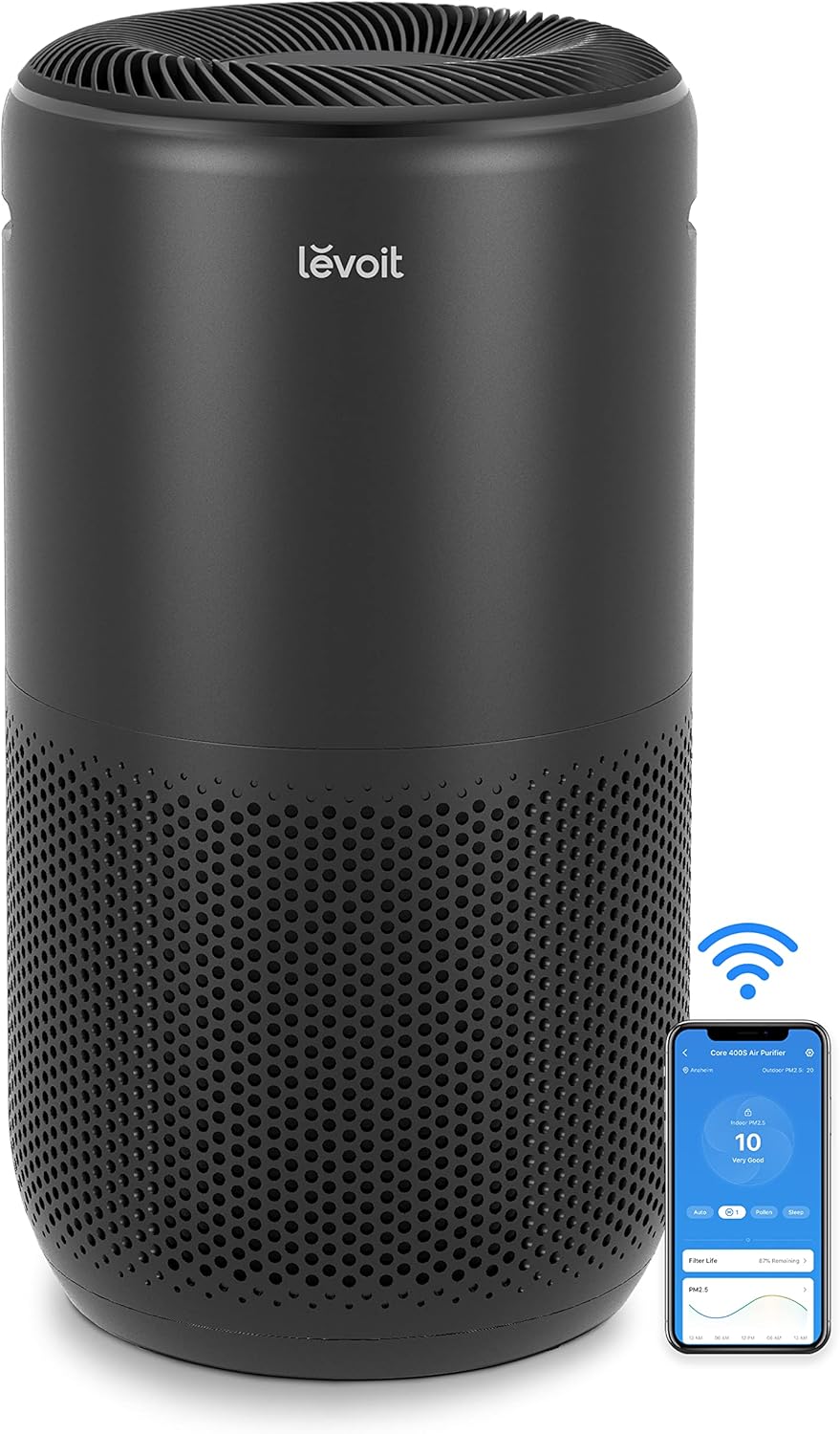
Image: LEVOIT Core 400S Smart Air Purifier in black, shown alongside a smartphone displaying its air quality monitoring app. The purifier is cylindrical with a perforated lower section, and the app shows air quality readings.
4. Caratteristiche del prodotto
4.1 LEVOIT Classic 36" Tower Fan Features
- Simulazione del vento naturale: Innovative airflow design with curved air inlets and unique multi-blades creates a soft, natural breeze.
- Flusso d'aria efficiente: Delivers 25ft/s speed and 1062 CFM airflow, suitable for large spaces up to 403 sq ft.
- Oscillazione grandangolare: Features a 90° oscillation range for broad air circulation.
- Dynamic Comfort: Smart sensors adjust airflow based on room temperature to maintain optimal comfort.
- Funzionamento silenzioso: Operates as quietly as 28dB, ideal for sleep and relaxation.
- Controlli reattivi: Equipped with a responsive touch-screen panel and a remote control for convenient operation.

Image: Woman meditating in a serene room, experiencing the gentle 'NaturalWind' from the LEVOIT Tower Fan. The fan is shown emitting a gentle blue airflow.

Image: LEVOIT Tower Fan demonstrating 90-degree oscillation, providing wide-angle air circulation in a living space with a woman and dog. Blue airflow lines indicate the wide coverage.
4.2 LEVOIT Core 400S Air Purifier Features
- Copertura di grandi stanze: Purifies rooms up to 403 sq ft 5 times per hour, or 1980 sq ft once per hour, suitable for bedrooms, living rooms, and kitchens.
- 3-Stage Sistema di filtraggio: Includes a pre-filter, H13 True HEPA filter, and an activated carbon filter to capture 99.97% of airborne particles 0.3 microns in size.
- AirSight Plus Technology: Continuously monitors air quality and automatically adjusts fan speed for efficient purification.
- Whisper-Level Quiet: Sleep Mode operates at a low 24dB, creating a peaceful environment for sleep.
- Controllo intelligente: Connects to a smartphone app for remote control and air quality monitoring.

Image: LEVOIT Air Purifier in a living room setting, demonstrating its ability to purify air across a large area, with a man working on a laptop. A blue shaded area on an overhead diagram indicates 403 sq ft coverage.
5. Istruzioni per l'uso
5.1 LEVOIT Classic 36" Tower Fan Operation
The tower fan can be operated using the touch control panel on top of the unit or the included remote control.
- Accensione/spegnimento: Premere il pulsante di accensione per accendere o spegnere la ventola.
- Velocità della ventola: Adjust between 5 fan speeds to customize airflow intensity.
- Oscillazione: Attivare l'oscillazione a 90° per una distribuzione più ampia dell'aria.
- Modalità automatica: The fan automatically adjusts its speed based on the room's ambient temperature.
- Modalità risparmio: Reduces fan speed to the lowest setting and dims the display for quiet operation during sleep.
- Timer: Set a timer for automatic shutdown after a specified period.
5.2 LEVOIT Core 400S Air Purifier Operation
Operate the air purifier using the control panel or through the dedicated smartphone application.
- Accensione/spegnimento: Press the power button to activate or deactivate the purifier.
- Velocità della ventola: Manually select desired fan speed for purification.
- Auto Mode (AirSight Plus): The purifier's AirSight Plus technology detects air quality and automatically adjusts fan speed to optimize purification.
- Modalità risparmio: Activates the lowest fan speed (24dB) and dims display lights for quiet, undisturbed operation.
- Timer: Imposta un timer per lo spegnimento automatico.
- Indicatore di ripristino del filtro: An indicator will light up when it's time to check or replace the filter.
6. Manutenzione
Regular maintenance ensures optimal performance and longevity of your LEVOIT appliances.
6.1 LEVOIT Classic 36" Tower Fan Maintenance
- Pulizia dell'esterno: Pulire l'esterno con un panno morbido e asciutto. Non utilizzare detergenti abrasivi o solventi.
- Pulizia dell'ingresso/uscita dell'aria: Utilizzare un aspirapolvere con spazzola per rimuovere delicatamente la polvere dalle prese d'aria e dalle uscite.
- Pulizia interna: The fan features a detachable back cover and filter, allowing for thorough internal cleaning to prevent dust buildup. Refer to the detailed user manual for specific instructions on how to safely remove and clean these components.
6.2 LEVOIT Core 400S Air Purifier Maintenance
- Sostituzione del filtro: Il 3-stage filter should be replaced every 6-8 months, depending on usage and air quality. A filter indicator light will signal when replacement is needed. Always use genuine LEVOIT replacement filters.
- Pulizia del prefiltro: The pre-filter, part of the 3-stage filter, can be gently cleaned with a soft brush or vacuum cleaner to remove larger particles and extend filter life.
- Pulizia del sensore della qualità dell'aria: Regularly clean the air quality sensor located on the side of the unit with a dry cotton swab to ensure accurate readings.
- Pulizia esterna: Pulisci l'esterno con un panno morbido e asciutto.

Image: Detailed diagram of the LEVOIT Air Purifier's 3-stage filtration system, showing preliminary, efficient middle, and activated carbon filters. Arrows indicate airflow through the different layers.
7. Risoluzione Dei Problemi
If you encounter any issues with your LEVOIT Tower Fan or Air Purifier, please refer to the following common troubleshooting steps.
| Problema | Possibile causa | Soluzione |
|---|---|---|
| L'apparecchio non si accende | Non collegato; malfunzionamento della presa di corrente; pulsante di accensione non premuto. | Assicurarsi che il cavo di alimentazione sia saldamente collegato a una presa di corrente funzionante. Premere il pulsante di accensione. |
| Weak airflow (Fan) | Air inlets/outlets blocked; Fan speed too low. | Clear any obstructions from the air inlets/outlets. Increase the fan speed. |
| Unusual noise (Fan/Purifier) | Appliance not on a level surface; Internal obstruction; Filter not installed correctly (Purifier). | Place the appliance on a flat, stable surface. Check for and remove any foreign objects. Ensure the air purifier filter is correctly seated. |
| Poor purification (Purifier) | Filter is dirty or expired; Room size exceeds capacity; Air inlets/outlets blocked. | Replace the air filter. Ensure the purifier is used in an appropriately sized room. Clear any obstructions. |
| Il telecomando non funziona | Batteries are dead; Remote is too far or obstructed. | Replace the remote control batteries. Ensure the remote is within range and pointed at the appliance. |
If the problem persists after trying these solutions, please contact LEVOIT customer support.
8. Specifiche
8.1 LEVOIT Classic 36" Tower Fan
- Marca: LEVOITO
- Colore: Bianco
- Stile: Classic 36"
- Caratteristica speciale: Oscillante
- Utilizzi consigliati: Circolazione dell'aria
- Misurare: 6.5 profondità x 6.5 larghezza x 36.2 altezza pollici
- Tipo di controller: Controllo dei pulsanti
- Numero di velocità: 5
8.2 LEVOIT Core 400S Air Purifier
- Marca: LEVOITO
- Tipologia di camera: Bedroom, Living Room, Kitchen, Basement
- Area di copertura: 403 sq ft (5x/hour), 1980 sq ft (1x/hour)
- Filtrazione: 3-Stage (Prefiltro, H13 True HEPA, Carbone attivo)
- Livello di rumore (modalità sospensione): 24 dB
- Intelligenti Caratteristiche: AirSight Plus Technology, App Control
9. Garanzia e supporto
LEVOIT products come with a standard manufacturer's warranty. Please refer to the warranty card included in your product packaging or visit the official LEVOIT websito per informazioni dettagliate sulla garanzia e sulla registrazione.
For technical support, troubleshooting assistance, or any questions regarding your LEVOIT Classic 36" Tower Fan or Core 400S Air Purifier, please contact LEVOIT Customer Support through their official websito o le informazioni di contatto fornite nella documentazione del prodotto.