Introduzione
The KEYCOOL K19 Wireless Numeric Keyboard is a versatile and ergonomic peripheral designed for enhanced productivity across various operating systems. Featuring triple mode connectivity, hot-swappable switches, and a multi-function knob, this keypad offers a customizable and efficient user experience. This manual provides detailed instructions for setup, operation, maintenance, and troubleshooting to ensure optimal performance of your K19 numeric keyboard.
Caratteristiche principali
- Connettività a tripla modalità: Seamlessly switch between wired (USB-C), Bluetooth 5.0, and 2.4GHz wireless connections for maximum flexibility.
- Interruttori sostituibili a caldo: Customize your typing experience by easily changing 3-pin or 5-pin mechanical switches without soldering.
- Manopola multifunzione: Control RGB lighting effects, adjust volume, and manage media functions with a versatile rotary knob.
- Retroilluminazione RGB: Enjoy dynamic and customizable RGB lighting modes to personalize your setup.
- Struttura montata su guarnizione: Designed with imported PORON foam tape for a pleasant and satisfying typing sound.
- Design ergonomico: Features a sloped keyboard and durable PBT keycaps for comfortable and long-lasting use.
- Ampia compatibilità: Compatible with Windows, Mac, Linux, Android, and iOS systems.

Immagine: Oltreview of the K19 Mechanical Numeric Keypad's core features.
Contenuto della confezione
Upon opening your KEYCOOL K19 package, please verify that all the following items are included:
- Tastiera numerica wireless K19
- Cavo USB-C
- Estrattore per tasti
- Estrattore per interruttori
- Additional Keycaps (e.g., Esc, Fan icon)
- Additional Switches
- Manuale dell'utente / Guida rapida
Video: Unboxing the Keycool K19 numeric keyboard and its included accessories.
Impostare
Caricamento della tastiera
Before initial use, ensure the K19 numeric keyboard is fully charged. Connect the provided USB-C cable to the keyboard's USB-C port and the other end to a power source (e.g., computer USB port, wall adapter). The charging indicator light will show the charging status.
Modalità di connettività
The K19 supports three connection modes: Wired, 2.4GHz Wireless, and Bluetooth. Use the switch located on the keyboard to select your desired mode.
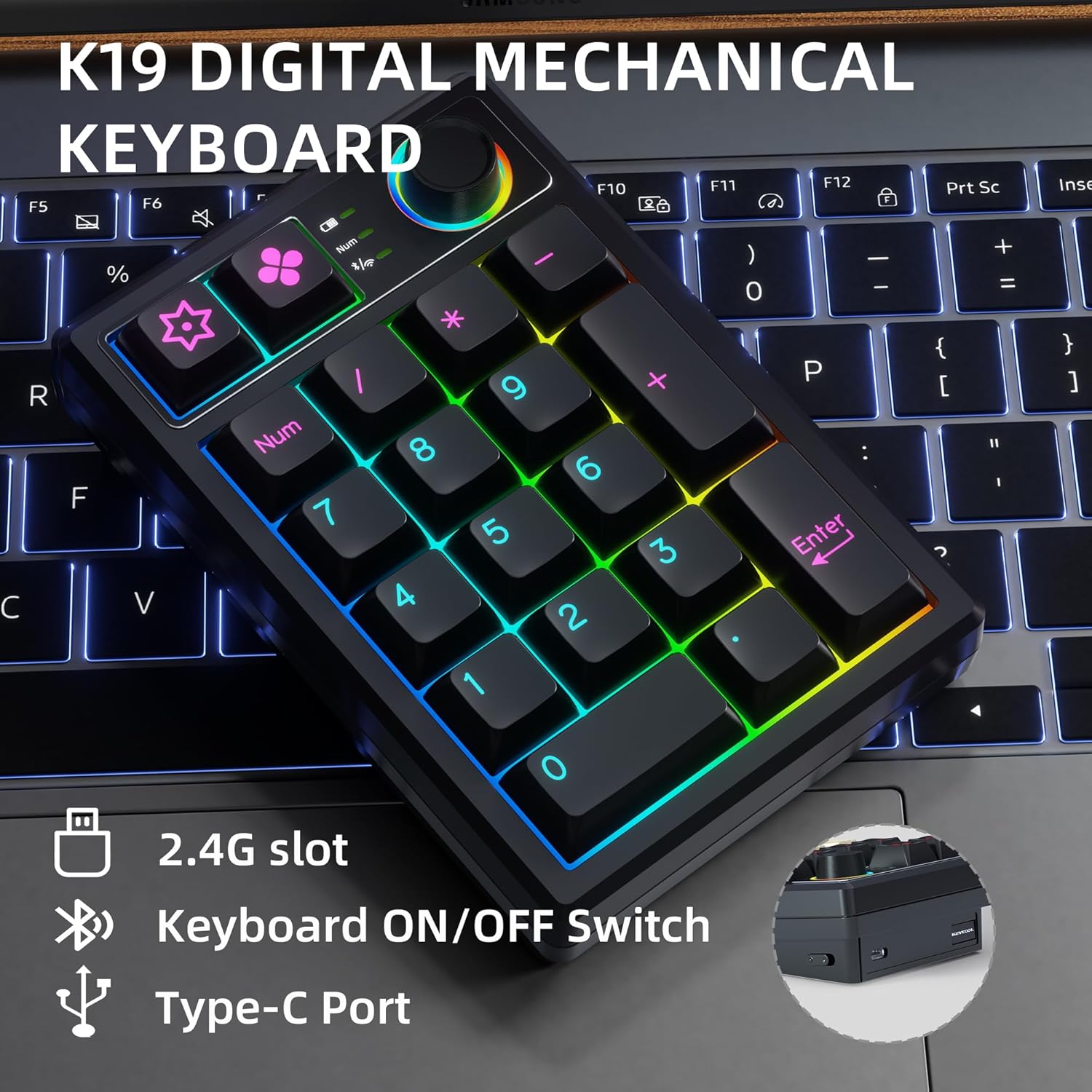
Image: Key connection points on the K19 numeric keyboard.
1. Connessione cablata
- Ensure the keyboard's mode switch is set to the wired (USB) position.
- Collega il cavo USB-C dalla tastiera alla porta USB del computer.
- La tastiera verrà riconosciuta automaticamente e sarà pronta all'uso.
2. Connessione wireless a 2.4 GHz
- Locate the 2.4G USB receiver, usually stored in a slot on the keyboard.
- Collega il ricevitore USB a una porta USB disponibile sul tuo computer.
- Set the keyboard's mode switch to the 2.4G wireless position.
- La tastiera dovrebbe connettersi automaticamente.
3. Connessione Bluetooth
- Set the keyboard's mode switch to the Bluetooth position.
- Sul tuo dispositivo (computer, tablet, smartphone), attiva il Bluetooth e cerca nuovi dispositivi.
- Select "KEYCOOL K19" from the list of available devices to pair.
- Seguire le istruzioni visualizzate sullo schermo per completare il processo di associazione.
Installazione di driver e software
For advanced customization, including key remapping and macro settings, you may download the official driver software from the KEYCOOL websito: www.kc-keycool.com. Install the software according to the instructions provided on the websito.

Image: Driver download site for KEYCOOL products.
Istruzioni per l'uso
Manopola multifunzione
The rotary knob on the K19 numeric keyboard provides quick access to various functions:
- Regolazione dell'illuminazione RGB: Rotate the knob to cycle through different RGB lighting effects or adjust brightness. Press the knob to switch between lighting modes or turn lighting on/off.
- Controllo multimediale: The knob can also be configured via software to control media functions such as volume adjustment (rotate) or play/pause (press).
Retroilluminazione RGB
The K19 features vibrant RGB backlighting with multiple effects. Use the multi-function knob or specific key combinations (refer to the Quick Start Guide or software) to customize the lighting to your preference.
Video: Demonstration of the RGB backlit effects on the K19 numeric keyboard.

Image: The K19 numeric keyboard showcasing la sua illuminazione RGB.
Interruttori sostituibili a caldo
The K19 allows you to easily change mechanical switches without soldering. This feature enables you to customize the feel and sound of your keypad. Use the included switch puller to carefully remove existing switches and insert new 3-pin or 5-pin compatible switches.

Immagine: Primo piano view of the K19's hot-swappable switch sockets.
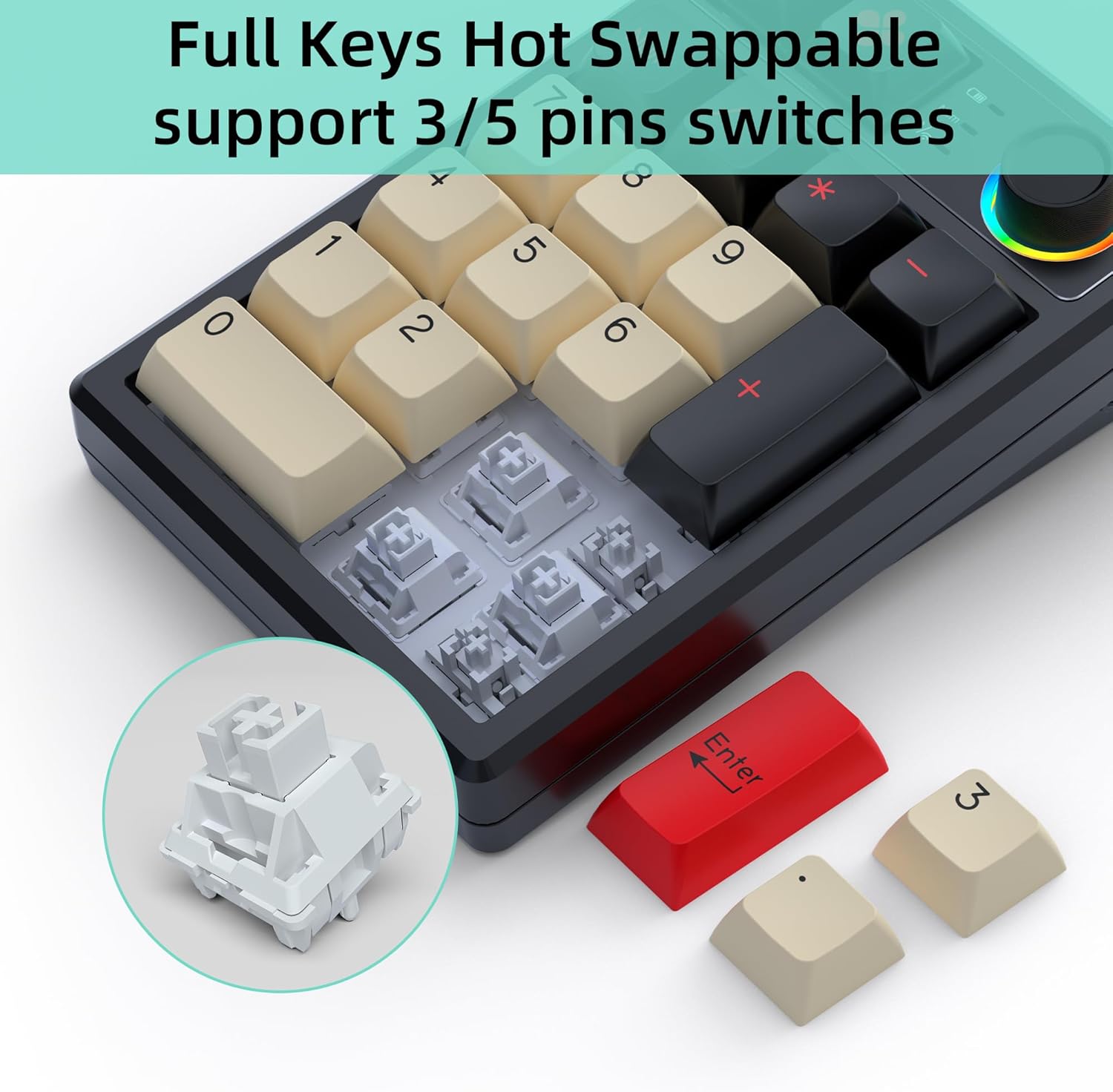
Image: Illustration of replacing keycaps and switches on the K19.
Personalized Programmable Keys
Utilize the dedicated software (downloadable from www.kc-keycool.com) to customize key functions, create macros, and fine-tune lighting effects according to your workflow and preferences. The custom settings are stored directly on the keypad, allowing you to use your personalized layout across different devices without needing the software running in the background.

Image: Software interface for customizing the K19 numeric keyboard.
Manutenzione
- Pulizia: Use a soft, dry cloth to wipe the surface of the keyboard. For deeper cleaning, gently remove keycaps with the provided keycap puller and use compressed air to clear dust and debris from between the switches.
- Evitare i liquidi: Non esporre la tastiera a liquidi. In caso di versamento di liquidi, scollegare immediatamente la tastiera e lasciarla asciugare completamente prima di ricollegarla.
- Magazzinaggio: Conservare la tastiera in un luogo fresco e asciutto, lontano dalla luce solare diretta e da temperature estreme.
Risoluzione dei problemi
| Problema | Possibile soluzione |
|---|---|
| La tastiera non risponde in modalità wireless. | Ensure the keyboard is charged, the mode switch is set correctly (2.4G or Bluetooth), and the receiver is properly plugged in (for 2.4G) or Bluetooth is paired (for Bluetooth). Try re-pairing or reconnecting. |
| I tasti non vengono registrati o vengono digitati due volte. | This may indicate a loose or faulty switch. Use the switch puller to remove the affected switch and re-insert it firmly. If the issue persists, try replacing the switch with one of the spares. |
| L'illuminazione RGB non funziona o è bloccata. | Check the multi-function knob settings. Ensure the keyboard is not in power-saving mode. Refer to the user manual or software for specific lighting control key combinations. |
| Connessione Bluetooth instabile. | Ensure no strong interference sources are nearby. Try moving the keyboard closer to your device. Disconnect and re-pair the Bluetooth connection. |
| Software not recognizing the keyboard. | Ensure the keyboard is connected via wired mode when using the software. Reinstall the software if necessary. |
Specifiche
| Attributo | Dettaglio |
|---|---|
| Numero di modello | K19+1Knob |
| Dimensioni del prodotto | 5.2 x 3.5 x 1.25 pollici (13.2 x 8.9 x 3.2 cm) |
| Peso dell'articolo | 11.7 once (331.7 g) |
| Tecnologia di connettività | Bluetooth, Wi-Fi 2.4G, USB-C (Triple Mode) |
| Descrizione della tastiera | Meccanico |
| Numero di chiavi | 21 (19 keys + 1 knob) |
| Caratteristiche speciali | Portable, Volume Roller, Backlit, Hot-Swappable |
| Dispositivi compatibili | Laptop, PC, console di gioco, tablet, smartphone |
| Colore | Nero |
| Capacità della batteria | 1500mAh (as per feature bullets) |
| Paese di origine | Cina |
Garanzia e supporto
KEYCOOL products are manufactured to high-quality standards. For warranty information, technical support, or any inquiries regarding your K19 Wireless Numeric Keyboard, please refer to the contact details provided on the official KEYCOOL webposto (www.kc-keycool.com) o contatta il tuo rivenditore.