
Introduzione
This manual provides detailed instructions for the installation, operation, and maintenance of your STUDIOFINIX TA2002 2-Channel Mini Bluetooth Amplifier. Please read this manual thoroughly before using the product to ensure proper function and to maximize your audio experience. This amplifier is designed to power passive speakers and offers versatile connectivity options including Bluetooth 5.1 and AUX input.
Caratteristiche del prodotto
- Compatibilità universale: Suitable for various passive speakers including wall-mounted, ceiling-mounted, marine, and bookshelf speakers.
- Bluetooth 5.1: Built-in Bluetooth 5.1 core for faster transmission speed, longer transmission distance, and stable performance.
- Installazione semplice: Compact and lightweight design for convenient installation on flat surfaces like walls, ceilings, or cabinets.
- Connessione TWS: Supports True Wireless Stereo (TWS) function to connect two amplifiers for synchronized music playback.
- Ingresso AUX: Provides an auxiliary input for wired audio connections.

Image: The STUDIOFINIX TA2002 amplifier highlighting its Bluetooth 5.1, AUX input, 30W output, lightweight design, and TWS capabilities.
Cosa c'è nella scatola
- Bluetooth a 2 canali Amplifier Box (1)
- 12V3A Power Adapter (1)
- Manuale d'uso (1)
- Cacciavite (1)
- Viti (2)
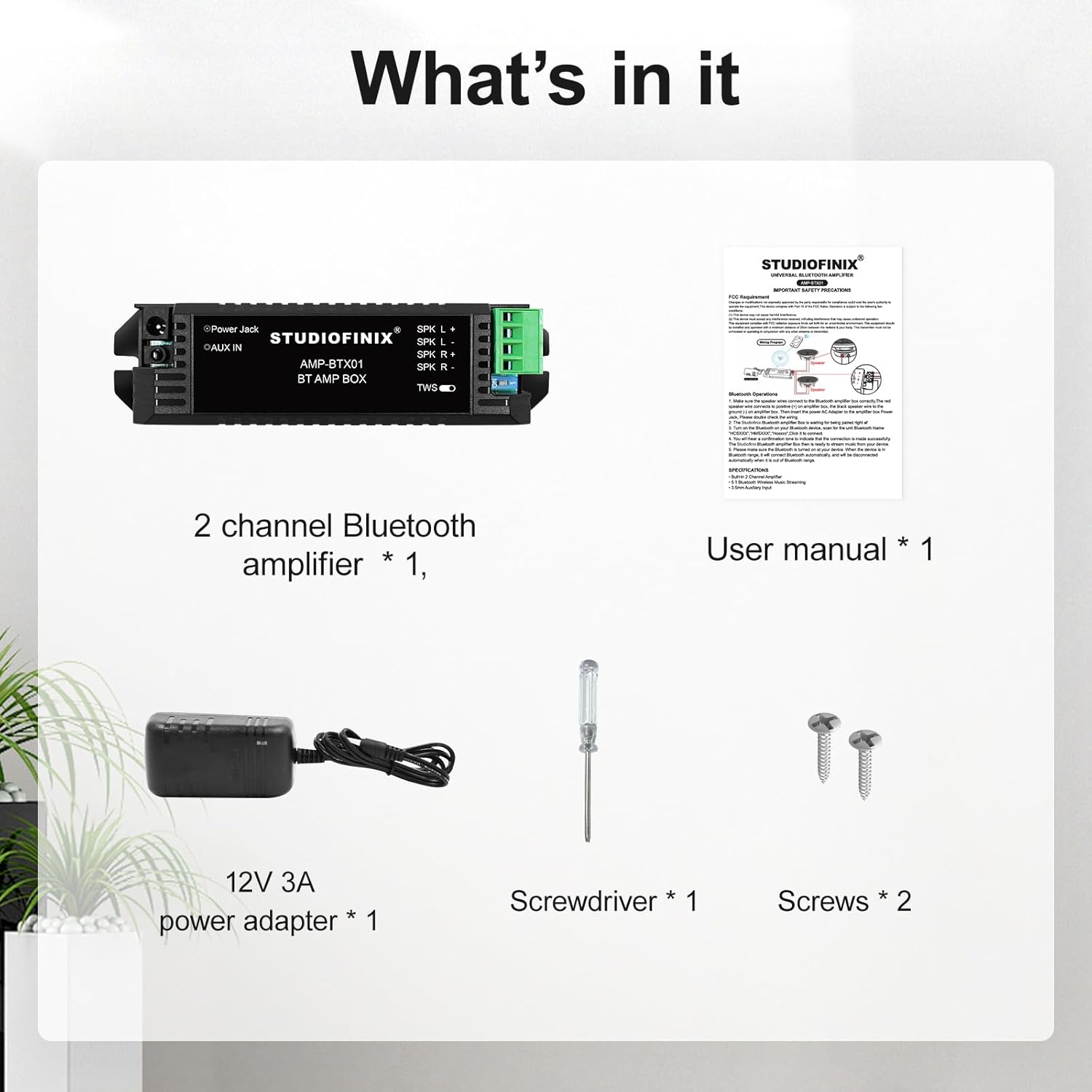
Image: The package contents including the amplifier, power adapter, user manual, screwdriver, and screws.
Prodotto finitoview
The STUDIOFINIX TA2002 is a compact amplifier designed for easy integration into various audio setups. Below is an overview of its components and dimensions.

Immagine: Frontale view of the STUDIOFINIX TA2002 amplifier, showing the power jack, AUX IN, speaker terminals (SPK L+, SPK L-, SPK R+, SPK R-), and TWS switch.

Image: Diagram showing the dimensions of the amplifier: 5.20 inches (13.2 cm) length, 1.18 inches (3 cm) height, and 1.65 inches (4.2 cm) width.
Impostare
1. Collegamento degli altoparlanti
Collega i tuoi altoparlanti passivi a amplifier's speaker terminals. Ensure correct polarity: connect the positive (+) terminal of the speaker to the SPK L+ or SPK R+ terminal of the amplifier, and the negative (-) terminal of the speaker to the SPK L- or SPK R- terminal. Use the provided screwdriver to secure the speaker wires.

Image: Diagram illustrating how to connect two passive speakers (Speaker A and Speaker B) to the amplifier's left and right speaker terminals.
2. Accensione
Connect the 12V3A power adapter to the "Power Jack" input on the amplifier, then plug the adapter into a power outlet. The amplifier will power on automatically.
3. Accoppiamento Bluetooth
Con il amplifier powered on, ensure no AUX cable is connected. The amplifier will automatically enter Bluetooth pairing mode. On your audio device (smartphone, tablet, etc.), search for Bluetooth devices and select "STUDIOFINIX" to connect.

Image: The STUDIOFINIX TA2002 amplifier connected via Bluetooth 5.1 to a smartphone displaying a music player interface.
4. Collegamento AUX
To use the AUX input, connect your audio source (e.g., MP3 player, laptop) to the "AUX IN" jack on the amplifier using a 3.5mm audio cable. When an AUX cable is connected, the amplifier will prioritize the wired connection over Bluetooth.
5. Connessione TWS (True Wireless Stereo)
The TWS function allows you to connect two STUDIOFINIX TA2002 amplifiers for a true stereo experience.
- Assicurare entrambi amplifiers are powered on and not connected to any Bluetooth device or AUX cable.
- Flip the TWS switch on both amplifiers to the 'ON' position.
- IL amplifiers will automatically pair with each other. Once paired, one amplifier will act as the master and the other as the slave.
- Connect your audio device to the master amplifier via Bluetooth. Audio will now play in stereo through both connected amplificatori.

Immagine: Primo piano view of the TWS switch on the STUDIOFINIX TA2002 amplifier, indicating its function for True Wireless Stereo pairing.

Image: Diagram showing two amplifiers connected via TWS, with the TWS switch in the 'ON' position, enabling a versatile listening experience.
Operazione
Once connected via Bluetooth or AUX, playback and volume control are managed directly from your connected audio device. The amplifier itself does not have physical volume controls.
Video: Un oltreview of the 2-Channel Mini 5.1 Bluetooth Amplifier, demonstrating its compact size and connectivity options. This video is provided by Studiofinix Direct.
Manutenzione
- Pulizia: Utilizzare un panno morbido e asciutto per pulire il amplificatore. Non utilizzare detergenti liquidi o spray.
- Magazzinaggio: Conservare il amplifier in un luogo fresco e asciutto, lontano dalla luce solare diretta e da temperature estreme.
- Ventilazione: Assicurare il amplifier has adequate ventilation to prevent overheating. Do not block the ventilation slots.
Risoluzione dei problemi
| Problema | Soluzione |
|---|---|
| Nessun potere | Assicurarsi che l'adattatore di alimentazione sia collegato saldamente al amplifier and a working power outlet. Check the power adapter for damage. |
| Nessun suono dagli altoparlanti |
|
| Bluetooth device cannot find amppiù vivace |
|
| Problemi di connessione TWS |
|
Specifiche
| Caratteristica | Dettaglio |
|---|---|
| Marca | STUDIOFINIX |
| Numero di modello | TA2002 |
| Potenza massima in uscita dell'altoparlante | 30 Watt |
| Numero di canali audio | 5.1 (Note: Product title indicates 2-channel, but specifications list 5.1. For this manual, we focus on 2-channel operation as implied by the product description and images.) |
| Tecnologia di connettività | Bluetooth, ausiliario |
| Versione Bluetooth | 5.1 |
| Portata Bluetooth | 10 metri |
| Ingresso volumetage | 12 Volt (CC) |
| Tipo di montaggio | Ceiling Mount (Versatile for flat surfaces) |
| Materiale di recinzione | Plastica |
| Colore | Nero |
| Metodo di controllo | App (tramite dispositivo connesso) |
| Usi specifici | Home entertainment systems, Wall/ceiling mounted speakers, Multi-room audio setups |
Garanzia e supporto
The product comes with a Limited Warranty. For specific details regarding the warranty period and coverage, please refer to the warranty information included with your purchase or contact STUDIOFINIX customer support.
For technical support or inquiries, please visit the official STUDIOFINIX websito o contattare il loro servizio clienti.