
1. Introduzione
The PEAKMETER PM8232A is a portable digital multimeter designed for accurate electrical measurements. It features stable performance, high precision, and low power consumption, making it a reliable instrument for various users. This device can measure DC Voltage, AC voltage, Resistance, 1.5V/9V/12V Battery voltage, diode, and continuity, and includes Non-Contact Voltage rilevamento (NCV).
1.1 Informazioni sulla sicurezza
AVVERTIMENTO: To avoid electrical shock, remove test leads before opening the case. Always adhere to safety guidelines when operating electrical testing equipment.
- Il volume massimotage allowed between the measuring terminal and ground is 600V DC or AC RMS.
- This device conforms to safety standards EN61010-1, EN61010-2-033, EN61326, and is rated CAT III 600V.
- Non utilizzare il dispositivo se appare danneggiato o se l'isolamento è compromesso.
- Prima di effettuare le misurazioni, assicurarsi di aver selezionato la funzione e l'intervallo corretti.
2. Contenuto della confezione
Verificare che tutti gli articoli siano presenti e integri al momento dell'apertura del pacco:
- PEAKMETER PM8232A Digital Multimeter
- Cavi di prova (rosso e nero)
- Manuale d'uso
3. Prodotto finitoview
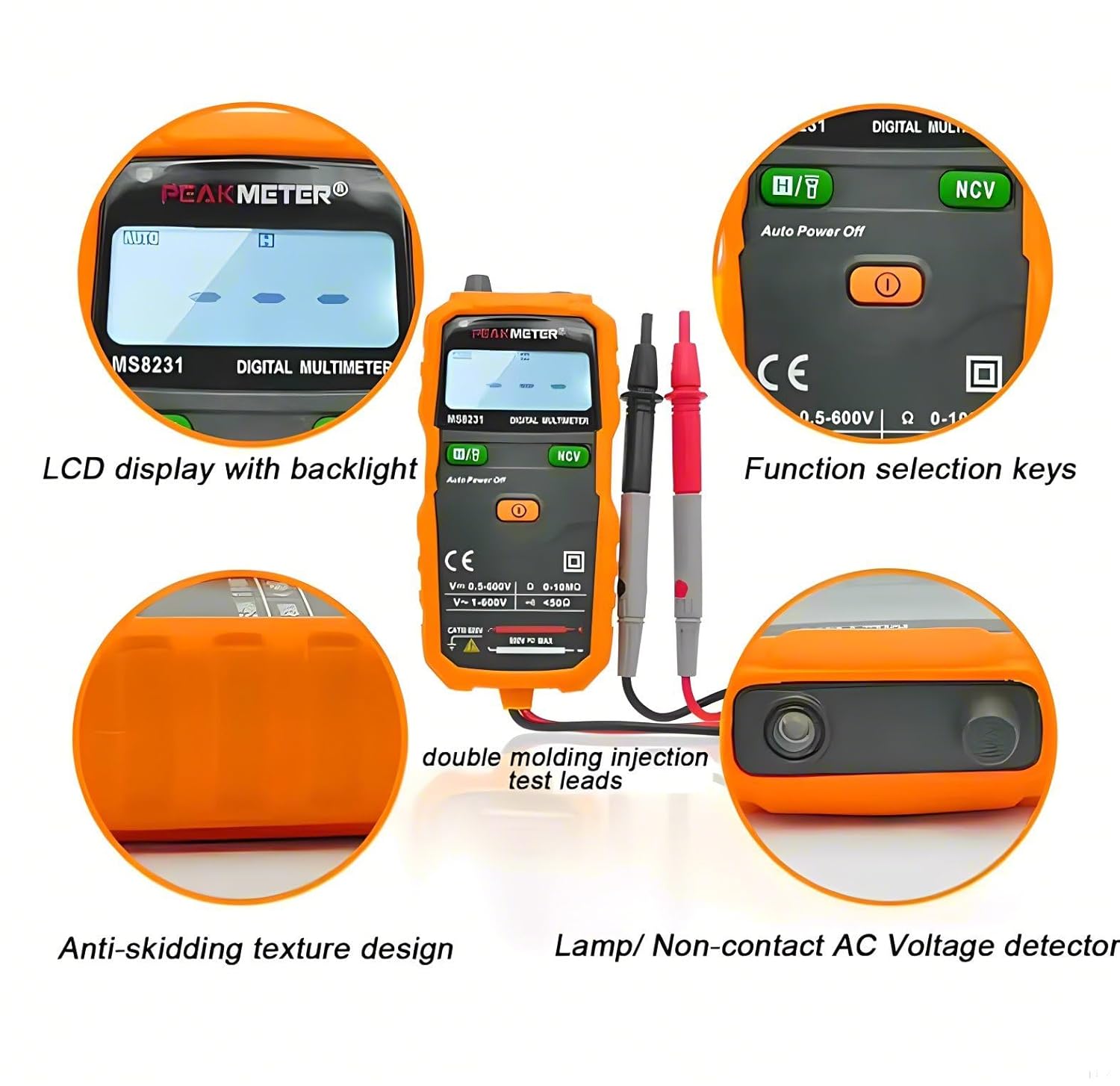
The PM8232A multimeter features a compact design with an easy-to-read LCD display and intuitive controls.

Le caratteristiche principali includono:
- Display LCD con retroilluminazione: Fornisce letture chiare in diverse condizioni di illuminazione.
- Function Selection Keys: Buttons for 'FUNC', 'RANGE', and 'HOLD/☀' (flashlight/backlight).
- Quadrante rotante: Used to select measurement modes (e.g., DCV, ACV, Resistance, Battery, NCV, OFF).
- Test Lead Ports: Standard input jacks for red and black test leads.
- Vol. AC senza contattotage Detector (NCV): Integrated sensor for detecting live AC voltage senza contatto diretto.
- Torcia elettrica: Luce integrata per illuminare le aree di lavoro.
- Anti-Skidding Texture Design: Ergonomic design for a secure grip.

4. Impostazione
4.1 Installazione della batteria
The PM8232A multimeter requires two 1.5V AAA batteries for operation.
- Ensure the multimeter is powered off and disconnect all test leads from the device and any circuits.
- Individuare il coperchio del vano batteria sul retro del multimetro.
- Utilizzare un cacciavite per aprire il vano batteria.
- Inserire due batterie AAA da 1.5 V, rispettando la polarità corretta (+/-) come indicato all'interno del vano.
- Riposizionare il coperchio del vano batteria e fissarlo con la vite.

5. Istruzioni per l'uso
5.1 Accensione/spegnimento
Rotate the central dial to any measurement function to power on the multimeter. To power off, rotate the dial to the 'OFF' position. The device features an automatic power-off function to conserve battery life after a period of inactivity.
5.2 Misurazioni di base
Connect the black test lead to the 'COM' jack and the red test lead to the 'VΩmA' jack for most measurements.
- Volume DCtage Misura: Rotate the dial to the 'V—' position. The multimeter will automatically select the appropriate range.
- Volume ACtage Misura: Rotate the dial to the 'V~' position. The multimeter will automatically select the appropriate range.
- Misura della resistenza: Ruotare la manopola sulla posizione 'Ω'.
- Prova del diodo: Rotate the dial to the 'Ω' position and press the 'FUNC' button until the diode symbol appears on the display.
- Test di continuità: Rotate the dial to the 'Ω' position and press the 'FUNC' button until the continuity symbol (buzzer) appears. A continuous beep indicates continuity.
5.3 Misurazione della batteria
The PM8232A can measure 1.5V, 9V, and 12V batteries.
- Rotate the dial to the '1.5V/9V/12V' battery measurement position.
- Collegare il puntale di prova rosso al terminale positivo della batteria e il puntale di prova nero al terminale negativo.
- Leggi il vol.tage visualizzato sullo schermo.
5.4 Senza contatto voltage (NCV) Rilevamento
La funzione NCV consente il rilevamento della tensione alternatatage senza contatto diretto con i conduttori.
- Ruotare la manopola sulla posizione 'NCV'.
- Move the top end of the multimeter near the conductor or outlet you wish to test.
- The device will emit an audible beep and the NCV indicator light will flash if AC voltage viene rilevato.

5.5 Funzioni speciali
- Data Hold: Premere il pulsante 'HOLD' per bloccare la lettura corrente sul display. Premere nuovamente per rilasciare.
- Retroilluminazione/Luce da lavoro: Press and hold the 'HOLD/☀' button to activate the display backlight. A short press of the same button will toggle the work light (flashlight) on or off.

6. Manutenzione
Una corretta manutenzione garantisce la longevità e la precisione del multimetro.
- Pulizia: Pulire il dispositivo con un panno asciutto e morbido. Non utilizzare detergenti abrasivi o solventi.
- Magazzinaggio: Store the multimeter in a cool, dry place away from direct sunlight and extreme temperatures. Remove batteries if the device will not be used for an extended period.
- Sostituzione della batteria: Replace batteries promptly when the low battery indicator appears on the display.
7. Risoluzione Dei Problemi
Se riscontri problemi con il tuo multimetro, fai riferimento ai seguenti problemi comuni e alle relative soluzioni:
- Nessun display/dispositivo non acceso: Controllare l'installazione delle batterie e assicurarsi che non siano scariche. Sostituirle se necessario.
- Indicazione "OL": This indicates an over-range condition. The measured value exceeds the selected range. If in auto-range, the value is beyond the device's maximum capability for that function.
- Letture imprecise: Ensure test leads are properly connected and not damaged. Verify the correct function and range are selected. Clean the test lead tips if corroded.
8. Specifiche
| Misurazione | Allineare | Precisione |
|---|---|---|
| Volume DCtage | 200mV / 2V / 20V 200 V/600 V | ±(0.8%+5) ±(1.0%+5) |
| Volume ACtage | 2V/20V/200V/600V | ±(1.2%+5) |
| Resistenza | 200Ω/2kΩ/20kΩ/200kΩ/2MΩ/20MΩ | ±(0.8%+3) |
| Misurazione della batteria | 1.5 V/2 V 9 V/20 V 12 V/20 V | ±(0.8%+5) |
| Caratteristica | Dettagli |
|---|---|
| Display | 2000 conteggi |
| Auto Range | SÌ |
| Conservazione dei dati | SÌ |
| Retroilluminazione | SÌ |
| Luce da lavoro (torcia) | SÌ |
| Rilevamento NCV | SÌ |
| Test diodi | SÌ |
| Test di continuità | SÌ |
| Spegnimento automatico | SÌ |
| Alimentazione elettrica | 2 batterie AAA da 1.5 V |
| Misurare | Dimensioni: 128 mm x 61 mm x 25 mm |
| Peso | Circa 150 g |
| Valutazione di sicurezza | EN61010-1, EN61010-2-033, EN61326, CAT III 600V |
| Temperatura di esercizio | Fino a 60°C |
| Specifiche conformi | Certificazione CE, RoHS, UL |
9. Garanzia e supporto
This product comes with a 1-year availability for spare parts, ensuring support for potential repairs or replacements of components.
For technical assistance or warranty inquiries, please contact your retailer or the manufacturer directly. Keep your purchase receipt as proof of purchase.