
FLEXISPOT OC4-PRO
FLEXISPOT OC4-PRO Office Chair User Manual
Model: OC4-PRO
1. Introduzione
Thank you for choosing the FLEXISPOT OC4-PRO Office Chair. This ergonomic chair is designed to provide maximum comfort and support for extended periods, featuring multiple adjustment points including headrest, lumbar support, armrests, and seat height. This manual provides essential information for assembly, operation, maintenance, and troubleshooting to ensure optimal use and longevity of your chair.
2. Informazioni sulla sicurezza
- Leggere attentamente tutte le istruzioni prima del montaggio e dell'uso.
- Prima di utilizzare la sedia, assicurarsi che tutti i componenti siano fissati saldamente.
- Non salire sulla sedia e non usarla come sgabello.
- Non superare la capacità di peso massima di 400 libbre (181.44 kg).
- Tenere bambini e animali domestici lontani dalla sedia durante il montaggio.
- Utilizzare la sedia su una superficie piana e stabile.
- Evitare di esporre la sedia alla luce diretta del sole o a temperature estreme.
3. Contenuto della confezione
Verificare che tutti i componenti siano presenti prima di iniziare il montaggio. Se qualche componente risulta mancante o danneggiato, contattare il servizio clienti.
- Braccioli
- Supporto lombare
- Ruote
- Alzata a gas
- Poggiatesta
- Guida per l'utente (questo manuale)
- Strumenti di assemblaggio
- Base della sedia
- Cuscino del sedile
- Schienale
4. Istruzioni di montaggio
Assembly of the FLEXISPOT OC4-PRO chair is designed to be straightforward and can typically be completed within 30 minutes. A detailed user manual with step-by-step diagrams and all necessary assembly tools are included in the package. Please follow the specific instructions provided in the separate assembly guide for your model.
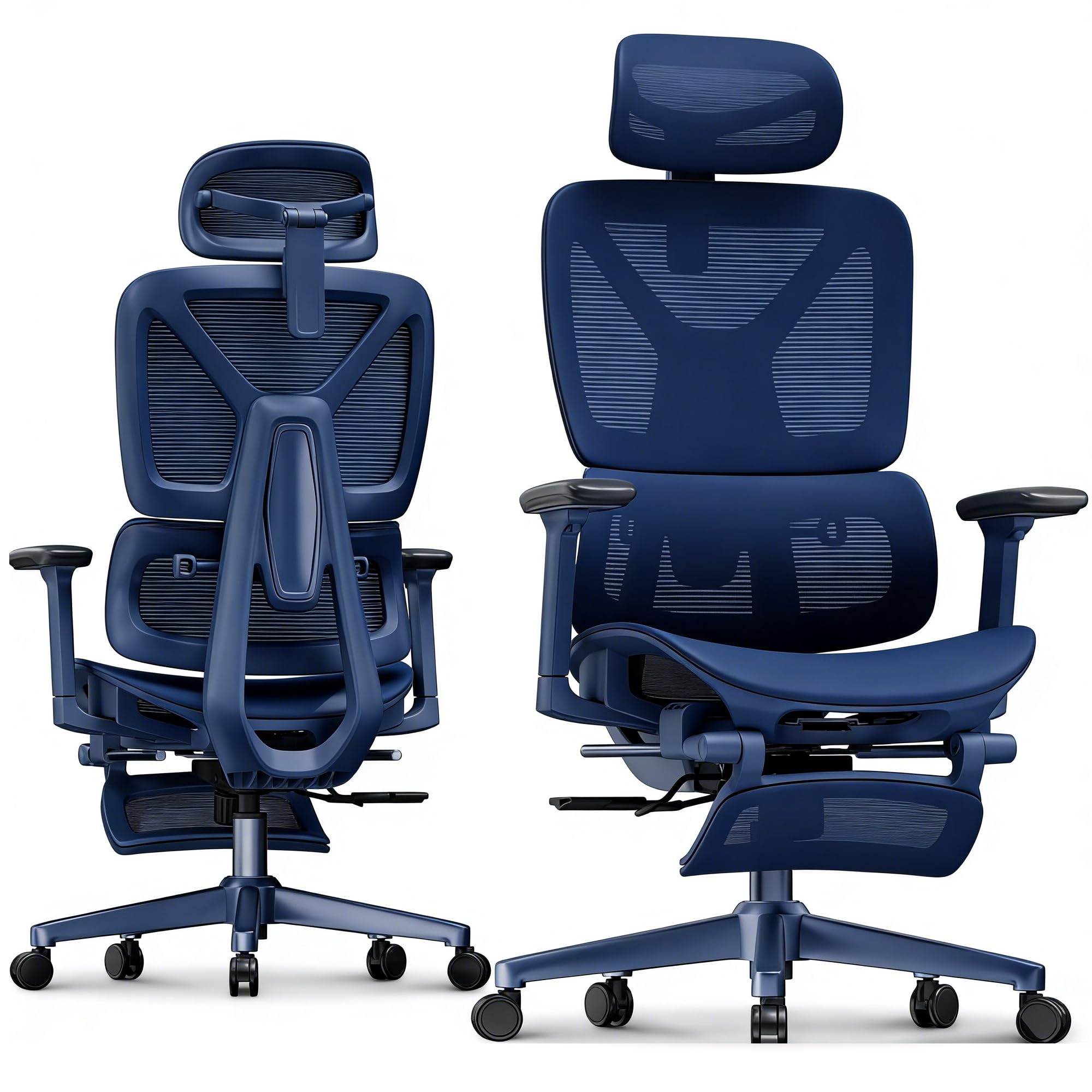
Image: FLEXISPOT OC4-PRO Office Chair. This image shows the fully assembled chair, highlighting its ergonomic design and mesh backrest.
5. Istruzioni per l'uso
The FLEXISPOT OC4-PRO chair offers multiple adjustment features to customize your seating experience.
5.1. Regolazione dell'altezza del sedile
Locate the lever on the right side beneath the seat. To raise the seat, lift the lever while taking your weight off the chair. To lower the seat, lift the lever while seated. Release the lever at the desired height.
5.2. Recline and Tilt Adjustment
The chair features an adjustable back angle and tilt tension. Use the lever on the left side to lock or unlock the recline function. Rotate the knob located beneath the seat, usually at the front, to adjust the tilt tension. Turn clockwise to increase tension (making it harder to recline) and counter-clockwise to decrease tension (making it easier to recline).
5.3. Regolazione del supporto lombare
The multi-functional lumbar support system can be adjusted vertically and horizontally to fit the curve of your lower back. Locate the adjustment controls on the backrest to position the lumbar support for optimal comfort.
5.4. Regolazione del bracciolo
The 3D armrests can be adjusted in three dimensions: height, forward/backward, and pivot (inward/outward). Use the buttons or levers on the armrests to unlock and adjust them to your preferred position. Ensure they are locked securely after adjustment.
5.5. Regolazione del poggiatesta
The headrest can be adjusted for height and angle. Gently push or pull the headrest to move it up or down, and tilt it to find the most comfortable position for your neck and head.
5.6. 360° Rotation and Casters
The chair is equipped with a 360° swivel mechanism and smooth-rolling casters for easy movement. Ensure the casters are clean and free of debris for optimal performance on hard floors.
6. Manutenzione
- Pulizia: Per la pulizia generale, pulire la sedia con un pannoamp cloth. For mesh and fabric areas, dry clean as needed. Avoid harsh chemical cleaners that may damage the material.
- Ispezione: Controllare periodicamente tutte le viti e i bulloni per assicurarsi che siano ben serrati. Serrarli nuovamente se necessario.
- Cura delle rotelle: Per garantire un movimento fluido, tenere le rotelle libere da capelli e detriti.
- Magazzinaggio: Quando non viene utilizzata per lunghi periodi, conservare la sedia in un luogo fresco e asciutto, lontano dalla luce solare diretta.
7. Risoluzione Dei Problemi
| Problema | Possibile causa | Soluzione |
|---|---|---|
| La sedia non si regola in altezza | Malfunzionamento del pistone a gas o leva non innestata. | Assicurarsi che la leva di regolazione dell'altezza sia completamente innestata. Se il problema persiste, potrebbe essere necessario sostituire il pistone a gas. Contattare l'assistenza clienti. |
| La sedia scricchiola o traballa | Viti o componenti allentati. | Check and tighten all screws and bolts, especially those connecting the seat, backrest, and base. |
| Le rotelle non girano fluidamente | Detriti incastrati nelle rotelle o rotelle danneggiate. | Rimuovere eventuali capelli o detriti dalle ruote girevoli. Se le ruote sono danneggiate, potrebbe essere necessario sostituirle. |
| Lo schienale non si reclina o non si blocca | Recline mechanism locked or tilt tension too high. | Ensure the recline lock lever is disengaged. Adjust the tilt tension knob counter-clockwise to reduce tension. |
8. Specifiche
| Marca | FLESSIBILE |
| Nome del modello | OC4-PRO (Ergonomic office chair) |
| Colore | Nero |
| Materiale | Mesh & Nylon & Steel (Fill Material: Memory Foam) |
| Dimensioni del prodotto (P x L x A) | 73.9D x 73.9W x 133.1H centimetri |
| Peso dell'articolo | 40 libbre (18.14 kg) |
| Peso massimo raccomandato | 400 libbre (181.44 kg) |
| Caratteristiche speciali | Ergonomic, Adjustable Headrest, 3D Arm Rest, Adjustable Lumbar, Tilt, Back Support, Adjustable Recliner, Adjustable Height, Tilt Tension Control |
| Assemblaggio richiesto | SÌ |
| Certificazioni | BIFMA, SGS |
9. Garanzia e supporto
FLEXISPOT stands behind the quality of its products. For warranty information, technical support, or assistance with parts, please contact FLEXISPOT customer service. Refer to the official FLEXISPOT websito o nella documentazione di acquisto per i termini di garanzia specifici e i dettagli di contatto.
Assistenza clienti: For any questions or concerns, please reach out to FLEXISPOT's professional customer service team.
Ask a question about this manual
Ask about setup, troubleshooting, compatibility, parts, safety, or missing instructions. Manuals+ will review the question and use this page’s manual context to help answer it.