
1. Introduzione
This manual provides detailed instructions for the installation, operation, and maintenance of the Yitouniu EWeLink 2-Channel Smart WiFi Switch Relay. This device enables remote control of household appliances and electronic devices via a mobile application, RF remote control, and voice commands through smart assistants like Alexa and Google Home. It supports various operating modes and timing functions to enhance smart home automation.
2. Informazioni sulla sicurezza
- Prima dell'installazione o della manutenzione, assicurarsi che l'alimentazione sia scollegata per evitare scosse elettriche.
- Installation should be performed by qualified personnel or under strict adherence to electrical safety guidelines.
- Non superare la corrente massima e il voltage le classificazioni specificate per il dispositivo.
- Tenere il dispositivo lontano da acqua, umidità e temperature estreme.
- Prima di ripristinare l'alimentazione, verificare che tutti i collegamenti elettrici siano sicuri e corretti.
3. Prodotto finitoview
The Yitouniu EWeLink Smart WiFi Switch Relay is a compact, 2-channel device designed for integrating traditional appliances into a smart home system. It features WiFi and Bluetooth connectivity for app control and supports RF 433MHz for remote control.

Immagine 3.1: anteriore view of the Yitouniu EWeLink Smart WiFi Switch Relay. The device is white with branding and connection labels visible.

Immagine 3.2: Primo piano view of the Yitouniu EWeLink Smart WiFi Switch Relay, showing input terminals (N, L), output terminals (NO, COM, NC), and model information.

Image 3.3: The compact size of the Yitouniu EWeLink Smart WiFi Switch Relay, held in a hand for scale.
4. Specifiche
| Parametro | Valore |
|---|---|
| Ingresso volumetage | AC/DC 85-250V, Micro USB 5V input |
| Max corrente | 10A |
| Potenza massima | 2200W |
| WiFi standard | WiFi 2.4GHz b/n/g + Bluetooth (IEEE 802.11b/g/n) |
| Temperatura di esercizio | -20°C a 70°C |
| Materiale | ABS ignifugo |
| Dimensioni del prodotto | 2.76 x 1.77 x 1.1 pollici |
| Peso dell'articolo | 1.76 once |
| Tipo di contatto | Normalmente aperto |
| Valutazione internazionale di protezione | Grado di protezione IP65 |
| Certificazione | Commissione federale delle comunicazioni |
5. Configurazione e installazione
5.1 Istruzioni per il cablaggio
The device supports both AC/DC 85-250V input and Micro USB 5V input. Ensure correct wiring based on your application. The relay has Normally Open (NO), Common (COM), and Normally Closed (NC) contacts for controlling external devices.
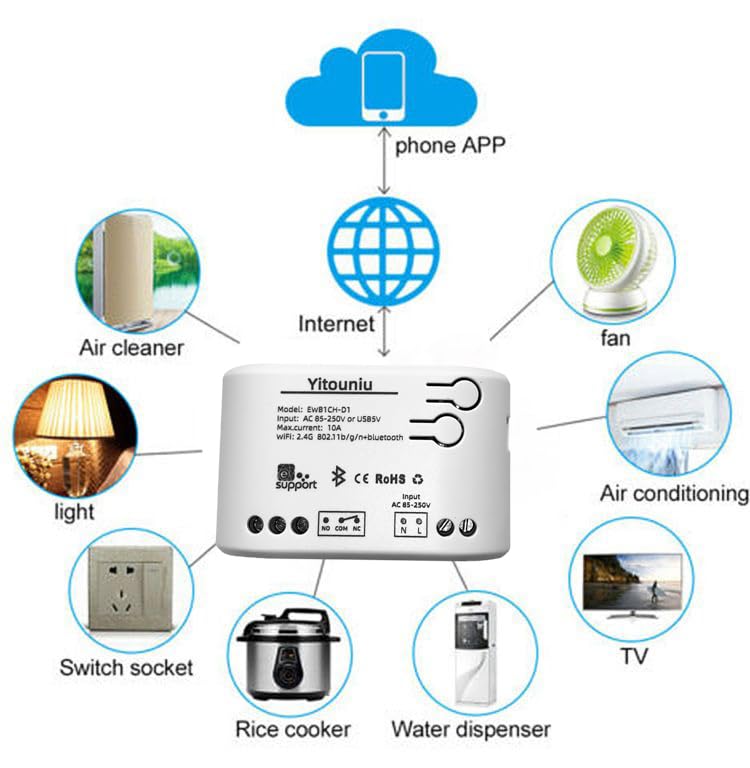
Image 5.1: Diagram illustrating the connectivity of the Yitouniu EWeLink Smart WiFi Switch Relay to various household appliances like lights, fans, and air conditioners, all controlled via a phone app and the internet.
5.2 Download e associazione dell'app
- Scarica il Collegamento eWeLink app da Apple App Store o Google Play Store.
- Registra un account e accedi.
- Power on the Smart WiFi Switch Relay.
- Open the eWeLink app, tap the '+' icon to add a device.
- Follow the on-screen instructions to connect the device to your 2.4GHz WiFi network.

Image 5.2: Screenshots of the eWeLink app interface, showing controls for a garage door (ON/OFF) and a scheduling function for setting specific times.
6. Modalità operative
The device supports three operating modes: self-locking, interlocking, and inching (micromotion). These modes can typically be configured within the eWeLink app or via physical buttons on the device, depending on the specific model variant.
- Modalità autobloccante: Each channel operates independently. Pressing the button (or app control) turns the relay ON, pressing it again turns it OFF.
- Modalità di interblocco: When one channel is turned ON, all other channels are automatically turned OFF. This is useful for applications where only one device should be active at a time.
- Inching (Micromotion) Mode: The relay turns ON for a set duration (e.g., 0.5 seconds to 1 hour) and then automatically turns OFF. This is suitable for momentary actions like garage door openers or pulse controls.
7. Controllo app e controllo vocale
7.1 eWeLink App Features
The eWeLink app provides comprehensive control over your Smart WiFi Switch Relay:
- Accensione/spegnimento remoto: Controlla i dispositivi connessi da qualsiasi luogo con una connessione Internet.
- Funzioni di temporizzazione: Set schedules, countdowns, or recurring timers for automatic on/off operations.
- Controllo indipendente: Each of the two channels can be controlled independently.
- Condivisione dispositivi: Share control of your devices with family members.
- Controllo di gruppo: Organize multiple smart devices into groups for simultaneous control.

Image 7.1: A user remotely controlling home lighting via the eWeLink mobile application, demonstrating the convenience of app-based control.

Image 7.2: Illustration of the eWeLink app's group control and sharing functions, allowing multiple users to manage devices across different rooms.

Image 7.3: The timing function interface within the eWeLink app, enabling users to set specific on/off times for connected appliances.
7.2 Integrazione del controllo vocale
The Yitouniu Smart WiFi Switch Relay is compatible with popular voice assistants, including Amazon Alexa and Google Home/Nest. To enable voice control:
- Ensure your Smart WiFi Switch Relay is successfully paired with the eWeLink app.
- Apri l'app Alexa o Google Home.
- Vai alla sezione "Competenze" o "Funziona con Google".
- Cercare and enable the 'eWeLink Smart Home' skill/service.
- Collega il tuo account eWeLink quando richiesto.
- Discover devices. Your Smart WiFi Switch Relay should now be controllable via voice commands.
Exampi comandi:
- "Alexa, accendi la luce del soggiorno."
- "Ehi Google, spegni il ventilatore."

Image 7.4: A user interacting with voice assistants like Amazon Alexa and Google Home to control smart devices, highlighting the voice control capability of the relay.
8. Manutenzione
The Yitouniu Smart WiFi Switch Relay requires minimal maintenance. Follow these guidelines:
- Pulizia: Wipe the device with a dry, soft cloth. Do not use liquid cleaners or solvents.
- Verifica della connessione: Ispezionare periodicamente i collegamenti elettrici per accertarsi che siano sempre saldi.
- Aggiornamenti del firmware: Keep the eWeLink app updated to receive the latest firmware for the device, which may include performance improvements and new features.
9. Risoluzione Dei Problemi
- Dispositivo non connesso al Wi-Fi:
- Assicurati che la tua rete Wi-Fi sia a 2.4 GHz. Il dispositivo non supporta reti a 5 GHz.
- Controlla se la password Wi-Fi inserita nell'app è corretta.
- Avvicina il dispositivo al router Wi-Fi.
- Riavviare il dispositivo e il router.
- Dispositivo offline nell'app:
- Verifica che la tua connessione Internet domestica sia attiva.
- Controllare se il dispositivo è alimentato.
- Riavviare il dispositivo.
- Il controllo vocale non funziona:
- Confirm the eWeLink skill/service is enabled and linked in your Alexa or Google Home app.
- Ensure the device is named clearly in the eWeLink app and discovered by your voice assistant.
- Controlla la tua connessione Internet.
- Device not responding to RF remote:
- Ensure the RF remote is paired with the switch. Refer to the RF pairing instructions (if applicable to your specific remote).
- Controllare la batteria del telecomando RF.
10. Cosa c'è nella scatola
All'apertura della confezione del prodotto, dovresti trovare i seguenti elementi:
- 1 x Yitouniu Wifi 2-Channel Relay Switch
- 1 x Manuale di istruzioni (questo documento)
11. Garanzia e supporto
This product comes with a standard manufacturer's warranty. For specific warranty terms, conditions, and duration, please refer to the documentation included with your purchase or contact Yitouniu customer support. For technical assistance or further inquiries, please visit the official Yitouniu websito o contattare i loro canali di assistenza clienti.