
1. Introduzione
This manual provides detailed instructions for the installation, operation, and maintenance of the Yitouniu EWeLink 4CH Smart WiFi 85-250V Switch Controller, Model EWB4CH-D1. This device allows remote control of up to four electrical appliances via the eWeLink mobile application, Bluetooth, or RF remote control, and supports voice control through compatible smart assistants like Amazon Alexa and Google Assistant.
Per garantire il corretto funzionamento e la sicurezza, leggere attentamente il presente manuale prima dell'installazione e dell'uso.
2. Prodotto finitoview e Caratteristiche
The EWB4CH-D1 is a versatile 4-channel smart switch controller designed for various applications, including smart home automation, access control, and DIY projects. It offers multiple control methods and operating modes for enhanced flexibility.
Caratteristiche principali:
- Controllo a 4 canali: Independently control up to four electrical devices.
- Metodi di controllo multipli:
- eWeLink App (iOS/Android) for remote control.
- Bluetooth connectivity for local control and pairing.
- RF 433MHz remote control support.
- Manual buttons on the device.
- Controllo vocale: Compatibile con Amazon Alexa e Google Assistant per l'utilizzo a mani libere.
- Modalità operative flessibili: Supports Point (Momentary), Self-Locking (Toggle), and Interlocking modes.
- Programmazione e timer: Set timed schedules for connected devices via the eWeLink app.
- Condivisione dispositivi: Share control of the device with multiple users through the eWeLink app.
- Ampio volumetage Ingresso: AC 85-250V and Micro USB 5V input options.
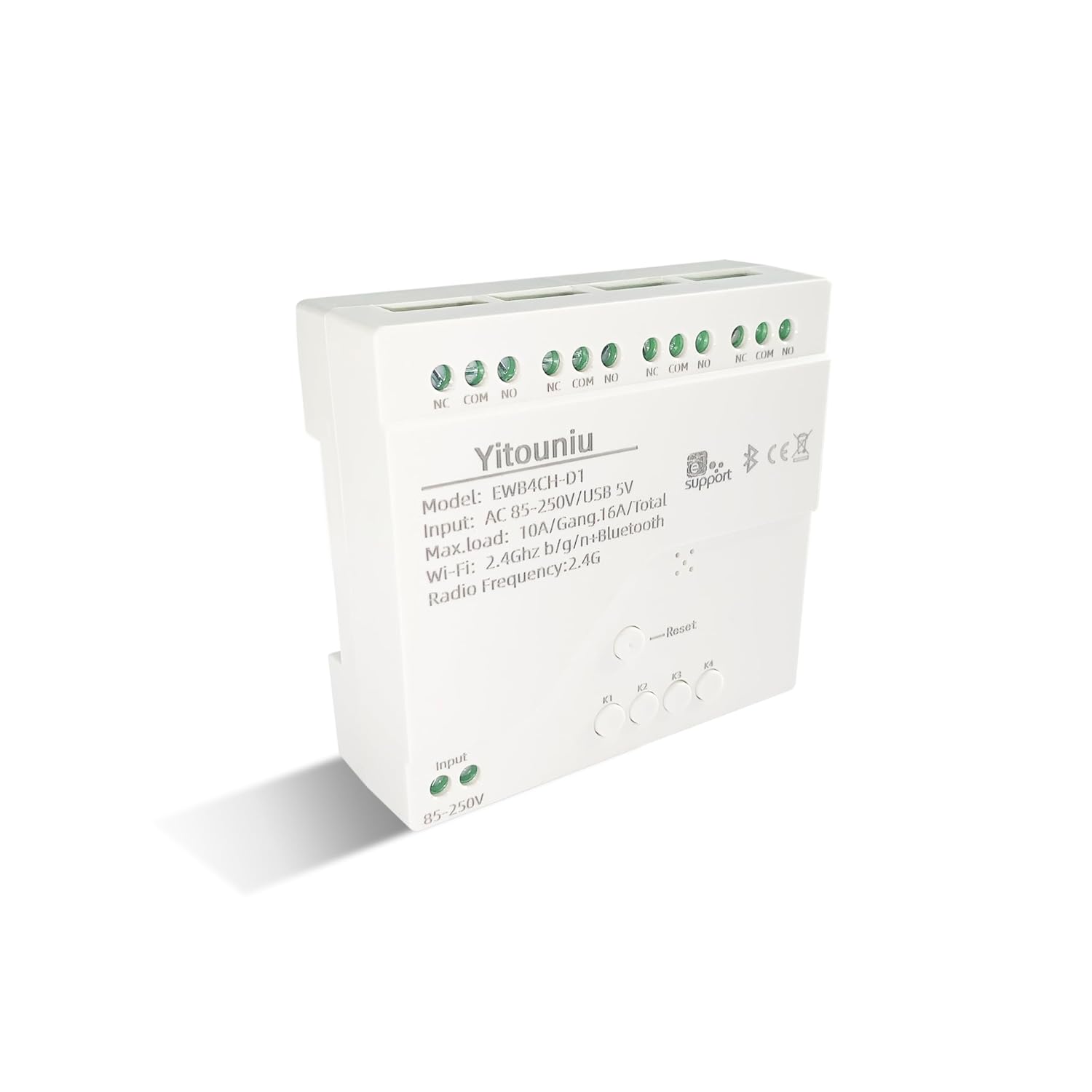
Immagine 1: anteriore view of the Yitouniu EWB4CH-D1 Smart Switch Controller, showing input terminals, control buttons, and model information.

Image 2: The Yitouniu EWB4CH-D1 Smart Switch Controller alongside its internal circuit board, illustrating the components and relay switches.
3. Cosa c'è nella scatola
Dopo aver aperto la confezione, verificare che siano presenti tutti i componenti:
- 1x Yitouniu EWeLink 4CH Smart WiFi Switch Controller (Model EWB4CH-D1)
- 1x Manuale di istruzioni (questo documento)
4. Specifiche
| Parametro | Valore |
|---|---|
| Modello | EWB4CH-D1 |
| Ingresso volumetage | AC 85-250V, Micro USB 5V |
| Maximum Current (per gang) | 10A |
| Maximum Load (total) | 16A / 3500W (for 4 gangs) |
| standard wireless | Wi-Fi 2.4 GHz b/g/n + Bluetooth |
| Temperatura di esercizio | -20°C a 70°C |
| Materiale | ABS ignifugo |
| Dimensioni del prodotto (L x P x A) | 3.15 x 2.95 x 0.98 pollici (80 x 75 x 25 mm) |
| Peso | 3.84 once (109 g) |
| Modalità di funzionamento | Acceso-Spento-Acceso |
| Tipo di contatto | Normalmente aperto (NO), comune (COM), normalmente chiuso (NC) |
| Tipo di connettore | Terminale a vite |
| Tipo di attuatore | App, RF Remote, Manual Button |
5. Impostazione
5.1 Precauzioni di sicurezza
AVVERTIMENTO: L'installazione comporta un alto volumetage. Ensure power is disconnected at the circuit breaker before performing any wiring. If you are unsure about electrical wiring, consult a qualified electrician. Improper installation can lead to electric shock, fire, or property damage.
5.2 Schema elettrico
The device features screw terminals for input power and four independent relay outputs. Each output has Normally Open (NO), Common (COM), and Normally Closed (NC) contacts.
- Potenza in ingresso: Connect AC 85-250V to the 'Input 85-250V' terminals. Alternatively, for low-voltage applications or testing, connect a 5V Micro USB power supply to the Micro USB port.
- Load Connections (Channels K1-K4): Each channel (K1, K2, K3, K4) has three terminals:
- NC (normalmente chiuso): Connected to COM when the relay is OFF.
- COM (Comune): Il terminale comune per il relè.
- NO (normalmente aperto): Connected to COM when the relay is ON.
Connect your appliance's power line to the COM terminal and the control line to either NO or NC, depending on whether you want the appliance to be ON or OFF when the relay is activated.

Immagine 3: In alto view of the Yitouniu EWB4CH-D1 controller, clearly showing the input terminals and the NC, COM, NO terminals for each of the four channels.
5.3 eWeLink App Installation and Device Pairing
- Scarica l'app eWeLink: Cercare "eWeLink" in the Apple App Store (iOS) or Google Play Store (Android) and install it.
- Registrati/Accedi: Apri l'app e crea un nuovo account oppure accedi con uno esistente.
- Entra in modalità di associazione: Power on the EWB4CH-D1 controller. Press and hold the 'Reset' button on the device for approximately 5-7 seconds until the Wi-Fi indicator LED flashes rapidly.
- Aggiungi dispositivo nell'app: In the eWeLink app, tap the '+' icon (usually in the bottom center or top right) to add a new device. Select 'Quick Pairing' or 'Bluetooth Pairing' if available.
- Connettiti al Wi-Fi: Follow the on-screen instructions to connect the device to your 2.4GHz Wi-Fi network. Enter your Wi-Fi password when prompted. (5GHz Wi-Fi networks are not supported).
- Assegna un nome al tuo dispositivo: Once successfully paired, give your device a descriptive name (e.g., "Living Room Lights Controller").
6. Modalità operative
The EWB4CH-D1 supports three distinct operating modes, configurable within the eWeLink app:
- Point (Momentary) Mode: When activated, the relay turns ON for a set duration (0.5 seconds to 1 hour) and then automatically turns OFF. This mode is suitable for applications like garage door openers or momentary button presses.
- Self-Locking (Toggle) Mode: Each channel operates independently. When activated, the relay turns ON and stays ON until it is manually turned OFF. This is ideal for controlling lights or other devices that need to remain in a specific state.
- Modalità di interblocco: In this mode, only one channel can be ON at a time. When one channel is activated, any other currently active channel will automatically turn OFF. This is useful for controlling motors with forward/reverse functions or blinds.
To change the operating mode, access the device settings within the eWeLink app.
7. Controllo app e controllo vocale
7.1 Controllo dell'app eWeLink
After successful pairing, you can control each of the four channels independently from anywhere using the eWeLink app. The app provides real-time status updates for each channel.
- Accensione/spegnimento remoto: Tap the respective channel button in the app to turn devices on or off.
- Pianificazione: Set up single, repeating, or countdown timers for automated control.
- Scene: Create custom scenes to control multiple devices with a single tap or based on specific conditions.
- Condivisione dispositivi: Share control of your device with family members or other users by inviting them through the app.

Image 4: Illustration showing how one mobile phone can control multiple smart switches, and how a single smart switch can be controlled by multiple mobile phones.

Image 5: Screenshot of the eWeLink app interface highlighting the 'Share Device' option, allowing users to grant control access to others.
7.2 Integrazione del controllo vocale
The EWB4CH-D1 is compatible with Amazon Alexa and Google Assistant. To enable voice control:
- Collega l'account eWeLink: In your Alexa or Google Home app, search for the "eWeLink Smart Home" skill/service and link it to your eWeLink account.
- Scopri i dispositivi: Once linked, ask your smart assistant to "Discover devices" or manually initiate device discovery in the app.
- Comandi vocali: You can now use voice commands to control your connected appliances.
Example Comandi:
- "Alexa, accendi [Nome dispositivo]"
- "Ehi Google, disattiva [Nome dispositivo]"

Image 6: Depiction of smart speakers (Amazon Echo, Google Home) used for voice control, with example commands for turning on/off lights.

Image 7: Illustration of using voice commands with Alexa or Google Assistant to control a garage door, demonstrating hands-free operation.
8. Manutenzione
To ensure optimal performance and longevity of your EWB4CH-D1 controller:
- Pulizia: Scollegare l'alimentazione prima di pulire il dispositivo. Utilizzare un panno asciutto e morbido per pulirlo. Non utilizzare detergenti liquidi o solventi.
- Aggiornamenti del firmware: Periodically check the eWeLink app for available firmware updates. Keeping the firmware updated ensures the latest features and security patches.
- Condizioni ambientali: Evitare di esporre il dispositivo a temperature estreme, elevata umidità o luce solare diretta.
9. Risoluzione Dei Problemi
If you encounter issues with your EWB4CH-D1 controller, refer to the following common problems and solutions:
- Dispositivo non associato:
- Assicurati che la tua rete Wi-Fi sia a 2.4 GHz. Le reti a 5 GHz non sono supportate.
- Verificare che la password Wi-Fi sia corretta.
- Make sure the device is in pairing mode (Wi-Fi LED flashing rapidly). If not, press and hold the 'Reset' button.
- Avvicina il dispositivo al router Wi-Fi.
- Dispositivo offline nell'app:
- Controlla la tua connessione Internet.
- Assicurati che il dispositivo sia acceso.
- Riavviare il dispositivo scollegando e ricollegando l'alimentazione.
- Check if your router settings have changed or if there's Wi-Fi interference.
- Il controllo vocale non funziona:
- Confirm that your eWeLink account is correctly linked to your Alexa or Google Home app.
- Ensure the device is discovered by your smart assistant.
- Per i comandi vocali, utilizzare il nome esatto del dispositivo configurato nell'app eWeLink.
- RF remote control not responding:
- Ensure the RF remote is paired with the controller (refer to specific RF pairing instructions if provided with your remote).
- Controllare la batteria del telecomando RF.
10. Informazioni sulla sicurezza
Si prega di osservare le seguenti linee guida di sicurezza:
- Non tentare di smontare o modificare il dispositivo. Ciò potrebbe invalidare la garanzia e comportare rischi per la sicurezza.
- Ensure proper wiring according to local electrical codes and this manual.
- Do not exceed the maximum current and load ratings of the device (10A per gang, 16A/3500W total).
- Tenere il dispositivo lontano da acqua, umidità e materiali infiammabili.
- Questo dispositivo è destinato esclusivamente all'uso in ambienti interni.
- Tenere fuori dalla portata dei bambini.
11. Garanzia e supporto
For warranty information and technical support, please refer to the seller's policy or contact the manufacturer directly. Typically, support can be accessed through the eWeLink app's 'FAQ & Feedback' section or the official eWeLink websito.