1. Introduzione
Thank you for choosing the 2NLF 12MP Outdoor Security Camera. This device is designed to provide comprehensive surveillance for your property with advanced features including a triple-lens system, 360° PTZ control, color night vision, and two-way audio. This manual will guide you through the installation, operation, and maintenance of your security camera to ensure optimal performance and security.
2. Prodotto finitoview
2.1 Caratteristiche principali
- 12MP Triple-Lens System: Combines two 4MP bullet cameras and one 4MP PTZ dome camera for wide-ranging, high-definition coverage.
- Controllo PTZ a 360°: Pan, Tilt, and Zoom functionality for comprehensive area monitoring.
- Zoom digitale 10X: Allows for detailed inspection of specific areas.
- Visione notturna a colori: Provides clear and vibrant images even in low-light conditions.
- Advanced Motion Detection & Automatic Tracking: Intelligent sensors detect movement and track objects, sending real-time notifications.
- Audio bidirezionale: Microfono e altoparlante integrati per la comunicazione.
- Opzioni di connessione multiple: Supports 2.4 GHz Wi-Fi (5 GHz not supported), AP hotspot, and Bluetooth.
- Archiviazione flessibile: Supports local storage via TF card (up to 128GB, not included) and cloud storage (subscription required).
- IP66 resistente alle intemperie: Progettato per resistere a diverse condizioni meteorologiche esterne.
2.2 Contenuto della confezione
- 2NLF 12MP Outdoor Security Camera (Model GAD1029WT1)
- Adattatore di alimentazione
- Viti e ancoraggi di montaggio
- Manuale d'uso
2.3 Componenti della fotocamera

Immagine 1: Davanti view of the 2NLF 12MP Outdoor Security Camera, illustrating its design and a smartphone displaying the live feed from the camera.

Immagine 2: Diagram illustrating the camera's triple-lens system, where two bullet cameras and one dome camera provide three distinct views simultaneously on a single screen.
3. Impostazione
3.1 Luogo di installazione
Choose a suitable location for your camera. The camera is IP66 weatherproof, making it suitable for outdoor installation. Ensure the chosen location has a stable 2.4 GHz Wi-Fi signal and a power outlet nearby.
3.2 Montaggio della telecamera
- Segnare le posizioni di foratura sulla parete utilizzando la base della telecamera come modello.
- Praticare i fori e inserire gli ancoraggi forniti.
- Secure the camera base to the wall using the mounting screws.
- Regola l'angolazione della telecamera secondo necessità.
3.3 Accensione e connessione dell'app
- Collegare l'adattatore di alimentazione alla telecamera e inserirlo in una presa di corrente. La telecamera si accenderà e avvierà il test automatico.
- Download the designated mobile application (refer to the packaging or included quick start guide for app name) from your smartphone's app store.
- Registra un account e accedi.
- Follow the in-app instructions to add your camera. This typically involves scanning a QR code on the camera or connecting via Bluetooth/AP hotspot. Ensure your phone is connected to a 2.4 GHz Wi-Fi network during setup.
4. Utilizzo della fotocamera
4.1 Vivere View e controllo PTZ
Una volta connesso, accedi alla diretta view through the mobile app. You can control the camera's pan (horizontal), tilt (vertical), and zoom (digital) functions directly from the app interface.
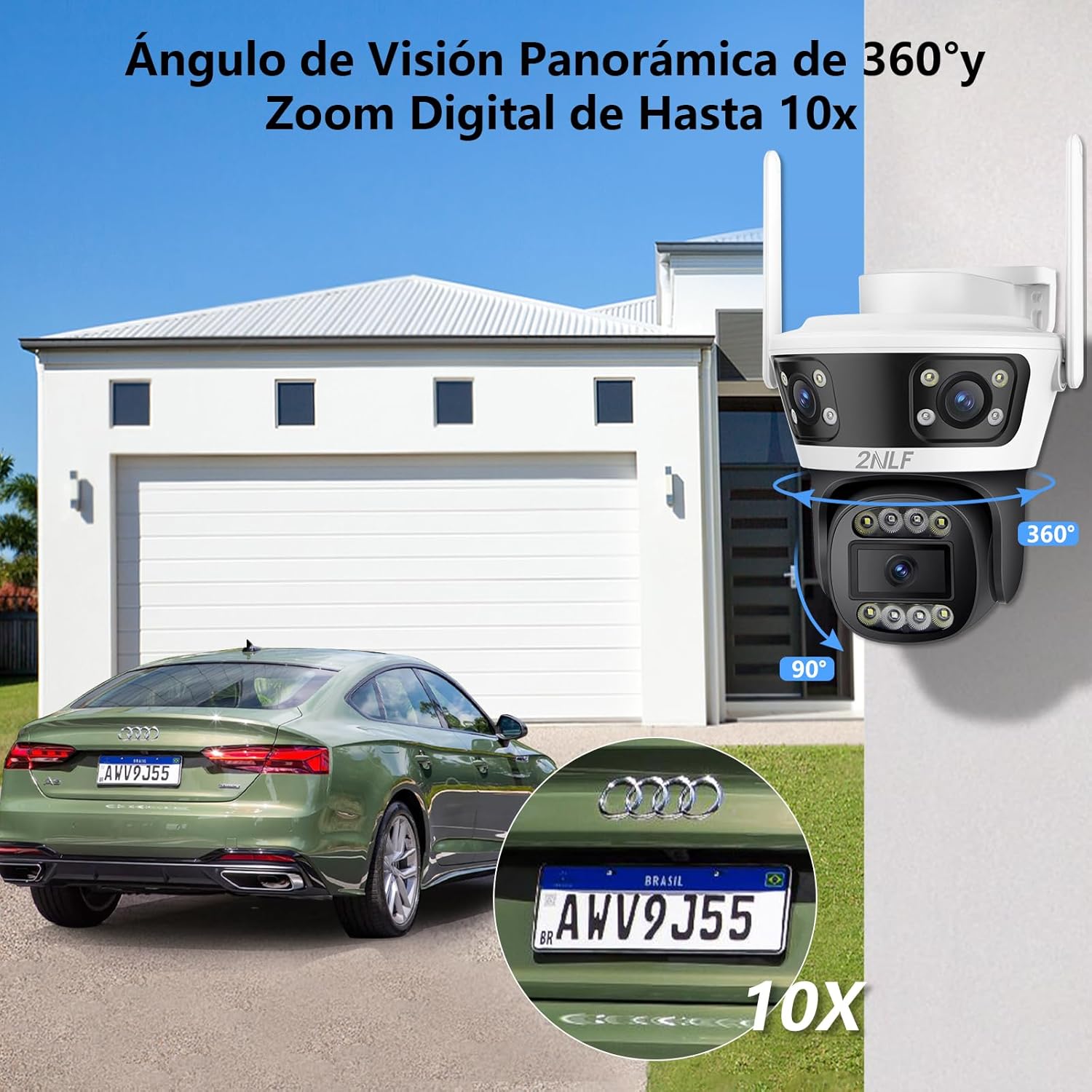
Immagine 3: Illustration of the camera's 360° panoramic view and 10X digital zoom capability, demonstrated by focusing on a car's license plate.
4.2 Rilevamento del movimento e tracciamento automatico
The camera is equipped with intelligent motion sensors. When motion is detected, the camera can automatically track the moving object and send real-time notifications to your smartphone. You can customize motion detection zones and sensitivity settings within the app.

Immagine 4: Visual representation of the camera's motion detection and automatic tracking feature, showing it following the movement of two children in a yard.
4.3 Modalità di visione notturna
The camera supports both infrared (black and white) and color night vision. In low-light conditions, the camera can automatically switch to night vision mode. Color night vision provides more detailed and vibrant images.

Immagine 5: A comparison demonstrating the camera's color night vision capability, showing a clear, illuminated view at night versus a standard infrared (monochrome) view.
4.4 Audio bidirezionale
Utilize the two-way audio feature to communicate with individuals near the camera. Press the microphone icon in the app to speak, and release to listen.

Immagine 6: Depiction of the two-way audio function, showing a person speaking through the camera to someone outside, and the multi-user sharing feature allowing multiple family members to access the camera feed.
4.5 Opzioni di archiviazione
Le registrazioni possono essere memorizzate in due modi:
- Memoria della carta di TF: Insert a TF (microSD) card (up to 128GB) into the designated slot on the camera for local storage.
- Archiviazione cloud: Subscribe to the cloud storage service through the app for secure, remote storage of your recordings.

Immagine 7: Illustration of the camera's flexible storage options, including local storage via a TF (microSD) card and cloud storage, with a smartphone displaying recorded footage.
5. Manutenzione
5.1 Pulizia della fotocamera
Pulire regolarmente l'obiettivo e l'alloggiamento della fotocamera con un panno morbido eamp panno. Evitare l'uso di prodotti chimici aggressivi o materiali abrasivi che potrebbero danneggiare la lente o la finitura.
5.2 Aggiornamenti firmware
Periodically check the mobile app for available firmware updates. Keeping your camera's firmware up-to-date ensures optimal performance, security, and access to new features.
6. Risoluzione Dei Problemi
6.1 Problemi comuni e soluzioni
- Fotocamera non in linea:
- Controllare che la fotocamera sia accesa.
- Verifica che la tua rete Wi-Fi sia attiva e che la telecamera si trovi nel raggio d'azione.
- Ensure your Wi-Fi is 2.4 GHz, as 5 GHz is not supported.
- Riavvia la telecamera e il router Wi-Fi.
- Scarsa qualità dell'immagine:
- Pulisci l'obiettivo della fotocamera.
- Assicurare un'illuminazione adeguata, soprattutto per la visione notturna.
- Controlla la velocità della tua connessione Internet.
- Il rilevamento del movimento non funziona:
- Verificare che il rilevamento del movimento sia abilitato nelle impostazioni dell'app.
- Regola la sensibilità e le zone di rilevamento del movimento.
- Assicurarsi che non vi siano ostacoli che bloccano la telecamera view.
- Problemi con l'audio bidirezionale:
- Controlla le autorizzazioni per microfono e altoparlante dell'app sul tuo telefono.
- Assicurarsi che il microfono e l'altoparlante della telecamera non siano ostruiti.
- Regola le impostazioni del volume nell'app.
7. Specifiche
| Nome del modello | Videocamera di sicurezza esterna |
| Numero di modello | GAD1029WT1 |
| Marca | 2NLF |
| Risoluzione di acquisizione video | 1440p (12MP total from 3x 4MP lenses) |
| Tecnologia di connettività | Wireless (2.4 GHz Wi-Fi, AP Hotspot, Bluetooth) |
| Fattore di forma | Proiettile + Cupola |
| Caratteristiche speciali | Weatherproof, Two-way audio, Motion detector, HD Resolution, PTZ Technology, Color Night Vision |
| Gamma di visione notturna | 20 metri |
| Livello di resistenza all'acqua | Grado di protezione IP66 |
| Fonte di alimentazione | Cavo elettrico |
| Materiale | Acrilonitrile Butadiene Stirene (ABS) |
| Dimensioni del prodotto (L x P x A) | 17.53 x 16 x 14.99 cm (6.9 x 6.3 x 5.9 pollici) |
| Peso | 620 grammi |
| Tipo di montaggio | Montaggio a parete (avvitabile) |
8. Garanzia e supporto
8.1 Informazioni sulla garanzia
- Garanzia limitata di 1 anni: Your 2NLF camera is covered by a 1-year limited warranty from the date of purchase, covering manufacturing defects.
- Garanzia soddisfatti o rimborsati entro 30 giorni: If you are not satisfied with your purchase, you may return the product within 30 days for a full refund.
8.2 Assistenza clienti
Customer satisfaction is our top priority. Our dedicated global support team is available to assist you with any questions or issues you may encounter with your 2NLF security camera.
- Supporto tecnico a vita: We provide lifetime technical support for your product.
- All-Day Customer Service: Our customer service team is available all day to provide assistance.
For support, please refer to the contact information provided on the product packaging or the official 2NLF websito.