
Aufero AL3-20A (20W)
Manuale utente dell'incisore laser Aufero AL3-20A
Model: AL3-20A (20W) | Brand: Aufero
1. Introduzione
This manual provides essential information for the safe and effective use of your Aufero Laser Engraver AL3-20A. This powerful 20W laser engraver and cutter is designed for precision work on a variety of materials, including wood, metal, acrylic, and leather. It features a large working area and comes equipped with a 40L air assist pump to enhance performance and safety.
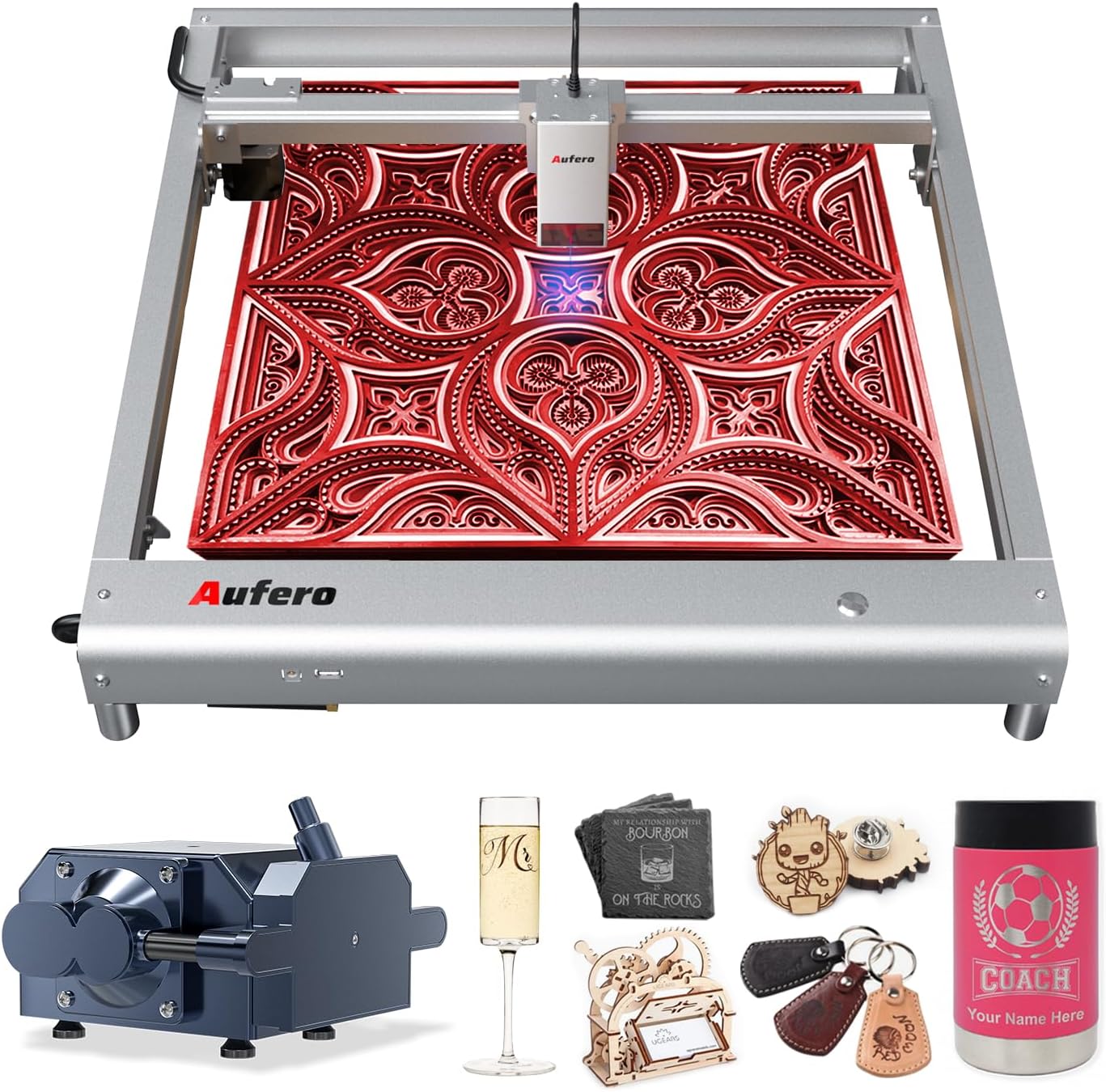
Figure 1.1: The Aufero Laser Engraver AL3-20A with exampdi oggetti incisi.
Please read this manual thoroughly before operating the machine to ensure proper setup, operation, and maintenance, and to understand all safety precautions.
2. Informazioni sulla sicurezza
WARNING: This product is a Class 4 laser device. Direct exposure to the laser beam can cause severe eye damage and skin burns. Always wear appropriate laser safety goggles (OD6+) when operating the machine. Never look directly into the laser beam.
2.1 Precauzioni generali di sicurezza
- Operate the machine in a well-ventilated area to dissipate fumes and smoke produced during engraving/cutting.
- Keep a fire extinguisher nearby. Materials can ignite during laser processing.
- Non lasciare la macchina incustodita durante il funzionamento.
- Assicurarsi che l'area di lavoro sia libera da materiali infiammabili.
- Tenere bambini e animali domestici lontani dalla macchina in funzione.
- Scollegare l'alimentazione prima di effettuare qualsiasi intervento di manutenzione o regolazione.
2.2 Funzionalità di sicurezza avanzate
The Aufero AL3-20A incorporates six protective measures to enhance user safety:
- Motherboard Program Monitoring: Monitor voltage and current to prevent electrical issues.
- USB Connection Monitoring: Detects and alerts if the USB connection is interrupted during operation.
- Attuale e voltage Monitoraggio: Continuously checks power supply stability.
- Laser Exposure Monitoring: Filters 97% of ultraviolet rays and limits laser exposure duration for a secure working environment.
- Protezione attiva della posizione: Detects unexpected movement or tilting of the machine and stops laser output.
- Sloping Position Protection: Automatically halts operation if the machine is tilted beyond a safe angle.
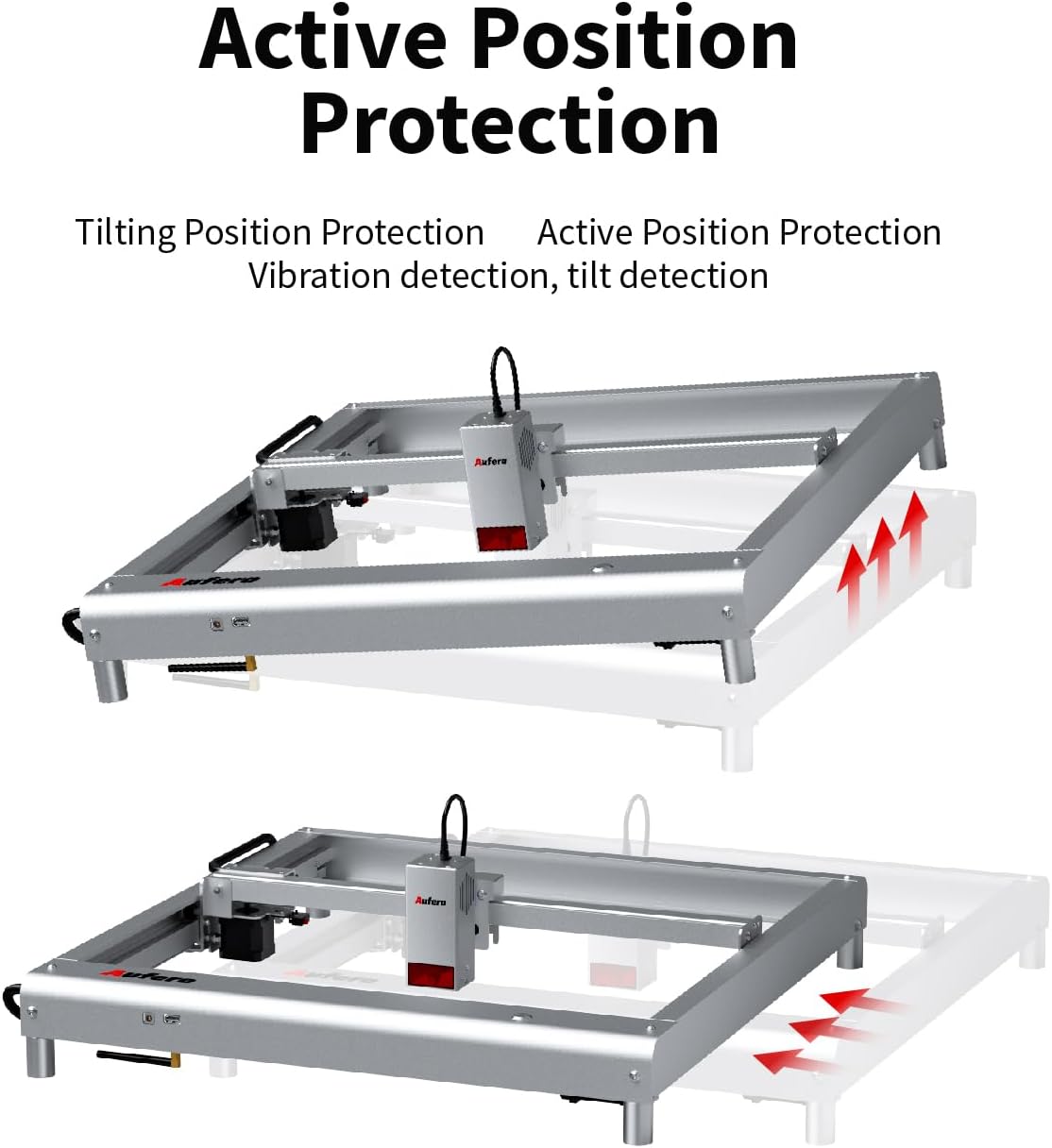
Figure 2.1: Active Position Protection mechanism, detecting and responding to tilting.

Figure 2.2: Laser Beam Safety Guard, featuring USB watchdog detection function.

Figure 2.3: Exposure Duration Detection and Limitation, ensuring a secure working environment.

Figure 2.4: Motherboard Program Monitoring, part of the voltage and current safety control system.
3. Componenti del prodotto
The Aufero AL3-20A laser engraver consists of the following main components:
- Laser Module (AL3-20A): The core component responsible for laser emission, featuring a 20W output power and a precise spot size of 0.08mm*0.18mm. It includes integrated fixed focus, dual fans for cooling, and supports air assist.
- Machine Frame: A uni-body frame design made of superior aluminum alloy, providing stability and durability.
- Pannello di controllo: Manages the machine's operations, supporting high baud rates up to 921600.
- 40L Air Assist Pump: An adjustable air assist device that blows away fumes and cutting residues, significantly improving engraving and cutting performance and preventing material ignition.
- Adattatore di alimentazione: Supplies power to the machine.
- Cavo USB: For connecting the engraver to a computer.
- Occhiali di sicurezza: Essential eye protection for operation.
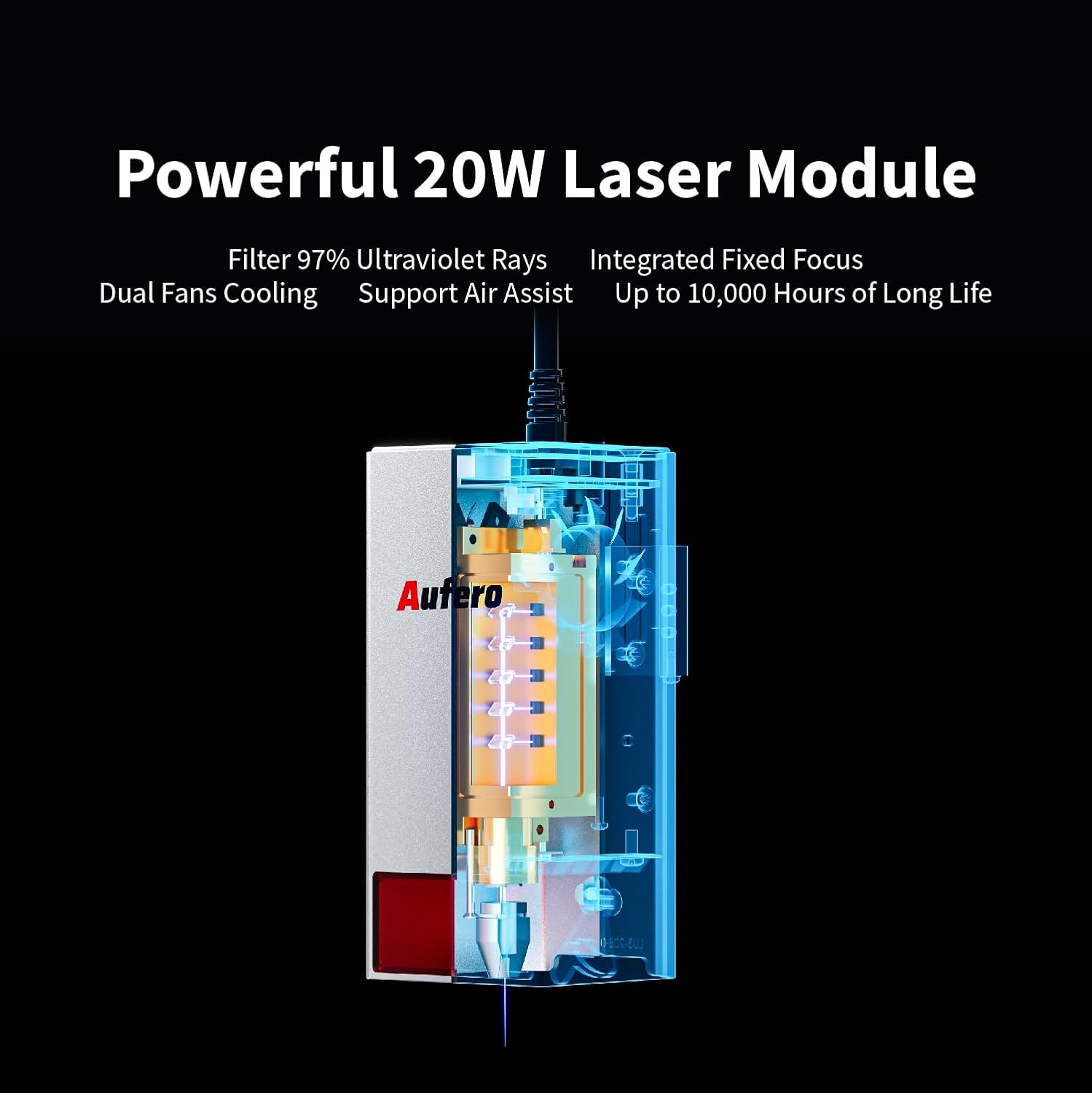
Figure 3.1: The powerful 20W Laser Module, featuring UV ray filtration, integrated fixed focus, dual fan cooling, and air assist support.

Figure 3.2: Comprehensive Air Assist Solution, demonstrating how the air assist pump improves engraving and cutting performance.
4. Installazione e assemblaggio
The Aufero AL3-20A is designed for easy installation. Follow these general steps for initial setup:
- Disimballare i componenti: Rimuovere con cautela tutti i componenti dall'imballaggio. Verificare che tutti i componenti elencati nella lista di imballaggio siano presenti.
- Montare il telaio: The machine features a uni-body frame. If any minor assembly is required (e.g., attaching feet), follow the detailed instructions in the included quick start guide.
- Installare il modulo laser: Securely attach the laser module to the gantry according to the provided diagrams. Ensure it is firmly seated.
- Connect Air Assist: Connect the 40L air assist pump to the designated port on the laser module and ensure the air hose is properly routed.
- Collegamento elettrico: Collegare l'adattatore di alimentazione alla macchina e poi a una presa di corrente idonea.
- Connessione USB: Collegare l'incisore al computer utilizzando il cavo USB in dotazione.
- Installazione del software: Install the necessary engraving software (e.g., LaserGRBL, LightBurn, or Laser Explorer APP) on your computer or mobile device.

Figure 4.1: The Aufero AL3 20W Laser Engraver, ready for operation after assembly.
Refer to the detailed product installation guide included in your package for specific step-by-step instructions and diagrams.
5. Guida operativa
5.1 Compatibilità e connessione del software
The Aufero AL3-20A supports various professional engraving software, including LaserGRBL and LightBurn. It also offers its own Laser Explorer application. You can connect the machine via four convenient modes:
- WIFI: Per il controllo wireless e file trasferimento.
- APPLICAZIONE: Control via the Laser Explorer mobile application.
- USB: Direct connection to a computer for real-time control.
- Carta TF: For offline engraving by loading G-code files directly onto the machine.

Figure 5.1: The Aufero engraver adapts to common software like Laser Explorer, LightBurn, and LaserGRBL.
5.2 Processo di incisione e taglio
- Preparare il materiale: Place the material to be engraved or cut on the working area. Ensure it is flat and securely positioned.
- Design and Load File: Create or load your design in the chosen software. Adjust parameters such as power, speed, and passes based on the material type and desired outcome.
- Posizionamento: Use the software to precisely position your design on the material. The machine supports automatic homing for consistent positioning.
- Start Air Assist: Ensure the 40L air assist pump is active, especially for cutting or engraving materials that produce significant smoke or residue.
- Inizia l'incisione/taglio: Avviare il processo dal software. Monitorare attentamente l'operazione.
5.3 Performance and Capabilities
- Precisione: With a spot size of only 0.08mm*0.18mm, the AL3-20A can achieve highly detailed and intricate engravings.
- Velocità: The engraving speed can reach up to 20000 mm/min, significantly improving efficiency.
- Cutting Ability: The 20W laser module allows for excellent cutting capabilities, such as cutting 20mm pine board and 30mm acrylic.
- Compatibilità dei materiali: Engrave and cut a wide range of materials including plywood, hardwood, metal, leather, glass, paper, dark acrylic, fabric, and more.
- Y-axis Rotation Engraving: Suitable for engraving cylindrical objects like mugs, wine bottles, and goblets (requires optional rotary attachment).

Figure 5.2: Precision Spot Size for Detailed Engraving, capturing intricate details.

Figure 5.3: Overall Speed Improvement, with maximum speed increased to 20,000 mm/min.

Figure 5.4: Automatic Homing, ensuring precise positioning and consistency.

Figure 5.5: Excellent Cutting Ability, demonstrating cuts through 20mm pine and 30mm acrylic.

Figure 5.6: Y-axis Rotation Engraving, suitable for cylindrical objects.
6. Manutenzione
Regular maintenance ensures the longevity and optimal performance of your Aufero laser engraver.
- Pulizia della lente: Periodically clean the laser lens with a specialized lens cleaning solution and a lint-free cloth. A dirty lens can reduce laser power and engraving quality.
- Pulizia della macchina: Use a soft, dry cloth to wipe down the machine frame and gantry. Remove any dust, debris, or residue from the working area.
- Lubrificazione: Check the guide rails and moving parts for smooth operation. Apply a small amount of appropriate lubricant if necessary, as per the manufacturer's recommendations.
- Manutenzione della pompa di assistenza pneumatica: Ensure the air assist pump is free from blockages and operating efficiently. Clean or replace filters if applicable.
- Aggiornamenti del firmware: Check the official Aufero websito per verificare la disponibilità di eventuali aggiornamenti del firmware, per garantire che il tuo computer disponga delle funzionalità e delle correzioni di bug più recenti.
Always disconnect the power supply before performing any cleaning or maintenance tasks.
7. Risoluzione Dei Problemi
This section addresses common issues you might encounter with your Aufero AL3-20A laser engraver.
| Problema | Possibile causa | Soluzione |
|---|---|---|
| La macchina non si accende | Power cable loose; Power adapter faulty; Outlet issue. | Check all power connections. Try a different outlet. Test power adapter if possible. |
| Il laser non si accende o ha un'uscita debole | Laser lens dirty; Incorrect power settings; Laser module faulty; Material too far from laser. | Clean the laser lens. Adjust power settings in software. Ensure material is at correct focal distance. Contact support if module is suspected faulty. |
| La qualità dell'incisione/taglio è scarsa | Incorrect speed/power settings; Material not flat; Laser focus incorrect; Air assist not active. | Adjust speed and power settings. Ensure material is flat. Verify laser focus. Activate air assist for cleaner cuts. |
| La macchina non si connette al software | USB cable faulty; Driver not installed; Incorrect COM port selected; WIFI/APP connection issues. | Try a different USB cable. Install necessary drivers. Select correct COM port in software. Check WIFI connection and APP settings. |
| La macchina si ferma inaspettatamente | Safety feature triggered (e.g., tilt, vibration); USB connection lost; Overheating. | Check for machine movement or tilting. Verify USB connection. Allow machine to cool down. Review safety feature alerts in software. |
If the problem persists after attempting these solutions, please contact Aufero customer support.
8. Specifiche
Key technical specifications for the Aufero Laser Engraver AL3-20A:
| Caratteristica | Specificazione |
|---|---|
| Modello | AL3-20A |
| Potenza di uscita laser | 20W |
| Classe laser | Classe 4 |
| Area di incisione | 15.7 x 15.7 pollici (400 mm x 400 mm) |
| Velocità di incisione | Fino a 20000 mm/min |
| Dimensioni del punto laser | 0.08mm * 0.18mm |
| Pompa di assistenza ad aria | Adjustable 40L |
| Scheda madre | Supports up to 921600 baud rate |
| Connettività | WIFI, APP, USB, TF Card |
| Software supportato | LaserGRBL, LightBurn, Laser Explorer APP |
| Peso dell'articolo | 17.21 libbre |
| Dimensioni del pacco | 31.4 x 9 x 8.1 pollici |
9. Garanzia e supporto
9.1 Informazioni sulla garanzia
The Aufero Laser Engraver AL3-20A comes with a standard manufacturer's warranty. For detailed information regarding warranty terms, duration, and coverage, please refer to the warranty card included with your product packaging or visit the official Aufero websito.
9.2 Assistenza clienti
For technical assistance, troubleshooting, or any inquiries regarding your Aufero laser engraver, please contact Aufero customer support. You can typically find contact information on the official Aufero websito o all'interno della documentazione del prodotto.
Produttore: Aufero
Risorse online: Visit the official Aufero websito per FAQ, download di software e materiale di supporto aggiuntivo.
Ask a question about this manual
Ask about setup, troubleshooting, compatibility, parts, safety, or missing instructions. Manuals+ will review the question and use this page’s manual context to help answer it.