
Introduzione
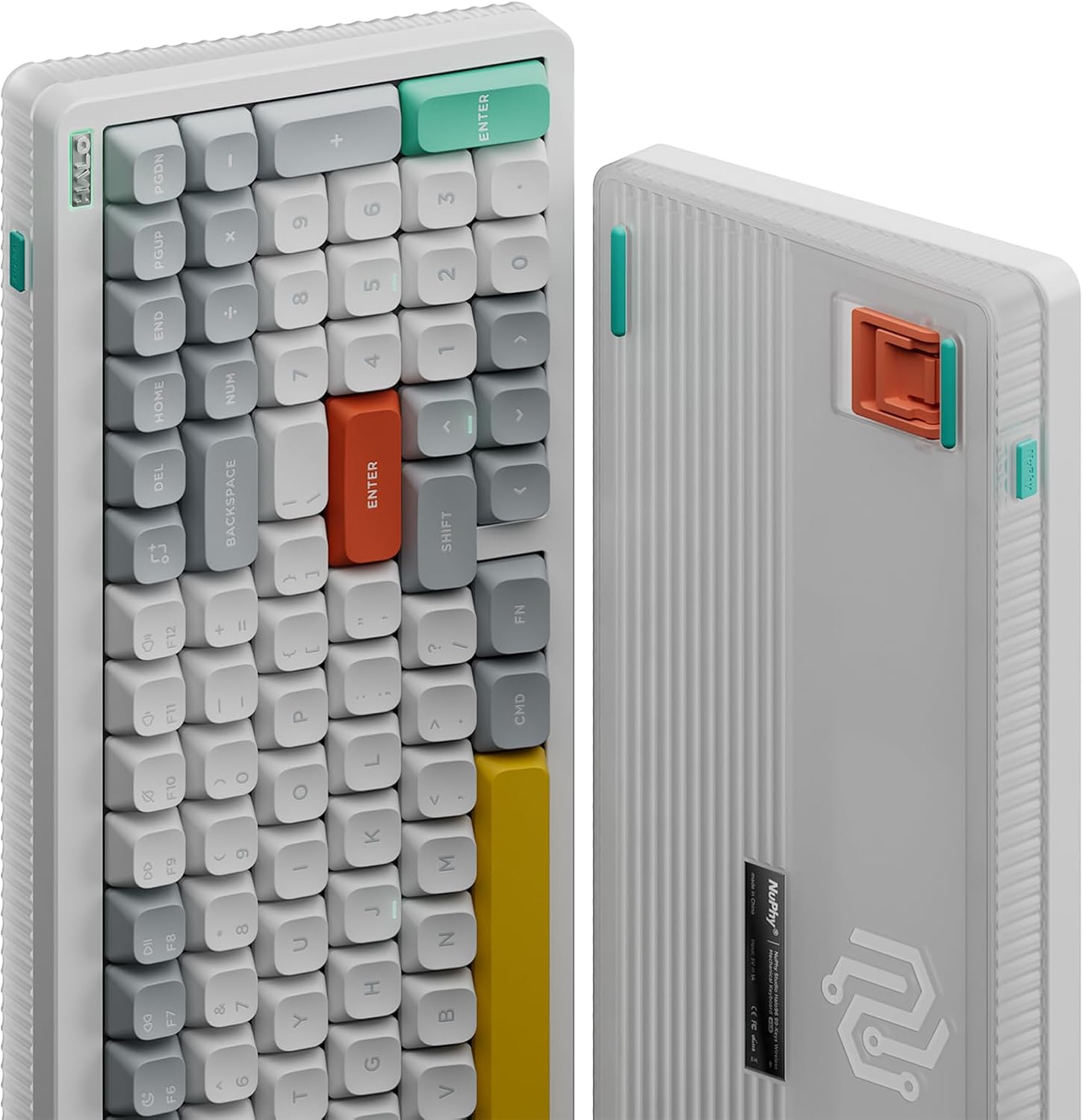
The NuPhy Halo96 V2 is a high-performance 96% layout wireless mechanical keyboard designed for versatility and customization. Featuring a gasket structure, hot-swappable switches, and vibrant RGB backlighting, it offers a premium typing and gaming experience. This keyboard supports QMK/VIA for advanced customization and provides multiple connectivity options including Bluetooth 5.0, 2.4GHz wireless, and USB-C wired modes, ensuring compatibility across various operating systems and devices.
This manual provides essential information for setting up, operating, maintaining, and troubleshooting your NuPhy Halo96 V2 keyboard.
Cosa c'è nella scatola
- Tastiera meccanica wireless NuPhy Halo96 V2
- Cavo da USB-C a USB-A
- Ricevitore wireless da 2.4 GHz (dongle)
- Estrattore per tasti/interruttori
- Extra Keycaps (for Mac/Windows layouts)
- Interruttori extra (sample switches for different types)
- Manuale utente / Guida rapida
- Adesivi
Impostare
1. Configurazione fisica
- Posizionare la tastiera su una superficie piana e stabile.
- Adjust the keyboard's feet to your preferred typing angle. The Halo96 V2 features two-level adjustable feet for ergonomic comfort.
2. Opzioni di connettività
The Halo96 V2 offers three modes of connection:
- Modalità cablata USB-C: Connect the provided USB-C cable from the keyboard to your computer. The keyboard will automatically switch to wired mode and begin charging.
- Modalità wireless a 2.4 GHz: Insert the 2.4GHz wireless receiver into an available USB port on your computer. Toggle the switch on the keyboard to 'Wireless' mode. The keyboard should connect automatically.
- Modalità Bluetooth 5.0:
- Toggle the switch on the keyboard to 'Wireless' mode.
- Press and hold the 'Fn' key + one of the Bluetooth keys (e.g., 'Fn' + '1', '2', '3', or '4') to enter pairing mode. The indicator light will flash.
- On your device (computer, tablet, smartphone), search for Bluetooth devices and select 'NuPhy Halo96 V2' to pair.
- The keyboard supports connecting up to 4 Bluetooth devices simultaneously. Switch between paired devices using 'Fn' + '1'/'2'/'3'/'4'.

3. Compatibilità del sistema
The Halo96 V2 is compatible with macOS, Windows, Linux, Android, and iOS systems. Use the dedicated switch on the keyboard to select between Windows and Mac layouts for optimal functionality.
4. QMK/VIA Configuration
The keyboard supports open-source QMK/VIA firmware, allowing for extensive customization of key mappings, macros, and lighting effects. Download the VIA software and the appropriate JSON file for your Halo96 V2 model from the official NuPhy websito per iniziare la personalizzazione.

Istruzioni per l'uso
1. Utilizzo di base
- Simply connect the keyboard using your preferred method (wired, 2.4GHz, or Bluetooth) and begin typing.
- The 96% layout retains essential arrow keys and a number pad for both work and gaming.
2. RGB Backlighting (Halolight 2.0)
The Halo96 V2 features advanced RGB backlighting with a semi-transparent bottom case for enhanced light transmission. You can customize various lighting effects, colors, and brightness levels:
- Use 'Fn' + specific keys (refer to the quick guide) to cycle through different lighting modes and colors.
- Adjust brightness levels using 'Fn' + arrow keys (up/down).
- Further customization is available via the QMK/VIA software.
3. Mac Shortcuts
When in Mac mode, the keyboard provides access to Mac-specific function keys, including Do Not Disturb and Spotlight, for seamless integration with your Apple ecosystem.
4. Bassa latenza
Experience a 1000Hz polling rate in both wired and 2.4GHz modes, ensuring minimal input lag for responsive gaming and typing.

Manutenzione
1. Pulizia
- Regularly clean your keyboard with a soft, dry cloth.
- Per una pulizia più approfondita, utilizzare l'estrattore per tasti in dotazione per rimuovere i tasti e pulire polvere o detriti con aria compressa.
2. Switch sostituibili a caldo
The Halo96 V2 features hot-swappable switches, allowing you to change them without soldering:
- Use the provided switch puller to carefully remove a switch.
- Allineare i pin del nuovo interruttore con le prese sul PCB e premere delicatamente verso il basso finché non scatta in posizione.
3. Gestione della batteria
The keyboard is equipped with a 4000mAh battery. To maximize battery life:
- Caricare completamente la tastiera prima del primo utilizzo.
- Connect via USB-C cable to charge.
- Reduce RGB brightness or turn off backlighting when not needed to conserve power.
- The keyboard has a go-to-sleep mode to save power after a period of inactivity.

Risoluzione dei problemi
1. Problemi di connettività
- Errore di associazione Bluetooth: Ensure the keyboard is in pairing mode (indicator flashing). Remove previous pairings from your device and try again.
- 2.4GHz Disconnection: Ensure the dongle is securely inserted and the keyboard is in 2.4GHz mode. Try a different USB port.
- Wireless Lag: Ensure the keyboard is fully charged. If issues persist, try updating the keyboard firmware.
2. Key Input Errors (Chattering)
If you experience unintended repeated key presses (chattering), it may be due to switch sensitivity or a faulty switch. Try the following:
- Identify the problematic key.
- Carefully remove the switch using the switch puller.
- Replace the switch with a new one or swap it with a less frequently used key to test if the issue is resolved.
- Adjust typing habits to avoid accidental actuation if switches are highly sensitive.
3. Aggiornamenti del firmware
Regularly check the official NuPhy website for firmware updates. Updates can improve performance, fix bugs, and enhance compatibility. Follow the instructions provided on the website for a successful update.
Specifiche
| Caratteristica | Dettaglio |
|---|---|
| Dimensioni del prodotto | 14.84 cm L x 5.31 cm P x 1.3 cm A |
| Peso dell'articolo | 1.74 libbre |
| Produttore | nuphy |
| Numero modello articolo | Halo96 v2 |
| Batterie | 1 batteria P76 richiesta (inclusa) |
| Dispositivi compatibili | Portatile, Pc, Tablet |
| Tecnologia di connettività | Bluetooth, USB-C, 2.4GHz |
| Descrizione della tastiera | Support macOS/Windows/Linux/Android/iOS |
| Usi consigliati | Gioco d'azzardo |
| Caratteristica speciale | Hot-Swap |
| Materiale | Aluminum, ABS, POM |
Garanzia e supporto
For warranty information and technical support, please refer to the documentation included with your product or visit the official NuPhy website. The manufacturer provides support for product-related inquiries and issues.
Extended protection plans may be available for purchase separately. Please check with your retailer for details on available plans.