
Introduzione
The nuphy Halo96 V2 is a high-performance 96% layout wireless mechanical keyboard designed for an optimal typing and gaming experience. Featuring a gasket structure, hot-swappable switches, and vibrant RGB backlighting, this keyboard offers extensive customization through QMK/VIA firmware and versatile connectivity options. This manual provides essential information for setting up, operating, maintaining, and troubleshooting your Halo96 V2 keyboard.
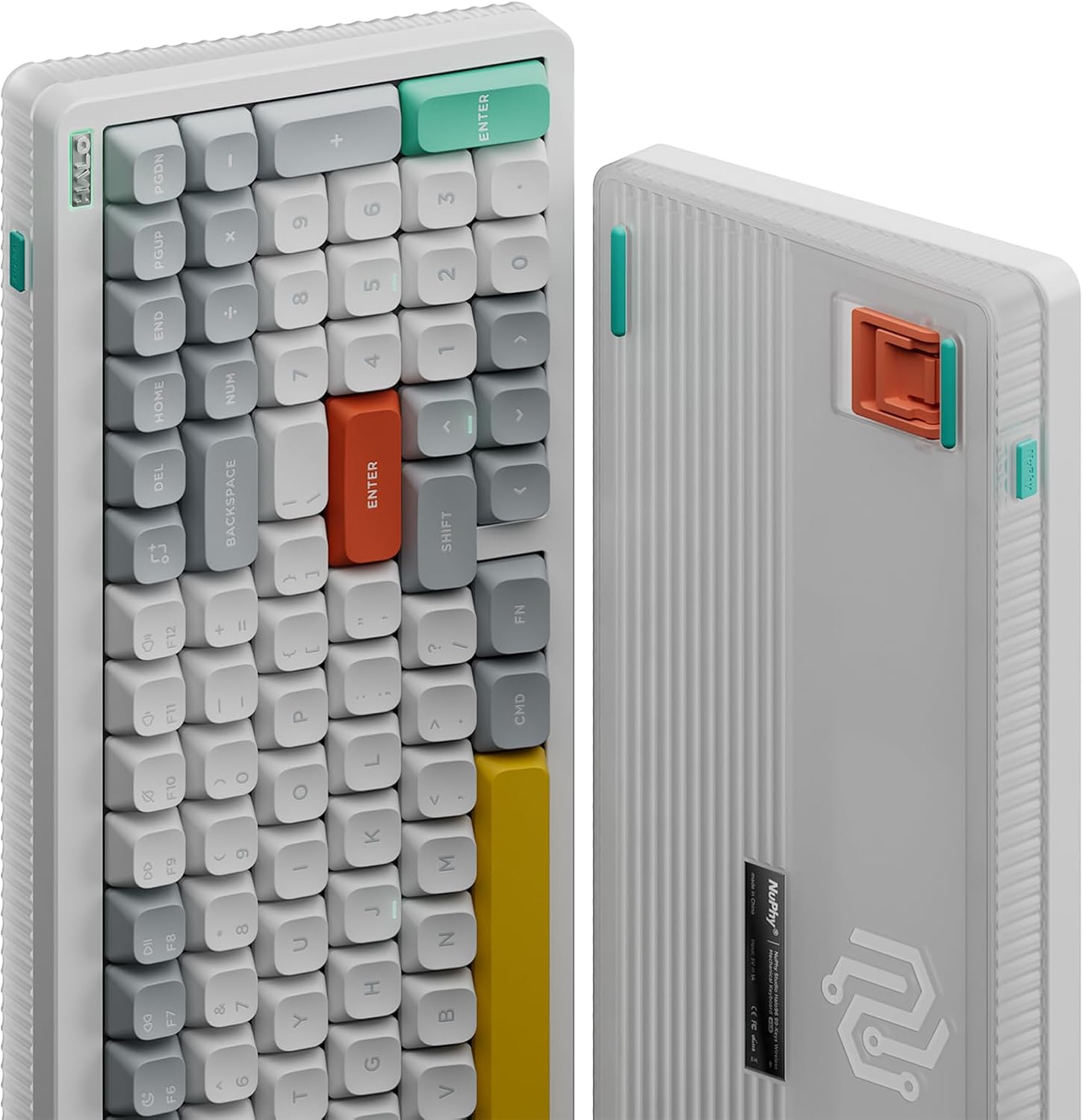
Immagine: dall'alto verso il basso view of the nuphy Halo96 V2 Wireless Mechanical Keyboard, showcasinil suo layout al 96% e il design dei tasti.
Impostare
Disimballaggio e ispezione iniziale
Carefully remove the keyboard and all accessories from the packaging. Inspect the keyboard for any visible damage. The package typically includes the Halo96 V2 keyboard, a USB-C cable, a 2.4GHz receiver, a keycap/switch puller, and a rechargeable battery (pre-installed).

Image: The retail packaging box for the nuphy Halo96 V2 keyboard.
Caricamento della tastiera
Before first use, it is recommended to fully charge the keyboard. Connect the provided USB-C cable to the keyboard's USB-C port and the other end to a powered USB port on your computer or a wall adapter. The keyboard features a built-in 4000mAh battery for extended use.
Opzioni di connettività
The Halo96 V2 offers three versatile connectivity modes:
- USB-C cablato: For a direct and low-latency connection.
- Wireless a 2.4 GHz: Utilizes a dedicated USB receiver for a stable, high-performance wireless connection with a 1000Hz polling rate.
- Bluetooth 5.0: Connects to up to 4 devices simultaneously, allowing easy switching between them.

Image: Diagram illustrating the three connectivity options: USB-C wired, Bluetooth, and 2.4GHz wireless.
Compatibilità del sistema
The keyboard supports macOS, Windows, Linux, Android, and iOS systems. Use the dedicated Mac/Windows switch on the keyboard to select your operating system for optimal key mapping and functionality, including Mac-specific function keys like Do Not Disturb and Spotlight.
Operativo
Funzioni chiave e layout
The Halo96 V2 features a 96% layout with 99 keys, retaining essential arrow keys and a number pad. Specific key combinations (often involving the 'Fn' key) control various functions such as backlighting, media playback, and system settings. Refer to the quick guide for detailed FN key combinations.
Personalizzazione QMK/VIA
The keyboard supports open-source QMK/VIA firmware, allowing for extensive customization of key mapping, macros, and lighting effects. This enables users to personalize their typing experience to a high degree. The 1000Hz polling rate in wired and 2.4GHz modes ensures responsive performance for gaming and work.

Image: Screenshot of the QMK/VIA interface demonstrating key remapping capabilities for the Halo96 V2 keyboard.
Retroilluminazione RGB
The Halo96 V2 features advanced RGB backlighting with a semi-transparent bottom case and a Halo band for enhanced light transmission. It includes LED homing bars, sidelight, and south-facing backlight for a customizable visual experience. Multiple lighting effects and colors can be configured.

Image: Visual breakdown of the Halo96 V2's RGB lighting features, including Halolight 2.0, sidelight, and south-facing backlight.
Video ufficiale del prodotto
Video: An official product video from NuPhy-Store showcasing the features and design of the Halo96 V2 mechanical keyboard.
Manutenzione
Pulizia della tastiera
Per pulire la tastiera, scollegarla prima da tutte le fonti di alimentazione. Utilizzare un panno morbido e privo di lanugine leggermenteampened with water or a mild cleaning solution to wipe down the keycaps and chassis. For deeper cleaning, use the provided keycap puller to remove keycaps and clean underneath with compressed air or a small brush. Ensure the keyboard is completely dry before reconnecting.
Interruttori sostituibili a caldo
The Halo96 V2 features hot-swappable switches, allowing you to easily change switches without soldering. Use the provided switch puller to carefully remove existing switches and insert new compatible 3-pin or 5-pin mechanical switches. This allows for personalized typing feel and easy replacement of faulty switches.
Cura della batteria
The 4000mAh battery provides long-lasting power. To maximize battery life, enable the keyboard's sleep mode when not in use. Avoid exposing the keyboard to extreme temperatures or moisture. Recharge the battery when the low battery indicator appears.
Image: Diagram showing the internal six layers of padding designed to reduce cavity sound and create a more focused, thicker sound.
Risoluzione dei problemi
Problemi di connettività
- Bluetooth: Ensure the keyboard is in Bluetooth mode and discoverable. Check your device's Bluetooth settings.
- 2.4 GHz: Ensure the USB receiver is properly plugged in and the keyboard is in 2.4GHz mode.
- Wired: Verify the USB-C cable is securely connected to both the keyboard and your computer.
Key Chattering or Unresponsive Keys
If you experience keys registering multiple inputs or not registering at all, try the following:
- Clean the affected switch using compressed air.
- If the issue persists, use the switch puller to replace the faulty switch with a new one.
- Assicurarsi che il firmware della tastiera sia aggiornato.
Aggiornamenti del firmware
Regularly check the nuphy official website for the latest QMK/VIA firmware updates. Updating the firmware can resolve bugs, improve performance, and add new features. Follow the instructions provided on the website for a successful update.
Specifiche
| Caratteristica | Specificazione |
|---|---|
| Numero di modello | Halo96 v2 |
| Disposizione | 96% (99 tasti) |
| Connettività | Bluetooth 5.0, 2.4GHz, USB-C Wired |
| Tasso di sondaggio | 1000Hz (Wired & 2.4GHz) |
| Interruttori | Hot-Swappable (Raspberry Switches - 46gf) |
| Retroilluminazione | RGB (Halolight 2.0, Sidelight, South-facing) |
| Capacità della batteria | 4000mAh |
| Sistema operativo compatibile | macOS, Windows, Linux, Android, iOS |
| Dimensioni del prodotto | 5.31 cm L x 14.84 cm P x 1.3 cm A |
| Peso dell'articolo | 1.74 libbre |
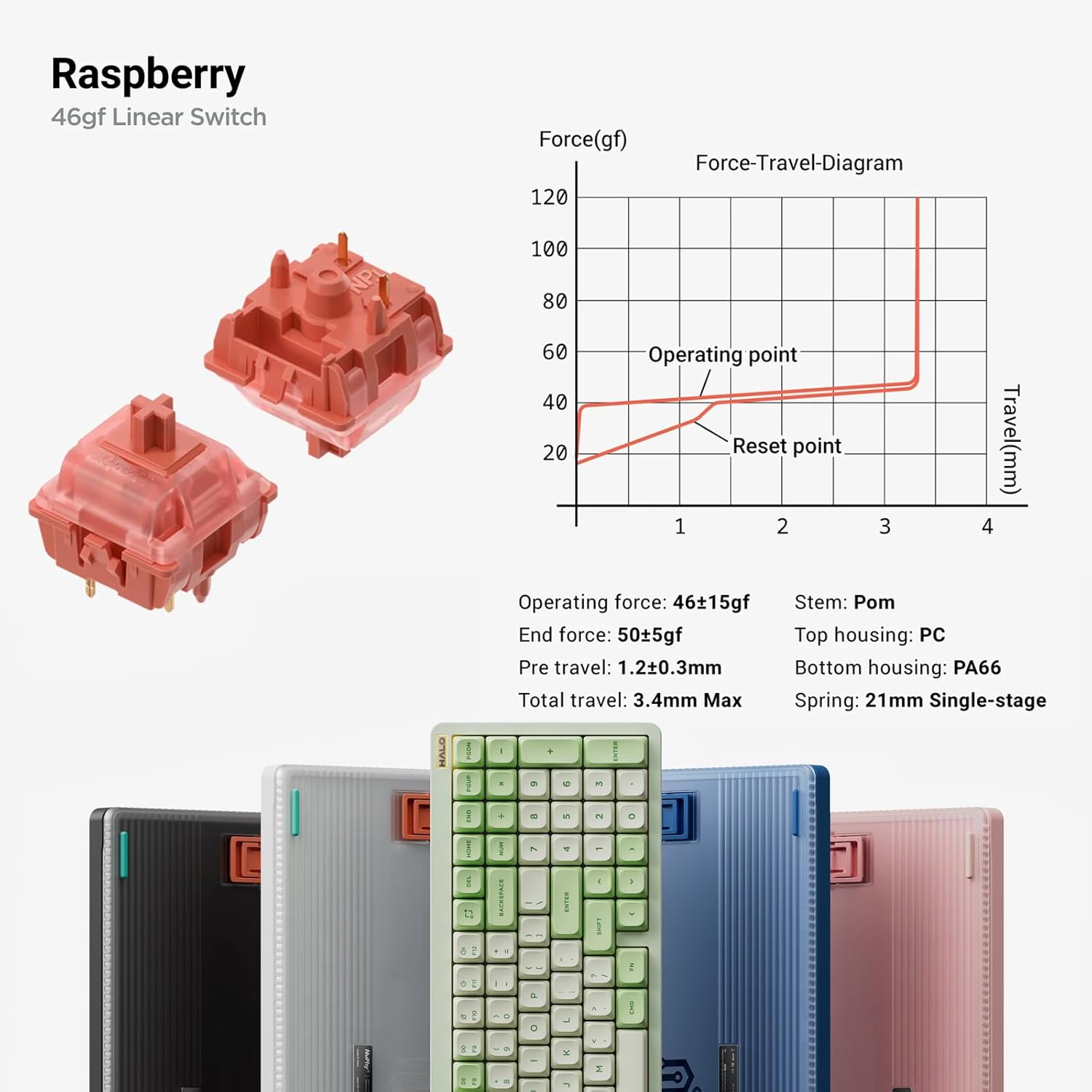
Image: Detailed force-travel diagram for the Raspberry 46gf Linear Switch, alongside various color options for the Halo96 V2 keyboard.

Image: Technical diagram showing the precise dimensions and angles of the nuphy Halo96 V2 keyboard.
Garanzia e supporto
For warranty information, technical support, or further assistance, please refer to the official nuphy websito o contattare direttamente il servizio clienti. Conservare la ricevuta d'acquisto per eventuali reclami in garanzia.