
nuphy Halo96V2
Manuale utente della tastiera meccanica wireless NuPhy Halo96 V2
Guida completa per l'installazione, il funzionamento e la manutenzione.
Introduzione
This user manual provides detailed instructions for setting up, operating, and maintaining your NuPhy Halo96 V2 Wireless Mechanical Keyboard. Please read this manual thoroughly to ensure optimal performance and longevity of your device.

Figure 1: NuPhy Halo96 V2 Wireless Mechanical Keyboard. This image shows the full keyboard from a top-down perspective, highlighting its 96% layout and keycap colors.
Impostare
Contenuto della confezione
- NuPhy Halo96 V2 Mechanical Keyboard
- Cavo da USB-C a USB-A
- Ricevitore USB a 2.4 GHz
- Estrattore per tasti
- Estrattore per interruttori
- Additional Keycaps (for Mac/Windows layouts)
- Manuale dell'utente (questo documento)
Carica iniziale
Before first use, it is recommended to fully charge the keyboard. Connect the provided USB-C cable to the keyboard's USB-C port and the other end to a powered USB-A port on your computer or a wall adapter. The keyboard features a 4000mAh battery.
Opzioni di connettività
The Halo96 V2 offers three modes of connection: Bluetooth 5.0, 2.4GHz wireless, and USB-C wired.

Figure 2: Connectivity options for the NuPhy Halo96 V2. This image illustrates the three primary connection methods: USB-C wired, Bluetooth, and 2.4GHz wireless, along with icons for each.
Connessione wireless 2.4GHz
- Individuare il ricevitore USB da 2.4 GHz.
- Collegare il ricevitore a una porta USB-A disponibile sul computer.
- On the keyboard, switch the mode selector to 2.4GHz. The keyboard will automatically connect.
Connessione Bluetooth 5.0
- On the keyboard, switch the mode selector to Bluetooth.
- Premere e tenere premuto Fn + 1 (or 2, 3, 4) for 3 seconds until the indicator light flashes rapidly, indicating pairing mode.
- On your device (computer, tablet, smartphone), go to Bluetooth settings and select "NuPhy Halo96 V2" from the list of available devices.
- Once connected, the indicator light will become solid. The keyboard can store up to 4 Bluetooth profiles.
Connessione cablata USB-C
- Collegare il cavo USB-C in dotazione alla porta USB-C della tastiera.
- Connect the USB-A end of the cable to your computer's USB-A port.
- On the keyboard, switch the mode selector to USB-C. The keyboard will function immediately.
Cambio del sistema operativo
The keyboard supports both macOS and Windows/Linux/Android/iOS systems. Use the dedicated switch on the side of the keyboard to toggle between Mac and PC modes for optimized key mappings and shortcuts.

Figura 3: lato view of the NuPhy Halo96 V2 keyboard. This image displays the side profile of the keyboard, including the USB-C port, mode switches, and the semi-transparent bottom case.
Operazione
Personalizzazione QMK/VIA
The NuPhy Halo96 V2 supports QMK/VIA firmware, allowing for extensive customization of key mappings, macros, and lighting effects. Download the VIA software from the official QMK/VIA websito per accedere a queste funzionalità.

Figure 4: QMK/VIA customization interface for Halo96 V2. This image demonstrates how users can remap keys and customize functions.
RGB Backlighting and Halolight
The keyboard features per-key RGB backlighting and a unique "Halolight" RGB strip around the base. Both can be customized for color, brightness, and animation effects. The semi-transparent bottom case enhances the Halolight's visual impact.
- Utilizzo Fn + [key] combinations to cycle through preset lighting effects and colors.
- Adjust brightness and speed of effects using dedicated function keys.
- For advanced customization, use the QMK/VIA software.

Figure 5: Keyboard demonstrating SignalRGB support. This image highlights the vibrant RGB lighting capabilities of the keyboard, including the Halolight strip, and mentions compatibility with SignalRGB for broader lighting control.
Interruttori sostituibili a caldo
The Halo96 V2 features hot-swappable switch sockets, allowing you to change mechanical switches without soldering. This enables users to customize the typing feel and sound to their preference.
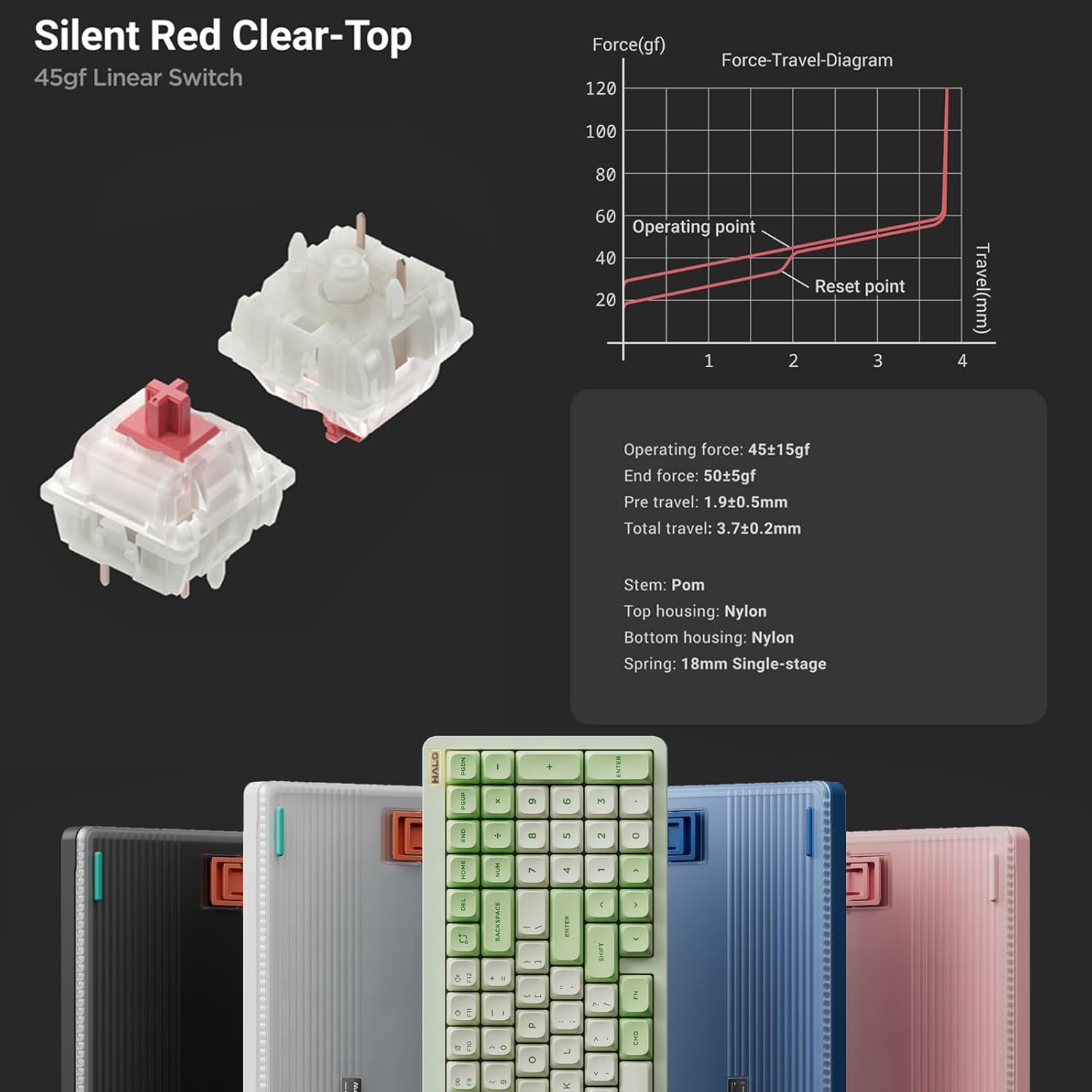
Figura 6: dettagliata view of Silent Red Clear-Top switches. This image provides a close-up of the mechanical switches, including their force-travel diagram and specifications, emphasizing the hot-swappable feature.
Per sostituire un interruttore:
- Rimuovere delicatamente il tasto utilizzando l'apposito estrattore in dotazione.
- Utilizzare l'estrattore per afferrare con cautela l'interruttore e tirarlo verso l'alto.
- Allineare i pin del nuovo interruttore con i fori sul PCB e premere con decisione fino a sentire uno scatto. Assicurarsi che i pin non siano piegati.
- Sostituire il tasto.
Caratteristiche principali finiteview
- Illuminazione migliorata: Semi-transparent bottom case and double-shot moulding for superior RGB light transmission.
- Acustica migliorata: Gasket mount style replaces top mount for better sound and feel.
- Connettività multi-dispositivo: Seamlessly switch between up to 4 devices via Bluetooth 5.0, 2.4GHz, or USB-C wired modes.
- Full Customization: QMK/VIA support for endless key mapping, macro creation, and light customization.
- Ampia compatibilità: Supports macOS, Windows, Linux, Android, and iOS operating systems.
- Bassa latenza: Achieves a 1000Hz polling rate in both wired and 2.4GHz modes for responsive performance.
- Mac-Specific Functions: Dedicated switch for Mac system, providing access to Mac-specific function keys like Do Not Disturb and Spotlight.
- Batteria a lunga durata: Built-in 4000mAh battery for extended wireless use.
- Layout compatto: 96% layout with 99 keys, saving desktop space while retaining essential arrow keys and number pad.

Figure 7: Collage of NuPhy Halo96 V2 features. This image visually summarizes several key aspects including Halolight 2.0, 1000Hz polling rate, QMK/VIA support, PCB Gasket Mount, LED Homing Bars, Hot-Swappable switches, Sidelight, and South-Facing Backlight.
Manutenzione
Pulizia della tastiera
- Turn off the keyboard and disconnect it from all devices.
- Utilizzare una bomboletta di aria compressa per rimuovere polvere e detriti dagli spazi tra i tasti.
- For stubborn dirt, carefully remove keycaps using the keycap puller and clean the switch area.
- Pulisci i tasti e la superficie della tastiera con un panno morbido e privo di lanugine, delicatamenteampcon acqua o una soluzione detergente delicata. Evitare prodotti chimici aggressivi.
- Ensure the keyboard is completely dry before reconnecting or turning it on.
Cura della batteria
- Evitare di scaricare completamente la batteria frequentemente.
- Charge the keyboard regularly, especially if not in use for extended periods.
- Quando non la si utilizza, conservare la tastiera in un luogo fresco e asciutto.
Risoluzione dei problemi
Problemi di connettività
- Keyboard not connecting via 2.4GHz:
- Ensure the keyboard is in 2.4GHz mode.
- Prova a collegare il ricevitore USB a un'altra porta USB.
- Assicurarsi che la tastiera sia carica.
- Errore di associazione Bluetooth:
- Ensure the keyboard is in Bluetooth mode and in pairing state (flashing indicator).
- Remove "NuPhy Halo96 V2" from your device's Bluetooth list and try pairing again.
- Try a different Bluetooth channel (Fn+1, Fn+2, etc.).
- Assicurati che il Bluetooth del tuo dispositivo sia abilitato e rilevabile.
- Connessione cablata non funzionante:
- Ensure the keyboard is in USB-C mode.
- Prova un cavo USB-C o una porta USB diversi sul tuo computer.
Problemi di illuminazione
- Le luci non si accendono:
- Controllare il livello della batteria.
- Ensure backlighting is enabled via keyboard shortcuts or VIA software.
- Illuminazione non uniforme:
- Perform a factory reset (refer to QMK/VIA documentation for your specific firmware version).
- Update keyboard firmware via NuPhy's official websito.
Key Functionality Issues
- I tasti non rispondono:
- Ensure the switch is properly seated in its socket. Remove and re-insert the switch.
- Test with a different switch if available.
- Check key mappings in VIA software for accidental reassignments.
- Incorrect key output (e.g., Greek letters):
- This may indicate a firmware issue. Check NuPhy's official websito per gli ultimi aggiornamenti del firmware e le istruzioni di installazione.
- Eseguire un ripristino delle impostazioni di fabbrica.
Specifiche
| Nome del modello | Halo96 V2 |
| Marca | NuPhy |
| Disposizione | 96% (99 tasti) |
| Connettività | Bluetooth 5.0, wireless a 2.4 GHz, USB-C cablato |
| Tasso di sondaggio | 1000Hz (Wired & 2.4GHz) |
| Capacità della batteria | 4000mAh |
| Tipo di interruttore | Hot-Swappable Mechanical Switches (e.g., Silent Red Clear-Top 45gf Linear) |
| Retroilluminazione | RGB (Per-key & Halolight) |
| Supporto firmware | QMK/VIA |
| Sistema operativo compatibile | macOS, Windows, Linux, Android, iOS |
| Dimensioni del prodotto | 125.2 x 44.88 x 7.28 pollici |
| Peso dell'articolo | 1.74 libbre |

Figure 8: Technical drawing showing the dimensions and weight of the NuPhy Halo96 V2. This image provides precise measurements and weight specifications for the keyboard.
Garanzia e supporto
For warranty information and technical support, please refer to the official NuPhy webo contattare direttamente il servizio clienti. Conservare la ricevuta d'acquisto come prova d'acquisto per eventuali reclami in garanzia.
Visit the official NuPhy Store: NuPhy Store on Amazon
Ask a question about this manual
Ask about setup, troubleshooting, compatibility, parts, safety, or missing instructions. Manuals+ will review the question and use this page’s manual context to help answer it.