Introduzione
This manual provides comprehensive instructions for the installation, operation, and maintenance of your new Jingelsye Android 13 Car Radio. Designed specifically for Mazda 3 models from 2010 to 2013, this unit offers advanced features including an 8Core processor, 4GB RAM, 32GB ROM, a 9-inch 1280x800 IPS touchscreen, Wireless CarPlay, Android Auto, GPS navigation, WiFi, Bluetooth, AM/FM radio, and DSP audio processing. Please read this manual thoroughly before installation and use to ensure proper function and safety.
Informazioni sulla sicurezza
- Prima di iniziare l'installazione, assicurarsi che l'accensione del veicolo sia spenta e che la batteria sia scollegata, per evitare cortocircuiti o danni.
- Per ottenere prestazioni e sicurezza ottimali si consiglia l'installazione da parte di un professionista.
- Non utilizzare il dispositivo in modo da distrarti dalla guida. Dai sempre priorità alla sicurezza stradale.
- Evitare di esporre l'unità a temperature estreme, alla luce solare diretta per periodi prolungati o a umidità eccessiva.
- Use only specified cables and accessories provided with the unit or approved by Jingelsye.
Contenuto della confezione
Verifica che tutti gli articoli elencati di seguito siano inclusi nel tuo pacchetto:
- 1x Jingelsye Car Radio for Mazda 3
- 2x cavi USB
- 1x Cavo di alimentazione
- 1x modulo GPS
- 1x 4G Antenna Adapter
- 1x Reversing Line
- 1x Crowbar (for panel removal)
- 1 set di cavi RCA
- 1x External Microphone (MIC)
- 1x decoder Canbus
- 1x Original USB Adapter
- 1x Backup Camera (1080P AHD)

Image: All components included in the Jingelsye Car Radio package, laid out on a wooden surface.
Configurazione e installazione
This section outlines the general steps for installing your Jingelsye Android 13 Car Radio. Specific vehicle disassembly instructions are not included and may vary by Mazda 3 model year. Refer to your vehicle's service manual for detailed panel removal procedures.
1. Preparazione
- Parcheggiare il veicolo su una superficie piana e stabile e inserire il freno di stazionamento.
- Disconnect the negative terminal of your car battery to prevent electrical hazards.
- Carefully remove the factory radio and surrounding trim panels using the provided crowbar or appropriate tools.
2. Collegamento dei componenti
Connect the various cables and modules to the main head unit as shown in the video and general diagrams. Ensure all connections are secure.
Video: Detailed wiring instructions for the Jingelsye Car Radio, demonstrating how to connect the various cables and modules to the main unit.
- Cavo di alimentazione: Connect the main power harness to the car radio and the vehicle's wiring harness. Ensure the Canbus decoder is properly integrated if your vehicle requires it (e.g., for steering wheel controls, Bose system integration).
- Antenna GPS: Collegare l'antenna GPS alla porta designata sul retro dell'unità. Posizionare l'antenna in un luogo con una vista libera view of the sky, such as on the dashboard or under the windshield, for optimal signal reception.
- Antenna 4G (se applicabile): Connect the 4G antenna adapter if your unit supports 4G connectivity.
- Antenna radio: Collegare l'antenna radio del veicolo all'unità.
- Cavi USB: Connect the provided USB cables to the unit. These can be routed to the glove compartment or center console for easy access to USB devices.
- Cavo del segnale della telecamera posteriore: Connect the rear camera signal wire (typically yellow RCA) to the "CAM IN" port on the unit. The red wire on the camera extension cable should be connected to the reverse light power for automatic camera activation.
- Microfono esterno: Plug in the external microphone for enhanced call clarity. Route it to a suitable location, such as near the sun visor or steering column.
- Cavi RCA: Collegare qualsiasi dispositivo esterno amplifiers, subwoofers, or auxiliary audio/video inputs/outputs using the RCA cable set as needed.
3. Test e riassemblaggio
- Before fully reassembling the dashboard, reconnect the car battery.
- Turn on the ignition and power on the car radio. Test all functions: radio, Bluetooth, GPS, CarPlay/Android Auto, steering wheel controls, and the backup camera.
- If all functions work correctly, carefully reassemble the dashboard and trim panels.
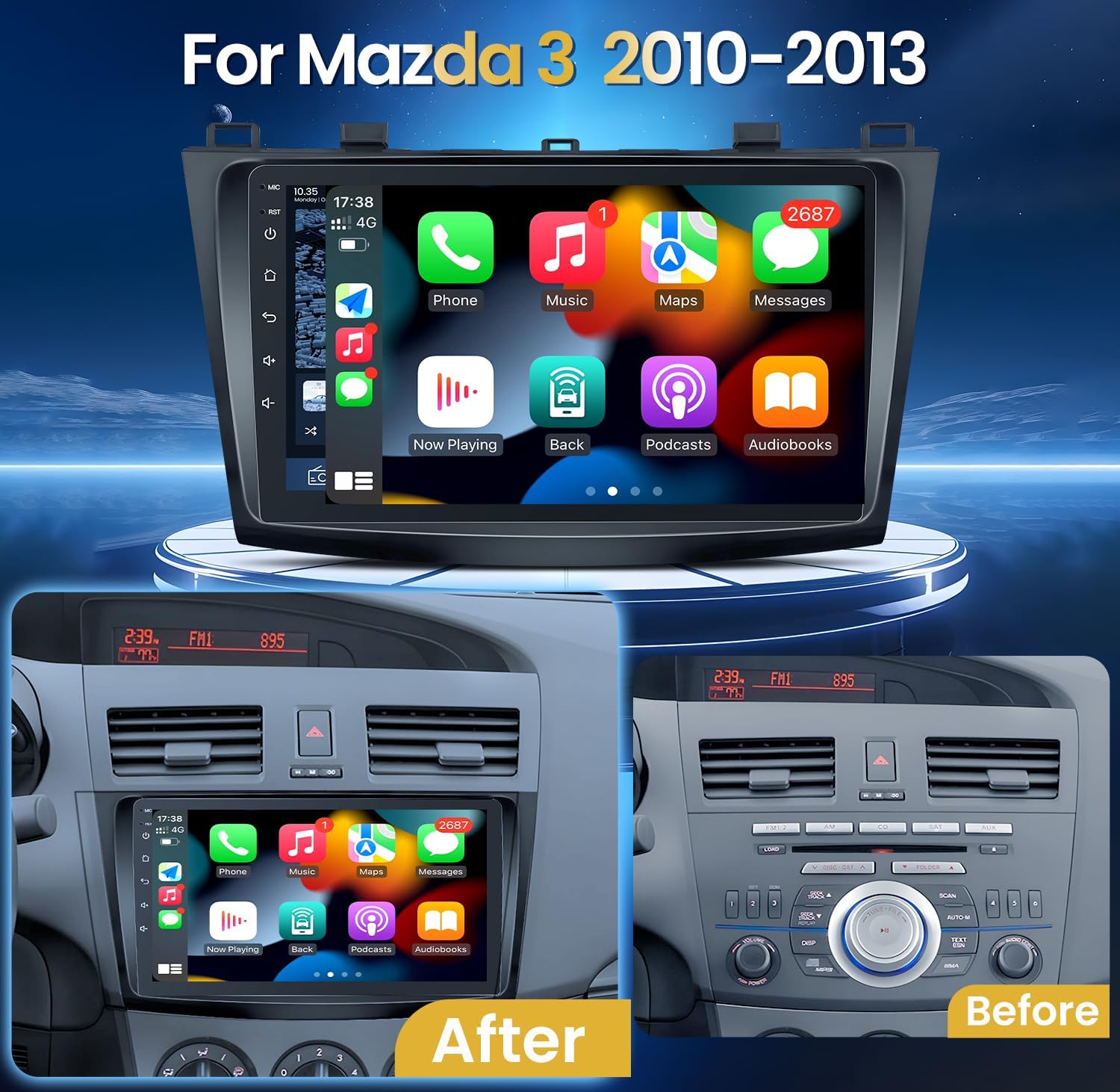
Image: Comparison of the Mazda 3 dashboard before and after the installation of the Jingelsye car radio, showing the integrated fit.
Istruzioni per l'uso
This section details the operation of your Jingelsye Android 13 Car Radio. The unit features a responsive 9-inch 1280x800 IPS touchscreen for clear visuals and easy interaction.

Image: A close-up of the car radio's Full HD 1280x800 IPS screen, highlighting its clarity and rich colors.
Video: Un oltreview of the car radio's user interface and key features, including split-screen, DSP sound settings, Bluetooth connectivity, CarPlay/Android Auto, GPS navigation, and Wi-Fi connection.
1. Funzionamento di base
- Accensione/spegnimento: Press the power button on the unit or turn the vehicle ignition on. The unit will boot up automatically.
- Schermo tattile: È possibile navigare nell'interfaccia toccando, scorrendo e pizzicando sul touchscreen IPS da 9 pollici.
- Controllo del volume: Regola il volume utilizzando i comandi sullo schermo o i comandi al volante del veicolo.
2. CarPlay wireless e Android Auto
Connect your smartphone wirelessly for seamless integration of navigation, music, calls, and messaging.

Image: The car radio display showing the Wireless CarPlay and Android Auto interface with various app icons.
- Assicurati che il Bluetooth e il Wi-Fi del tuo telefono siano abilitati.
- On the car radio, open the "Car Link" or similar application.
- Abbina il tuo telefono all'autoradio tramite Bluetooth.
- Seguire le istruzioni sullo schermo per stabilire la connessione CarPlay o Android Auto.
- Once connected, you can access compatible apps for navigation, music, and communication directly from the car radio display.
3. Navigazione GPS e connessione Wi-Fi
The unit supports both offline maps and online GPS navigation when connected to Wi-Fi. The 5G Wi-Fi connection allows for faster downloads and online map usage.

Image: The car radio display showing a 5G Wi-Fi connection and various application icons, indicating internet access for online maps and app downloads.
- To connect to Wi-Fi, go to Settings > Wi-Fi and select your network. Enter the password if required.
- Aprire l'applicazione "Mappe".
- For online maps, ensure the unit is connected to a Wi-Fi hotspot (e.g., from your phone).
- Inserisci la tua destinazione utilizzando la tastiera touchscreen o i comandi vocali.
4. Bluetooth Handsfree & Audio Streaming
Connect your phone via Bluetooth for hands-free calling and wireless music playback.
- Vai alle impostazioni Bluetooth dell'autoradio.
- Attiva il Bluetooth sul tuo telefono e cerca i dispositivi disponibili.
- Select the car radio from your phone's list and confirm pairing.
- Once paired, you can make/receive calls and stream audio through the car's speakers.
5. Radio FM/AM
Access your favorite radio stations with the built-in FM/AM tuner.
- Aprire l'applicazione "Radio".
- Utilizzare i controlli sullo schermo per cercare le stazioni o sintonizzarsi manualmente su una frequenza specifica.
- Salva le tue stazioni preferite sui pulsanti preimpostati per accedervi rapidamente.
6. Comandi al volante
The unit retains compatibility with your vehicle's original steering wheel controls for convenience and safety.

Image: A car interior showing the steering wheel with integrated controls, highlighting their functionality with the new car radio.
- Volume Up/Down: Adjust audio levels.
- Track Skip: Change music tracks or radio stations.
- Call Answer/End: Manage phone calls.
- Mode/Source: Switch between audio sources.
7. Elaborazione audio DSP
Utilize the built-in Digital Signal Processor (DSP) to customize your audio experience.

Image: The car radio display showing the DSP audio settings, including a 36-band equalizer and sound field adjustments.
- Access the "Equalizer" or "DSP" app from the main menu.
- Regola l'equalizzatore a 36 bande per regolare con precisione le frequenze sonore.
- Utilize features like sound field, surround, stereo sound enhancement, bass enhancement, and sound filter for a personalized audio experience.
8. Funzionalità schermo diviso
The octa-core processor allows for split-screen multitasking, enabling you to run two applications simultaneously.
- To activate split-screen, open an application, then long-press the recent apps button or swipe from the bottom (depending on UI theme) to select another app to run alongside it.
9. Telecamera di retromarcia
The included 1080P AHD backup camera provides a clear view when reversing, automatically activating when the vehicle is in reverse gear.

Image: A diagram illustrating the 1080P AHD backup camera's wide-angle view and night vision capabilities, with an example of the display when reversing.
- Quando il veicolo viene innestato in retromarcia, il display passerà automaticamente alla telecamera view.
- The camera features 170-degree ultra-wide angle, IR night vision, and an IP69 waterproof design.
Manutenzione
- Pulizia dello schermo: Utilizzare un panno morbido e privo di lanugine per pulire delicatamente il touchscreen. Per le macchie ostinate, strofinare leggermenteampPulisci il panno con acqua o un detergente per schermi. Evita prodotti chimici aggressivi.
- Aggiornamenti software: Controllare periodicamente la presenza di aggiornamenti software tramite le impostazioni di sistema o il sito del produttore website to ensure optimal performance and access to new features. Connect to Wi-Fi for updates.
- Cura generale: Mantenere l'unità libera da polvere e detriti. Evitare di appoggiare oggetti pesanti sull'unità o di esporla a urti diretti.
Risoluzione dei problemi
| Problema | Possibile causa | Soluzione |
|---|---|---|
| L'unità non si accende. | Collegamento elettrico allentato, fusibile bruciato, problema alla batteria del veicolo. | Check all power cable connections. Inspect vehicle fuses and battery. Consult a professional if issues persist. |
| Nessun suono o audio distorto. | Incorrect wiring, volume too low, DSP settings misconfigured, ampproblema del lificatore. | Verify speaker wiring. Adjust volume. Check DSP equalizer and sound settings. Ensure external amplifiers are powered on. |
| Wireless CarPlay/Android Auto does not connect automatically. | Phone settings, software glitch, Wi-Fi/Bluetooth interference. | Ensure phone's Wi-Fi and Bluetooth are on. Try restarting both phone and car radio. Update the Car Link app on the stereo (connect to home Wi-Fi for updates). Re-pair the device. |
| Il segnale GPS è debole o impreciso. | Posizionamento dell'antenna GPS, interferenze ambientali. | Assicurarsi che l'antenna GPS abbia una visuale libera view del cielo. Evitare di posizionarlo sotto oggetti metallici. |
| La telecamera di retromarcia non viene visualizzata. | Cablaggio errato, malfunzionamento della telecamera, segnale di retromarcia non rilevato. | Check camera signal wire connection and power supply to the camera. Ensure the reverse trigger wire is correctly connected. |
| I comandi al volante non funzionano. | Canbus wiring issue, incorrect settings. | Verificare il collegamento del decoder Canbus. Controllare le impostazioni dei comandi al volante nel menu dell'unità. |
Specifiche
| Caratteristica | Dettaglio |
|---|---|
| Sistema operativo | Androide 13 |
| Processore | Octa-core |
| Memoria RAM | 4 GB |
| ROM | 32 GB |
| Dimensioni dello schermo | 9 pollici |
| Risoluzione dello schermo | Schermo IPS da 1280 x 800 |
| Connettività | Bluetooth, USB, Wi-Fi (5G support) |
| Caratteristiche speciali | Wireless CarPlay, Android Auto, GPS Navigation, DSP Audio, Touchscreen, Steering Wheel Control compatibility, 1080P AHD Backup Camera support |
| Modalità di uscita audio | Stereo |
| Peso dell'articolo | 3.58 libbre |
| Dimensioni del pacco | 12.76 x 8.74 x 5.2 pollici |
| Tipo di servizio del veicolo | Auto (Mazda 3 2010-2013) |

Image: A visual representation of the unit's intelligent chip, highlighting its 8-core processor, 4GB RAM, and 32GB ROM for efficient operation.
Garanzia e supporto
For warranty information, technical support, or service inquiries, please refer to the contact information provided with your purchase or visit the official Jingelsye websito. Conservare la prova d'acquisto per eventuali reclami in garanzia.