
1. Introduzione
This manual provides detailed instructions for the installation, operation, and maintenance of your COOLLEO BL360 Digital Display White ARGB 360mm All-in-One (AIO) CPU Liquid Cooler. Please read this manual thoroughly before installation to ensure proper setup and optimal performance.
2. Prodotto finitoview e componenti
The COOLLEO BL360 is a high-performance liquid CPU cooler designed for efficient heat dissipation. It features a digital display, ARGB lighting, and a robust pump and fan system.
2.1. Cosa c'è nella scatola
- COOLLEO BL360 Digital Display White ARGB 360mm AIO CPU Cooler Kit
- Mounting plates and fasteners for AMD and Intel platforms
- Pasta termica
- Manuale d'uso (questo documento)

3. Caratteristiche principali
3.1. Digital Display and Temperature Monitoring
The integrated smart digital display provides real-time visualization of CPU temperature and usage data. This information can be displayed via software or set to alternate at fixed intervals. The system includes a temperature alarm design:
- Yellow Warning: Activates when CPU temperature reaches or exceeds 60°C.
- Red Warning: Activates when CPU temperature reaches or exceeds 80°C.

3.2. Advanced Pump Technology
The cooler features a three-phase, nine-stage motor pump designed for efficient and stable operation. This design contributes to lower noise, reduced vibration, and extended lifespan. The pump operates at 3000 RPM ± 10%.

3.3. High-Performance Fans
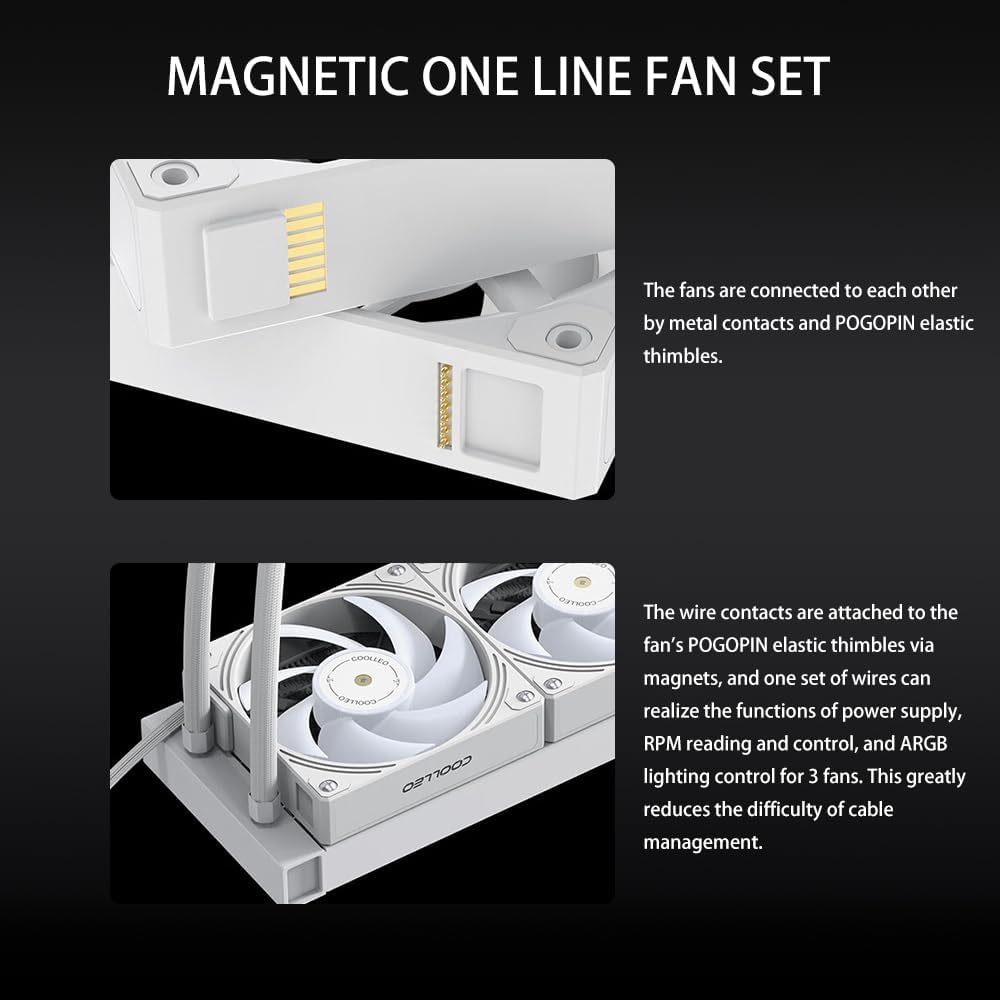
Equipped with three Hurricane T28 magnetic 28mm thick PWM fans, constructed from industrial-strength PA66 nylon and PC material. These fans feature double ball bearings for durability and are designed for high airflow (80 CFM ± 5%) and high air pressure (2.9 mm/H2O ± 5%). The fans connect via a magnetic one-line fan set, simplifying cable management.

3.4. Costruzione durevole
The pump head features an ARGB magic halo with a 2.5D hardened curved glass cover, enhancing both aesthetics and durability.

4. Guida all'installazione
The COOLLEO BL360 AIO liquid CPU cooler is designed for convenient installation across multiple platforms. Refer to the included installation kits for specific fasteners and plates.
4.1. Compatibilità
This cooler supports the following CPU socket platforms:
- Deterioramento progressivo: AM4, AM5
- Informazioni: LGA 115X, LGA 1200, LGA 1700
4.2. Preinstallazione
- Assicurati che il sistema sia spento e scollegato.
- Remove your existing CPU cooler. Clean any residual thermal paste from the CPU surface.
- Identify the correct mounting hardware for your CPU socket from the installation kit.
4.3. Montaggio del Water Block
- Attach the appropriate backplate (if required for your socket) to the motherboard.
- Secure the standoffs onto the backplate or directly into the motherboard's CPU cooler mounting holes.
- Applicare una piccola quantità di pasta termica al centro del dissipatore di calore integrato (IHS) della CPU.
- Posizionare con attenzione il waterblock sulla CPU, allineando i fori di montaggio.
- Secure the water block with the provided screws, tightening them in a diagonal pattern until snug. Avoid over-tightening.
4.4. Installazione del radiatore e della ventola
- Determine the optimal mounting location for the 360mm radiator within your PC case (e.g., top, front).
- Mount the radiator to your chosen location using the provided screws. Ensure proper airflow direction (intake or exhaust) for your system.
- Connect the fans to the radiator. The magnetic one-line fan set simplifies this process; connect the fans to each other, then connect the main fan cable to the motherboard's PWM fan header.
- Connect the pump's power cable to an appropriate header on your motherboard (e.g., AIO_PUMP or CPU_FAN).
- Connect the ARGB cable from the pump head and fans to a compatible 5V ARGB header on your motherboard.

4.5. Installazione del software
To utilize the intelligent digital display and monitor CPU data, install the latest English version of the software. The software package can be downloaded from the following link: Scarica il software.
5. Istruzioni per l'uso
5.1. Digital Display Operation
Once the cooler is installed and the software is running, the digital display on the pump head will show real-time CPU temperature and usage. You can configure the display settings within the software to show specific data or cycle through information at set intervals.
5.2. Avvisi di temperatura
The digital display provides visual temperature warnings:
- The display will show a yellow warning when the CPU temperature reaches or exceeds 60°C.
- The display will show a avvertimento rosso when the CPU temperature reaches or exceeds 80°C.
These warnings are designed to help you monitor your CPU's thermal status and ensure stable operation.
6. Manutenzione
Regular maintenance helps ensure the longevity and optimal performance of your COOLLEO BL360 AIO CPU Cooler.
- Pulizia della polvere: Pulire periodicamente le alette del radiatore e le pale della ventola dalla polvere utilizzando aria compressa. Assicurarsi che le ventole non siano in funzione durante la pulizia.
- Ispezione della ventola: Controllare che le pale della ventola non siano ostruite o danneggiate. Assicurarsi che le ventole siano montate saldamente.
- Ispezione dei tubi: Inspect the water tubes for any kinks, leaks, or damage.
- Pasta termica: While not frequently required, if you ever remove the water block, reapply fresh thermal paste before reinstallation.
7. Risoluzione Dei Problemi
If you encounter issues with your COOLLEO BL360 cooler, refer to the following common troubleshooting steps:
- Nessuna corrente/luci: Ensure all power cables (pump, fans, ARGB) are securely connected to the motherboard and power supply. Check motherboard headers for proper configuration in BIOS/UEFI.
- Temperature elevate della CPU:
- Verify that the water block is properly seated on the CPU and tightened evenly.
- Confirm that thermal paste was applied correctly.
- Check fan orientation for proper airflow (e.g., pushing air through the radiator).
- Ensure pump is running (listen for a faint hum or check software monitoring).
- Pulire eventuali accumuli di polvere sulle alette del radiatore.
- Le ventole non girano/ARGB non funzionanti:
- Check fan and ARGB cable connections.
- Ensure the 5V ARGB header on your motherboard is enabled and configured correctly via motherboard software.
- Verify that the COOLLEO software is installed and running.
- Display digitale non funzionante: Ensure the cooler's software is installed and running. Check the display's connection to the motherboard.
8. Specifiche tecniche
| Caratteristica | Specificazione |
|---|---|
| Modello | BL360 |
| Colore | Bianco |
| Metodo di raffreddamento | Liquido (Acqua) |
| Dimensioni del radiatore (L x P x A) | Dimensioni: 397 mm x 120 mm x 27 mm |
| Dimensioni della pompa (L x P x A) | Dimensioni: 75 mm x 75 mm x 58 mm |
| Lunghezza del tubo dell'acqua | 380mm |
| Materiale per tubi dell'acqua | EPDM + IIR |
| Dimensioni della ventola (L x P x A) | Dimensioni: 120 mm x 120 mm x 28 mm |
| Tipo di ventola | Hurricane T28Mag PWM Fan |
| Velocità della ventola | 2050 giri al minuto |
| Flusso d'aria del ventilatore | 80 CFM ± 5% |
| Pressione dell'aria del ventilatore | 2.9 mm/H2O ± 5% |
| Livello di rumore della ventola | ≤25.4 dBA ± 2dBA |
| Velocità della pompa | 3000 giri/min ± 10% |
| Livello di rumore della pompa | ≤28 dBA ± 2dBA |
| Aspettativa di vita della pompa | 40,000 ore |
| Ingresso volumetage | 12V |
| Input Current (Pump) | 0.28 A±10% |
| Corrente di ingresso (ventola) | 0.18 A±10% |
| Tipo di connettore di alimentazione | 4 pin |
| Dispositivi compatibili | Scrivania |
| Socket supportati | AMD AM4/AM5, Intel LGA 115X/1200/1700 |
| Supporto TDP | Fino a 300W |

9. Garanzia e supporto
The COOLLEO BL360 Digital Display White ARGB 360mm AIO CPU Cooler comes with a reliable Garanzia del produttore di 5 anni. For technical support, warranty claims, or further assistance, please refer to the contact information provided with your product packaging or visit the official COOLLEO websito.