
1. Introduzione
This manual provides essential information for the safe and effective use of your Kariwust Power Recliner Hand Control, Model KDH120-003. This 4-button switch is designed as a replacement for electric sofas and lift chairs, featuring a USB port for charging devices. It controls both power headrest and power recline functions.
2. Informazioni sulla sicurezza
- Ensure all connections are secure before operating the recliner.
- Do not expose the hand control to liquids or excessive moisture.
- Avoid pulling on the cables to disconnect the unit. Always grasp the connector itself.
- If the unit appears damaged or malfunctions, discontinue use immediately and consult customer support.
- Tenere fuori dalla portata dei bambini per evitare azionamenti accidentali o danni.
3. Contenuto della confezione
Verifica che il pacco contenga i seguenti articoli:
- Kariwust Power Recliner Hand Control (Model KDH120-003) with integrated USB port and cables.

Figura 3.1: Sopraview of the KDH120-003 hand control unit, including the attached power box and connecting cables.
4. Configurazione e installazione
This hand control is designed for recliners and lift chairs that utilize a 5-pin round plug and a 2-pin female plug for power and motor connections.
- Identificare i connettori: Locate the existing 5-pin male connector and 2-pin female connector on your recliner's motor or wiring harness.
- Connect 5-Pin Plug: Align the 5-pin male connector from the new hand control with the corresponding 5-pin female receptacle on your recliner. Gently push until it clicks into place. The plug is designed with a 180-degree angle for direct connection to the motor connector.
- Connect 2-Pin Plug: Connect the 2-pin female connector from the new hand control to the 2-pin male plug on your recliner's power system.
- Cablaggio sicuro: Ensure all cables are routed safely and are not pinched or tangled, allowing for free movement of the recliner mechanism.

Figura 4.1: Dettagliato view of the 5-pin male connector (left) and 2-pin female connector (right) for proper installation.
5. Istruzioni per l'uso
The KDH120-003 hand control features four buttons and a USB charging port.

Figura 5.1: Davanti view of the hand control, showing the four control buttons and the central USB charging port.
5.1 Recliner Control
- Recline Back: Premere e tenere premuto il tasto pulsante in alto a sinistra to recline the chair backward.
- Return Upright: Premere e tenere premuto il tasto pulsante in basso a sinistra to bring the chair back to an upright position.
5.2 Headrest Control
- Adjust Headrest Up: Premere e tenere premuto il tasto pulsante in alto a destra to raise the power headrest.
- Adjust Headrest Down: Premere e tenere premuto il tasto pulsante in basso a destra to lower the power headrest.
5.3 porta di ricarica USB
The integrated USB port allows you to charge compatible electronic devices. Simply plug your device's USB cable into the port located in the center of the hand control.
6. Manutenzione
- Pulizia: Wipe the surface of the hand control with a soft, dry cloth. Do not use abrasive cleaners or solvents.
- Ispezione dei cavi: Periodically check the cables for any signs of wear, cuts, or damage. Replace the unit if damage is observed.
- Magazzinaggio: When not in use for extended periods, store the hand control in a dry, cool place away from direct sunlight.
7. Risoluzione Dei Problemi
If you encounter issues with your hand control, refer to the following common solutions:
- La poltrona reclinabile non risponde:
- Ensure all connectors (5-pin and 2-pin) are fully seated and secure.
- Verify that the recliner is properly plugged into a functional power outlet.
- Check for any visible damage to the hand control cable or the recliner's power cord.
- Porta USB non in carica:
- Confirm the recliner is powered on and connected correctly.
- Test the USB port with a different device and cable to rule out device-specific issues.
- Funzionamento intermittente:
- Check for loose connections at both the hand control and the recliner motor.
- Ensure no cables are being pinched or obstructed by the recliner mechanism.
Se questi passaggi non risolvono il problema, contattare l'assistenza clienti.
8. Specifiche
Detailed specifications for the Kariwust Power Recliner Hand Control Model KDH120-003:
| Caratteristica | Specificazione |
|---|---|
| Modello | KDH120-003 |
| Marca | Kariwust (Manufacturer: Kaidi) |
| Modalità di funzionamento | Manuale |
| Tipo di interruttore | Premere il pulsante |
| Numero di posizioni | 4 |
| Metodo di controllo | Tocco |
| Tipo di connettore | 5-pin male, 2-pin female |
| Materiale | Plastic (Contact Material: Copper) |
| Colore | Nero |
| Tipo di montaggio | Tabletop (typically recessed into furniture) |
| Tipo di circuito | 2 vie |
| Specifica Met | ETL |

Figura 8.1: Identification label on the back of the hand control, displaying the model number KDH120-003.
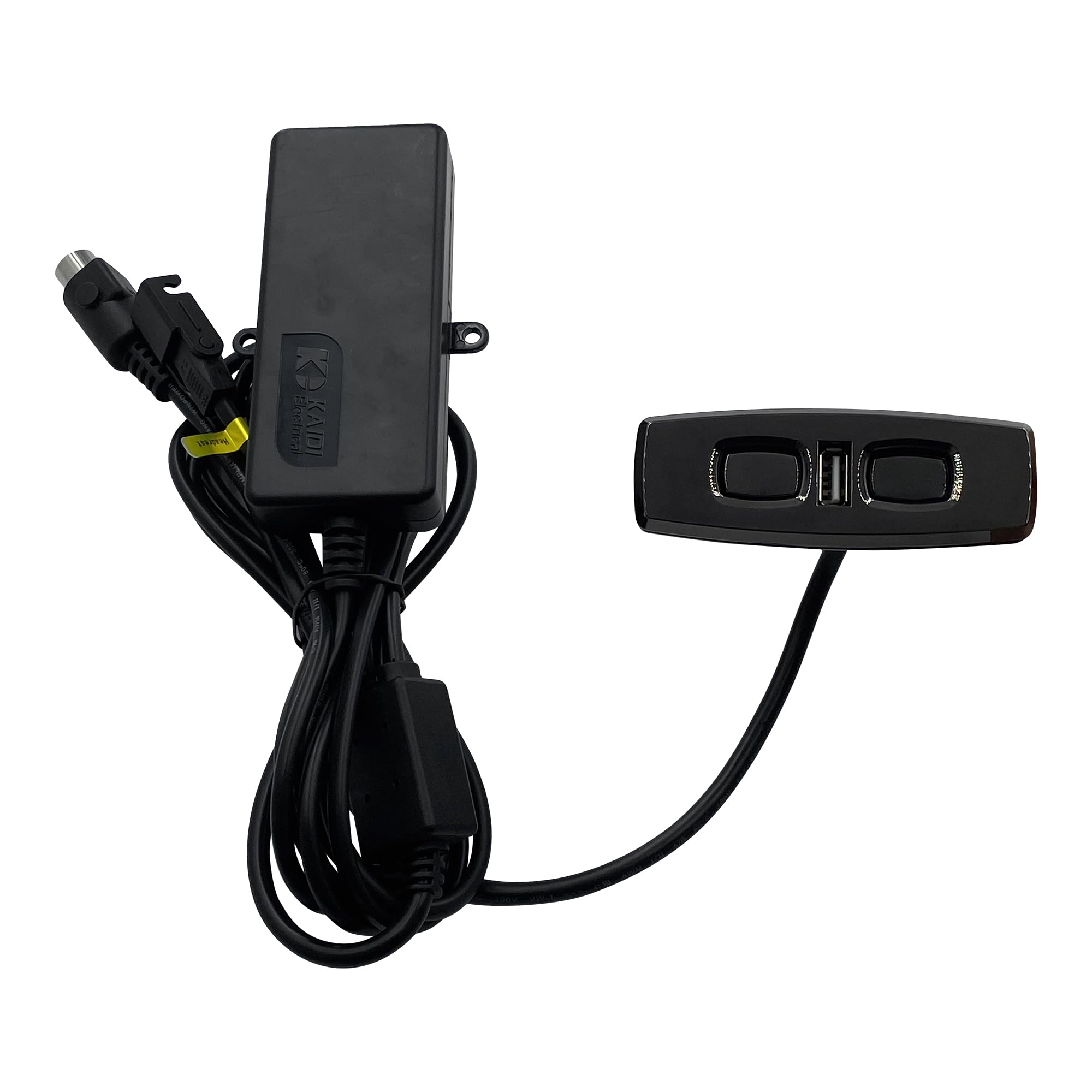
Figura 8.2: Dimensional drawing indicating the length of the hand control unit.
9. Informazioni sulla garanzia
Warranty terms and conditions for the Kariwust Power Recliner Hand Control Model KDH120-003 are provided by the seller or manufacturer at the time of purchase. Please retain your proof of purchase for any warranty claims. For specific details regarding warranty coverage, duration, and claim procedures, refer to the documentation included with your product or contact the seller directly.
10. Assistenza clienti
For technical assistance, troubleshooting not covered in this manual, or warranty inquiries, please contact the seller or manufacturer through their official support channels. Have your product model number (KDH120-003) and purchase information ready when contacting support.
You may visit the Kariwust Store on Amazon for more information: Kariwust Store