
BirdDog BDX1UW
Manuale utente della telecamera BirdDog X1 Ultra 4K PTZ
Model: BDX1UW
Introduzione
This user manual provides comprehensive instructions for the setup, operation, and maintenance of your BirdDog X1 Ultra 4K PTZ Camera. Please read this manual thoroughly before using the product to ensure proper functionality and to prevent damage.
Informazioni sulla sicurezza
- Ensure the camera is placed on a stable, level surface to prevent tipping.
- Non esporre la fotocamera ad acqua, umidità o temperature estreme.
- Utilizzare solo l'alimentatore e i cavi forniti.
- Evitare di bloccare le aperture di ventilazione per evitare il surriscaldamento.
- Non tentare di smontare o riparare la fotocamera da soli. Per qualsiasi intervento di assistenza, rivolgersi a personale qualificato.
- Tenere la fotocamera lontana da forti campi magnetici.
Contenuto della confezione
Verifica che tutti gli articoli elencati di seguito siano inclusi nel tuo pacchetto:
- 1x BirdDog X1 Ultra 12x Zoom 4K PTZ Camera (White)
- 1x telecomando
- 1x 12 VDC Power Supply
- 1x High-Speed HDMI Cable with Ethernet
- 1x USB 2.0 Type-A Male to Type-B Male Cable
Prodotto finitoview

Figura 1: BirdDog X1 Ultra 4K PTZ Camera with included HDMI and USB cables. This image shows the camera from the front, highlighting its compact design and the two included cables.

Figura 2: Davanti view of the BirdDog X1 Ultra camera, showcasing the lens and the integrated 2.93" E-Ink display on the side, which provides essential camera information.
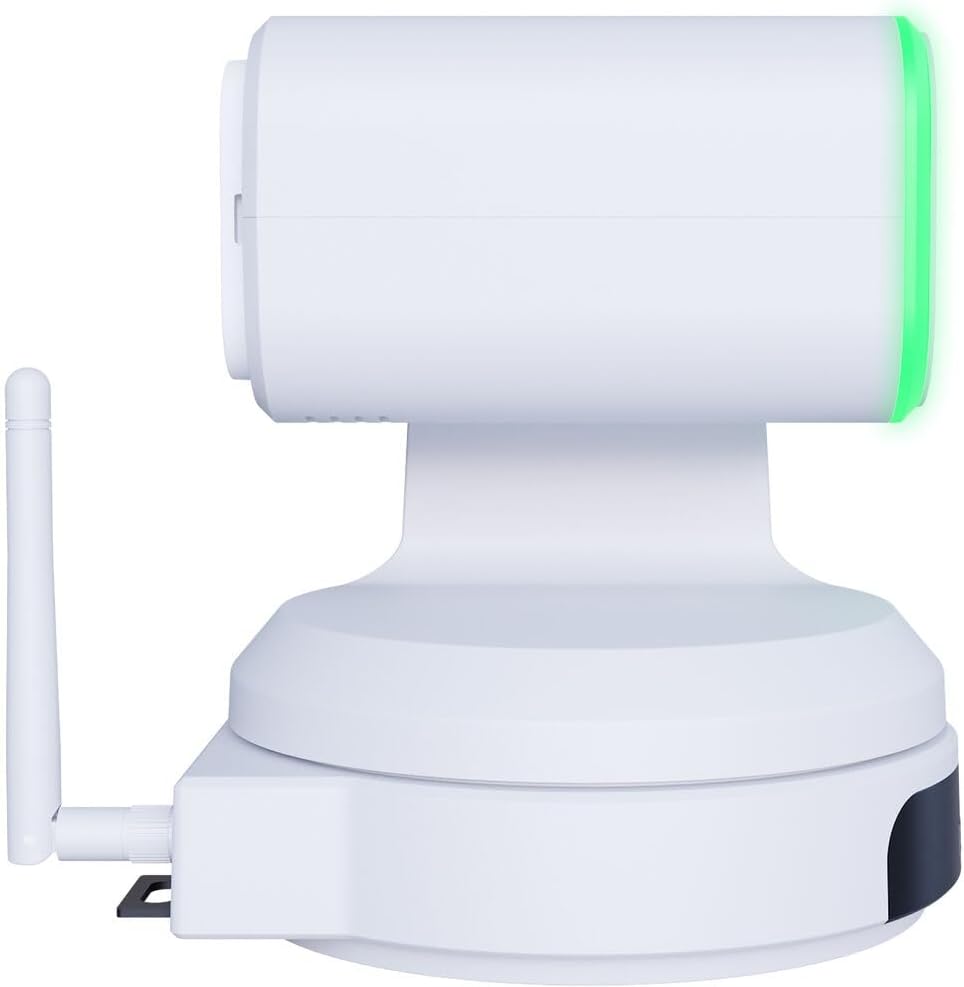
Figura 3: Lato view of the BirdDog X1 Ultra camera, illustrating the antenna for wireless connectivity and the sleek profile del dispositivo.

Figura 4: Posteriore view of the BirdDog X1 Ultra camera, detailing the various connectivity ports including DC12V power input, RS232, USB3.0, HDMI, and PoE/LAN.
Componenti chiave:
- Lente: 12x optical zoom lens for capturing UHD 4K30 resolution video.
- Display E-Ink: A 2.93" display providing real-time status and network information.
- Halo Tally: Built-in indicator for live production status.
- Antenna: For Wi-Fi 5 connectivity.
- Porte di connettività: DC12V, RS232, USB3.0, HDMI, PoE/LAN.
Impostare
1. Connessione fisica
- Collegamento elettrico: Connect the included 12 VDC power supply to the DC12V port on the rear of the camera. Alternatively, if using Power over Ethernet (PoE), connect an Ethernet cable from a PoE-enabled switch to the PoE/LAN port.
- Uscita video:
- HDMI: Connect the included High-Speed HDMI Cable from the camera's HDMI output to your display or video switcher.
- USB/UVC: Connect the included USB 2.0 Type-A Male to Type-B Male Cable from the camera's USB3.0 port to your computer for direct connection to applications like Microsoft Teams or Zoom.
- Connessione di rete:
- Wired (LAN/PoE): Connect an Ethernet cable to the PoE/LAN port for network access and NDI|HX3 support.
- Senza fili (Wi-Fi): Ensure the antenna is securely attached. The camera supports Wi-Fi 5. Refer to the operating section for Wi-Fi configuration.
2. Accensione iniziale
Once all connections are made, the camera will power on automatically. The E-Ink display will show boot-up information and then display network details and current video resolution.
Operativo
1 Controllo di base della telecamera
The camera can be controlled via the included remote control, a web interface, or compatible NDI software.
- Panoramica/Inclinazione/Zoom (PTZ): Use the joystick on the remote control or the PTZ controls in the web interface to adjust the camera's pan, tilt, and zoom.
- Messa a fuoco: Adjust focus manually or use autofocus settings.
- Esposizione: Control exposure settings including aperture, shutter speed, and gain. The camera features automatic exposure control.
- Bilanciamento del bianco: Adjust color temperature for accurate color reproduction. The camera supports Kelvin control.
2. AI Auto Framing
The X1 Ultra features AI auto framing to automatically keep subjects in frame. This feature can be enabled and configured via the camera's web interfaccia.
3. NDI|HX3 and Network Configuration
The camera supports NDI|HX3 for low-latency, high-quality video transmission over IP networks.
- Accesso Web Interfaccia:
- Assicurati che il tuo computer sia sulla stessa rete della telecamera.
- Locate the camera's IP address from the E-Ink display or by using BirdDog Central Lite software.
- Aprire un web browser e inserisci l'indirizzo IP della telecamera.
- Log in using the default credentials (refer to the camera's documentation or the E-Ink display for initial login details).
- Configurazione Wi-Fi: All'interno del web interface, navigate to the network settings to connect the camera to your Wi-Fi network.
- NDI Settings: Configure NDI stream settings, including resolution and bandwidth, within the web interfaccia.
4. USB/UVC Output
When connected via USB, the camera functions as a standard UVC (USB Video Class) device, compatible with most video conferencing applications like Microsoft Teams, Zoom, and OBS Studio. The USB output supports independent resolution from the HDMI/NDI outputs.
Manutenzione
- Pulizia: Use a soft, dry cloth to clean the camera body. For the lens, use a lens cleaning cloth and specialized lens cleaning solution. Do not use abrasive cleaners or solvents.
- Magazzinaggio: When not in use for extended periods, store the camera in a cool, dry place, away from direct sunlight and dust.
- Aggiornamenti del firmware: Controllare periodicamente il BirdDog official websito for firmware updates to ensure optimal performance and access to new features.
Risoluzione dei problemi
| Problema | Possibile causa | Soluzione |
|---|---|---|
| Nessun potere | Power cable not connected; PoE not active; faulty power supply. | Check power connections. Ensure PoE switch is active if using PoE. Try a different power outlet or power supply. |
| No video output (HDMI/USB) | Incorrect cable connection; incorrect input selected on display; driver issue (USB). | Verify HDMI/USB cable connections. Select correct input on your display/software. Reinstall USB drivers if necessary. |
| NDI stream not detected | Network issue; camera not on same subnet; NDI disabled. | Check network cables. Ensure camera and receiving device are on the same network. Verify NDI is enabled in camera's web interfaccia. |
| Controllo PTZ non reattivo | Remote control battery low; IR sensor blocked; software issue. | Replace remote control batteries. Ensure clear line of sight to IR sensor. Restart camera. Check web controlli dell'interfaccia. |
Specifiche
| Caratteristica | Dettaglio |
|---|---|
| Numero di modello | BDX1UW |
| Risoluzione video | UHD 4K30 (4K at 30fps), 1080p (USB) |
| Zoom ottico | 12x |
| Connettività | HDMI, USB3.0 (UVC), PoE/LAN, Wi-Fi 5, RS232 |
| Protocollo di rete | NDI|HX3 |
| Caratteristiche speciali | AI Auto Framing, Integrated 2.93" E-Ink Display, Built-In Halo Tally, Color Matrix, API & Kelvin Control, Low-Light Performance |
| Alimentazione elettrica | 12 VDC or PoE |
| Colore | Bianco |
Garanzia e supporto
For warranty information and technical support, please refer to the official BirdDog webo contattare direttamente il servizio clienti. Conservare la prova d'acquisto per eventuali reclami in garanzia.
Ufficiale Websito: https://birddog.tv
Documenti correlati - BDX1UW
 |
Manuale utente della telecamera BirdDog X5 Ultra 4K PTZ Manuale utente completo per la telecamera BirdDog X5 Ultra 4K PTZ, che comprende la descrizione del prodotto, le caratteristiche, le specifiche tecniche, i collegamenti, la configurazione, il menu OSD e la garanzia. |
 |
Manuale utente della telecamera BirdDog X4 Ultra 4K WiFi PTZ Comprehensive user manual for the BirdDog X4 Ultra 4K WiFi PTZ Camera, covering setup, features, technical specifications, and troubleshooting. |
 |
BirdDog PTZ Keyboard User Manual Comprehensive user manual for the BirdDog PTZ Keyboard, detailing setup, features, and operation for controlling PTZ cameras via various protocols including VISCA, PELCO, and NDI. |
 |
Guida utente della tastiera PTZ BirdDog: istruzioni NDI Manuale utente completo per la tastiera PTZ BirdDog, incentrato sulla connessione NDI® e sulle istruzioni di configurazione della telecamera. Scopri come collegare e controllare le telecamere NDI® utilizzando la tastiera PTZ. |
 |
Manuale utente della telecamera BirdDog X4 Ultra 4K WiFi PTZ Manuale utente completo per la telecamera PTZ WiFi BirdDog X4 Ultra 4K, che descrive in dettaglio le sue caratteristiche, l'installazione, la configurazione, le capacità di tracciamento AI, il menu OSD, la risoluzione dei problemi e le specifiche. |
 |
Manuale utente della telecamera BirdDog X5 Ultra 4K PTZ Manuale utente completo per la telecamera BirdDog X5 Ultra 4K PTZ, che descrive in dettaglio installazione, caratteristiche, specifiche tecniche, telecomando, configurazione, menu OSD, configurazione di rete e informazioni sulla garanzia per la produzione video professionale. |
Ask a question about this manual
Ask about setup, troubleshooting, compatibility, parts, safety, or missing instructions. Manuals+ will review the question and use this page’s manual context to help answer it.