
Introduzione
The Kmise 3D DELAY pedal is an analog delay effect designed for electric guitars and bass. It provides a warm, natural classic delay tone, suitable for various musical styles. This manual provides essential information for the proper setup, operation, and maintenance of your pedal.
Informazioni sulla sicurezza
- Ensure the pedal is connected to a DC 9V power supply with the correct polarity (center negative). Incorrect power supply can damage the unit.
- Non esporre il pedale ad acqua, umidità o temperature estreme.
- Evitare di far cadere il pedale o di sottoporlo a forti urti.
- Disconnect the power supply when not in use or during cleaning.
- Tenere fuori dalla portata dei bambini.
Contenuto della confezione
Si prega di controllare il pacco per assicurarsi che siano presenti tutti gli articoli:
- Kmise 3D DELAY Guitar Pedal
- Manuale dell'utente (questo documento)
- Note: A DC 9V power adapter is not included and must be purchased separately.
Prodotto finitoview
The Kmise 3D DELAY pedal features a compact design with intuitive controls for shaping your delay sound.

Figura 1: Fronte view of the Kmise 3D DELAY pedal, showing the input, output, control knobs, and footswitch.
Controlli e Connessioni:
- Manopola MIX: Regola il bilanciamento tra il segnale dry (non modificato) e il segnale wet (modificato).
- Manopola DELAY: Controls the delay time, from short slap-back echoes to long, atmospheric repeats.
- F.BACK Knob (Feedback): Determines the number of repeats. Higher settings result in more echoes.
- Presa INGRESSO: Connect your guitar or the output of another effect pedal here.
- Uscita jack: Connettiti al tuo amplifier or the input of another effect pedal.
- Ingresso CC 9 V: For connecting a standard DC 9V power adapter (center negative).
- Interruttore a pedale: Toggles the effect on/off. The LED indicates the effect status (on/off).

Figura 2: Dall'alto verso il basso view highlighting the MIX, DELAY, and F.BACK control knobs, along with the input and output labels.
Impostare
- Collegamento elettrico:
Connect a standard DC 9V power adapter (center negative) to the DC 9V input jack on the pedal. Ensure the power supply meets the pedal's requirements to prevent damage.
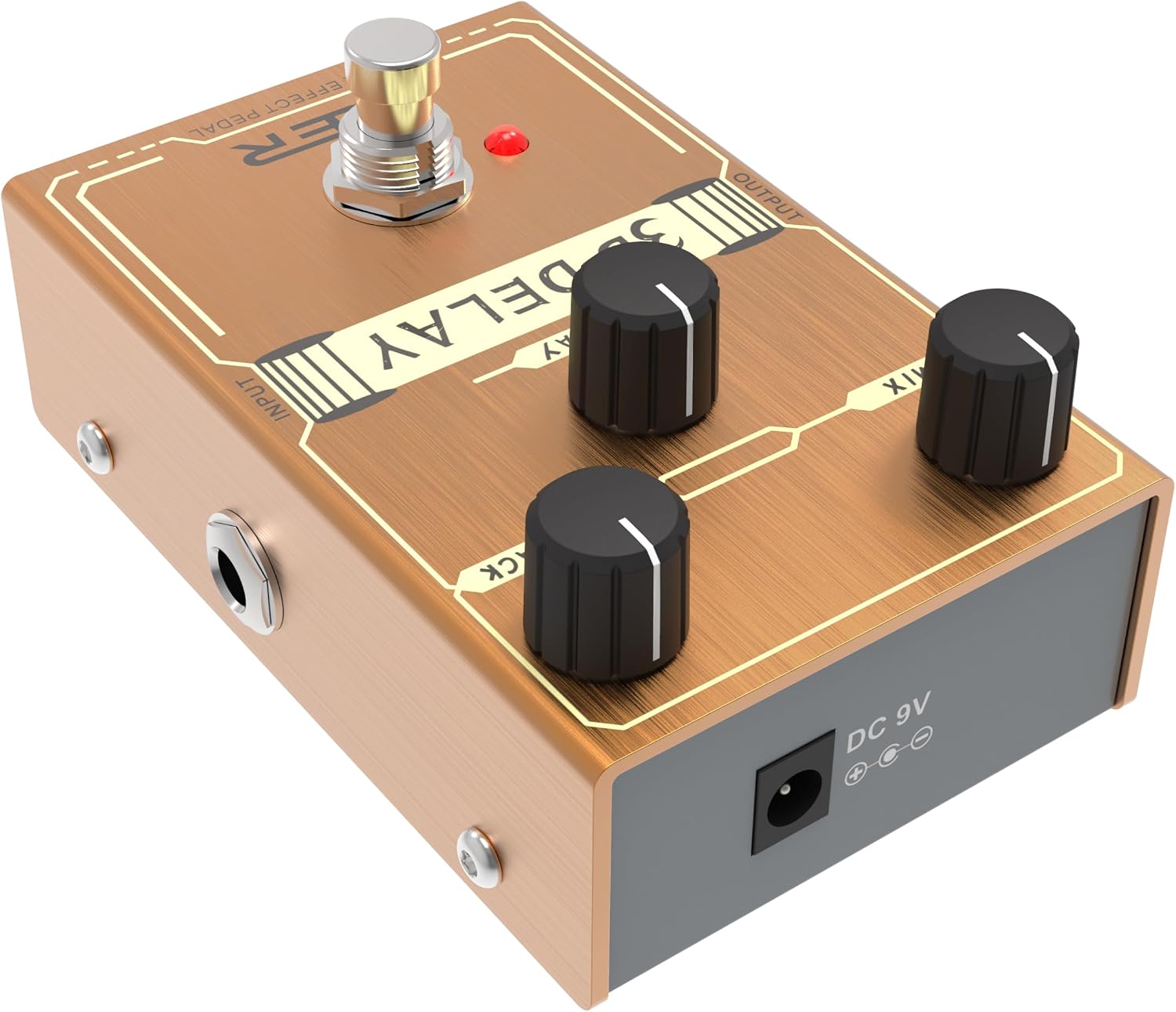
Figura 3: lato view showing the DC 9V power input jack.
- Collegamenti audio:
- Connect your guitar (or the output of a preceding pedal) to the INGRESSO jack of the 3D DELAY pedal.
- Collegare il PRODUZIONE jack of the 3D DELAY pedal to your amplifier (or the input of a subsequent pedal).
- Impostazioni iniziali: Prima di accendere il tuo amplifier, set the volume on your amplifier a un livello basso.
Utilizzo del pedale
- Accensione: Once all connections are secure, plug in your DC 9V power adapter. The pedal's LED will illuminate when the effect is active.
- Coinvolgimento dell'effetto: Press the footswitch to toggle the delay effect on or off. The LED will light up when the effect is engaged.
- Adjusting the Delay:
- Utilizzare il RITARDO knob to set the desired delay time.
- Regolare il F. INDIETRO knob to control the number of repeats. Lower settings produce fewer repeats, while higher settings create a longer, more sustained echo.
- IL MESCOLARE knob blends the dry signal with the delayed signal. Start with the MIX knob at a lower setting and gradually increase it to find your preferred balance.
- Vero bypass: The 3D DELAY pedal features true bypass, meaning that when the effect is disengaged, your guitar's signal passes directly through the pedal without any tonal coloration.
Manutenzione
- Pulizia: Utilizzare un panno morbido e asciutto per pulire la superficie del pedale. Non utilizzare detergenti abrasivi o solventi.
- Magazzinaggio: Conservare il pedale in un luogo asciutto e fresco, lontano dalla luce solare diretta e da temperature estreme.
- Cura del cavo: Regularly check all cables for damage and ensure secure connections.
Risoluzione dei problemi
| Problema | Possibile causa | Soluzione |
|---|---|---|
| No sound when pedal is on. |
|
|
| Suono debole o distorto. |
|
|
| Rumore o ronzio eccessivi. |
|
|
Specifiche
- Modello: 3D DELAY
- Tipo di effetto: Ritardo analogico
- Alimentazione elettrica: DC 9V (centro negativo)
- Assorbimento di corrente: Not specified in provided data, but typically low for analog pedals.
- Ingresso: 1/4" Monaural Jack
- Produzione: 1/4" Monaural Jack
- Bypassare: Vero bypass
- Materiale: Metallo casing
- Dimensioni: Approximately 5 x 3 x 2 inches (Package Dimensions, actual pedal size is smaller)
- Peso: Circa 8 once
Garanzia e supporto
Kmise products are designed for reliability and performance. For warranty information, technical support, or service inquiries, please refer to the official Kmise webo contattare il distributore locale. Conservare la prova d'acquisto per eventuali reclami in garanzia.